At a glance
What it does
An early-development, island-style local workspace for learning and doing AI-assisted coding with DeepSeek Harness.
Before you choose it
agent-isles turns an AI coding workspace into an explorable island world. Its currently available workbench connects a real local project and lets you chat with AI, inspect files and tool calls, manage approvals, and continue workspaces and sessions. A Windows portable preview and a local Web development path are documented.
Best for
People new to AI coding who want a more approachable interface, plus creators who want to attach an existing local project and work with AI directly.
Common tasks
- Connect a local project and work with an AI coding partner.
- Inspect project files, conversation history, tool calls, and Git change states through the workspace.
- Try the Windows x64 portable preview or run the local Web development environment.
Permissions and data
Uses a configured model and a user-selected local project folder through the DeepSeek Harness runtime.
Permissions- May read, modify, and verify the selected local project through AI actions.
- May use model, file, terminal, tool-call, and approval capabilities exposed by DeepSeek Harness.
- Windows app data is stored under %LOCALAPPDATA%\agent-isles\data.
- Local Web development data defaults to .agent-isles-home/ in the repository unless DSH_HOME is set.
- Requires model configuration on first use; the specific provider is not declared in supplied evidence.
- Model configuration is required for first use; credential format is not declared in supplied evidence.
Limitations
- Early development; the full guided first lesson has not completed end-to-end validation with a real model.
- File Keeper is read-only by application boundaries and prompting, not complete strong permission isolation.
- The latest Windows installer has not been rebuilt and validated for installation, removal, and real tasks.
- The preview is unsigned, has no automatic updates, and does not provide a release channel.
- Mobile panels are supported, but world interaction is primarily keyboard and mouse.
What DSHub checked
- The source is pinned to an immutable Git commit.
- README documents a Windows portable preview, local Web startup commands, Windows requirements, and a fixed DeepSeek Harness 0.1.3-alpha.1 channel.
- The repository is MIT-licensed.
What DSHub did not check
- Installation, uninstall, runtime task execution, model-provider behavior, and end-to-end learning flows were not independently executed.
- Compatibility beyond the documented Windows environment and fixed Harness channel was not verified.
Pinned install
Primary action
This application does not have a DSH Plugin install action. Use its source documentation for the delivery method.
Maintainer source
Project README
[!IMPORTANT] agent-isles 仍处于早期开发阶段。目前提供本地 Web MVP 和 Windows x64 启动器、安装包预览版。安装与构建说明见 Windows 启动器。
Windows 便携预览版:下载 v0.1.0-preview.1。下载 ZIP,完整解压到较短路径后运行 agent-isles.exe;首次使用需配置模型。用户数据保存在 %LOCALAPPDATA%\agent-isles\data,退出服务使用系统托盘菜单。版本未签名、无自动更新,更新时退出旧版后将新版解压到新目录,不覆盖运行中的文件。
agent-isles 是什么
agent-isles 是一个可探索的 AI Coding 学习与创作环境。它把原本藏在聊天框、终端和工具列表里的 Agent 能力,变成群岛世界中的伙伴、地点和行动。你不需要先弄懂模型、会话、工具调用和项目结构,就可以从一句自己的想法出发,和 AI 一起把它做成真正能运行的作品。
你可以选择“跟着学”,在完成第一个作品的过程中认识需求、项目、执行、审批和验收;也可以选择“自由创作”,直接绑定已有项目,按自己的节奏探索和修改。教学不是脱离实践的课程,而是附着在真实创作上的引导:AI 可以动手,但作品仍由你提出、体验、判断并继续完善。
可探索的群岛降低了第一次接触 AI 编程时的陌生感,但没有隐藏真实能力和责任边界。任务状态会反映在世界和角色上,文件、历史对话与项目各有明确入口;需要深入时,你仍然可以进入高级工作台查看完整对话、工具调用和人工审批。
当前体验
Windows 预览版通过安装包安装后,点击 agent-isles 图标即可启动服务并进入小岛,运行时和资源已内置。源码开发仍可使用 打开小岛.cmd 打开正在运行的开发服务;该脚本不作为安装版入口。
主要功能
<table> <tr> <td width="50%" valign="top"> <h3>工作台 <sup><code>当前可用</code></sup></h3> <p>在本地工作台里连接真实项目,与 AI 对话,查看文件和工具调用,处理审批,并继续已有的 Workspace 与 Session。</p> </td> <td width="50%" valign="top"> <h3>教育与引导 <sup><code>规划中</code></sup></h3> <p>把需求表达、项目选择、执行、审批和验收做成循序渐进的学习路径,让第一次接触 AI Coding 的人也能完成自己的作品。</p> </td> </tr> <tr> <td width="50%" valign="top"> <h3>更多的小岛 <sup><code>规划中</code></sup></h3> <p>继续扩展群岛中的地点、居民和主题,把不同类型的项目能力放进各自有性格、有入口的空间。</p> </td> <td width="50%" valign="top"> <h3>更丰富有意思的玩法 <sup><code>规划中</code></sup></h3> <p>让任务进展、居民关系、探索和作品成果产生更多互动,在不牺牲真实工作流的前提下,增加值得发现和反复体验的反馈。</p> </td> </tr> </table>| 居民 | 职责 | 当前能力 |
|---|---|---|
| Q · 计算机 | 制作伙伴 | 通过完整对话接收目标,使用附件、模型与权限设置读取、修改并验证项目 |
| 苔伯 | 项目与历史管理员 | 选择和切换项目、搜索历史,并查看或继续已有对话 |
| 阿澜 · File Keeper | 文件管理员 | 浏览真实目录、预览文本,并查看 Git 暂存、未暂存与未跟踪修改 |
- 跟着学,也能自由做:教程帮助你完成第一个作品,普通项目支持直接进入创作。
- 在项目中学习:讲解、实践和验收共享同一个真实 Workspace。
- 角色即能力入口:不同居民拥有清晰的职责、会话和状态。
- 过程可观察:群岛中的角色、气泡和动画反映 AI 的工作状态。
- 保留专业界面:高级工作台承载完整对话、工具结果和人工审批。
- 不复制执行引擎:底层复用固定版本的 DeepSeek Harness runtime。
产品画面
当前小岛与 Q
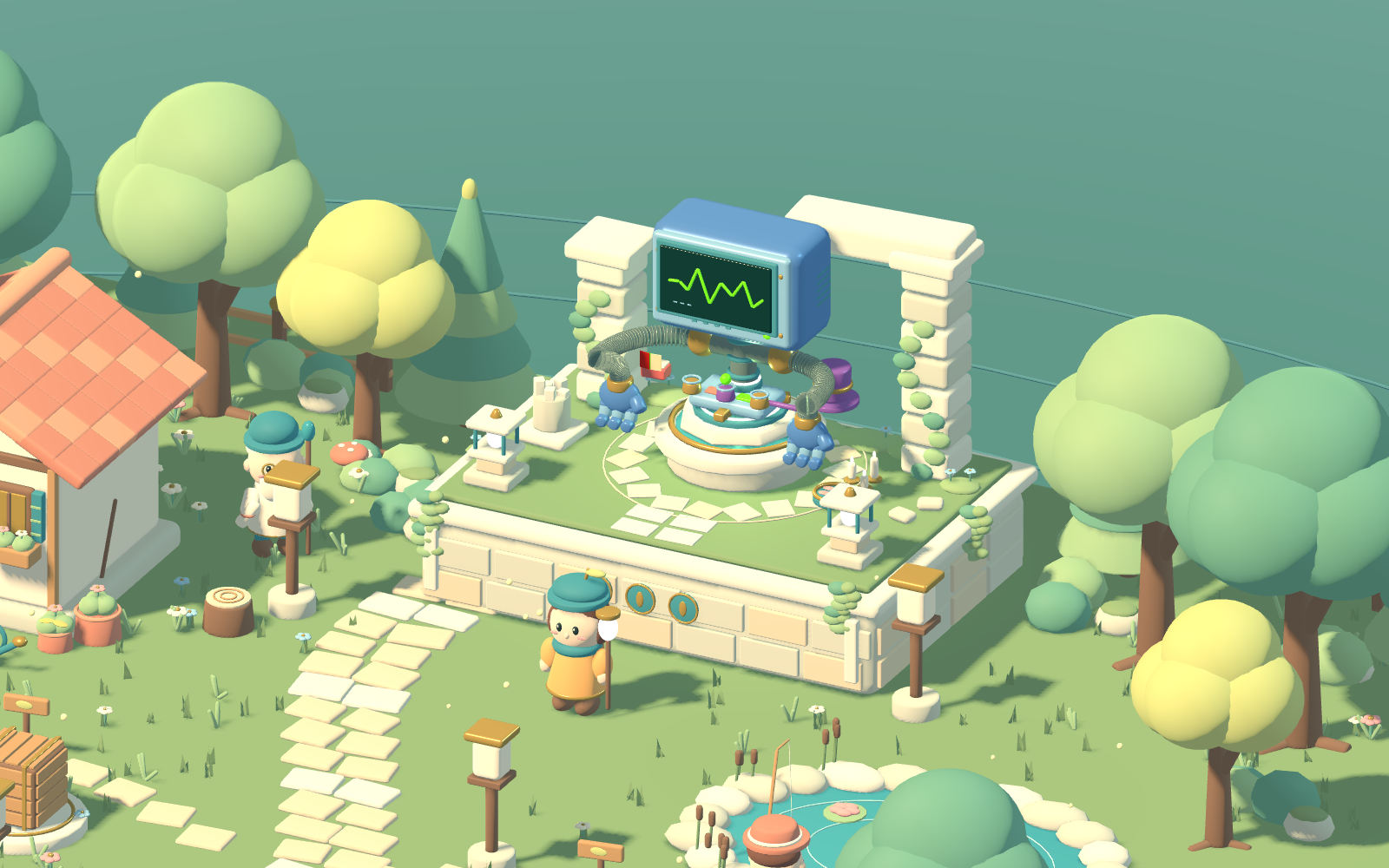
Q 连接真实项目的原生对话与执行过程;项目和历史由苔伯管理,文件由阿澜查阅。网页面板和窄屏截图待重新采集,已移除旧版画面,避免与当前界面混淆。
快速开始
环境要求
- Windows
- Node.js
^22.19.0或>=24.0.0 - Corepack
- Git(包含 submodule 支持)
启动本地 Web
在仓库根目录运行:
corepack enable
corepack yarn install --immutable
corepack yarn dev:web --no-open
打开终端输出的本地地址。首次使用时,按页面提示完成模型配置并选择一个本地项目文件夹,然后即可与居民交谈。
开发数据默认保存在仓库内的 .agent-isles-home/。如需更换位置,可在启动前设置 DSH_HOME。
工作原理
创作者 / 学习者
  -> agent-isles Web:群岛世界、角色、对话与状态
    -> agent-isles Host/Client 插件:Workspace 与 Resident/Session 映射
      -> DeepSeek Harness:模型、工具、审批、文件与终端
        -> 本地项目
Godot 负责呈现世界和居民状态,React 负责 Workspace、居民选择和交互面板,DeepSeek Harness 是会话与执行状态的唯一事实来源。agent-isles 通过公开的 DSH/Cordis 插件接口接入,不修改上游源码,也不再包装一套重复的 Session API。
仓库结构
| 目录 | 用途 |
|---|---|
apps/web/ |
启动 agent-isles 的 DSH Web profile |
apps/desktop/ |
Windows 启动器、安装器及发行验证脚本 |
packages/agent-isles-web/ |
agent-isles Host/Client Web 插件 |
games/mosslight/ |
使用 Blender 与 Godot 构建的世界 |
deepseek-harness/ |
固定版本的上游 Git submodule |
vendor/dsh-runtime/ |
固定并校验过的 DSH runtime 包 |
docs/ |
产品、架构与实施文档 |
开发命令
| 命令 | 用途 |
|---|---|
corepack yarn dev:web --no-open |
构建插件并启动本地 Web |
corepack yarn typecheck |
检查 Web 插件类型 |
corepack yarn build:web |
构建 Web 插件 |
corepack yarn build:world |
导出 Godot Web 世界 |
corepack yarn check:upstream |
校验上游 submodule 版本 |
corepack yarn check:vendored-runtime |
校验 vendored runtime |
上游与版本
当前稳定通道固定在 DeepSeek Harness 0.1.3-alpha.1,对应 commit d347e703908d0406b7a7ef80e3a0e594d86b2215。版本与 runtime 产物记录在 upstream.json 中。
- 不直接修改
deepseek-harness/。 - runtime 升级先更新固定版本,再执行兼容性验证。
- agent-isles 的产品逻辑保留在自身插件和世界代码中。
当前限制
- File Keeper 的只读行为目前由应用边界和提示词共同约束,尚未形成完整的强权限隔离。
- File Keeper 暂不支持编辑文件、预览图片、访问远程文件系统或展示父级仓库的修改。
- 完整首课尚未通过真实模型的端到端验收,真实任务、异常恢复和教学节奏仍需继续验证。
- 移动端已支持面板布局,世界操作仍以键鼠为主。
- 通知保存在当前浏览器中,暂不跨浏览器同步,也不提供操作系统通知。
- 最新 Windows 安装包尚未重新构建并完成安装、卸载与真实任务验收;预览版未签名,自动更新和发布渠道尚未实现。
文档
参与贡献
Bug 报告、功能建议和 Pull Request 都欢迎。较大的功能或交互调整建议先通过 Issue 对齐范围。
贡献前先阅读:
- 贡献指南:开发工具版本、环境准备、首次启动、测试与 PR 要求。
- 仓库约束:代码边界、提交规则和施工文档维护;修改某个目录前,再阅读该目录的
AGENTS.md。 - 文档门户:按贡献方向找到相关规范,无需通读全部文档。
再按本次改动选择专项文档:
| 贡献方向 | 开始前阅读 |
|---|---|
| Web / Host 插件 | 插件开发指南、总体架构 |
| 新岛屿、居民与世界交互 | 岛屿接入契约、世界开发说明 |
| 教程流程 | 教程架构、首课施工记录 |
| Windows 启动器与发行 | 桌面说明、发布检查清单 |
| 文档 | 文档维护指南 |
路线图
- 完成真实模型、完整首课和主要异常路径的端到端验收。
- 为不同居民建立可执行的强权限边界。
- 完善 Windows 安装包的签名、自动更新和发布渠道。
- 扩展课程、作品模板,以及与任务进展联动的世界反馈。
Operate deliberately
Install and manage
Prerequisites and target Profile
Target: Windows Profile
Delivery: External App — https://github.com/Qiuner/agent-isles/releases/tag/v0.1.0-preview.1。
Compatibility and access
Early Development Windows local Web and desktop Preview app: DeepSeek Harness 0.1.3-alpha.1 (fixed stable channel)。
Review compatibility evidence ↗
Risk facts
AI actions can read, modify, and verify a selected local project; File Keeper lacks complete strong permission isolation.
Evidence ↗The Windows preview is unsigned and has no automatic updates.
Evidence ↗Evidence and editorial reviewManifest, Bundle patch, distribution and freshness
Immutable evidence
Review status and source activity
Use this as an experimental local AI-coding environment, and review approvals and project access carefully before allowing agent actions.
AI reviewed Sep 16, 2026, 2:29 PM UTC。GitHub facts last checked Sep 16, 2026, 2:29 PM UTC。
No material source change has been recorded since this evidence baseline.