At a glance
What it does
A Windows desktop manager for installing and operating deepseek-harness without relying on the command line.
Before you choose it
dsh-launcher is a Tauri desktop app for Windows that manages the deepseek-harness (`dsh`) runtime. It can install dsh from npm or GitHub, switch versions, start and stop `dsh web`, open its Web GUI, and manage plugins, skills, MCP servers, toolchains, and logs from one window.
Best for
Windows 10/11 x64 users of deepseek-harness who want a graphical alternative to routine CLI setup and management.
Common tasks
- Install missing Node, Git, or Python prerequisites and install dsh through npm or GitHub.
- Start, stop, restart, and open a managed `dsh web` instance.
- Install, enable, disable, or remove dsh plugins; manage user skills and MCP servers.
- Inspect launcher and dsh logs, or switch between available dsh versions and installation channels.
Permissions and data
The app manages local runtimes, processes, files, and dsh-related configuration on the Windows machine.
Permissions- May install or remove Node, npm/pnpm, Git, Python, and dsh components.
- Starts, stops, and may terminate verified dsh processes.
- Writes managed sections of dsh plugin and MCP configuration; can manage skills under user-level skill roots.
- README states that DSH_HOME (default `~/.dsh`) is displayed read-only and retained by default when dsh is uninstalled.
- Logs are stored locally with rotation; exported logs can be token-redacted.
- GitHub token settings are stated to be encrypted with Windows DPAPI before storage.
- npm registries, GitHub repositories/releases, optional configured mirrors.
- A GitHub token is optional for rate-limit avoidance and Git authentication.
Limitations
- Windows 10/11 x64 only according to the supplied README.
- No deepseek-harness version range is declared.
- The publisher does not code-sign Windows builds, so SmartScreen may warn.
- Plugin compatibility can vary after a dsh version change; the launcher may reversibly disable a failing plugin entry.
- Installation and runtime behavior were not independently executed or verified.
What DSHub checked
- The pinned README documents a Windows desktop UI for dsh lifecycle, version, plugin, skill, MCP, toolchain, and log management.
- The README provides setup EXE and portable ZIP download instructions through GitHub Releases.
- The repository supplies an MIT license.
What DSHub did not check
- Release files, checksums, installation, runtime behavior, and compatibility with any specific deepseek-harness version were not independently verified.
Pinned install
Primary action
This application does not have a DSH Plugin install action. Use its source documentation for the delivery method.
Maintainer source
Project README
dsh-launcher
给 deepseek-harness(dsh)配一个 Windows 桌面管家。
装它、启动它、管它的插件和技能、看它的日志 —— 全在一个窗口里点鼠标完成,不用再跟命令行打交道。




这是个什么东西?
deepseek-harness(简称 dsh)是deepseek 开源的 harness 框架,但它启动方式和更新主要靠命令行操作,
deepseek-harness 还在开发前期没有稳定下来更新方式,更新特别麻烦;
装它要 npm 或 git 编译,启动要敲 dsh web --port 3080,管插件要 dsh plugin add ...,
日志还得去翻文件。
dsh-launcher 就是把这些事搬进一个启动器和提供桌面窗口:
- 🖱️ 点一下就能装 —— Node / Git / Python 运行环境缺什么补什么,dsh 本体支持 npm 与 GitHub 两条安装通道;
- 🔀 版本随意切、随意退 —— 版本管理面板把 npm 与 GitHub 两条通道的历史版本全列出来(最新置顶),
想升就升、想退就退:点哪个版本就装哪个,比如从最新版一键退回到某个稳定版、或换一条通道再装。
不用记
npm i -g xxx@版本、不用自己git clone --branch <tag>再编译; 切版本/换通道也不会动~/.dsh里的会话、技能与插件配置(详见下方「🔒」一节)。 - ▶️ 点一下就能跑 —— 启动 / 停止 / 重启
dsh web,状态实时显示,还能一键内嵌打开 Web GUI(自动带上免登录 token,不用手动复制那串地址); - 🧩 插件像 App 一样管 —— 装、卸、开着、关掉,改完 dsh 自己热重载,不用重启;
- ✨ 技能点点开关 —— 管理
~/.agents/skills下的技能,谁能被模型调用一目了然,还能从 GitHub 仓库批量导入; - 🔌 MCP server 也能管 —— 加一个 MCP 工具服务器,实时看到它有没有生效;
- 📜 日志有个"直播"面板 —— dsh 和启动器自己的日志都在这儿滚动,出问题一眼能看见。
一句话:如果你在用 dsh,但不想天天记命令、敲路径、翻日志,就装它。
它不做什么(重要):
- 不改 dsh 源码,只用官方开放的 CLI / 包 / GitHub tag —— dsh 升级了它照样能用;
- 不接管你的数据:
DSH_HOME(默认~/.dsh)里的东西只读展示,卸载时默认保留; - 不偷偷下东西:所有安装动作都是你点了才做,界面会实时显示进度与日志。
界面速览
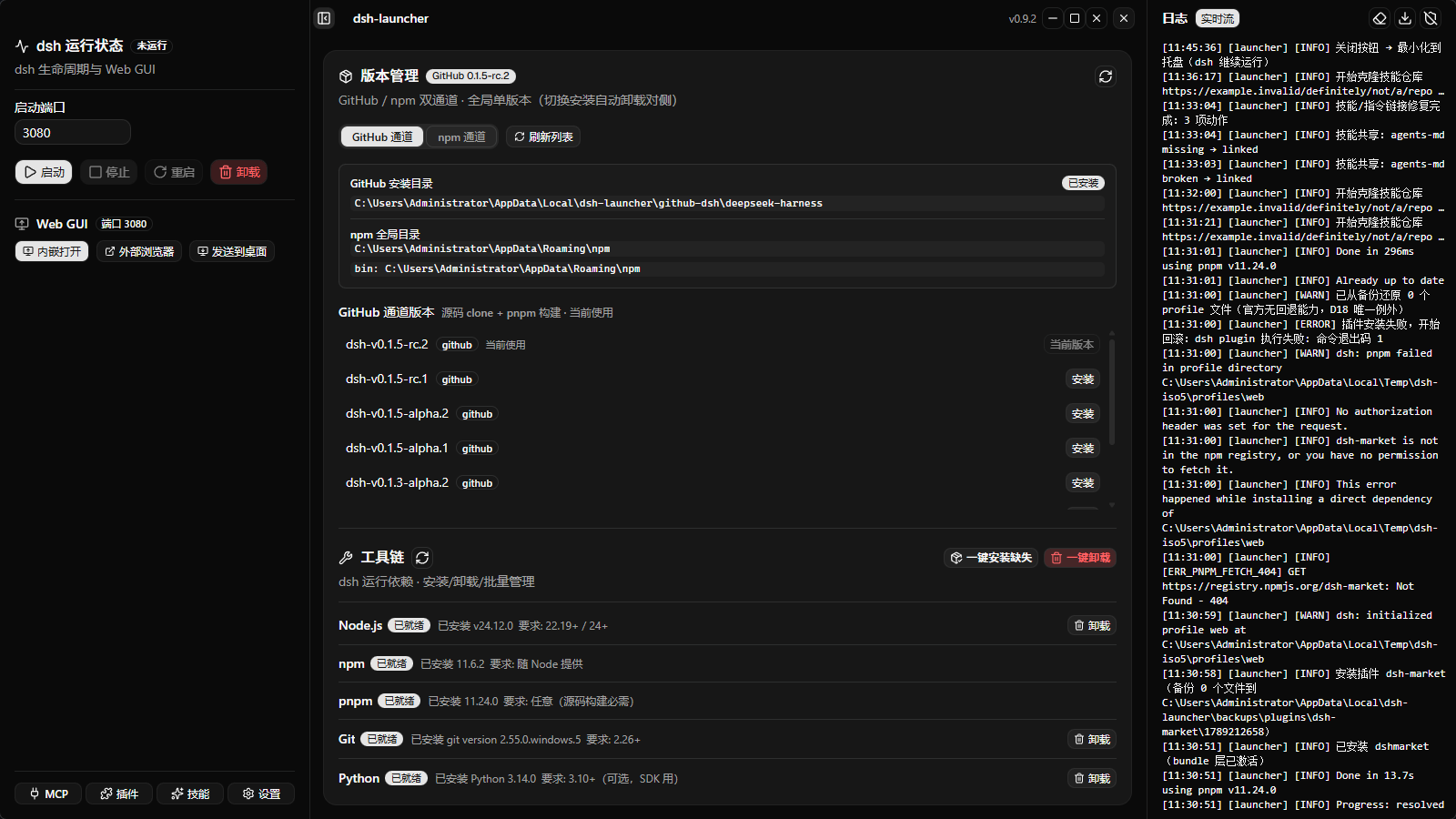
1. 主界面:版本管理 + 工具链 + 实时日志
左边看运行状态、点启动;中间管 dsh 版本(npm / GitHub 双通道)和运行环境(Node / npm / pnpm / Git / Python);右边是滚动的实时日志。
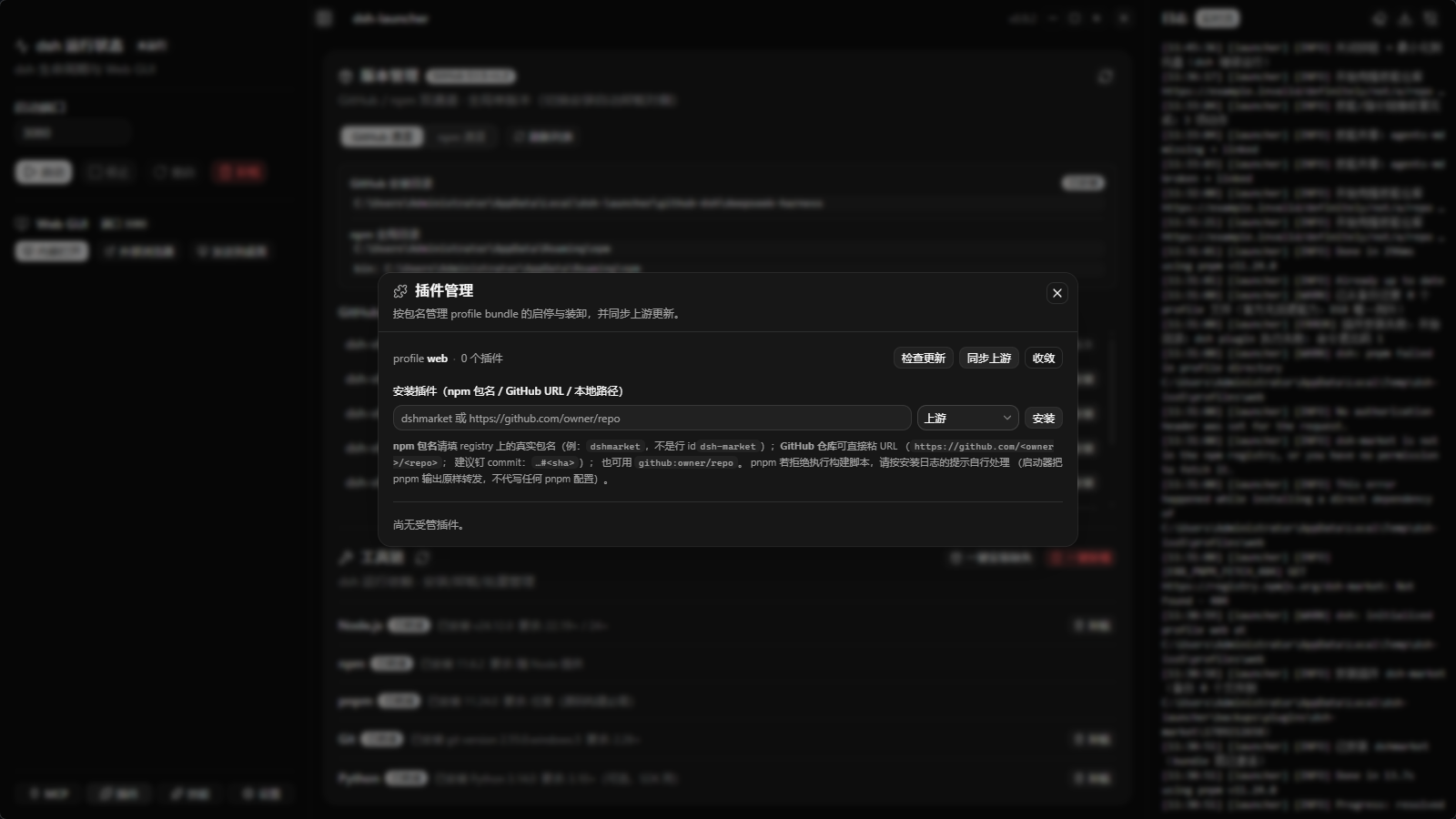
2. 插件管理:装、卸、开、关,热重载
填 npm 包名(如 dshmarket)或 GitHub 仓库 URL(如 https://github.com/owner/repo)即可安装。
upstream 来源的插件还能自动同步新版本 / 新 commit。
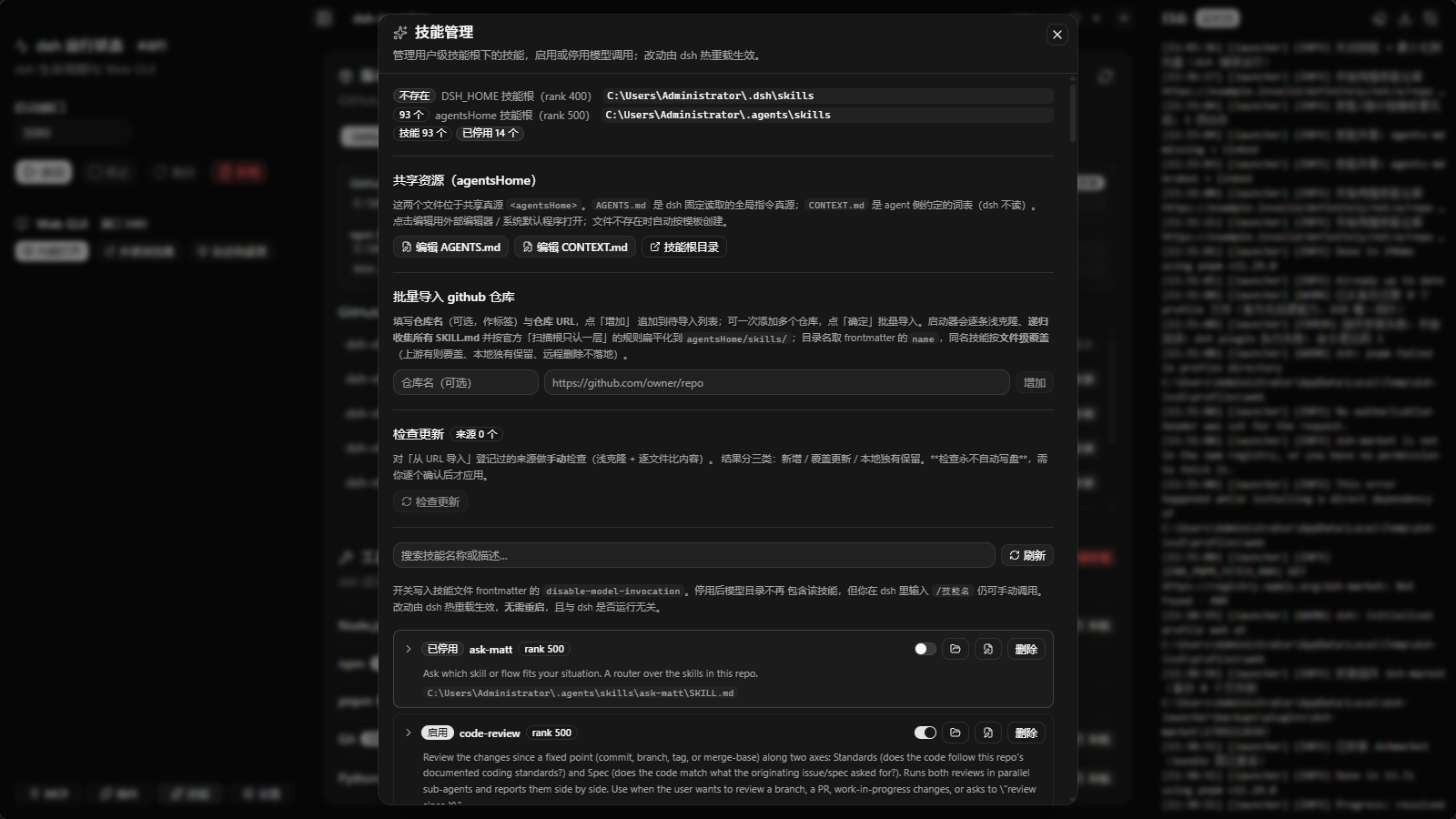
3. 技能管理:让模型用上你的技能
按官方扫描根管理技能(dsh 的 ~/.dsh/skills、共享的 ~/.agents/skills),
可单个启停、可批量从 GitHub 仓库导入、可检查上游更新(纯手动,永不自动写盘)。
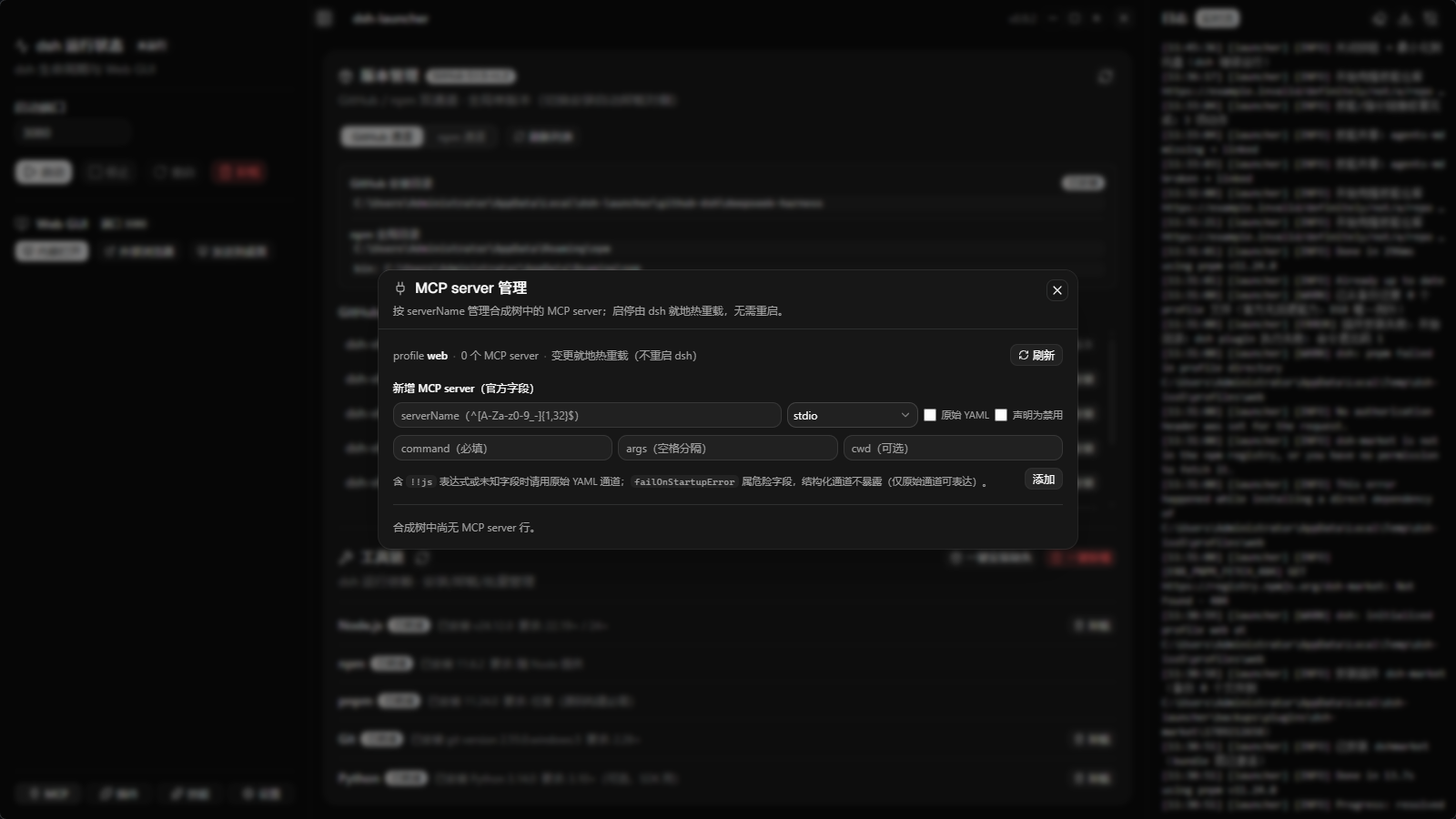
4. MCP server 管理
按 serverName 管理合成树里的 MCP 工具服务器;启停由 dsh 就地热重载,不需要重启。
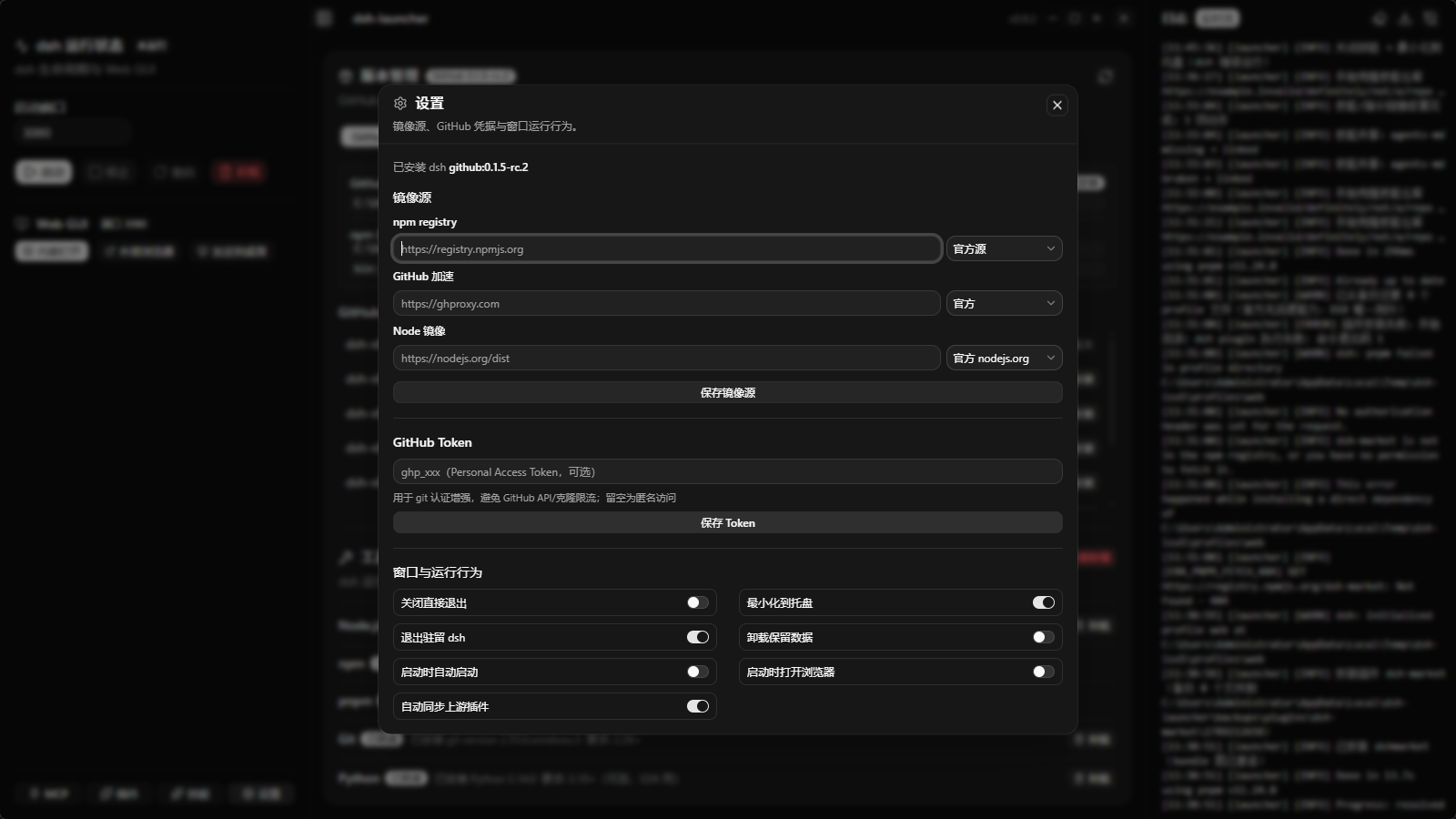
5. 设置:镜像源、Token、窗口行为
npm registry / GitHub 加速 / Node 二进制三类镜像源,GitHub Token(用于防限流 + git 认证,落盘前用 Windows DPAPI 加密),以及托盘、自动启动等开关。
快速开始
装
- 打开 Releases,下载最新的
dsh-launcher_<版本>_x64-setup.exe; - 双击安装(NSIS 简体中文安装器,免管理员,装到当前用户目录);
- 想要免安装版?下载
..._x64_portable.zip解压即用。
遇到「Windows 已保护你的电脑」/「未知发布者」? 这是正常的 —— 本项目不做代码签名(刻意的产品决策,非构建疏忽),所以 Windows SmartScreen 会提示。 点「更多信息」→「仍要运行」即可。 想先核对文件有没有被篡改?下载页附带
SHA256SUMS.txt,用sha256sum -c SHA256SUMS.txt校验。
用(典型流程)
- 打开 「工具链」 → 缺什么点「一键安装缺失」(Node 免 UAC;Git / Python 会弹 UAC 确认);
- 打开 「版本管理」 → 选 npm 或 GitHub 通道装一个 dsh;
- 点左侧 「启动」 → 状态变「运行中」;
- 点 「内嵌打开」 → 直接在窗口里用 dsh 的 Web GUI(token 自动带上,不用管);
- 想扩展能力 → 进 「插件」/「技能」/「MCP」 面板按需装。
功能一览
| 模块 | 能做什么 |
|---|---|
| dsh 生命周期 | 启动 / 停止 / 重启 dsh web(端口可配,默认 3080);五态实时状态;崩溃自动归因到不兼容插件并可逆禁用 |
| 版本管理 | npm 通道(registry 装包)与 GitHub 通道(clone + pnpm 构建)双通道;全局单版本,切换 = 先卸载再装;安装过程实时进度。换版本/换通道不碰 DSH_HOME —— 会话、技能、插件配置全部保留 |
| 工具链 | 检测 Node(22.19+/24+) / npm / pnpm / Git(2.26+) / Python(3.10+,可选),显示"已装/缺失/版本不符",支持单个或批量装卸 |
| Web GUI 集成 | 内嵌窗口打开 dsh Web UI(自动带 token);也可用外部浏览器或创建桌面快捷方式 |
| 系统托盘 | 打开主窗口 / 启动 / 停止 / 重启 / 退出;可配置「关闭窗口最小化到托盘」「退出时驻留 dsh」 |
| 日志 | dsh 与启动器日志统一落盘(按天轮转 + 10MB 切割 + 保留 30 天);前端实时流式展示;可导出(含 token 打码版) |
| 插件管理 | 按包名独立启停(写 profile 受管 patch 区块,dsh 热重载、无需重启);装卸走官方 dsh plugin 通道;upstream 插件可自动同步并钉 git commit;自研(本地路径)插件永不被同步改动 |
| 技能管理 | 列出用户级技能根下的技能;单个启停(= 写 disable-model-invocation);可恢复删除(移入 .trash/);从 GitHub 仓库批量导入并扁平化;手动检查更新(逐文件比较,永不自动写盘) |
| MCP server 管理 | 按 serverName 增删启停;写受管区块,dsh 热重载;危险字段 failOnStartupError 结构化通道不暴露;表达式(!!js)行只读 |
| 共享资源 | 一键用外部编辑器打开 ~/.agents/AGENTS.md / CONTEXT.md / 技能根目录(文件不存在时按模板创建) |
| 镜像源 | npm registry / GitHub 加速 / Node 二进制三类独立配置(含常用镜像快捷选择) |
| 命令行 | dsh-launcher plugin|skill|mcp ... —— 与 GUI 共用同一套逻辑,便于脚本化 / CI 验收 |
# 插件
dsh-launcher plugin list [--json]
dsh-launcher plugin install <spec> [--origin upstream|in-house|unknown]
dsh-launcher plugin enable|disable|uninstall <package>
dsh-launcher plugin sync [--check]        # 同步 upstream 插件(--check 只检查不落盘)
dsh-launcher plugin repair [--package <pkg>]

# 技能(注意:技能列表请用 status,没有 skill list)
dsh-launcher skill status [--json]
dsh-launcher skill apply [--mode auto|link|config] [--resource skills|agents-md|context-md]
dsh-launcher skill migrate [--dry-run]    # 迁移冲突资源(原文件改名保留,绝不删除)
dsh-launcher skill repair-links [--json]

# MCP
dsh-launcher mcp list [--json]
dsh-launcher mcp add --server-name <n> --transport <stdio|streamable-http> [选项]
dsh-launcher mcp remove <serverName>
dsh-launcher mcp enable|disable <serverName>
安装方式细节
两种 dsh 安装通道
| 通道 | 怎么装 | 适用 |
|---|---|---|
| npm | npm i -g @deepseek-ai/dsh@<版本> |
想要官方发布的稳定版,装得快 |
| GitHub | git clone --depth 1 --branch <tag> → pnpm install → pnpm build,并生成全局 dsh.cmd |
想用最新源码(含 rc / alpha) |
全局同时只有一个 dsh 生效 —— 切换通道时启动器会先清理对侧(ADR-0003)。
🔒 换版本 / 换通道 / 卸载,都不会碰你的数据
你可以随便切版本、切通道 —— 会话记录、技能、插件、配置全都在。
原因是 dsh 把用户数据集中放在 DSH_HOME(默认 ~/.dsh),而版本切换只动「程序本体」:
你的数据(在 ~/.dsh 里) |
说明 |
|---|---|
sessions/ |
会话历史(你的聊天记录) |
settings.yaml / .credentials.yaml |
设置与凭据 |
storages/ / task-board/ |
会话投影缓存、任务板 |
profiles/<name>/ |
已装插件与其配置(package.json、cordis.patch.yml、node_modules) |
~/.agents/skills/ |
你的技能(共享真源,官方扫描根) |
启动器实际做了什么(可对照源码):
| 动作 | 动的部分 ✅ | 不碰的部分 🔒 |
|---|---|---|
| 切换 npm ⇄ GitHub 通道 | 删另一条通道的程序本体(npm 全局包,或 github-dsh 源码目录 + 自家 dsh.cmd shim) |
DSH_HOME 全部数据(代码注释即明确写“不清 DSH_HOME 数据”,commands/version.rs) |
| 升级 / 降级到另一个版本 | 同理,只替换程序本体 | 同上(会话 / 技能 / 插件原样保留) |
| 卸载 dsh(默认) | 程序本体(npm 全局包 / 源码目录 / 全局命令) | DSH_HOME —— 默认 保留(keepDshHomeOnUninstall 默认为 true) |
| 卸载 dsh(仅当你手动关掉“卸载保留数据”) | 程序本体 + ~/.dsh |
删前会校验目录特征(含 profiles/ 或 settings.yaml),不像 dsh 数据就拒绝删除 |
要点:切版本不会清技能、不会丢会话、也不会重置插件配置。装上不同版本后,它们读的是同一个
DSH_HOME。例外(需你知情):插件本身是装在
~/.dsh/profiles/<name>/里的,跟 dsh 版本无关; 但如果某个插件与新版 dsh 不兼容,新版启动时可能报错 —— 此时启动器会自动把**冒头的那一行禁用(可逆)**并提示你,不会去卸载它。
插件安装:三种来源形态
在「插件」面板的输入框里可以填:
- npm 包名 —— 写 registry 上的真实包名,例如
dshmarket(⚠️ 不是它在配置里的行 iddsh-market); - GitHub / Git 仓库 URL —— 例如
https://github.com/owner/repo,建议钉 commit:https://github.com/owner/repo#<sha>; 也支持github:owner/repo、git+https://...git#main等 pnpm 原生写法; - 本地路径 —— 例如
link:../my-plugin(这类「自研」插件不会被自动同步改动)。
pnpm 拦住构建脚本? 部分插件安装时要跑 build/prepare 脚本,pnpm ≥10 默认会拦下并打印确切的键名。 按提示把那一行加到 profile 目录的
pnpm-workspace.yaml的allowBuilds下即可 —— 启动器会把这个路径和键名一并显示在错误信息里。 (启动器不代劳这一步:不写 profile 配置文件,与官方 dsh 行为保持一致。)
它是怎么做的(技术)
┌─────────────────────────────────────────────────┐
│  React 19 + TypeScript + shadcn/ui(深色主题)    │  ← 前端:UI 渲染
├─────────────────────────────────────────────────┤
│  Tauri 2 IPC(48 个类型化命令 + 事件推送)         │  ← 桥接层
├─────────────────────────────────────────────────┤
│  Rust:core/(进程·端口·配置·日志·工具链·         │  ← 后端:真正干活
│  GitHub·插件·技能·MCP)+ commands/(IPC 薄壳)    │
└─────────────────────────────────────────────────┘
- 后端(Rust / Tauri 2):进程生命周期、端口探测、工具链检测与安装、日志落盘、配置持久化、版本与通道管理、事件推送、插件 / 技能 / MCP 管理。
- 前端(React 19 + TS + shadcn/ui + Tailwind CSS 4):所有界面与交互。
- 进程模型:子进程一律无窗口启动(
CREATE_NO_WINDOW);dsh 的 stdout/stderr 重定向到文件后 tail 读取(解决 Windows 下管道缓冲导致 token 迟迟不出现的问题);停止时先发taskkill /PID /T(即 SIGTERM 语义,等待约 1 秒),未退再/F强杀,最后按端口兜底清剿残留(清剿前校验监听进程确为 dsh,防误杀)。 - 前后端类型契约:有一条 CI 测试逐字段对账 Rust DTO ↔ TS interface,改名漏改一侧会直接构建失败。
项目结构
dsh-launcher/
├── src/                     # 前端(React + TS + shadcn/ui)
│   ├── components/          #   面板:StatusCard / VersionPanel / ToolchainPanel
│   │                        #         PluginsPanel / SkillsPanel / McpPanel / ...
│   ├── components/ui/       #   shadcn/ui 组件
│   ├── hooks/               #   useTauriEvent / useResizablePanel / useIsMobile
│   └── lib/tauri.ts         #   IPC 的类型化封装(与 Rust 命令一一对应)
├── src-tauri/               # 后端(Rust)
│   ├── src/core/            #   核心逻辑(process / port / config / logging /
│   │                        #   toolchain / github / plugin / skill / mcp / tray …)
│   ├── src/commands/        #   Tauri IPC 命令(薄壳:spawn_blocking + 事件广播)
│   ├── src/cli.rs           #   无 GUI 命令行(与 GUI 共用同一套 core)
│   └── capabilities/        #   Tauri 2 权限声明(最小化授权)
├── docs/
│   ├── DESIGN.md            #   设计总览
│   └── adr/                 #   架构决策记录 ADR-0001 ~ 0009
├── png/                     #   本 README 的界面配图
└── .github/workflows/       #   CI / Release / Nightly 三条流水线
开发
npm install          # 安装依赖(若本机 .npmrc 含 omit=dev,需加 --include=dev)
npm run tauri dev    # 开发模式(前端热更新 + Rust 热重载)
npm run build        # 只构建前端(tsc 类型检查 + vite build)
npm run tauri build  # ★ 打包:产出可运行的 exe + NSIS 安装包
⚠️ 发布构建必须启用 custom-protocol(踩过的坑)
不要用裸 cargo build --release 产出发布件。
tauri::is_dev() 的实现是 !cfg!(feature = "custom-protocol")(见 tauri-2.11.5/src/lib.rs:308)。
缺少该 feature 时,即使加了 --release,二进制仍处于开发模式:它不去加载内嵌的前端资源,
而是去连 build.devUrl(http://localhost:1420)—— 于是窗口报
ERR_CONNECTION_REFUSED("localhost 拒绝连接"),且构建输出目录不会生成 tauri-codegen-assets。
| 命令 | 结果 |
|---|---|
✅ npm run tauri build |
推荐。tauri build 会自动启用该 feature(CI 的 tauri-action 同理) |
✅ cargo build --release --features custom-protocol |
需要直调 cargo 时用这个 |
❌ cargo build --release |
不启用任何非 default feature → 得到 dev 模式二进制 |
自检:看构建输出目录有没有
target/release/build/dsh-launcher-*/out/tauri-codegen-assets/—— 有 = 前端已内嵌(正常);没有 = dev 模式(启动会连不上)。
测试
cargo test --manifest-path src-tauri/Cargo.toml --lib          # Rust 单元测试
cargo test --manifest-path src-tauri/Cargo.toml --test <name>  # 集成测试
npx tsc --noEmit                                               # 前端类型检查
持续集成与发布
三条 GitHub Actions 流水线(.github/workflows/):
- CI —— 每次 push / PR:版本一致性门禁 →
tsc类型检查 → 前端构建 →cargo check(零警告)→ 单元 + 离线集成测试; - Release —— push 到 master:自动递增 PATCH 版本、写 CHANGELOG、构建 NSIS 安装包 + 便携 zip +
SHA256SUMS.txt,发布 GitHub Release; - Nightly —— 每晚跑依赖真实网络 / 真实 dsh 环境的
#[ignore]集成测试(失败不阻断 master)。
版本号由 scripts/bump-version.mjs 同步「五文件六落点」并带一致性校验(ADR-0004 / ADR-0009),防止手工改一处导致漂移。
常见问题(FAQ)
<details> <summary><b>装插件报 <code>ERR_PNPM_FETCH_404</code>?</b></summary>说明这个 npm 包名不存在(或拼写有误 / 无权限)。请确认用的是 registry 上的真实包名。
如果其实想装的是某个 GitHub 仓库,请改用 URL 形态:https://github.com/owner/repo。
启动器会把 pnpm 的原始报错和这个提示一起显示在界面上。
pnpm ≥10 出于安全考虑,默认拦下依赖的 build / prepare 脚本。pnpm 会在报错里打印确切的键名,
把它加到 profile 目录下 pnpm-workspace.yaml 的 allowBuilds 里再重试即可。
启动器会显示完整报错 + profile 路径 + 该键名,但不代劳修改(与官方 dsh 行为一致)。
dsh 的访问 token 是进程级随机数,只从它自己的 stdout 打印。
- 由启动器启动的实例:冷启动可能较慢(插件多时可达 20 秒以上),状态会持续显示"启动中"并自动收敛;
- 别人(或你自己)在命令行手动启动的实例:启动器原理上拿不到它的 token。此时界面会提示你可以「接管」—— 停止该实例并由启动器重新拉起,从而捕获 token(会中断该实例上的会话,故需你确认)。</details>
v0.9.1 起已修复早期版本"超时即卡死"的问题:启动就绪由启动探活线程与每 5 秒状态对账线程共同保证, 冷启动再慢也会持续探测直到端口就绪。若长期不收敛,请查看日志面板排查端口冲突或插件报错。
</details><details> <summary><b>换个 dsh 版本,我的会话 / 技能 / 插件会没吗?</b></summary>不会。 你的数据都在 DSH_HOME(默认 ~/.dsh)—— 包括 sessions/(会话)、settings.yaml、
profiles/(插件)、以及 ~/.agents/skills/(技能)。版本切换(含 npm ⇄ GitHub 通道互切)
只替换程序本体,一个字节都不会碰这些目录;它们代码里就明确写着“不清 DSH_HOME 数据”。
连卸载 dsh 也默认保留数据(keepDshHomeOnUninstall 默认开);只有你主动关掉该开关,
启动器才会删 ~/.dsh —— 而删除前还会校验目录特征(含 profiles/ 或 settings.yaml),不像 dsh 数据就拒删。
详见上方「🔒 换版本 / 换通道 / 卸载,都不会碰你的数据」。
</details><details> <summary><b>会不会误杀我自己的进程?</b></summary>不会。停止 / 清剿前会校验端口监听进程的命令行确实形如 dsh(含 deepseek-harness / bin.ts / @deepseek-ai 等特征);
无法判定时宁可残留也不误杀,并在日志里明确警告。
DSH_HOME(默认~/.dsh):只读展示;卸载时默认保留(可用开关改为删除,删除前还会校验目录特征防误删);- dsh 配置文件:启动器只拥有
cordis.patch.yml里 marker 包裹的受管区块,块外内容逐字节保留; - 「自研」插件(本地路径 / link)与「本地独有的技能文件」:永不被自动同步或删除。</details>
文档
| 文件 | 内容 |
|---|---|
CONTEXT.md |
术语表(词表,不是 spec) |
docs/DESIGN.md |
设计总览:模块划分、分层纪律、核心流程 |
docs/adr/ |
架构决策记录 ADR-0001 ~ 0009(安装通道 / 生命周期 / 单版本 / 版本号 / 插件与技能 / MCP / 技能管理 / 技能导入 / 审计整改) |
CHANGELOG.md |
逐版本变更日志 |
技术栈
Tauri 2 · Rust · React 19 · TypeScript · Vite · Tailwind CSS 4 · shadcn/ui(base-nova)
许可
MIT © 2026 dsh-launcher contributors
<div align="center">如果它帮你省下了敲命令的时间,欢迎点个 ⭐ Star

Operate deliberately
Install and manage
Prerequisites and target Profile
Target: Deepseek Harness Profile, Dsh Profile, Windows Profile
Delivery: External App — https://github.com/youridol/dsh-launcher/releases。
Compatibility and access
Windows 10/11 x64 desktop application: Not declared in supplied evidence。
Review compatibility evidence ↗
Risk facts
Windows builds are intentionally unsigned
Evidence ↗Can install toolchains and modify managed dsh/plugin, skill, and MCP configuration
Evidence ↗User-triggered installs may download packages, GitHub sources, and runtime dependencies
Evidence ↗Evidence and editorial reviewManifest, Bundle patch, distribution and freshness
Immutable evidence
Review status and source activity
Repository claims are summarized as supplied evidence; download and runtime behavior should be verified before relying on the app.
AI reviewed Sep 12, 2026, 2:00 PM UTC。GitHub facts last checked Sep 12, 2026, 2:00 PM UTC。
No material source change has been recorded since this evidence baseline.