At a glance
What it does
Manage DeepSeek Harness MCP client entries from the web settings page.
Web Profile
Not declared in supplied evidence
Evidence-verified
Checked Sep 12, 2026, 1:58 PM UTC
Code-evidenced contributions
What it adds to DSH
Adds a settings-page editor for configured @deepseek-ai/dsh-mcp-client instances.
Mechanism evidence ↗Before you choose it
@dshp/mcp-manager adds a settings section for listing and changing @deepseek-ai/dsh-mcp-client instances in your active profile's cordis.patch.yml. It offers form and JSON editing, preserves YAML comments on write-back, and includes same-origin JSON routes plus an HTTP probe.
Best for
DeepSeek Harness users who administer MCP server connections and prefer a settings-page workflow over editing profile YAML by hand.
Common tasks
- Add an MCP client entry to a DSH profile.
- Edit or disable an existing MCP client configuration.
- Probe a configured MCP server and manage entries through form or JSON editing.
Permissions and data
The plugin manages MCP client configuration in the active DSH profile.
Permissions- Reads and writes @deepseek-ai/dsh-mcp-client loader entries in the profile's cordis.patch.yml.
- Provides same-origin JSON routes for its settings interface.
- Can send an HTTP probe to a configured MCP server.
- Configuration changes are written back while preserving YAML comments, according to the supplied description.
- Configured MCP servers may be contacted through the HTTP probe.
- No credential requirement is declared in the supplied evidence.
Limitations
- The supplied evidence does not establish a supported DeepSeek Harness version range.
- Installation and runtime behavior were not executed during this review.
- The npm registry version was not found; use the verified pinned Git bundle path rather than assuming npm availability.
What DSHub checked
- The package declares Node.js >=20.
- The bundle patch and immutable Git distribution structure were verified.
- The package is MIT licensed.
What DSHub did not check
- Successful installation in a DSH environment.
- Whether any configured MCP server is reachable or compatible.
- The behavior of the HTTP probe and settings UI at runtime.
Pinned install
Install MCP Server Manager
This plugin bundle does not have a DSH Plugin install action. Use its source documentation for the delivery method.
Maintainer source
Project README
deepseek-harness-plugins
DeepSeek Harness(DSH)插件 Monorepo(pnpm workspaces + TypeScript ESM)。
运行时零依赖 · 构建产物已提交:所有插件
dependencies恒为{},lib/host.js/lib/client.js随仓库提交 —— clone 下来即可直接安装,无需先 build。
插件一览
| 插件 | 一句话 | 文档 |
|---|---|---|
| @dshp/token-meter | Token 额度 + 用量统计:多供应商额度卡(opencode / DeepSeek / Command Code / 手动) + 本机会话日志聚合(趋势 / 热力图 / 模型分布) | README |
| @dshp/vision-bridge | 视觉桥接:让纯文本模型也能“看图”(vision_describe 工具 + 主/备模型自动降级) |
README |
| @dshp/mcwiki-search | Minecraft Wiki 查询工具(搜索 / 引言 / 全文,含模板清理的 AI 可读转换) | README |
| @dshp/search-provider | web_search 供应商中枢:Tavily 等可插拔接入,动态选型 |
README |
| @dshp/web-style | Web 外观定制:23 套主题画廊一键切换并持久化 + 壁纸取色(Material You)+ 全局圆角 | README |
| @dshp/skill-manager | 技能管理:设置页统一管理全局(~/.dsh/skills、~/.agents/skills)与工作区技能——新建/编辑/启停/复制移动/删除 |
README |
| @dshp/mcp-manager | MCP 服务器管理:设置页管理 cordis.patch.yml 里的官方 dsh-mcp-client 实例——新建/编辑/启停/删除/探活,表单+JSON 双模式,回写保注释 | README |
截图预览
@dshp/token-meter — Token 额度 + 用量
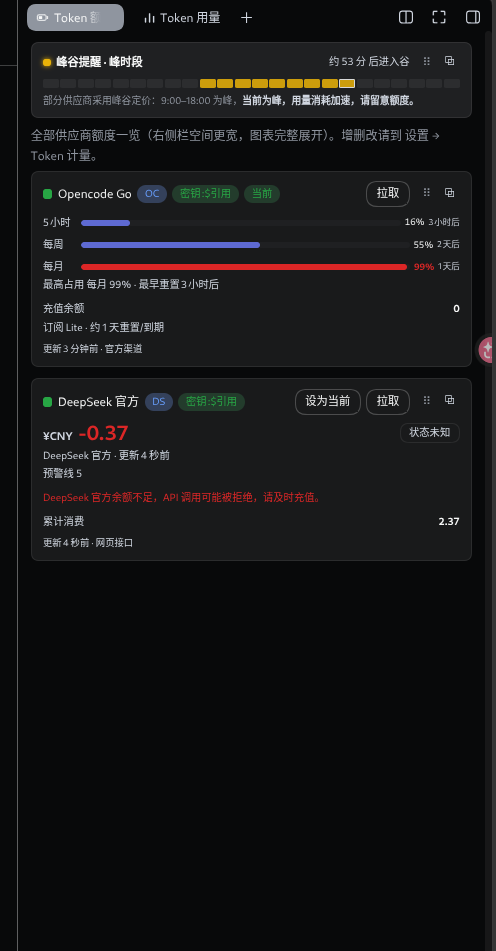
右侧栏「额度」Tab:峰谷提醒横幅 + 全部供应商富卡片(配额进度条按 5 小时 / 每周 / 每月分级,标注占比与重置倒计时,余额不足触发红色预警,禁用项沉底并加分组标题)。
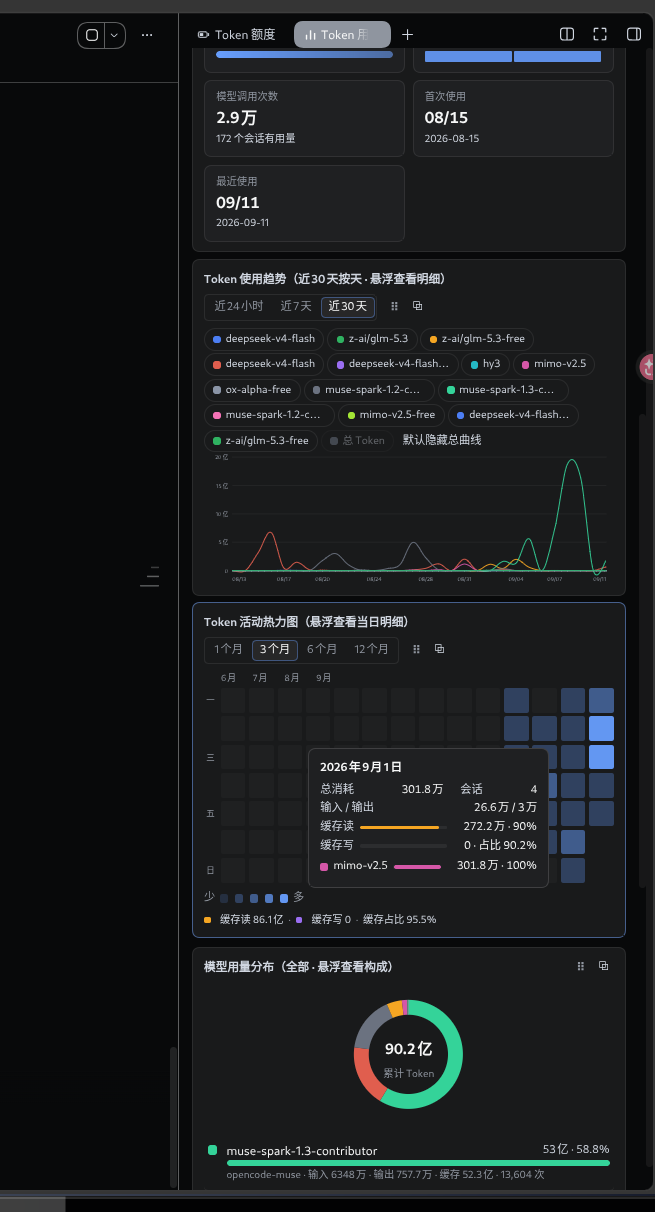
右侧栏「用量」Tab:指标卡 + Token 趋势折线 + 活力热力图 + 模型用量分布环形图。
| 额度 Tab | 用量 Tab |
|---|---|
 |
 |
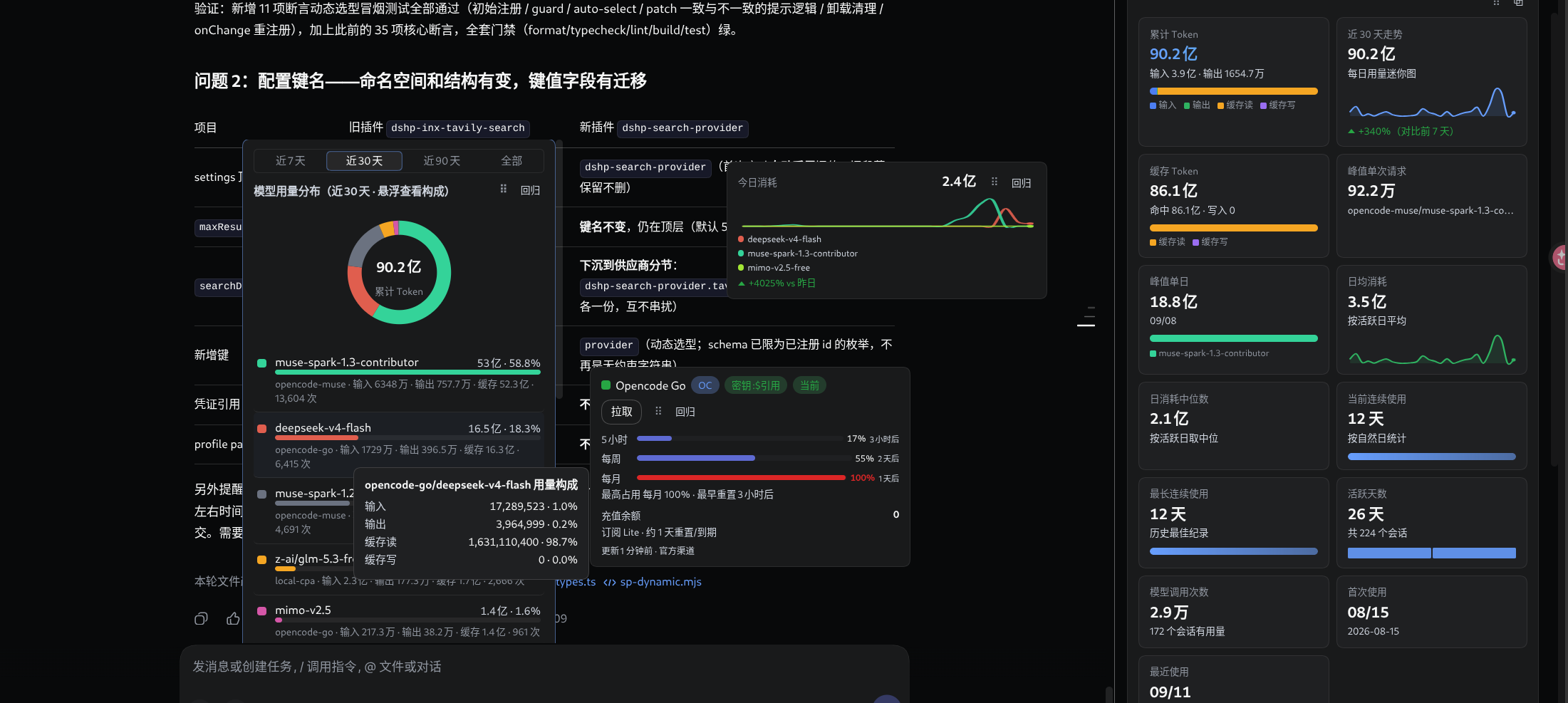
宽屏布局:今日消耗面板 + 指标卡网格;任意图表可 ⠿ 拖拽或 ⧉ 弹出为独立浮窗。
其余插件暂无界面截图;使用说明与配置见各自的 README(上表「文档」列)。
安装到 DSH
方式一(推荐):克隆仓库安装 —— 更新只需 git pull,旧版 DSH 可 checkout tag
git clone git@github.com:Yinxe/deepseek-harness-plugins.git
cd deepseek-harness-plugins
pnpm install
# lib/ 已提交,clone 下来就能用;改了 src 才需要 pnpm build

# 安装你需要的插件(按目录名,可多个)
dsh plugin --profile web add ./plugins/token-meter
dsh plugin --profile web add ./plugins/vision-bridge
dsh plugin --profile web add ./plugins/mcwiki-search
dsh plugin --profile web add ./plugins/search-provider
dsh plugin --profile web add ./plugins/web-style
dsh plugin --profile web add ./plugins/skill-manager
dsh plugin --profile web add ./plugins/mcp-manager

dsh web   # 重启生效
- 更新:仓库内
git pull+dsh web(最快——lib 已提交,未改 src 无需 build);兼容旧版 DSH:按compat.json的 taggit checkout <tag>后重跑上面的 add。
dsh plugin add 会把包写进 profile 的 dsh.profile.bundles —— 无需手动改配置文件。
各插件的详细安装说明、配置与常见问题见对应 README(上表)。
方式二:从 Release 安装(无需 clone;更新需手动重跑命令)
CI 把每个插件打包成 tgz 发布到 Releases,latest 滚动发布固定跟随 main 最新构建(持 Latest 徽标、始终置顶):
# macOS / Linux
dsh --profile web add \
  https://github.com/Yinxe/deepseek-harness-plugins/releases/download/latest/dshp-mcwiki-search-latest.tgz
# Windows PowerShell
dsh --profile web add `
  'https://github.com/Yinxe/deepseek-harness-plugins/releases/download/latest/dshp-mcwiki-search-latest.tgz'
全部插件的下载与安装命令见 Releases 各预发布说明;滚动更新 = 重跑同一条命令 + dsh web 重启(latest 资产随 main 每次构建滚动重建)。
两个 pnpm 语义坑,遇到别绕远路:
dsh plugin … update对 tarball URL 直装无效——pnpm update只重解析 semver 范围,URL 是精确 spec(且 lockfile 用 integrity 钉住首次内容),永远 "Already up to date"。滚动更新请重跑同一条 add 命令(或用下面的 Git tag 安装);remove后重装同一 URL 若报ERR_PNPM_MISSING_TARBALL_INTEGRITY(lockfile 残留了无 integrity 的条目),删掉 profile 目录里的pnpm-lock.yaml再 add 即可(lockfile 是可再生的本机状态)。
历史版本(兼容旧版 DSH)
main 永远跟随最新 DSH。老版本 DSH 用户装静态历史版本:按 compat.json 记录的兼容 tag(「DSH 版本 → 推荐 tag」矩阵),到 Releases 找对应版本 Release(v* tag 触发,静态存档、永不滚动),资产名 = dshp-<插件名>-<tag>.tgz:
# 以 v0.1.5-rc.1 为例
dsh --profile web add \
  https://github.com/Yinxe/deepseek-harness-plugins/releases/download/v0.1.5-rc.1/dshp-mcwiki-search-v0.1.5-rc.1.tgz
方式三:Git 依赖安装 —— 支持 update 一键(可解析较慢,列为备选)
仓库自带一个随 CI 滚动的 latest git tag(每次 main 构建通过门禁后重置到 main HEAD)。装它 = "永远最新",且 update 一键跟进——spec 永不改变,可变性由 git ref 承担,完全绕开 tarball URL 的语义坑:
# 安装(一次,此后 spec 永不改)
dsh plugin --profile web add \
  "github:Yinxe/deepseek-harness-plugins#latest&path:plugins/<插件名>"

# 之后每次更新就这一条:
dsh plugin --profile web update @dshp/<插件名>
dsh web   # 重启生效
同一机制的两种变体(换选择器即可):
#semver:^1.0.0&path:plugins/<插件名>—— 跟发版 tag 走的受控升级:只在 push 了匹配范围的新 tag 后 update 才会动;预发布 tag 受 node-semver 元组规则限制,范围必须显式含预发布(如^0.1.5-rc.1只匹配 0.1.5 系列);#main&path:plugins/<插件名>—— 与#latest等价的分支滚动。
注意:
latesttag 在门禁通过后才移动到 main HEAD,所以 update 拿到的永远是过了门禁的构建;- git 解析在你网络慢时可能要 2–4 分钟(
github:简写走 HTTPS,慢可换git+ssh://git@github.com/…形态,前提是配好 GitHub SSH key);一次 clone 后 pnpm 有本地缓存,重复 update 会快一些; - 对比:tarball URL 直装(
…latest.tgz)的 spec 是精确 URL,update永远 no-op——这正是 git 依赖方案存在的理由。
多插件统一更新:update 支持一条命令带多个包名(git 与 tarball 混装亦可):
dsh plugin --profile web update "@dshp/*" # 或显式列出:update @dshp/a @dshp/b …
实测耗时(国内网络、SSH 热缓存):约 35 秒/插件、线性增长(3 个 ≈ 1 分 40 秒;首次冷安装更久,每个都要完整 clone)。插件多且网络差时更新会到分钟级——这是 git 解析的固有成本,根治要等 npm 发布渠道恢复(registry 元数据 + CDN tarball,秒级)。tarball 渠道的多插件重装同样支持一条命令带多个 URL,但在 HTTPS 不稳的网络下可能超时。
卸载
dsh plugin --profile web remove "@dshp/<插件名>"
dsh web   # 重启生效
remove 直接转发 pnpm(参数 = 包名),并自动从 dsh.profile.bundles 撤下挂载;写入 settings.yaml 的配置分节按需手动清理。各插件的详细安装/更新/卸载说明见各自 README。
一键 AI 安装
把下面这段发给你的 DSH AI,让它代你装:
帮我从 monorepo Yinxe/deepseek-harness-plugins 安装插件(按需选择子目录):
1. git clone 仓库并 pnpm install
2. dsh plugin --profile web add ./plugins/<子目录名>
3. 重启 dsh web,确认无报错、设置页出现对应条目
发布与更新约定(CI 自动执行)
| 通道 | 触发 | 行为 |
|---|---|---|
latest |
推送 main |
滚动重建到最新提交(正式渠道,持 Latest 徽标置顶),下载地址固定 |
| 版本 Release | 推送 v* tag |
静态存档,永不随构建变化 |
| 分支预发布 | 推送其他分支 | 以分支名命名的预发布(release/1.0 → release-1.0) |
| 自定义后缀 | 手动触发 | 勾选 rolling = 预发布随滚动;不勾 = 静态正式版 |
- 滚动约定:所有预发布(以及 notes 首行带
<!-- rolling: true -->标记的 release)都跟随 main——每次 main 推送成功后整体重建到最新提交;停止跟随 = 取消 Pre-release 勾选或删除标记行。latest每次最后重建并授予 Latest 徽标,始终置顶 Releases 列表。 - 数量约束:除
latest外同时最多允许 1 个滚动项;出现多个时 CI 立即报错终止(不动任何现有 Release),处理后再推送即可。 dev与feature/*分支、PR 只跑 CI 门禁,不产出发布物。- Release 说明由
scripts/gen-release-notes.cjs生成:逐插件列出包名、版本、双语描述、下载与安装命令。
结构
.
├── plugins/
│   ├── token-meter/            # @dshp/token-meter(Token 额度 + 用量统计)
│   │   ├── src/host/           #   Host TS:providers/{opencode,deepseek,commandcode,manual} + view/errors + stats/
│   │   ├── src/client/         #   Client TS:providers/{kit,sections,registry,ui/*} + Quota/Stats/TokenMeter Section
│   │   ├── images/             #   界面截图(README「截图预览」用)
│   │   ├── lib/                #   单文件构建产物(已提交,DSH git 安装必需)
│   │   └── cordis.patch.yml    #   bundle 声明(id: dshp-token-meter)
│   ├── vision-bridge/          # @dshp/vision-bridge(视觉桥接)
│   │   ├── src/host/           #   Host TS:types/http/config/cache/vision/index
│   │   ├── src/client/         #   Client TS:types/styles/api/components/VisionSection/index
│   │   └── lib/                #   单文件构建产物(已提交)
│   ├── mcwiki-search/          # @dshp/mcwiki-search(Minecraft Wiki 查询)
│   ├── search-provider/        # @dshp/search-provider(web_search 供应商中枢)
│   ├── skill-manager/          # @dshp/skill-manager(全局 + 工作区技能管理)
│   ├── mcp-manager/            # @dshp/mcp-manager(MCP 服务器管理:patch 条目 CRUD + 探活)
│   └── web-style/              # @dshp/web-style(23 套主题画廊 + 壁纸取色 + 全局圆角)
│       ├── src/host/           #   Host TS:types/http/config + themes/(token 单源,21 个主题模块)
│       ├── src/client/         #   Client TS:GallerySection/apply-theme/md3/official/radius/themes/api/state
│       ├── scripts/            #   check-themes.mjs(目录 ↔ 画廊 meta ↔ 产物一致性)
│       └── lib/                #   单文件构建产物(已提交)
├── AGENT.md                    # 插件开发规范(新插件必读)
├── tsconfig.base.json          # 共享 TS 配置(NodeNext + strict)
├── tsconfig.json               # solution 引用
├── pnpm-workspace.yaml         # packages: plugins/* + storeDir
├── compat.json                 # DSH 版本兼容矩阵(空 = 暂无历史包袱)
└── .github/workflows/CICD.yml  # 门禁 + 打包发布:main→latest 滚动发布,v* tag→版本 Release,其他分支→同名预发布;dev 与 feature/* 仅门禁
每个插件内部一律是同一套布局:src/host/(Node 半)+ src/client/(浏览器半)+ lib/(已提交的单文件产物)+ cordis.patch.yml。
设置键名约定(全仓统一,改名即 breaking)
每个插件只有一个配置键,四处同名,等于 dshp-<目录名>:
| 位置 | 值(以 token-meter 为例) |
|---|---|
settings.yaml 命名空间(installSection / settings.update) |
dshp-token-meter |
| 同源路由前缀 | /ext/dshp-token-meter/* |
cordis.patch.yml 的 id |
dshp-token-meter |
设置页 settings.section 的 id |
dshp-token-meter |
插件只读自己的键,不做任何历史键兼容与迁移:不读 dshp-inx-* 等旧命名空间、不读 storages/*.json、不改写 settings.yaml(规范见 AGENT.md §7.1 / §7.3)。升级时若键名有变,请按各插件 README 的更新日志手工把旧分节改名或重配;配置键改名属 breaking 变更。
环境
- Node >= 20(推荐 24,见
.nvmrc) - pnpm 11.7.0(见
devEngines) - 本沙箱全局 store 只读,
pnpm-workspace.yaml已设storeDir: /tmp/pnpm-store(pnpm v11 必须写这里,.npmrc会被忽略)
常用命令
pnpm install
pnpm check         # 一条流程:build → typecheck → lint → format(提交前跑这个)
pnpm format        # prettier 全仓写盘
pnpm format:check  # CI 用,只检查不写
pnpm lint          # oxlint 全仓(--deny-warnings,警告也算挂)
pnpm typecheck     # pnpm -r typecheck
pnpm build         # pnpm -r build
pnpm test          # pnpm -r test

# 单个插件
pnpm --filter @dshp/token-meter build
pnpm --filter @dshp/token-meter typecheck
提交前跑 pnpm check(构建 → 类型检查 → 质量检查 → 格式化一步完成);CI 仍按严格检查序把关;改了 src/ 必须重新 build 并把 lib/ 一起提交。
加新插件
mkdir -p plugins/<name>/src
# 照抄 plugins/vision-bridge/{package.json,tsconfig.json},改 name/version/description
# tsconfig.json 里 extends 保持 ../../tsconfig.base.json
# 根 tsconfig.json references 加一条 { "path": "./plugins/<name>" }
pnpm install
规范细节(目录布局、TS 策略、package.json 逐字段、Cordis 契约、多供应商分层渲染、门禁)见 AGENT.md。
Operate deliberately
Install and manage
Prerequisites and target Profile
Target: Web Profile
Delivery: Dsh Bundle Git — Yinxe/deepseek-harness-plugins#d92df41b570b800ce4b52b8fb83515c8eb76c41b。
Verify, update, and remove
Show lifecycle commands
dsh plugin --profile web listCompatibility and access
Requires Node.js 20 or later; DSH version range is not declared.: Not declared in supplied evidence。
Review compatibility evidence ↗
Risk facts
Can create, edit, enable, disable, and delete MCP client entries in the profile's cordis.patch.yml.
Evidence ↗Includes an HTTP probe for configured MCP servers.
Evidence ↗Evidence and editorial reviewManifest, Bundle patch, distribution and freshness
Immutable evidence
Review status and source activity
Review the MCP endpoints and configuration values before saving: this plugin can modify profile-level MCP client entries.
AI reviewed Sep 12, 2026, 1:59 PM UTC。GitHub facts last checked Sep 12, 2026, 1:59 PM UTC。
No material source change has been recorded since this evidence baseline.