At a glance
What it does
A read-only Files tab for browsing and previewing a DeepSeek Harness session workspace.
Web Profile
DeepSeek Harness 0.1.5-rc.2; Node >=22.19.0
Evidence-verified
Checked Sep 12, 2026, 2:23 PM UTC
Code-evidenced contributions
What it adds to DSH
Adds a read-only workspace tree and format-aware preview beside Chat and Trajectory.
Mechanism evidence ↗Before you choose it
Adds a Files tab beside Chat and Trajectory on the Harness Web surface. Browse the session workspace as a tree, open several files in tabs, and preview Markdown, JSON, supported source formats, images, or plain text.
Best for
DeepSeek Harness Web users who need to inspect files produced or used in a session without leaving the conversation view.
Common tasks
- Browse the session working directory one level at a time.
- Preview Markdown as rendered content or source, inspect strict JSON as a collapsible tree, and view supported code with syntax highlighting.
- Open images or copy the source text of a previewed file.
Permissions and data
Read-only workspace-file viewing through DeepSeek Harness; the plugin declares no configuration or credentials.
Permissions- Uses the Harness `workspaceFiles` remote namespace to read files that the Host filesystem permits.
- Adds a browser-side Files tab; its Host half is documented as inert.
- Does not write files or add data to the session log.
- Preview state is held in memory and discarded with the session.
- Absolute HTTP(S) images in Markdown previews can load; relative workspace images remain inert.
- No plugin-specific credentials are declared.
Limitations
- Web-only: headless and SDK profiles have no browser tab.
- Previews are read-only; editing, saving, and diffs are unavailable.
- Text previews stop at 2,000 lines; binary files cannot be previewed.
- JSONC is not parsed as JSON, and unsupported source suffixes use plain text.
- No search, rename, context menu, file watching, or multi-root browsing is provided.
What DSHub checked
- The immutable source commit, bundle patch, registry identity, and MIT license were captured.
- The bundle patch mounts @jaxzhou/dsh-file-explorer and documents that unloading removes the Files tab.
- The manifest declares Node >=22.19.0 and a peer dependency on @deepseek-ai/cordis ^4.0.2.
What DSHub did not check
- Installation and runtime behavior were not executed during this review.
- Registry package contents were not audited.
Pinned install
Install DSH File Explorer
This plugin bundle does not have a DSH Plugin install action. Use its source documentation for the delivery method.
Maintainer source
Project README
dsh-file-explorer


English | 中文
Published on npm as
@jaxzhou/dsh-file-explorer— the unscoped namedsh-file-explorerbelongs to a different author's plugin.
A Files tab for DeepSeek Harness, beside Chat and Trajectory: the session workspace as a tree, and a preview that adapts to what the file is — rendered Markdown, a JSON tree, highlighted source, an image, or plain text. Read-only, no configuration, nothing stored.
dsh plugin --profile web add @jaxzhou/dsh-file-explorer
dsh --profile web
Demo
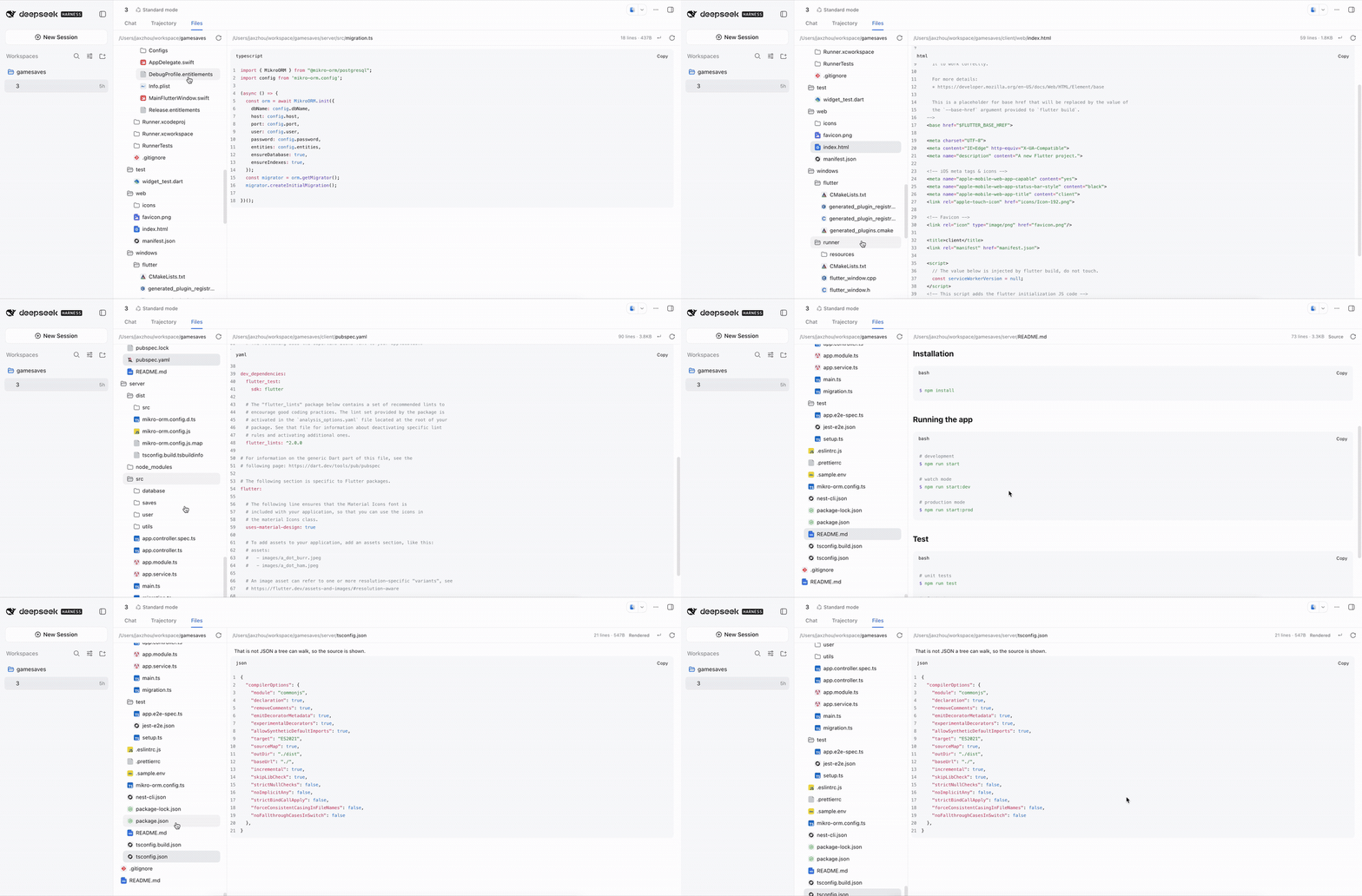
30 seconds — click for the full-quality MP4.
What you get
The left pane is the session's working directory, listed one level at a time, directories first. An expanded level stays expanded while you move between preview tabs.
Clicking a file opens it in a tab, so several files stay open at once — each with its own body and its own wrap setting. A file that is already open is focused rather than reopened, tabs whose names collide show their directory, and the tab's × or a middle click closes one.
The right pane picks each tab's body from the file:
| Category | Preview |
|---|---|
| Markdown | Rendered GFM — headings, tables, task lists, quotes, math, footnotes, highlighted code fences — with a Source toggle |
| JSON | A collapsible tree with per-value copy, and the same toggle |
| Source code | Syntax highlighting, line numbers, and a copy button for 24 grammars: TypeScript/JavaScript, shell, Python, Ruby, Go, Rust, Java, C, C++, C#, Kotlin, Swift, PHP, YAML, TOML, INI, HTML, CSS, SCSS, Less, SQL, XML, Lua, MDX |
| Images | PNG, JPEG, GIF, WebP, AVIF, BMP, ICO and SVG, drawn to the pane. An SVG goes through <img>, so its scripts never run |
| Anything else | Numbered plain text — an unmapped suffix (.vue, .proto, .txt) stays plain rather than guessing a wrong grammar |
Text previews wrap at their spaces and keep every word whole; an image reads its complete bytes. Every text body carries a Copy control in the pane's toolbar, which copies the file's own text — a rendered Markdown document copies its Markdown source.
Requirements
DeepSeek Harness 0.1.5-rc.2 on the Web surface — dsh web, or a profile
composed from @deepseek-ai/dsh-base + @deepseek-ai/dsh-web-app. A headless or
SDK profile has no browser and gets no tab. The plugin declares no configuration,
so nothing in cordis.yml needs setting.
Install
dsh plugin --profile web add @jaxzhou/dsh-file-explorer
dsh --profile web                 # bundle membership is read at startup
A custom profile needs the Web composition first:
dsh --profile myprofile --from-default-profile web
dsh plugin --profile myprofile add @jaxzhou/dsh-file-explorer
dsh --profile myprofile
Prefer a checkout or a git ref? Nothing needs building — the runtime artifacts are committed:
dsh plugin --profile web add /path/to/dsh-file-explorer
dsh plugin --profile web add github:jaxzhou/dsh-file-explorer
Then open a session that has a workspace and click Files. To confirm the layer landed:
dsh --profile web --dump-config | grep -A 2 jaxzhou-file-explorer
Disable or uninstall
Disable the tab without uninstalling by adding an override to the profile's
cordis.patch.yml — it is applied after every bundle layer, and a
patchReload: live profile picks it up without a restart:
- id: jaxzhou-file-explorer
  disabled: true
Uninstall with dsh plugin --profile web remove @jaxzhou/dsh-file-explorer, then
restart the profile.
Privacy
- Read-only. Reads go through the harness's own
workspaceFilesRemote namespace; the Host's filesystem decides what is readable. The plugin holds no file access, no path resolution, and no credentials of its own. - Nothing stored. No disk writes and nothing added to the session log; view state lives in memory and is discarded with the session.
- Inert Host half. The package's Node side registers no service, tool, prompt section, or event.
Known limitations
- Preview only — no editing, saving, or diffing.
- Strict JSON. Comments or a trailing comma make a file JSONC, which
JSON.parserejects —tsconfig.jsonis the common case. The pane says so and shows the highlighted source instead of guessing at a tree. - Text previews stop at 2 000 lines, with a truncation note and no "load more"; binary files report why they cannot be shown.
- Fixed grammar set. A suffix the shared highlighter does not carry is plain text, never an approximation.
- Listing only — no search, rename, context menu, or file watching; a level refreshes through Reload.
- Loaded previews are bounded. A working set of five tabs keeps its content; an older tab stays open and reads again when you return to it.
- One root. The tree is rooted at the session's working directory, and the Host refuses directory listings outside the workspace root.
- Markdown has no workspace vocabulary. Relative image paths and file
mentions stay inert; only absolute
http(s)images load.
Contributing
Build, checks, the artifact model, and how the client bundle reaches the browser: CONTRIBUTING.md.
License
MIT — see LICENSE.
Operate deliberately
Install and manage
Prerequisites and target Profile
Target: Web Profile
Delivery: Dsh Bundle Git — jaxzhou/dsh-file-explorer#3d52f3bc7dac2ffecc39ad7f8d8ed0b77ee8529b。
Verify, update, and remove
Show lifecycle commands
dsh plugin --profile web listCompatibility and access
DeepSeek Harness Web surface required: DeepSeek Harness 0.1.5-rc.2; Node >=22.19.0。
Review compatibility evidence ↗
Risk facts
Displays files that the Harness workspace-files namespace makes readable.
Evidence ↗Markdown previews may load absolute HTTP(S) images.
Evidence ↗Evidence and editorial reviewManifest, Bundle patch, distribution and freshness
Immutable evidence
Review status and source activity
Use the scoped package name @jaxzhou/dsh-file-explorer; the README says the unscoped name belongs to another author.
AI reviewed Sep 12, 2026, 2:24 PM UTC。GitHub facts last checked Sep 12, 2026, 2:24 PM UTC。
No material source change has been recorded since this evidence baseline.