At a glance
What it does
A DeepSeek Harness bundle for provider-routed media generation, visual analysis, and an Iris web workbench.
Web Profile
>=0.1.2-rc.1 <0.1.3-0
Evidence-verified
Checked Sep 6, 2026, 1:52 PM UTC
Code-evidenced contributions
What it adds to DSH
Registers 14 tools for image/video generation, speech, transcription, image analysis, OCR, video summaries, and image comparison.
Mechanism evidence ↗Adds provider configuration, task management, and a draft-only prompt optimizer to the DSH web interface.
Mechanism evidence ↗Includes skills for bounded multi-step media composition and evidence-based UI verification.
Mechanism evidence ↗Before you choose it
Iris adds image and video generation, speech, transcription, vision, OCR, video summaries, media task tracking, and image-diff tools to DeepSeek Harness. Its web workbench configures providers and capability-to-model assignments; a separate input-area panel can optimize an unsent text draft before you choose to write it back.
Best for
DeepSeek Harness users who need to create or inspect media through configured DashScope or OpenAI Images-compatible providers.
Common tasks
- Generate images, text-to-video, image-to-video, or S2V avatar video.
- Ask questions about an image, extract long-image text, locate objects, crop images, or compare screenshots.
- Summarize a host-accessible video and optionally turn the summary into speech.
- Configure provider/model capability assignments and monitor asynchronous media tasks.
Permissions and data
Uses host-side configuration, local media/task storage, and configured third-party media providers.
Permissions- Requires a DeepSeek Harness environment, Node.js 20.10+, and a DSH Web profile.
- Video frame extraction and video summarization require system ffmpeg and ffprobe.
- The plugin registers server tools and web UI entry points; it does not declare an additional listening port.
- Stores provider configuration, prompt-optimizer settings, task metadata, generated outputs, and uploaded input copies under $DSH_HOME/iris/v1/.
- Browser uploads are retained for seven days by default; task metadata retains up to 500 records.
- The README states provider keys are not returned through state APIs and are stored in host-side configuration.
- Connects to configured DashScope services or OpenAI Images-compatible services for supported media and vision operations.
- Requires an API key for at least one supported media or vision provider.
Limitations
- Early-version interfaces and configuration formats may change.
- Only DeepSeek Harness is currently supported; standalone Core, CLI, and workbench are roadmap items.
- Model discovery does not prove a model supports a capability; actual provider calls determine support.
- Nonstandard environments such as bare Termux may need extra handling for the native sharp dependency.
- Host paths may not be accessible from browser, WSL, container, or remote environments; upload files instead.
What DSHub checked
- Pinned source commit, package identity, bundle patch, npm registry identity, MIT license, Node.js requirement, and DSH version range were supplied.
- The repository describes automated coverage and specific DSH Web smoke tests, including an Android browser prompt-optimizer flow.
What DSHub did not check
- This curation did not install or run the bundle.
- No configured provider, credential handling, actual media generation, network behavior, or runtime compatibility was independently exercised.
- npm package contents were not audited in the supplied evidence.
Pinned install
Install Iris Media for DSH
This plugin bundle does not have a DSH Plugin install action. Use its source documentation for the delivery method.
Maintainer source
Project README
dsh-iris 为 Agent 和 Iris 工作台提供图像、视频、语音与视觉理解能力,也能直接优化 DSH 对话框中的任意提示词。它可以连接 DashScope 百炼及 OpenAI Images 兼容服务;完整配置和任务管理集中在 Iris 工作台,右下角的 Iris 泡泡提供快捷入口。
实际生成示例
<p align="center"> <img src="docs/assets/examples/iris-flower-generated.webp" width="720" alt="由 Iris 优化提示词并生成的蓝紫色鸢尾花"> </p>从一句“鸢尾花”开始:Iris 对话框优化 Prompt(
deepseek-v4-flash,thinkingoff)→ 阿里云百炼qwen-image-3.0-pro生成 · 2048×2048
Android 16 真机界面
以下截图来自 Android 浏览器连接 Termux/PRoot Debian ARM64 中的 DSH,使用 DSH 默认皮肤;公开图片均已移除 EXIF/XMP/IPTC 元数据。
| 对话输入区的 🫧 入口 | 优化结果写回输入框 |
|---|---|
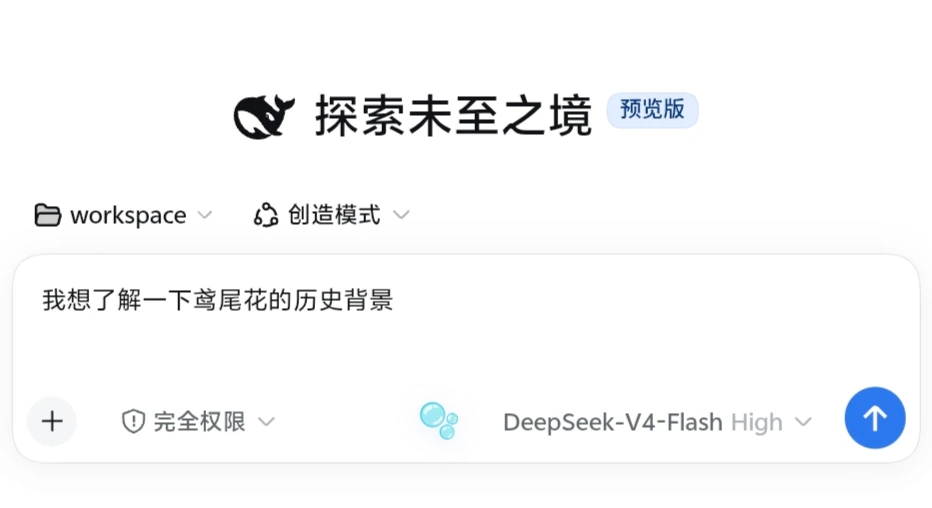 |
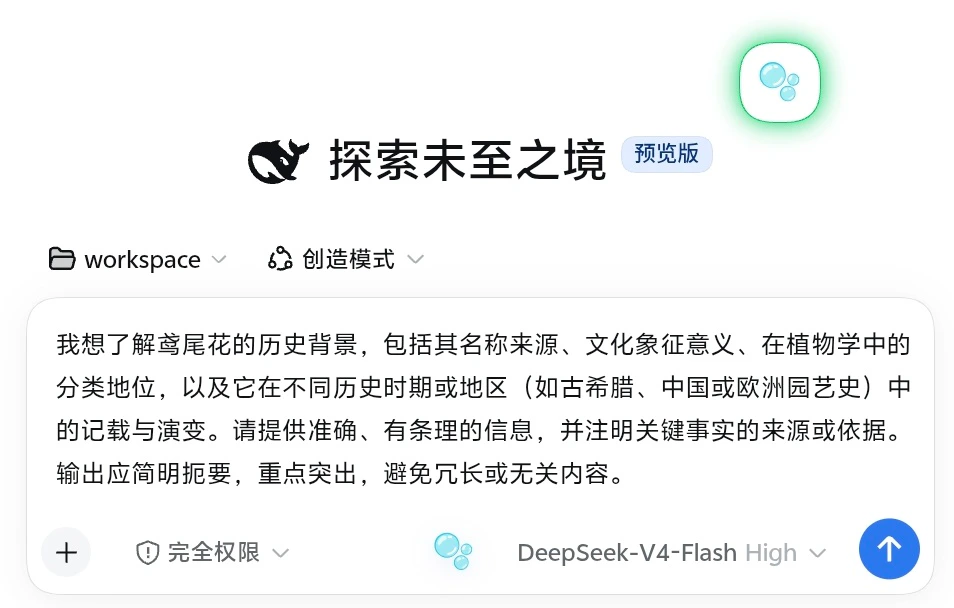 |
项目目前处于早期版本,接口和配置格式仍可能随版本迭代调整。
Iris 的长期方向是可独立运行、可接入不同 Agent 宿主的媒体生产核心。DeepSeek Harness 是首个受支持宿主;当前版本仍需要 DSH,独立 Core、CLI 和工作台属于后续路线,尚未提供。
与 ai-paint 的关系
ai-paint 是 Iris 维护者本机未公开的前身项目,不是 Iris 的公开依赖,也不是用户需要下载、安装或自行创建的目录。没有该项目的用户直接按下文在 Iris 工作台配置供应商即可。
早期版本从维护者本机的 ai-paint 配置读取模型与凭据,既用于迁移前身项目,也让宿主进程可以在本地复用已有 API Key,避免为迁移而把密钥粘贴到 Agent 会话、命令行参数或文档中。0.1.1 将两者的配置彻底分离:Iris 只使用自己的配置;旧配置仅可通过把 IRIS_IMPORT_WORKBENCH_CONFIG 显式设为本地配置文件的绝对路径进行一次性导入,不会默认扫描 ai-paint,也不会在两边同步。该变量保存的是文件路径而不是 API Key,来源文件不会被修改;具体操作见用户指南。
最快开始
已经安装 DeepSeek Harness 0.1.2-rc.1 且 pnpm 在 PATH 中时,把 Iris 加入 Web profile:
dsh plugin --profile web add @mokuyoaxis/dsh-iris
dsh web
npm 上无 scope 的
dsh-iris属于另一款插件。安装和更新 Iris Media 时必须保留完整包名@mokuyoaxis/dsh-iris。
从当前源码目录试用时,把第一条命令中的 @mokuyoaxis/dsh-iris 换成 .。插件会在下一次 DSH 启动时装载,Web UI 默认位于 http://127.0.0.1:3080。
首次启动后,打开“设置 → Iris 工作台 → + 添加供应商”,填入 DashScope Base URL 和 API Key,再点“发现模型”。单供应商可以先使用自动能力分配。完整步骤、OpenAI Images 兼容配置和故障转移说明见用户指南。
配置完成后,最小指令可以是:
使用 iris_draw_image:画一只坐在蓝色窗边的白猫。
总结我刚上传的这张图片。
用 Iris 总结 /absolute/path/demo.mp4,再把摘要合成为语音。
DSH 的 profile 与插件命令由官方安装说明定义。生成图片、视频或语音可能产生供应商费用。
功能概览
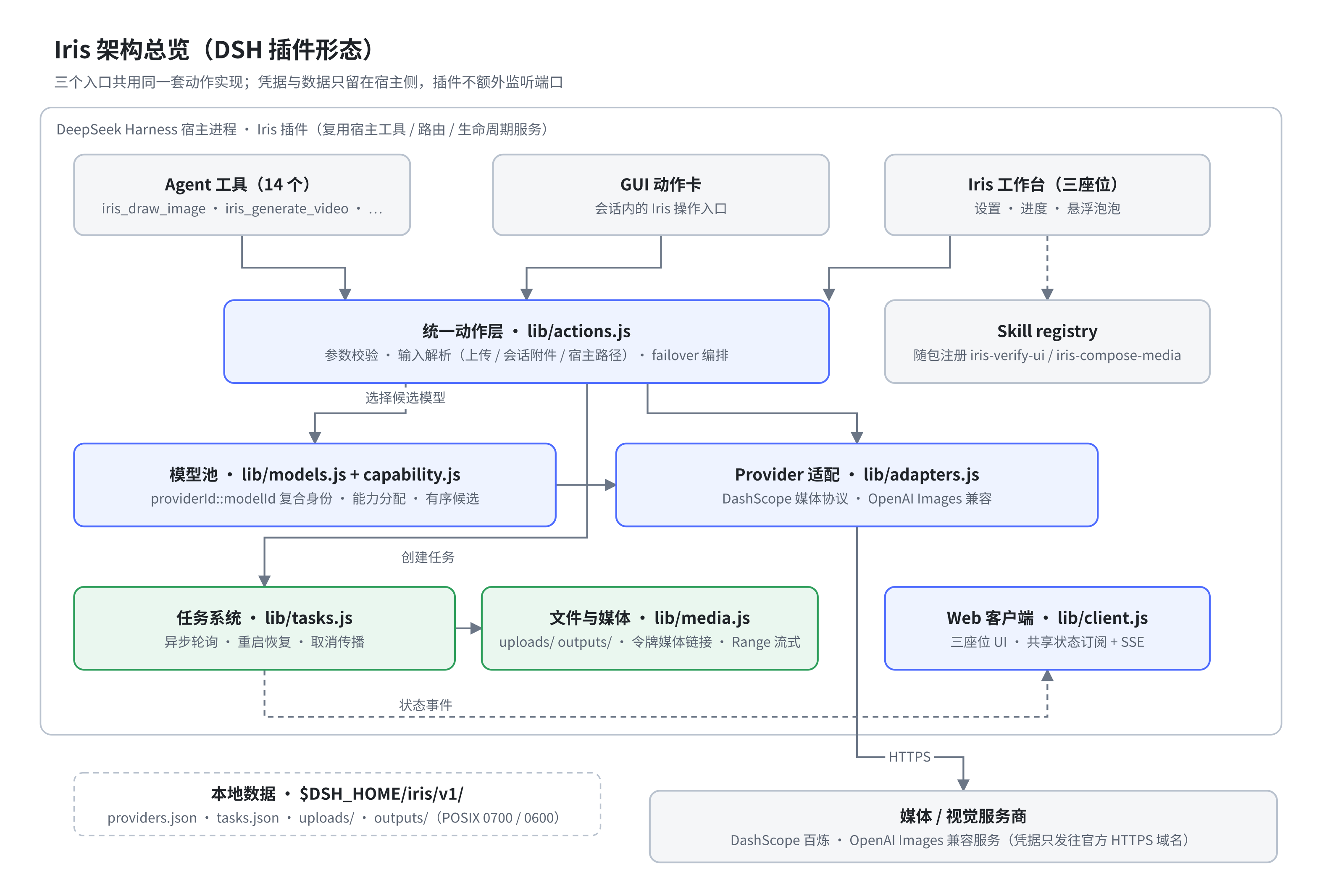
- 图像生成、文生视频、图生视频和 S2V 数字人视频
- 文本转语音与音频转写
- 看图问答、长图 OCR、目标定位、裁剪和像素差异分析
- 视频抽帧与多模态内容摘要
- 异步任务跟踪、重启恢复和带授权令牌的媒体播放
- 多供应商模型池,以及按
供应商 + 模型分配能力 - 浏览器上传、会话附件和宿主路径三种文件来源
- 独立于工作台的对话框提示词优化,支持当前会话模型与 JSON 固定模型路由
使用前准备
- 满足所用 DeepSeek Harness 版本要求的 Node.js;dsh-iris 自身最低为 20.10
- 一个可用的 DeepSeek Harness 环境,以及 PATH 中的
pnpm - 至少一个受支持的媒体或视觉服务供应商
- 使用视频抽帧和视频摘要时,需要系统提供
ffmpeg与ffprobe
安装插件后,在 Iris 工作台中添加供应商并为所需能力分配模型。供应商密钥保存在宿主侧的 Iris 配置中;POSIX 系统上 Iris 自有目录和文件分别收紧为 0700 与 0600,界面和接口不会返回完整密钥。Windows 的 mode 不等同于 ACL,仍需依赖当前用户目录和系统账户权限。
DeepSeek Harness 适配
dsh-iris 按 DeepSeek Harness 插件形态提供服务端与 Web 客户端入口:服务端注册 14 个 Agent 工具,并复用宿主的工具、路由和生命周期服务;客户端通过 DSH 模块加载器接入设置页、会话输入区和全局悬浮层。插件不会启动独立服务或额外监听端口。
当前自动化测试覆盖插件装载、工具注册、客户端槽位和路由行为。0.1.1 已在 Linux ARM64 的干净与真实 Web profile 中,使用 DSH 0.1.2-rc.1、Node.js 22.23.2 完成宿主烟测;浏览器启动图、完整组合 bundle、Iris 客户端工厂和当时的三个 UI 座位均已验证。0.1.2 新增的第四个提示词优化座位已在 Android 浏览器真机确认渲染,配置读取、真实会话模型优化(实际 thinking off)、预览写回、独立关闭与重新启用,以及从短草稿到图片生成任务成功的闭环均已验证;浏览器端取消和 JSON 操作已有自动化 HTTP/配置覆盖,尚待补充真机逐项记录。Iris 自身仍以 Node.js >=20.10 为最低基线。
Iris 0.1.1–0.1.2 明确支持 DSH >=0.1.2-rc.1 <0.1.3-0,不再兼容 0.1.0/0.1.1 的旧客户端 Runtime。DSH 仍在快速演进,后续预览版须经验证后再扩大范围;兼容徽章不代表官方认证。若 DSH 要求更高 Node 版本,以 DSH 为准。
工具
生成、语音与任务
| 工具 | 用途 |
|---|---|
iris_draw_image |
根据提示词生成图片 |
iris_generate_video |
生成文生视频、图生视频或 S2V 数字人视频 |
iris_speak_text |
将文本合成为语音 |
iris_transcribe_audio |
将音频转写为文本 |
iris_task_status |
查询单个任务或最近任务的状态和产物 |
视觉与图像处理
| 工具 | 用途 |
|---|---|
iris_look_at_image |
对图片提问并获得视觉模型回答 |
iris_relook_attachment |
使用新问题重新查看会话中的图片附件 |
iris_long_ocr |
分块识别长截图或长图文字 |
iris_locate |
定位图片中的目标并返回像素坐标 |
iris_crop |
按像素区域裁剪图片 |
iris_pixel_diff |
比较两张图片并生成差异统计和热力图 |
iris_html_screenshot |
在受限环境中将 HTML 字符串渲染为截图 |
视频处理
| 工具 | 用途 |
|---|---|
iris_video_frames |
从视频中均匀抽取画面帧 |
iris_media_summarize |
结合画面帧和可选音频转写生成视频摘要 |
文件输入
Iris 支持三种文件来源,推荐顺序如下:
- 浏览器上传:适合本地文件和跨环境访问,单文件上限为 64 MB。
- 会话附件:适合复用当前会话中已经上传或生成的媒体。
- 宿主路径:适合宿主可以直接读取的大文件。这里填写的是宿主进程看到的路径,不一定等同于浏览器所在系统的路径。
上传内容保存在 $DSH_HOME/iris/v1/uploads/,默认保留 7 天。不同系统下的路径选择建议见文件访问与跨环境。
对话框提示词优化
Iris 会在 DSH 对话输入区提供一个无边框、无文字的“🫧”入口,不需要打开 Iris 工作台。点击后打开带背景模糊、半透明层次和柔和光影的玻璃悬浮窗;桌面端靠近输入区显示,窄屏与 Android 浏览器自动切换为带安全区和内部滚动的底部面板,避免遮挡、溢出或控件挤叠。它只读取当前未发送的纯文本草稿,并提供通用、图片、视频和首尾帧视频四种目标模板;结果先预览,用户确认后才写回输入框,不会自动发送。含 @ 或 / 结构化引用的草稿暂不改写,以免引用身份丢失。
默认使用当前会话选中的主模型;会话尚未选定模型时回退到 DSH 默认模型。优化请求不携带聊天历史、工具、附件或工作区,只发送当前草稿与目标模板。为避免推理模型在正文前耗尽生成预算,默认 generation.reasoningEffort 为 off-if-supported:仅在 DSH 模型元数据明确支持关闭 thinking 时禁用推理,否则使用供应商默认值,并且不再继承主会话的 High/Low 档位。可在 JSON 中改为 provider-default、inherit 或模型声明的具体 effort ID;成本与稳定性优先时,建议使用 fixed 路由指定轻量非思考模型。用户也可以导出 prompt-optimizer.json,将 route.mode 改为 fixed 并指定其他已在 DSH 注册的 provider 与 model,然后从面板重新导入。面板提供“恢复默认”,可还原 Iris 内置 Prompt、目标模板、会话模型路由和生成参数。该对话入口可以单独关闭,并从 Iris 工作台重新启用;关闭不会停用工作台、Agent 工具或任务后台。优化调用可能产生对应文本模型的费用。
模型分配与故障转移
能力分配使用 providerId::modelId 作为模型身份。同名模型如果来自不同供应商或不同账号,会被视为两个独立选项。
生成类能力可以配置多个候选模型。Iris 只会在上传、提交或同步生成阶段失败时尝试下一个候选项;远端服务一旦受理任务,就不会自动重新提交,以免产生重复任务或重复计费。已经受理的异步任务由任务系统继续跟踪。
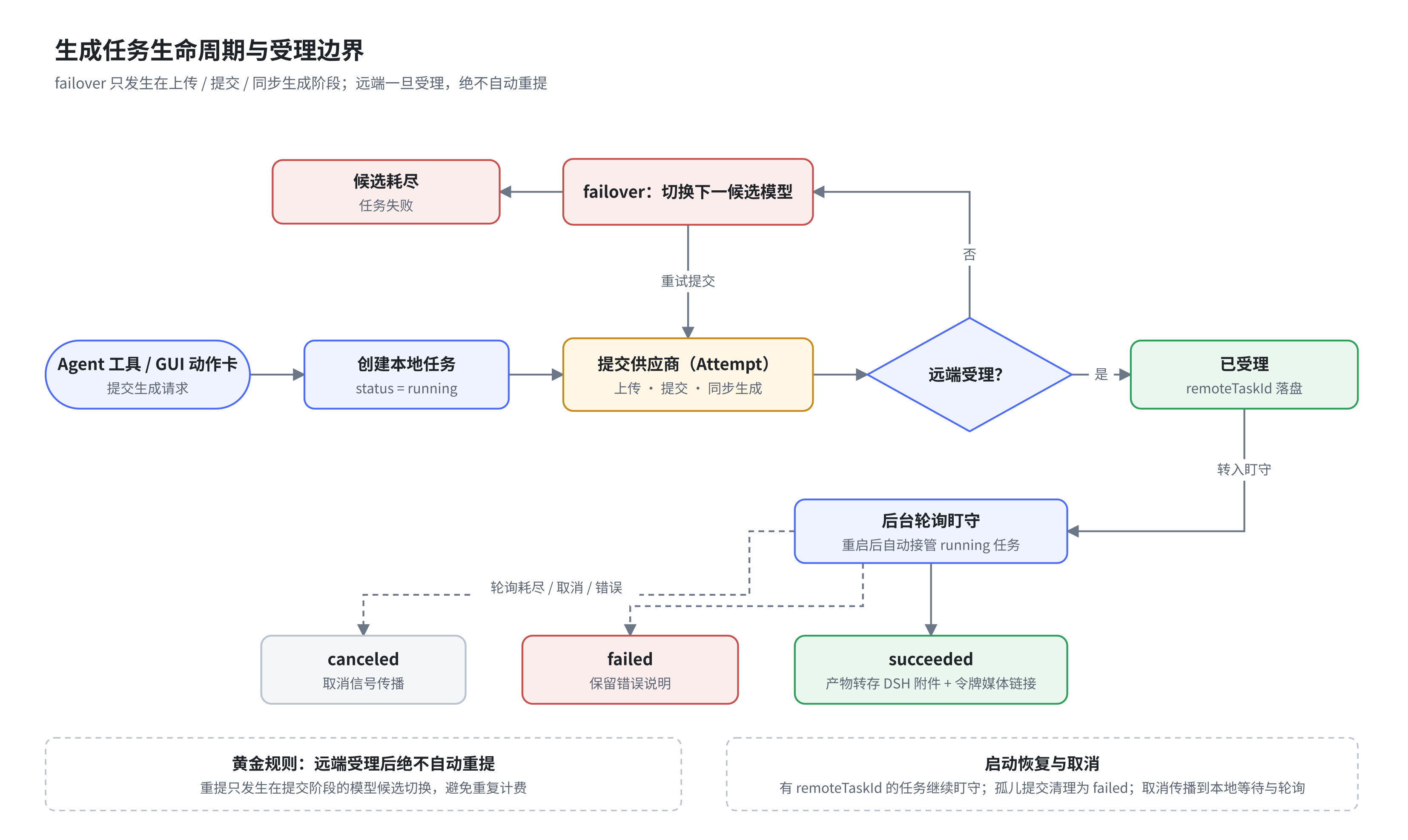
转写是独立的 transcribe 能力,不会占用 TTS 或视觉能力的模型配置。
组合工作流示例
Iris 自带两个 Agent Skills(iris-verify-ui 与 iris-compose-media),把多个工具编排成有界、可复核的媒体工作流。下例是「看图 → 重绘 → 自检」:先理解原图,再生成,复核针对具体偏差,只有复核通过才交付。
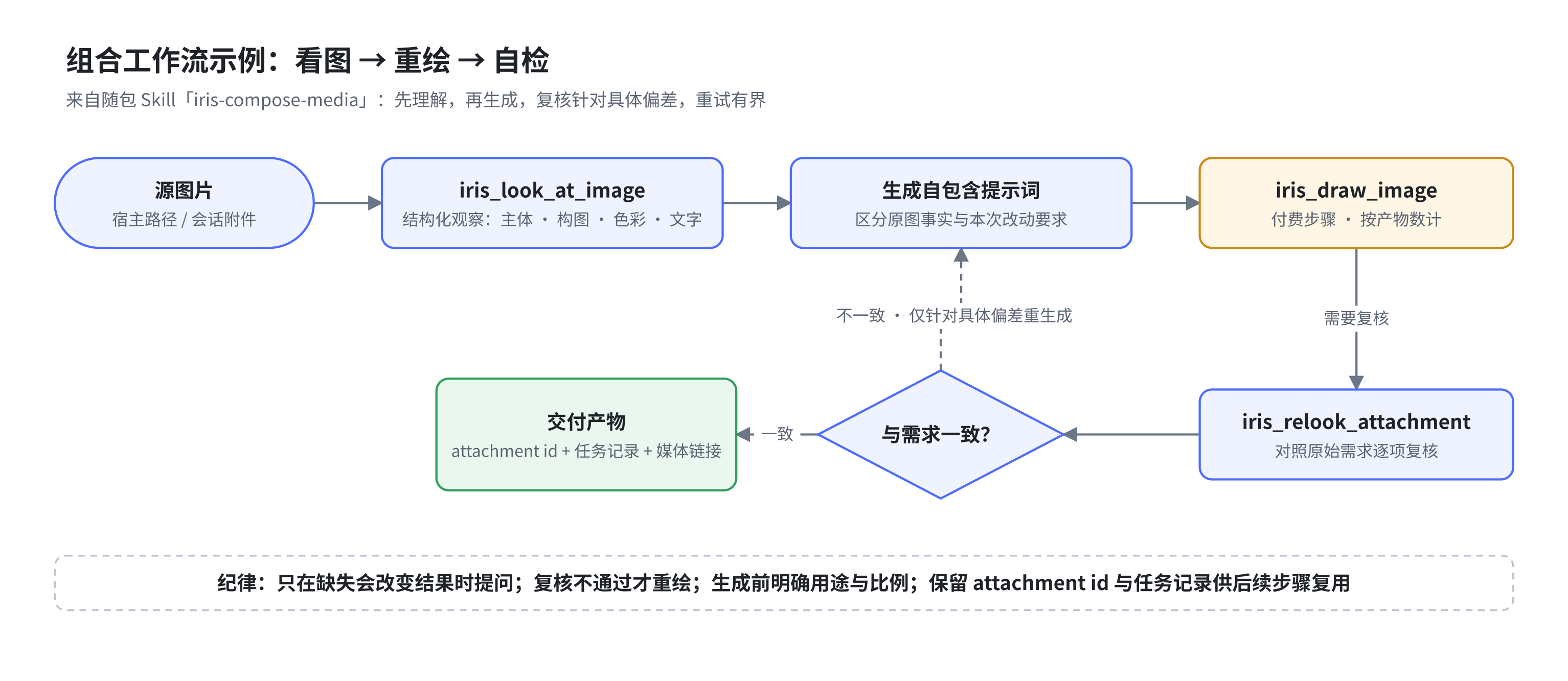
图的 SVG 版本与可编辑 drawio 源文件位于 docs/assets/diagrams/。
数据与任务
运行数据默认位于 $DSH_HOME/iris/v1/:
| 位置 | 内容 |
|---|---|
providers.json |
供应商和能力分配,文件权限为 0600 |
prompt-optimizer.json |
用户导入的优化 Prompt、目标模板、模型路由和生成参数,文件权限为 0600 |
tasks.json |
任务元数据和附件索引,最多保留 500 条 |
outputs/ |
生成和处理后的媒体文件 |
uploads/ |
浏览器上传的临时输入副本 |
0.1.1 首次装载时会收紧既有 $DSH_HOME/iris/v1/ 树的 POSIX 权限,不修改文件内容,也不跟随符号链接。大媒体下载采用流式私有临时文件与原子替换,不再把整段视频载入内存。
异步任务会在后台轮询。插件重启后,可以继续接管仍在远端执行的任务。取消信号会传递到本地等待与轮询流程;是否能取消远端计算,取决于供应商接口。
音频和视频通过带随机令牌的 Iris 媒体链接访问。图片会尽量转存为 DSH 持久附件,方便在会话中继续使用。
安全说明
- 供应商密钥不会通过状态接口返回。
- DashScope 媒体协议只允许把密钥发送到阿里云官方 HTTPS 域名;其他 Base URL 默认推断为 OpenAI Images 兼容协议。
/iris/*默认只接受回环 Host;LAN 或反向代理必须显式设置IRIS_TRUSTED_HOSTS,修改状态的请求还会检查跨站来源。IRIS_TRUSTED_HOSTS不是认证机制。对公网或不可信网络开放 DSH 时,必须在反向代理或宿主层配置身份认证与 HTTPS。- 模型实测只按单项能力运行,并在真实供应商调用前确认;视频和转写不会用空样本自动提交付费探针。
- HTML 截图在不具备同源权限的沙箱页面中渲染,脚本和外部网络默认不可用。
- 媒体链接使用随机能力令牌,文件路径只从任务记录解析。
- Iris 不提供独立账号体系,多用户隔离和访问控制由 DeepSeek Harness 部署负责。
已知限制
sharp包含原生组件;主要支持 glibc Linux、Windows 和 macOS。裸 Termux 等非标准运行环境可能需要额外处理。- 视频抽帧和视频摘要依赖系统安装的
ffmpeg与ffprobe。 - HTML 截图不加载远程脚本、字体或图片;需要的资源应先内联。
- WSL、容器和远程部署中,浏览器路径通常不能直接交给宿主读取,请优先上传文件。
- 供应商返回的模型清单只是候选集合,模型是否真正支持某项能力仍以实际调用为准。
Agent Skills
插件启用时会通过 DSH Skill registry 自动注册两个随包 Skill:
| Skill | 适用场景 |
|---|---|
iris-verify-ui |
组合截图、语义检查、元素定位、裁剪和像素比较,完成有证据的 UI 验收 |
iris-compose-media |
组合两个以上 Iris 工具,完成看图后绘图、图片转视频、视频总结配旁白或 S2V 等媒体工作流 |
从 0.1.2 起,只要宿主提供 DSH Skill registry,普通 npm 安装用户在任意项目目录中都能发现并加载它们,不需要克隆本仓库或另外配置 Skill 搜索目录。项目目录中存在同名 Skill 时,仍按 DSH 原生优先级使用项目版本;Skill registry 不可用时,14 个 Iris 工具仍可独立装载。
开发与验证
在项目目录运行:
npm test
测试覆盖配置合并、模型身份、任务生命周期、生成动作、HTTP/SSE 路由、客户端交互和安全边界。项目采用 ES Modules,不需要构建步骤。
测试调度使用 Node.js,逐文件启动独立进程,首个失败即停止,不依赖 Bash;临时目录使用系统 API 并在退出时清理。GitHub Actions 定义 Linux/Windows × Node.js 20.10/22 矩阵,发布前钩子会重新运行完整测试。原生 Windows/WSL 的 DSH 宿主烟测仍待实机验证。
发布由 v* 标签触发 .github/workflows/release.yml:跑完整测试后打包,用工作流内置 GITHUB_TOKEN 创建 GitHub Release(附 tarball,发布说明取自 CHANGELOG 对应章节),并在配置了 NPM_TOKEN secret 时发布到 npm。本机无需任何 GitHub 凭据。
文档
License
Operate deliberately
Install and manage
Prerequisites and target Profile
Target: Web Profile
Delivery: Dsh Bundle Git — mokuyoaxis/dsh-iris#d8727b678575f820aa79388758253994fb52594e。
Verify, update, and remove
Show lifecycle commands
dsh plugin --profile web listCompatibility and access
DeepSeek Harness bundle; Node.js 20.10+ required: >=0.1.2-rc.1 <0.1.3-0。
Review compatibility evidence ↗
Risk facts
Image, video, speech, and prompt-optimization requests may incur provider charges.
Evidence ↗Provider API keys are stored in Iris host-side configuration.
Evidence ↗Uploaded media is retained for seven days by default.
Evidence ↗Evidence and editorial reviewManifest, Bundle patch, distribution and freshness
Immutable evidence
Review status and source activity
Use the full scoped package name @mokuyoaxis/dsh-iris; the README warns that an unscoped dsh-iris package is a different plugin.
AI reviewed Sep 9, 2026, 2:15 PM UTC。GitHub facts last checked Sep 9, 2026, 2:15 PM UTC。
No material source change has been recorded since this evidence baseline.