At a glance
What it does
A Bilibili-style danmaku overlay for DeepSeek Harness Web conversations.
Web Profile
Not declared in supplied evidence
Evidence-verified
Checked Sep 15, 2026, 1:56 PM UTC
Code-evidenced contributions
What it adds to DSH
Adds Bilibili-style scrolling, top-fixed, and bottom-fixed comments above the DSH Web conversation area, with a draggable control ball and settings card.
Mechanism evidence ↗Before you choose it
dsh-livechat overlays animated live-chat comments on DeepSeek Harness Web while an agent works. It includes general, coding, and casual preset packs; a draggable control ball; settings; session-specific pools with replay and archive/restore; and optional LLM-generated quips.
Best for
DeepSeek Harness Web users who want a more lively, stream-like view of agent activity.
Common tasks
- Show lightweight preset comments when messages, replies, tool calls, or task completion events occur.
- Choose a general, coding, or casual danmaku atmosphere and adjust it from the settings card.
- Replay, archive, restore, or edit session-specific danmaku pools.
- Optionally configure LLM-generated contextual quips with smart, interval, or tool-call wake modes.
Permissions and data
Runs as a DSH Web bundle and adds a browser-side conversation overlay plus host HTTP routes.
Permissions- Injects a client module into the DSH web platform.
- Observes session/event activity to trigger danmaku.
- Provides configuration, trigger, LLM, and pool HTTP routes.
- Maintains per-session danmaku pools in JSONL form, with history replay and archive/restore.
- The README says caches are stored under `~/.dsh/danmaku-pools/` and can be cleared.
- Optional configured LLM generation.
- No credential requirement is declared; optional LLM configuration may require whatever credentials its configured provider needs.
Limitations
- Designed and documented as Chromium-first, optimized for Edge and Chrome.
- No Harness version range is declared in the supplied evidence.
- The supplied evidence does not establish successful installation, browser behavior, or LLM-provider behavior.
- The README's health-check example reports version 0.2.0 while the manifest declares 0.3.2.
What DSHub checked
- Pinned Git source, bundle patch structure, and Git-bundle distribution are verified.
- The manifest declares a DSH web client injection and a self-activating `livechat` bundle patch.
- MIT license is declared.
What DSHub did not check
- No npm registry package version was found.
- No installer script was captured.
- Runtime installation, health endpoint response, and automated tests were not executed for this record.
Pinned install
Install dsh-livechat
This plugin bundle does not have a DSH Plugin install action. Use its source documentation for the delivery method.
Maintainer source
Project README
dsh-livechat



给 DeepSeek Harness(dsh)Web 对话区叠加 B 站风格弹幕的插件。
围观 agent 工作:用户消息、回复完成、工具调用、任务完成时,预设弹幕(可选 LLM 生成)横向飘过对话区——就像看直播一样。
中文 · English
安装
插件是 bundle:自带 cordis.patch.yml,自我激活——一条命令,无需手动改 patch。
# 本地目录安装
dsh plugin --profile web add ./dsh-livechat

# GitHub 安装
dsh plugin --profile web add github:huashenglian/dsh-livechat

# tarball 安装(pnpm pack / npm pack 打包后)
dsh plugin --profile web add ./dsh-livechat-0.2.0.tgz
重启 dsh web 后打开 http://127.0.0.1:3080。弹幕覆盖层与浮动控制球会出现在对话区上方。
[!NOTE] bundle 自带
cordis.patch.yml自我激活(insert id: livechat)。不要在 profile 的 patch 里重复 insert——二次 insert 启动时会报duplicate loader entry id: livechat。
若还没有 dsh CLI,可直接启动 web 服务:
npx @deepseek-ai/dsh web
快速健康检查
curl http://127.0.0.1:3080/api/danmaku/health
# {"ok":true,"name":"dsh-danmaku","version":"0.2.0"}
它做什么
当 agent 发送消息、回复完成、调用工具或完成任务时,一串弹幕飘过对话列——就像看直播。预设包覆盖通用 / 编程 / 闲聊氛围,可选 LLM 按节流生成即时、贴合上下文的吐槽。拖球提供快捷控制;设置卡可调一切。
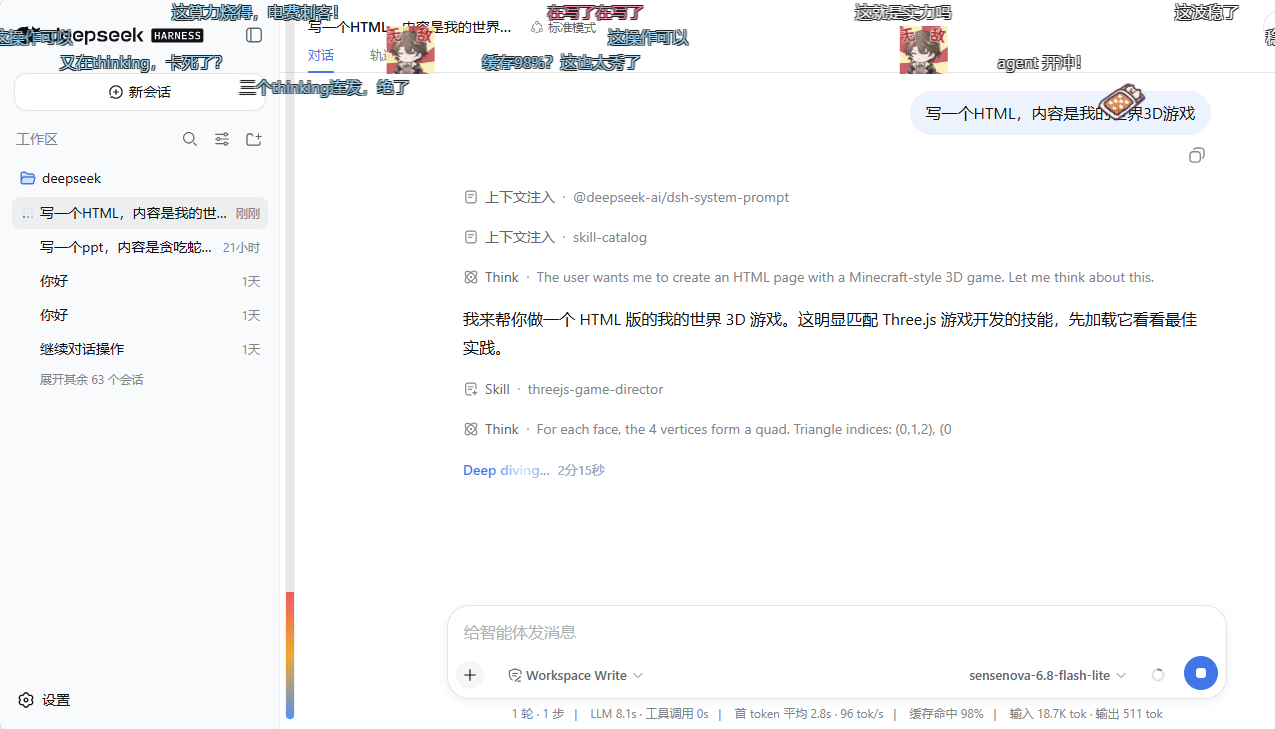
agent 工作时弹幕飘过对话区——多轨道、加权配色、右上浮动控制球。
功能
| 模块 | 覆盖内容 | 文档 |
|---|---|---|
| 覆盖层与渲染 | shell.overlay 挂载、DOM 渲染器、多轨道防碰撞、防遮挡渐隐、渲染后端链 |
overlay-and-rendering.zh-CN.md |
| 预设包与 LLM | 三套预设包、事件触发抽样、疲劳去重、可选 LLM 生成(smart/interval/toolcall 唤醒)、风格模板 | presets-and-llm.zh-CN.md |
| 交互 | 拖球、悬停暂停、点击详情(复制/屏蔽/删除)、手发弹幕、热度条、欢迎与任务完成效果 | interaction.zh-CN.md |
| 分会话弹幕库 | 分会话 .jsonl 弹幕池、历史回放(衰减+点赞加权)、归档/恢复、应用内池编辑器 |
session-pools.zh-CN.md |
| 配置与 API | 设置卡 UI、全部配置字段(默认值+范围)、完整 HTTP API 参考 | configuration.zh-CN.md |
亮点
- 三种布局:滚动、顶部固定、底部固定——按权重生成
- 防遮挡:阅读时覆盖层变暗,热闹时亮起
- LLM 安全降级:生成失败→静默降级预设,无报错弹窗
- 分会话记忆:点赞/回放过的弹幕会重现;删除会话自动清理池
- Chromium 优先:为 Edge / Chrome 调优;
translate3d、页面hidden暂停、同屏上限 - 暂停不消失:悬停/详情锁定的弹幕会一直留在画面,直到恢复滚动并离开范围
架构
dsh-livechat/
├─ package.json              # dsh.bundle + dsh.client 声明
├─ cordis.patch.yml          # 自激活 bundle 层(insert id: livechat)
├─ lib/
│  ├─ index.js               # Host:settings 命名空间、session/event 触发环、HTTP 路由、可选 LLM
│  ├─ client.js              # Client:shell.overlay 覆盖层 + 设置卡 + DOM 渲染器 + 拖球
│  └─ presets.js            # 共享:预设包、抽样、轨道碰撞纯函数
├─ tests/presets.test.js     # 单元测试(node --test)
├─ docs/                     # 模块文档(英文 *.md / 中文 *.zh-CN.md)
└─ assets/                   # 演示截图与封面图
- Host(
lib/index.js):注册danmakusettings 命名空间,观测session/event进入触发环形缓冲,提供 config/trigger/LLM/pool HTTP 路由,可选经配置的 LLM 生成弹幕。 - Client(
lib/client.js):自包含window.__ModuleLoader__工厂——在shell.overlay挂载pointer-events:none覆盖层,DOM 渲染(translate3d),驱动拖球、设置卡(settings.plugin.item)、池编辑器。 - 共享(
lib/presets.js):预设包、加权抽样、布局/颜色选取、轨道碰撞检查——全为纯函数,有单元测试。
渲染器接口对齐设计文档(参考文档/danmaku-renderer-design.md)。首版发布 L5 DOM 后端;架构预留平滑升级到 WebGL2 / Worker+WebGL2,业务层不变。
测试
node --test tests/presets.test.js
卸载
dsh plugin --profile web remove dsh-livechat
会移除依赖与 bundle 条目。若服务仍在运行时卸载,会一并清理弹幕库缓存(~/.dsh/danmaku-pools/)。也可在「库编辑器」右上角用红色「清空弹幕库」一键删除全部缓存。
许可证
MIT
Operate deliberately
Install and manage
Prerequisites and target Profile
Target: Web Profile
Delivery: Dsh Bundle Git — huashenglian/dsh-livechat#2bd5ee146f8dd900f5d1c93147dbdc44ee6f230d。
Verify, update, and remove
Show lifecycle commands
dsh plugin --profile web listCompatibility and access
DeepSeek Harness Web bundle; web client injection declared: Not declared in supplied evidence。
Review compatibility evidence ↗
Risk facts
Stores per-session danmaku pools and can clear them during removal or from the pool editor.
Evidence ↗Optional LLM-generated comments are available when configured.
Evidence ↗Evidence and editorial reviewManifest, Bundle patch, distribution and freshness
Immutable evidence
Review status and source activity
Install from the pinned Git bundle rather than relying on npm availability.
AI reviewed Sep 15, 2026, 1:57 PM UTC。GitHub facts last checked Sep 15, 2026, 1:57 PM UTC。
No material source change has been recorded since this evidence baseline.