At a glance
What it does
A visual web marketplace for browsing and managing DeepSeek Harness plugins.
Dsh Settings Profile, Dsh Client Runtime Profile, Dsh Client Ui Profile
@deepseek-ai/cordis ^4.0.1; @deepseek-ai/dsh-settings ^0.1.0-rc.7
Evidence-verified
Checked Aug 22, 2026, 7:14 AM UTC
Code-evidenced contributions
What it adds to DSH
Browse, search, install, update, diagnose, and manage community plugins through a web interface.
Mechanism evidence ↗The supplied source describes install, update, uninstall, hot enable/disable, diagnostics, and rollback-oriented workflows.
Mechanism evidence ↗Before you choose it
dsh-market is a DSH plugin bundle that provides a web UI for discovering, installing, updating, disabling, diagnosing, and removing community plugins. The supplied source includes a Cordis bundle patch and client injection declarations.
Best for
DeepSeek Harness users who prefer a visual plugin workflow, and teams operating a local web-based Harness profile.
Common tasks
- Browse and search community plugins
- Install or update plugins from approved sources
- Inspect plugin load order and configuration conflicts
Permissions and data
The source describes local profile, plugin, filesystem, and loopback restart integrations; this review did not execute the application.
Permissions- May write plugin and profile configuration when management actions are confirmed
- May access local plugin and profile state
- Exported logs are described as sanitized
- Profile backups may contain credentials
- Actual runtime data flow was not independently tested
- May fetch a curated plugin registry over HTTPS
- May use npm or GitHub as plugin distribution sources
- May connect to same-origin local services
- Credentials may exist in the managed Harness profile
- No credential was supplied or used for this review
Limitations
- Installation and runtime behavior were not performed
- Compatibility is source-declared rather than runtime-tested
- Fixture packages are private test evidence, not public distributions
What DSHub checked
- Git source commit is pinned
- Main bundle manifest and Cordis patch structure pass
- MIT license is identified
What DSHub did not check
- Successful installation
- Runtime compatibility
- Security certification or performance claims
Pinned install
Install dsh-market
This plugin bundle does not have a DSH Plugin install action. Use its source documentation for the delivery method.
Maintainer source
Project README
dsh-market
English | 中文


dsh-marketis independent of any particular client — it works in any host that speaks the standard DeepSeek Harness protocol. We're currently in discussions withanywhere-labs/deepseek-harness-desktopabout future cooperation, and we'll share updates here as they happen. Use dsh-desktop or deepseek-harness-desktop — both ship with this plugin market built in — or another excellent third-party client.
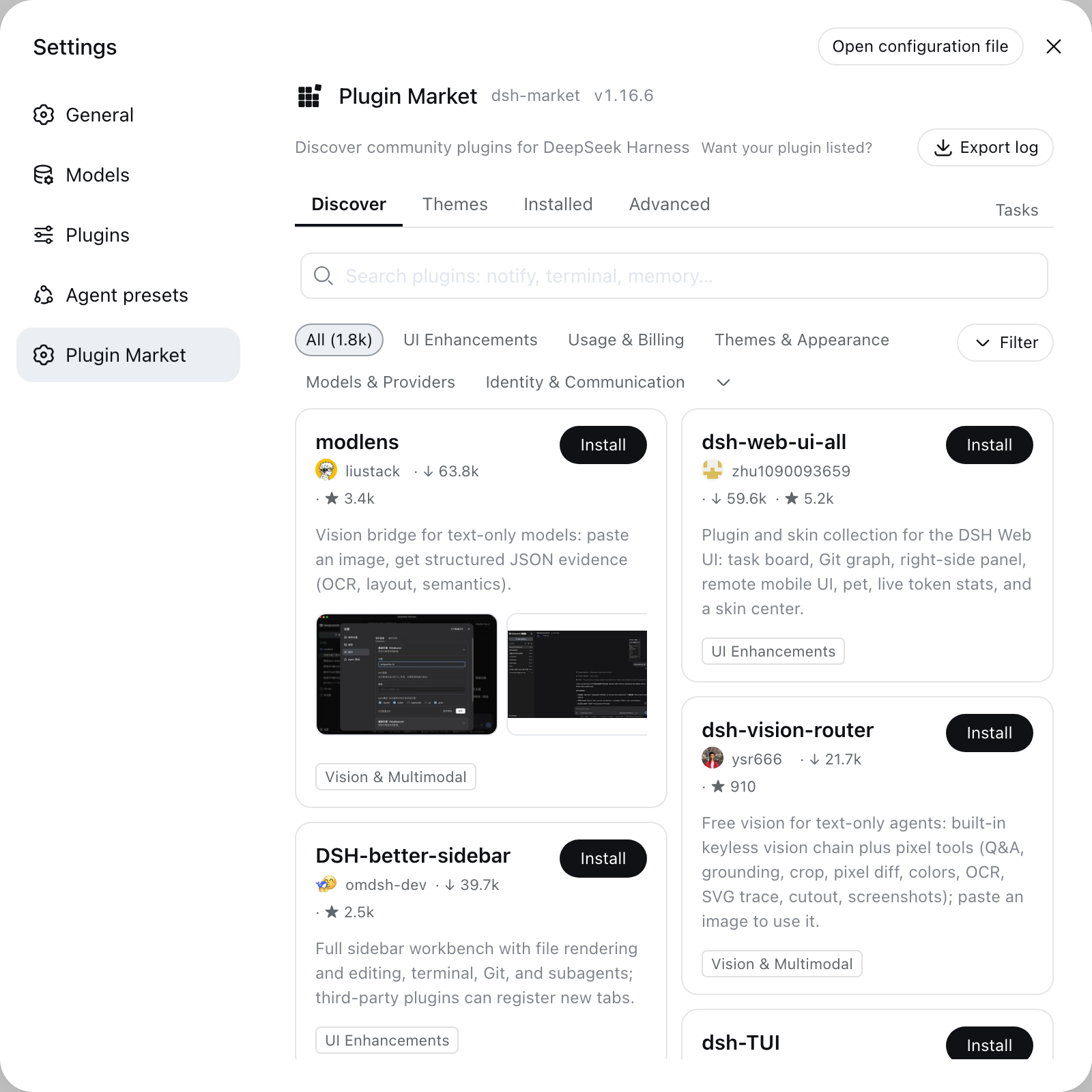
The plugin market inside DeepSeek Harness. Open Settings → Plugin Market → browse, search, one-click install.
One-click themes: install, switch live, no restart.
Install
dsh plugin --profile web add dshmarket
Restart dsh web, then open Settings → Plugin Market.
Requires dsh web 0.1.0-rc.6 or newer. On an older host the market
disables itself and says so in the browser console rather than rendering
against primitives that are not there — if the Plugin Market entry never
appears, that is usually why. Worth checking when a desktop build bundles
its own dsh: it may be older than the one npm would give you (#139).
What you get
Browse & search the full community catalog (1550+ plugins, growing daily) — category filters, star counts, top/new sorting, bilingual descriptions that follow your UI language
Screenshots — AppStore-style screenshots, auto-carousel when there's more than one, click to preview full-size: author-curated shots show right on the card (zero extra requests); plugins without curated shots fall back to automatic README extraction once you open the install dialog. Images load from GitHub hosting only
Themes — a dedicated tab for community themes and skins: install → active immediately, switch with one click (themes are mutually exclusive, your choice survives restarts), uninstall to revert
One-click install — confirm the source, watch live progress; most plugins go live after a page refresh, no restart
Backup & restore — export your profile's plugin list and configuration as readable JSON, import it on another machine, store it on WebDAV with daily auto-backup, or sync through a private GitHub Gist; restores merge (plugins installed after the backup are kept), validate before writing, and roll back on failure
Updates — per-plugin update checks (npm version or pinned commit vs HEAD), one-click update, or update everything at once; the market updates itself the same way
Uninstall — two-step confirm; plugins installed this session are removed live
Hot disable / enable — toggles write
- id: …+disabled: true|falseinto the profile'scordis.patch.yml(the official patch layer, mechanism ported from dsh-plugin-hub): DSH's HMR re-composes within ~1s, no restart, and the loader re-applies the choice on every boot; hand-edited patch rows show as badges, host-infrastructure plugins are protected from toggling, and a malformed patch file is never made worseRestart when needed — changes that cannot hot-load show a one-click restart beside the pending-change banner; the action is restricted to same-origin loopback requests
Zero jargon — if a component is missing (pnpm), the market detects it and offers a one-click automatic setup
Log export — one click produces a sanitized plain-text log for bug reports (home paths and credential shapes are masked; nothing is ever sent anywhere). The market's version sits next to the page heading, so a screenshot of a problem already carries it
Settings card — on dsh 0.1.0-rc.7 and newer the market manages itself from Settings → Plugins → Plugin configuration, next to every other plugin: see the running version, pick a release channel (stable, or beta to try builds still being verified — the market only, never your other plugins; a third dev channel appears once developer mode is switched on, and carries builds published straight off a branch), update, or remove the market — with an opt-in cleanup that also drops the disable rows it wrote, so plugins it switched off start running again rather than staying off with no UI left to switch them back on
Diagnostics — the plugin load order and conflict surface, one page: bundle stack with official/community badges, duplicate loader entries, dependency version mismatches, multi-version core packages, overrides and invalid config entries. Plain-language terms, problem blocks highlighted, everything collapsible
Load order — drag community bundles into the order you want, or take the suggested one derived from the plugins' own before/after rules. Nothing is written until a trial composition passes, and the panel tells you what the new order would change (overrides, invalid or duplicate entries) before you apply it
AI fix — one click copies a diagnostics-driven fix prompt (errors/warnings/order conflicts + conservative scope instructions) to the clipboard; you paste it into a new conversation and decide whether to send
Speed
Installs prefer npm tarballs over full-repo GitHub downloads whenever a plugin publishes to npm (registry-verified against the repo to prevent name squatting). Registry installs are typically seconds; GitHub-only plugins depend on your connection to GitHub.
Security
Installs are restricted to sources listed in the curated awesome-dsh-plugin registry — anything else is rejected
Build scripts stay blocked by default (pnpm ≥10); allowing one is your explicit per-package choice
Terminal/CLI-surface plugins are flagged before you install them into the web profile
The install endpoint accepts same-origin POST only; the market never phones home
Backups can contain credentials from your profile config — the UI warns before export and upload; WebDAV sync is https-only, refuses private-network targets, and never stores your password in the browser
The restart endpoint additionally requires a direct loopback client (forwarded requests are rejected) and relaunches the exact DSH entry, arguments, environment, and working directory
One-click restart launches a detached replacement. When this host is systemd's own service process the button is hidden automatically — the market would otherwise kill the takeover process along with the unit's cgroup and the service would not come back. The pending-change notice stays visible and says so. Detection requires both a systemd marker AND being the unit's main process, because
INVOCATION_IDis inherited by every descendant of a unit (an ordinary terminal included) and hiding the button for those would be the worse bug. pm2 and launchd are not detected, so those deployments need the explicit setting below. Either flip Allow restart off in Settings → Plugins → Plugin configuration, or write it into the profile patch — where it has to sit underconfig:, because the loader passes only that sub-object to a plugin and a top-levelallowRestart:is silently ignored (#227 by @Fantasymax):- id: dsh-market name: dshmarket config: allowRestart: false # NOT at the top level beside `name:`GET /dsh-market/statusreports"restart": falseonce it has taken effect.For terminal-attached launches, the detached replacement keeps running after the original terminal closes
Listing ≠ endorsement: plugins are third-party code, install sources you trust
Submit your plugin
This repo is the market app, not the catalog. The plugin list comes from the curated awesome-dsh-plugin registry — to get your plugin listed in the market, open a PR there (one entry in the list; the site and this market pick it up automatically, usually within a day). Please don't PR plugin entries against this repo.
Roadmap & feedback
- Bugs go in issues — attaching the market's "Export log" makes diagnosis roughly ten times faster
- Feature ideas go on the Roadmap. Issues are kept for things that are broken, so a proposal filed as an issue gets moved there and closed; the discussion stays where you wrote it either way
- Every roadmap item welcomes community PRs — say so on the item before starting, so two people don't build it twice
Data source
Fetched live on every open from awesome-dsh-plugin.com/plugins.json — curated entries, npm mapping, and star counts refreshed daily by CI, with no stale cache behind it. A failure reports the actual reason and elapsed time, with a Retry button.
There is deliberately no bundled snapshot to fall back on: for a catalog that grows daily, a stale answer is not a degraded one but a wrong one — a plugin published this morning would read as "does not exist".
If that host is unreachable from your network, point the market at a mirror instead. Set DSHM_REGISTRY_URL in the environment dsh runs in, to anything serving the same plugins.json shape:
DSHM_REGISTRY_URL=https://your-mirror.example/plugins.json dsh web
Friends
DSH Desktop (dataelement)
dsh-desktop — a desktop app for DeepSeek Harness: run and manage a local Harness without installing Node.js yourself. Ships with this plugin market preset as the default. dshdesktop.com
DeepSeek Harness Desktop (hairyf)
deepseek-harness-desktop — a native desktop app for DeepSeek Harness built with Tauri (Rust + Web): one-click local install and launch with no Node.js setup required. On first run it offers to install this plugin market as a recommended preset.
DSH Get
DSH Get — a searchable web directory for discovering DeepSeek Harness plugins: category filters, bilingual descriptions, install commands and per-plugin detail pages. Its normalized catalog snapshot is public at bobby-sheng/dshget-data.
modlens
modlens — the first vision plugin for DeepSeek Harness: bolts visual understanding onto text-only models like DeepSeek and GLM. Paste an image, get structured JSON evidence back — OCR, layout, semantics. Available right in this market:
dsh plugin --profile web add @liustack/modlens
License
MIT · dshmarket.com
Operate deliberately
Install and manage
Prerequisites and target Profile
Target: Dsh Settings Profile, Dsh Client Runtime Profile, Dsh Client Ui Profile
Delivery: Dsh Bundle Git — dsh-market/dsh-market#b9323cc85d0148013384a5aca5215be1922eea36。
Verify, update, and remove
Show lifecycle commands
dsh plugin --profile dsh-settings listCompatibility and access
Source Declared: @deepseek-ai/cordis ^4.0.1; @deepseek-ai/dsh-settings ^0.1.0-rc.7。
Review compatibility evidence ↗
Risk facts
Runtime installation was not independently verified
Evidence ↗Backups may contain profile credentials
Evidence ↗Listed plugins are third-party code
Evidence ↗Evidence and editorial reviewManifest, Bundle patch, distribution and freshness
Immutable evidence
Review status and source activity
Approved for publication after reviewing the source-linked content and immutable release record. AI assisted with the draft; the publication decision was human.
Human reviewed Aug 29, 2026, 4:45 PM UTC。GitHub facts last checked Aug 22, 2026, 7:16 AM UTC。
No material source change has been recorded since this evidence baseline.