At a glance
What it does
Conversation node navigation for jumping between messages in a DSH web conversation.
Web Profile
not tested
Evidence-verified
Checked Aug 28, 2026, 11:19 AM UTC
Code-evidenced contributions
What it adds to DSH
Provides dsh navbar based on the pinned repository evidence.
Mechanism evidence ↗Before you choose it
This plugin bundle provides conversation node navigation for jumping between messages in a DSH web conversation.
Best for
DSH users who need navigation capabilities.
Common tasks
- Use DSH Navbar for navigation workflows.
- Review the pinned repository evidence before deciding whether it fits your profile.
Permissions and data
Runtime behavior was not tested in this run; host access depends on the DSH integration and declared dependencies.
Permissions- Adds a DSH item to the selected profile.
- Runtime data handling was not tested in this run.
- May use dependencies or services declared by the pinned repository.
- No credential requirement was established by the supplied evidence.
Limitations
- Runtime installation and execution were not tested in this run.
- The description is based on pinned repository evidence.
What DSHub checked
- The source repository commit is pinned in the evidence.
- The supplied repository structure was collected deterministically.
What DSHub did not check
- Runtime installation, execution, and compatibility were not tested in this run.
- No security certification is implied.
Pinned install
Install DSH Navbar
This plugin bundle does not have a DSH Plugin install action. Use its source documentation for the delivery method.
Maintainer source
Project README
An evenly spaced node strip along the right edge of the conversation area (one node per user message): the active pill follows your reading position, hovering shows a preview card (truncated at 6 lines), clicking smooth-scrolls with a brand-blue highlight ring, more than 30 nodes switch to a fixed 30-node window with count badges (↑N/N↓) at the ends showing how many are hidden, it stays invisible until hovered, and it auto-hides only when no user message is loaded — in that case it automatically loads earlier history until at least one user message appears (or history runs out). Implements the dsh-external/issues#144 spec. Form: an official bundle plugin (dsh.bundle + dshClient channel, browser-only, empty Node half), 0 patches.
Preview
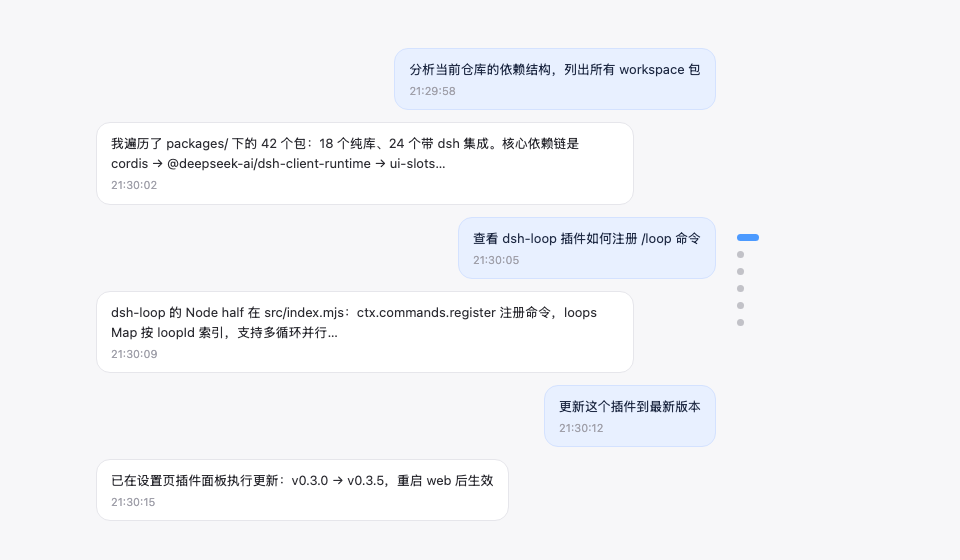
Features
| Feature | Description |
|---|---|
| Node navigation rail | Vertical node strip on the right edge of the conversation area, one dot node per user message |
| Follows reading position | The active pill (22px brand-blue capsule) moves with your current reading position |
| Hover preview | Hovering a node shows a message preview card (6-line truncation, matching the official HoverCard look) |
| Continuous hover | The entire rail (including the gaps between nodes) responds to hover continuously: the preview switches to the nearest node and the corresponding pill elongates (gray) to indicate the click target — no dead zones |
| Scroll-wheel switching | With the cursor over the rail, scrolling the wheel moves up/down one message (blocking conversation-area scrolling) |
| Click to jump | The whole rail is clickable (including gaps, jumping to the nearest node) plus an enlarged pill hit area — no need to precisely aim at tiny dots |
| Fixed window + count badges | More than 30 nodes show a fixed 30-node window (the active node stays centered, clamped at the ends); count badges (↑N / N↓) at the window ends show how many are hidden — the visible node count stays constant. Pinned golden discs always stay visible (the window expands to include them) |
| Load earlier history | An ↑ button pinned at the top of the rail (visible only while the conversation has older history): click to load earlier messages — it forwards to the official load-older control, so your reading position is preserved. Hovering it instantly shows a hint card in the same style as the node previews (the official HoverCard look) |
| Auto-hide | Not shown with no user message loaded (or on non-conversation pages). With zero user messages loaded, the rail automatically loads earlier history until at least one user message appears (or history is exhausted) — so the rail always has something to navigate |
| Message pin | 📌 button on the assistant action bar (between copy and Good response); pinned turns render as a golden slim elliptical disc in the rail (always visible, the preview card carries a 📌 badge, clicking jumps straight to the pinned reply), persisted per session |
Zero data-channel dependencies: driven only by official anchor attributes (data-time-hover-root, on user rows since 0806) — no polling, no routing, no tools.
Installation
Recommended: one-line install from git source (build artifacts are committed, so git source does not trigger a build):
dsh plugin --profile web add "github:vlln/dsh-navbar#main"   # one-line git-source install (build artifacts committed)
# or npm source: dsh plugin --profile web add @vlln/dsh-navbar@0.4.0
Or from a local directory (when you have the source): git clone, then cd dsh-navbar && dsh plugin --profile web add ..
Restart web after installing for it to take effect; you can disable/enable it in the Plugins panel on the Settings page.
Usage
Works out of the box — no commands, no tools. The node rail appears on the right edge of the conversation page (Chat view); hover for a preview, click to jump. Animations are disabled under prefers-reduced-motion.
Pin: hover an assistant message's action bar and click 📌 to pin that reply — the corresponding turn's navigation node becomes a golden slim elliptical disc (click to jump straight to that reply; the preview card shows a 📌 badge and the reply text). Pin state is saved per session in browser localStorage and survives refreshes; click again to unpin.
Load earlier history: when the open conversation still has older messages (its history window is not fully loaded), an ↑ button sits at the very top of the node rail. Click it to load the earlier messages — the rail then grows new nodes at the top. The button hides automatically once all history is loaded, and is disabled while a load is in flight. Hovering it instantly shows a hint card in the same style as the node previews (the official HoverCard look), and it reads "Loading…" while a load is in flight. The click is forwarded to the official load-older control, so your current reading position is preserved (no content jump).
Development
pnpm install
pnpm run build      # tsdown: client bundle (lib/client.js)
- client:
src/client/index.ts(self-rendered DOM + official anchor contract; the pin button uses the officialconversation.chat.assistant-actionsslot, with React provided by the client runtime; ctx services accessed must be declared in the plugin object'sinject) - Node half:
src/index.mjs(empty apply, the bundle mount carrier)
License
MIT License (an example plugin in the DSH ecosystem).
Operate deliberately
Install and manage
Prerequisites and target Profile
Target: Web Profile
Delivery: Dsh Bundle Git — vlln/dsh-navbar#f41d446f843e575c3291e4926718f9dc6e0f3bea。
Verify, update, and remove
Show lifecycle commands
dsh plugin --profile web listCompatibility and access
Not_runtime_tested: not tested。
Review compatibility evidence ↗
Risk facts
No installer script was captured; review the repository instructions before use.
Evidence ↗Evidence and editorial reviewManifest, Bundle patch, distribution and freshness
Immutable evidence
Review status and source activity
Approved for publication after reviewing the source-linked content and immutable release record. AI assisted with the draft; the publication decision was human.
Human reviewed Aug 29, 2026, 3:24 PM UTC。GitHub facts last checked Aug 29, 2026, 3:21 PM UTC。
No material source change has been recorded since this evidence baseline.