At a glance
What it does
Use DeepSeek Harness chat to drive local Origin scientific plotting, analysis, and export through MCP.
Web Profile
Not declared in supplied evidence
Evidence-verified
Checked Sep 15, 2026, 1:51 PM UTC
Code-evidenced contributions
What it adds to DSH
Registers local Origin tools for importing data, creating and editing scientific plots, analysis, verification, and PNG/SVG or editable OPJU delivery.
Mechanism evidence ↗A quick-reference skill for using the Origin plotting and analysis tool set, including planning, delivery, and graph-editing guidance.
Mechanism evidence ↗Before you choose it
This DSH bundle registers an Origin MCP server so chat can import local data, create scientific plots, inspect or edit existing graphs, run selected analyses, and export PNG, SVG, or editable OPJU projects. It also includes the origin-plotting quick-reference skill.
Best for
Windows researchers and analysts who already use Origin and want to control local plotting workflows from DeepSeek Harness.
Common tasks
- Import a CSV, TXT, XLSX, or XLS file and create a line, scatter, bar, contour, or 3D plot.
- Use plot plans and domain templates for stacked spectra, XRD, dual-Y, forest, or multi-panel figures.
- Adjust an existing graph's series, axes, legend, page size, or annotations, then export an image or OPJU project.
- Run supported fitting, descriptive statistics, FFT, correlation, t-test, ANOVA, PCA, or survival-analysis workflows.
Permissions and data
Runs a local Python stdio server that automates Origin and works with local data and output files.
Permissions- Launches Python and communicates with a local Origin MCP server over stdio.
- Automates the installed Origin application through Windows COM.
- Reads user-selected local data files and writes exported images or OPJU projects.
- Local file paths and supplied data can be imported into Origin for plotting and analysis.
- Exports and project files are written to paths selected during tool use.
- Uses DeepSeek Harness and its @deepseek-ai/dsh-mcp-client bridge.
- No remote data transfer behavior is established by the supplied evidence.
- No credentials are declared in the supplied evidence.
Limitations
- Requires Windows, Origin, Python 3.10+, and a DSH installation containing the MCP client dependency.
- The default bundle configuration targets the web profile and may need a config-only override for another profile or a dedicated Python virtual environment.
- Do not add a second full mcp-origin insert entry; the supplied documentation says it can cause a duplicate loader entry and startup failure.
- The npm distribution was not found in the supplied evidence; use the verified Git bundle route.
What DSHub checked
- Pinned Git source, package structure, bundle patch, and MIT license are evidenced.
- The bundle patch registers an Origin stdio MCP configuration with startup errors configured not to block DSH startup.
- The repository documents local smoke, MCP handshake, and end-to-end checks.
What DSHub did not check
- Installation, Origin connectivity, tool registration, and plotting behavior were not executed for this curation record.
- Actual compatibility with a particular DSH version, Origin version, Python environment, security software, or user profile was not verified.
- Repository-described performance and test outcomes were not independently verified.
Pinned install
Install DSH Origin Plugin
This plugin bundle does not have a DSH Plugin install action. Use its source documentation for the delivery method.
Maintainer source
Project README
DSH Origin Plugin · DeepSeek Harness × Origin 一键画图
让 DeepSeek Harness (DSH) 的 AI 对话直接驱动本机 Origin(科学绘图软件)自动画图并导出 PNG / SVG。
- 🤖 对话触发:
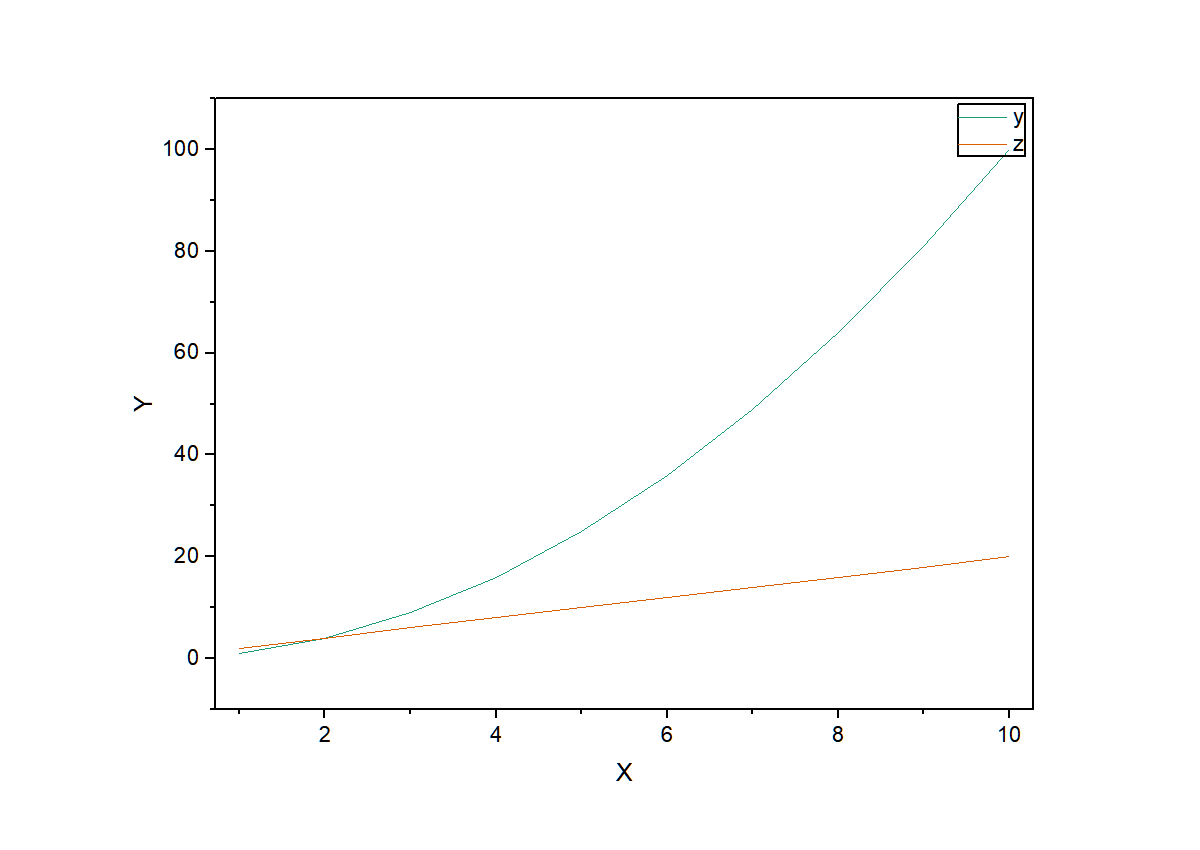
「用 Origin 画 y=x² 折线图并导出 PNG」→ 模型自动调用工具 → 图片落盘 - 🔌 官方 MCP 桥接:通过 DSH 内置的
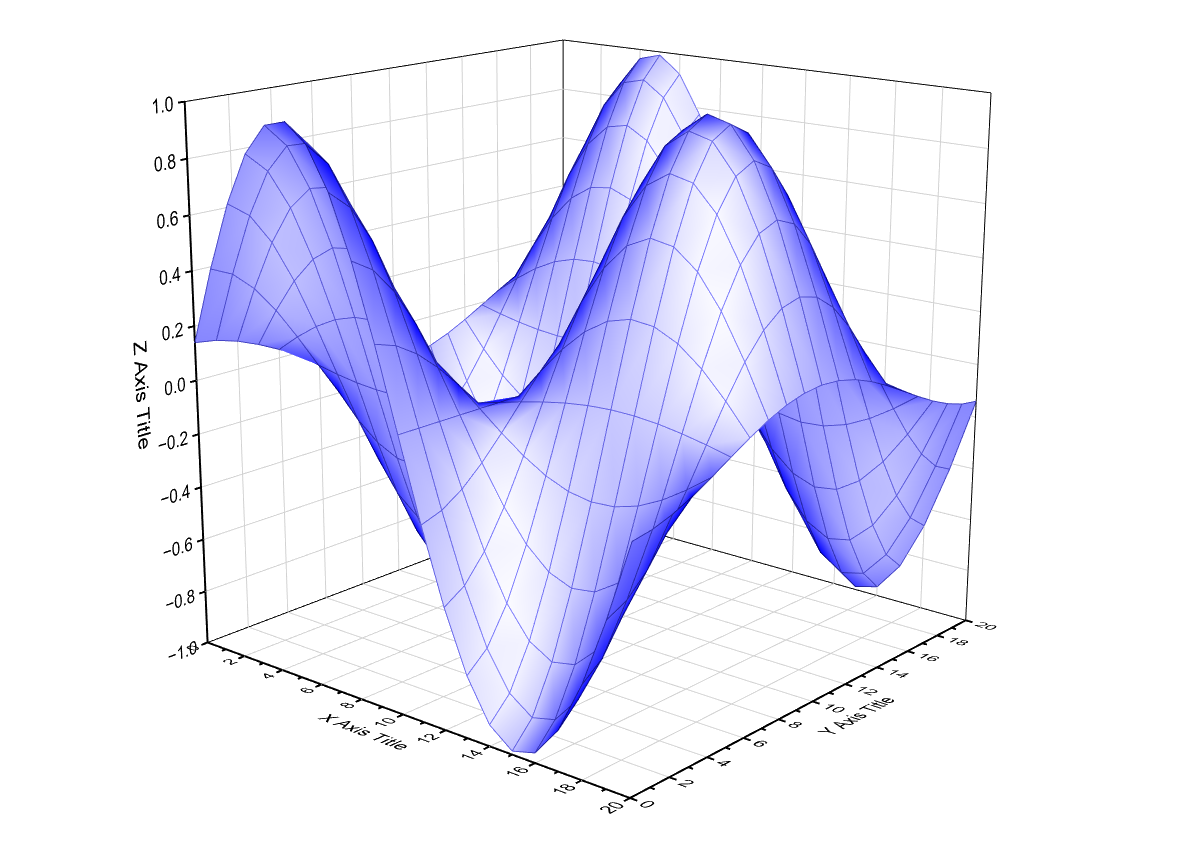
@deepseek-ai/dsh-mcp-client注册为原生工具mcp__origin__* - 🎨 43 个工具:2D 图 line/scatter/line_symbol/column/histogram/box/bar + 误差棒、3D、等高线、统计批
- 🎛 细粒度改图:
origin_edit_plot/axis/legend/page—— 只换一条线的颜色、加粗、隐藏、挪图例、改轴范围、调纸张尺寸;origin_manage_pages关窗/改名;origin_inspect_graph先看清现状 - 📂 文件导入:
origin_load_file直接读 CSV/TXT/XLSX/XLS(中文路径/编码安全) - 🧩 领域模板:多谱线堆叠偏移 / XRD 三件套 / 双Y轴 / 森林图 / 多面板(
origin_plot_template) - 📋 绘图计划确认流:
origin_plot_plan逐列画像+待确认问题 →origin_execute_plan执行(不确定列先问) - 📦 可信交付:
origin_export_delivery一键交付目录(图片+可编辑 OPJU);origin_save_project单独存工程 - ✨ 期刊级排版:
style_mode(journal/presentation) +family调色板(带使用约束)+ 幂等graph_name+ 语义轴标题 +style_overrides显式样式逐项回报 - 👁 双保险校验:
origin_view_graph内联图片(模型看)+origin_verify_graph确定性反读(程序核) - 🧮 统计批:t 检验 / ANOVA / PCA / Kaplan-Meier 生存分析(纯 numpy 自研)
- 🛡 稳定错误码:全部调用返回
error_code / recoverable / next_actions三件套,模型可安全分支 - 🤝 能力握手:
origin_status返回 Origin 版本 + 已知坑矩阵(真机探针结论数据化)+ 特性表 - 🔒 多会话并发安全:专用 COM 线程 + 单实例语义,实测 8 线程并发 8/8 通过;
ORIGIN_SESSION=isolated不劫持用户窗口
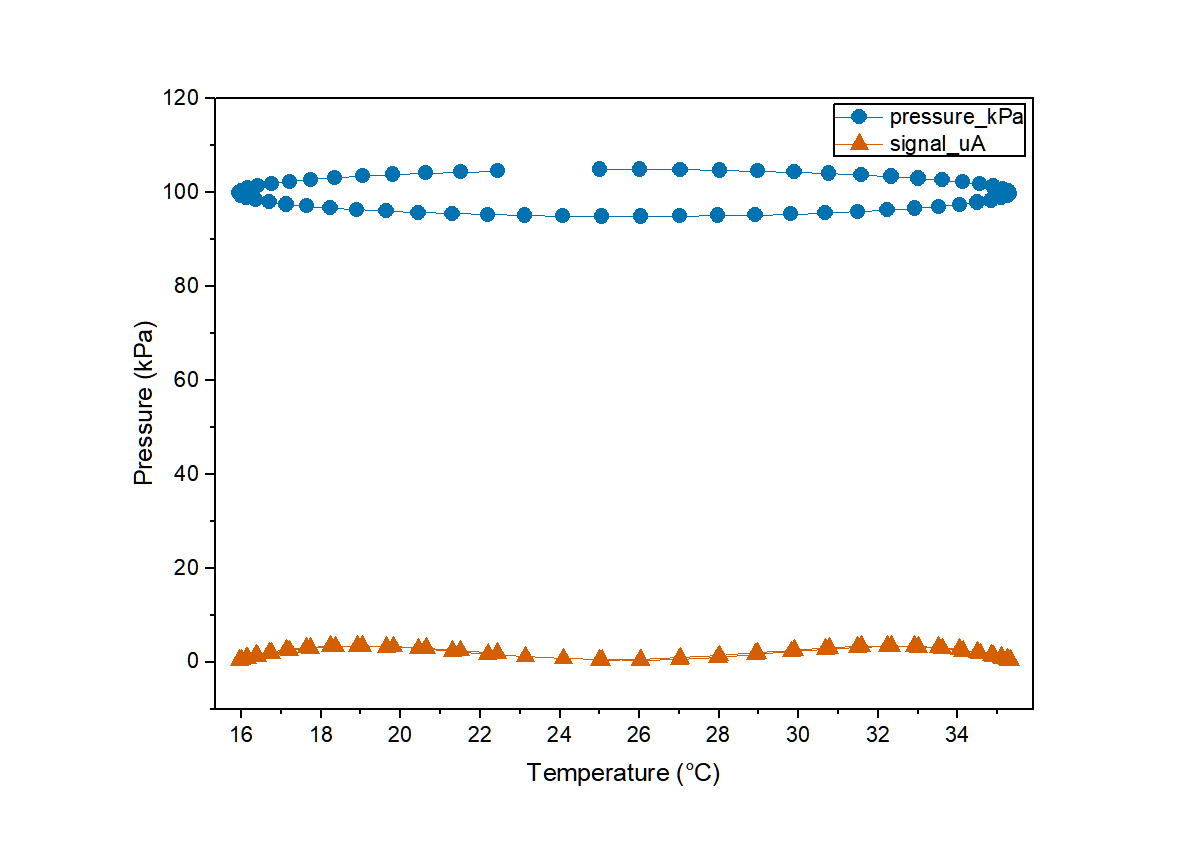
v2 排版示例(3 序列 line_symbol,journal 样式 + ocean 调色板 + 语义轴标题 + 符号循环):
权威设计/验证依据见 docs/DESIGN.md(设计蓝图 + 真机探测矩阵 + 官方文档依据)。 行为细节以真机探针为准(本环境网络屏蔽 docs.originlab.com,无法抓取官方页)。
DSH 对话(多会话并发)
   │  mcp__origin__origin_plot_file / origin_write_data / ...
   ▼
@deepseek-ai/dsh-mcp-client(DSH 官方 MCP 桥接)
   │  stdio 子进程
   ▼
origin_mcp_server.py(MCP 服务器,Python mcp SDK)
   │  专用 COM 线程(串行化)
   ▼
origin_engine.py(originpro → OriginExt → comtypes → COM)
   ▼
Origin64.exe(单实例 COM 自动化服务器)
快速开始
🚀 模型快速上手:本插件自带 DSH 原生
origin-plottingskill(安装后自动注册, 见下方「skill 速查」),模型画图前加载 skill 或调用origin_help即可秒懂用法, 无需阅读本 README。
1. 环境要求
- Windows + 已安装 Origin(实测 OriginPro 2026b;2018+ 一般均可)
- Python 3.10+(本插件自带独立 venv,不污染系统环境)
- DeepSeek Harness(DSH Desktop 或
dshCLI,需含@deepseek-ai/dsh-mcp-client)
2. 安装
git clone https://github.com/Fantasality/dsh-origin-plugin.git "%USERPROFILE%\dsh_origin_plugin"
cd "%USERPROFILE%\dsh_origin_plugin"

:: 创建独立 venv 并安装依赖
python -m venv .venv
.venv\Scripts\python.exe -m pip install mcp originpro pywin32 numpy

:: 冒烟验证 Origin COM 链路(需已安装 Origin;未运行会自动启动)
.venv\Scripts\python.exe -X utf8 smoke\origin_com_smoke_test.py
:: 预期结尾: RESULT: OK  files={'comtest.png': ..., 'comtest.svg': ...}
2.1 以 bundle 方式安装(一键 / 插件市场)
本仓库声明了 DSH 标准的 dsh.bundle 清单(package.json → cordis.patch.yml),
因此可从 DSH 插件市场(dsh-market / awesome-dsh-plugin)一键收录,也可用命令安装:
# 方式一:从 GitHub 源码安装
dsh plugin --profile web add github:Fantasality/dsh-origin-plugin
# 方式二:从 npm 安装(预构建分发,跳过 building 授权)
dsh plugin add dsh-origin-plugin
装好后 cordis.patch.yml 会注册一个 mcp-origin(@deepseek-ai/dsh-mcp-client)。
v2.0.3 起自动携带运行时依赖 @deepseek-ai/dsh-mcp-client:市场安装
(dsh plugin add)会把它作为传递依赖装进 profile 的 node_modules——缺少它时 loader
无法按 name 解析该条目,工具会静默永不注册(DSH 照常启动、无任何报错)。
v2.0.2 起 bundle 默认已自定位:server 绝对路径由 !!js 在启动时按
<DSH_HOME>/profiles/web/node_modules/dsh-origin-plugin/ 计算(DSH_HOME 缺省回退
%USERPROFILE%/.dsh),不再受进程工作目录影响;默认用系统 python 启动
origin_mcp_server.py。
📌 安装此插件不会破坏 DSH 启动:
failOnStartupError: false—— server 连不上只记日志、不注册工具,DSH 正常启动。这是插件市场适配的核心约束,已内置。 唯一硬性红线:不要在 profile 里再写第二条完整insert的mcp-origin(会触发duplicate loader entry id: mcp-origin启动失败);要用 venv,请用下面的 config-only 覆盖。
首次使用前仍需按上文「2. 安装」准备好 venv 依赖(本插件是 Windows + Origin 本地
进程,无法纯源码免装运行)。若依赖装在独立 venv,在 profile 的 cordis.patch.yml 里
用同一 id + config-only 覆盖(覆盖是整体替换 config,必须带全字段):
- id: mcp-origin
  config:
    serverName: origin
    transport: stdio
    command: 'C:/Users/<你>/dsh_origin_plugin/.venv/Scripts/python.exe'
    args: ['-X', 'utf8', 'C:/Users/<你>/dsh_origin_plugin/origin_mcp_server.py']
    env:
      PYTHONIOENCODING: utf-8
    failOnStartupError: false
    toolCallTimeoutMs: 120000
(层级:bundle patch → profile patch → $DSH_HOME/cordis.patch.yml,后层覆盖先层。
若你的 DSH profile 不是默认的 web,把自定位路径里的 /profiles/web/ 换成你的
profile 名再覆盖。)
3. 注册到 DSH
powershell -ExecutionPolicy Bypass -File "%USERPROFILE%\dsh_origin_plugin\register_to_dsh.ps1"
脚本会把以下 config-only 覆盖(注意:没有 name、没有 insert,只替换配置,
与 bundle 层 mcp-origin 合并、不产生重复条目;覆盖会整体替换 config,故带全字段)
追加到 %APPDATA%\dsh-desktop\harness\profiles\web\cordis.patch.yml
(自动备份、UTF-8 安全、幂等):
- id: mcp-origin
  config:
    serverName: origin
    transport: stdio
    command: 'C:/Users/<你>/dsh_origin_plugin/.venv/Scripts/python.exe'
    args: ['-X', 'utf8', 'C:/Users/<你>/dsh_origin_plugin/origin_mcp_server.py']
    env:
      PYTHONIOENCODING: utf-8
    failOnStartupError: false
    toolCallTimeoutMs: 120000
⚠️ 旧版脚本写入的是「完整 insert」,与 bundle 层组合会生成两条
mcp-origin→ DSH 启动直接报duplicate loader entry id: mcp-origin。v2.0.2 的脚本已改为 config-only 覆盖;如果你手工写过旧格式,请删掉那条完整 insert,只保留上面的覆盖。
然后 重启 Harness(DSH Desktop 菜单 Harness → Restart Harness,或 Ctrl+Shift+R)。
可选校验:dsh --profile web --dump-config 能看到 mcp-origin 条目。
机制说明:DSH 的插件生态是 Cordis 插件树 +
cordis.patch.ymlpatch 层;MCP 服务器是官方 一等公民——dsh-mcp-client会自动把外部 MCP 工具桥接为原生工具 (名称mcp__<serverName>__<rawName>),无需编写 TypeScript 插件即可接入 Python 能力。
4. 对话触发示例
| 你说 | 模型会调用 |
|---|---|
| 「用 Origin 画 y=x²(x=1..10)的折线图,导出 PNG」 | mcp__origin__origin_plot_file |
| 「把这两列数据画成散点图导出 SVG:x=[1,2,3,4,5], y=[3.1,4.9,7.2,8.8,11.3]」 | mcp__origin__origin_plot_file |
| 「先写数据再分步画图、导出」 | origin_write_data → origin_plot → origin_export |
快速上手(skill + origin_help)
模型在对话中遇到 Origin 画图/分析任务时,有两种秒级上手通道:
origin-plottingskill(DSH 原生机制):安装时自动写入%APPDATA%\dsh-desktop\harness\skills\origin-plotting\SKILL.md与~/.dsh\skills\origin-plotting\SKILL.md。模型目录可见该 skill,按需加载后 直接获得:数据格式、43 工具速查表、科学边界、12+ 个任务模板——不用再读 README;mcp__origin__origin_help工具:不连接 Origin、约 1ms 返回同一份速查 (JSON 格式,含 usage/tools/templates/tips),任何时刻可调用。
两者内容一致、互为备份;工具 description 中也已内嵌快速用法提示。
工具清单
| MCP 工具 | 作用 | 关键参数 |
|---|---|---|
origin_status |
连接状态 / Origin 进程数 / 环境 | 无 |
origin_write_data |
多列数据写入工作表(dict 或二维列表) | columns, worksheet? |
origin_plot |
画图:line/scatter/line_symbol/column/histogram/box/bar + 误差棒 | worksheet, plot_type, yerr_column, title |
origin_export |
导出 PNG/SVG | graph, fmt, file_path, width |
origin_plot_file |
一键:写数据→画图→导出 | columns, plot_type, fmt, file_path, width |
origin_filter_data |
删除/裁剪数据点(按行索引或 x 范围) | worksheet, drop_rows, x_min/x_max |
origin_fit |
线性/非线性拟合(Origin 内置函数),拟合曲线上图 | worksheet, kind(linear/ExpDec1/Gauss/...), plot_curve |
origin_plot3d |
3D 表面图 / 3D 散点图 | data, plot_type(surface/scatter) |
origin_stats |
描述统计:count/mean/std/min/p25/median/p75/max/skew | worksheet, columns |
origin_transform |
平滑/归一化/微分/插值(写回新列) | worksheet, op, method, window, new_x |
origin_integrate |
数值积分 AUC(梯形法) | worksheet, x_column, y_column |
origin_fft |
FFT 频谱:主频提取 + 频谱图 | worksheet, plot_spectrum, top |
origin_correlate |
Pearson 相关矩阵 | worksheet, columns |
origin_peak_find |
峰值检测(峰高/间距过滤) | worksheet, min_height, min_distance |
origin_histogram |
直方图统计(可画图导出) | worksheet, bins, plot |
origin_plot_contour |
等高线 / 填充等高线 / 3D 线框 | data, plot_type |
origin_catalog |
动态工具目录(按分类列出全部工具,文档即实现) | group |
origin_error_codes |
全部稳定错误码 + 恢复建议 | 无 |
origin_list_graphs / origin_list_sheets |
列出图页 / 工作表页短名 | 无 |
origin_read_worksheet |
读取工作表列数据(含列角色/点数) | worksheet, columns, max_rows |
origin_view_graph |
图→内联图片(模型可看,不落盘) | graph, max_width |
origin_apply_style |
对已有图应用排版/调色板/多序列区分 | graph, style_mode, family, columns |
origin_ttest |
t 检验:one / 两样本(Welch) / paired | column_a, column_b, kind, mu |
origin_anova |
单因素方差分析(每组一列) | columns |
origin_pca |
主成分分析(载荷/解释方差/得分) | columns, scale, n_components |
origin_survival |
Kaplan-Meier 生存分析 | time_column, event_column |
origin_load_file |
导入本地文件 CSV/TXT/XLSX/XLS(中文安全) | path, sheet?, worksheet? |
origin_plot_plan |
绘图计划(离线:逐列画像+角色建议+待确认问题) | columns, plot_type |
origin_execute_plan |
执行计划(按 plan_id 写数→画图→导出) | plan_id |
origin_plot_template |
领域模板:stacked_spectra/xrd_pattern/dual_y/forest/multi_panel | template_id, data |
origin_verify_graph |
确定性反读(轴标题/字号/几何/图例/文件完整性) | graph, expected_* |
origin_save_project |
保存可编辑 OPJU 工程 | path |
origin_export_delivery |
一键交付目录(源文件同级,图片+OPJU+核验) | graph, source_path, fmts |
origin_list_pages |
列出全部页面(图页/工作簿)+ 活动窗口 | 无 |
origin_inspect_graph |
巡检现状:图层几何/曲线样式/轴/图例/页面尺寸 | graph |
origin_edit_plot |
逐条改曲线:颜色/线宽/线型/符号/透明度/隐藏 | graph, edits |
origin_edit_axis |
改轴:标题/范围/刻度类型/网格/字号加粗 | graph, axis, props |
origin_edit_legend |
改图例:显示隐藏/字号/边框/四角锚点/文本 | graph, options |
origin_edit_page |
改纸张 cm 尺寸 / 图层位置(%页)/ 背景 | graph, page_size_cm |
origin_manage_pages |
窗口管理:关闭/激活/重命名/隐藏/复制 | action, pages |
origin_add_text |
加文本标注(峰位/条件说明) | graph, text, x, y |
进阶能力
删除/裁剪数据点(origin_filter_data)
# 删除第 2/5/9 行(0 起始索引)
origin_filter_data(worksheet="[Book1]Sheet1", drop_rows=[2, 5, 9])
# 只保留 x ∈ [0, 15] 的数据(x 列自动裁剪,NaN 填充尾部,图上不显示)
origin_filter_data(worksheet="[Book1]Sheet1", x_min=0, x_max=15)
拟合(origin_fit)
kind="linear":线性拟合,返回 slope / intercept 及误差;kind="ExpDec1"/"Gauss"/"Polynomial"/"Lorentz"/"Sigmoid"等: Origin 内置拟合函数名(非线性最小二乘,返回全部参数 + cod/R² 等统计量);plot_curve=True:自动生成「原始散点 + 拟合曲线」图。
实测参数还原精度:线性 slope=2.035(真值 2.0);ExpDec1 A1=5.08(真值 5.0)、k=0.518(真值 0.5)、cod=0.997。
3D 图(origin_plot3d)
# 3D 表面:z 为 2D 网格(自动生成 X/Y 索引网格,或提供 x/y 向量)
origin_plot3d(data={"z": [[1, 2, 3], [4, 5, 6], [7, 8, 9]]}, plot_type="surface")
# 3D 散点:x/y/z 三个等长列表
origin_plot3d(data={"x": [...], "y": [...], "z": [...]}, plot_type="scatter")
表面图走 Origin 原生 GLparafunc 模板(matrix Z/X/Y 三对象),散点走 plotxy plot:=310。
科学分析(origin_stats / origin_transform / origin_fft 等)
| 能力 | 工具 | 说明 |
|---|---|---|
| 描述统计 | origin_stats |
count/mean/std/min/p25/median/p75/max/skew |
| 平滑 | origin_transform(op="smooth") |
移动平均 / 中值滤波,窗口可调 |
| 归一化 | origin_transform(op="normalize") |
minmax / zscore / sum |
| 数值微分 | origin_transform(op="derivative") |
基于 x 步长的梯度 |
| 插值 | origin_transform(op="interpolate") |
任意新 x 网格线性插值 |
| 积分/AUC | origin_integrate |
梯形法曲线下面积 |
| 频谱分析 | origin_fft |
幅度谱 + 主频提取 + 频谱图 |
| 相关性 | origin_correlate |
Pearson 相关矩阵 |
| 峰值检测 | origin_peak_find |
局部极大值 + 峰高/间距过滤 |
| 直方图 | origin_histogram |
bin 频数 + 柱状图 |
实测:FFT 对 2Hz 正弦(256 点、0.05s 采样)主频检出 2.031Hz;AUC 梯形法精度良好; 峰值检测对高斯峰(σ=0.5)在 x=6.0 处检出多个候选峰(配合 min_height/min_distance 收敛)。
画图类型速查(origin_plot / origin_plot_file)
| plot_type | 实现 | 说明 |
|---|---|---|
| line / scatter / line_symbol / column | add_plot | 基础 2D |
| histogram | numpy 分箱 + 柱状图 | 稳定可控 |
| box | Origin 原生 box 模板 |
箱线图 |
| bar | Origin 原生 bar 模板 |
条形图(真机验证可靠;plotxy 204/215 在 2026b 会渲成面积图/不出图) |
+ yerr_column |
add_plot colyerr | 误差棒 |
通用排版参数(全部画图工具可用):
style_mode:default / journal(单栏 89mm·双栏 183mm·8pt 起)/ presentation —— 字号/线宽/刻度/几何真正落图;family:调色板(ocean/nightfall/duo_warm/forest/grey_tone/low_saturation/paired);graph_name:幂等命名——同名重复调用清旧重画,图名稳定(不再累积 Graph2/3);- 轴标题:从列名自动语义推断(
temperature_C→ "Temperature (°C)",pressure_kPa→ "Pressure (kPa)"),经GLayer.axis('x'/'y').title可靠落图; - 多序列自动区分:线型/符号循环 + 颜色(CVD 色盲安全);密集数据自动降符号。
排坑记录:LabTalk
plotxy的列范围必须用[Book]1!B短名形式((n)索引形式对 部分图型静默失败);box/bar 在真机上无可靠 plotxy 代码,统一改走 Origin 原生模板。
期刊级排版(plot_style.py,v2 新增)
采用感知色彩度量(clean-room 自研,未复制任何第三方代码/文档):
- OKLab 色彩空间计算调色板两两感知色差,保证多序列可分辨;
- CVD 色盲模拟(protanopia/deuteranopia/tritanopia 转换矩阵)筛选色盲可读方案;
- 白底对比度(WCAG 对比度)保证线条/符号在期刊白底上清晰;
- 每种
family返回min_oklab_distance / min_contrast_white / min_cvd_distance指标, 且每一步给出reason,可审计; style_mode预设(journal/presentation)给出目标图宽(mm)、最小字号、线宽、刻度长度。
视觉校验(origin_view_graph,v2 新增)
出图后模型不必先导出文件再想办法看:
{"graph": "styled3"} // 返回 [文本摘要, ImageContent]:模型直接看到图
- 图片为内联
mcp.types.ImageContent(PNG base64),不落盘;max_width控制 token 成本; - 适合让视觉模型核对:图型是否对、配色是否可区分、轴标题是否合理;
- 实配示例(识图模型核对过):3 序列 line_symbol,X=温度(°C)、Y=压力(kPa), 蓝圈/橙三角,图例在右上角。
统计批(纯 numpy 自研,无 scipy,v2 新增)
| 工具 | 统计量 | 说明 |
|---|---|---|
origin_ttest |
t / df / p | one(vs 指定 mu)/ 两样本(Welch)/ 配对;t 分布尾概率用 Lanczos γ + 连分数不完全 β 实现 |
origin_anova |
F / p / η² | 单因素,每组一列;F 分布尾概率同样自研 |
origin_pca |
解释方差比 / 载荷 / 得分 | SVD;scale=True 标准化 |
origin_survival |
KM 表 / 中位生存时间 | 事件+删失;中位时间为存活率过 0.5 的插值点 |
示例:origin_ttest({"worksheet":"[Book1]Sheet1","column_a":"a","column_b":"b","kind":"two"})
→ {"statistic": -1.39, "df": 2.31, "p_value": 0.284}。
稳定错误码(origin_errors.py,v2 新增)
所有调用(含遗留错误路径)统一返回:
{"ok": false, "error_code": "worksheet_not_found", "error": "...",
 "recoverable": true, "next_actions": ["..."]}
- 常用枚举:
worksheet_not_found/column_not_found/invalid_request/origin_operation_error/graph_not_found/unsupported_origin_feature(如 3D 散点无输出时优雅降级); _synchronized边界自动把历史{ok:false,error}升级为结构化错误;origin_error_codes一次返回全部枚举与恢复建议,模型可据此安全分支重试。
并发 / 多会话稳定性设计
Origin 是单实例 COM 自动化服务器,且 comtypes 的 COM 接口指针有线程亲和性 (实测跨线程调用报「对象没有连接到服务器」)。本插件的对策:
- 专用 COM 线程:所有 Origin 操作投递到唯一工作线程串行执行(任务队列), 同时解决线程亲和性与并发互踩;
- 单实例语义:连接前强制
OriginExt.ApplicationSI(复用已运行主实例), 杜绝多 Origin 进程导致的 COM 连错实例(实测多实例会让LT_execute报异常); - 唯一命名空间:每次调用新建
DSH_<8hex>工作表/图,互不覆盖; - 多进程加固:设置环境变量
ORIGIN_IPC_LOCK=1可启用 Windows 命名互斥体, 覆盖多 DSH 实例同时操作同一 Origin 的极端场景; - 实测:8 线程并发各画一张图 8/8 通过,单张耗时约 1~2 秒。
细粒度改图(v2.2 新增:AI 帮你微调已有图)
新手最常提的需求是"只改一点点",例如「把第二条线换成红色」「这条曲线加粗一点」 「图例挪到右上角」「冲掉几个多余的工作簿」。这类操作对应的是一整套编辑工具, 且每一次改动都带读回校验:
origin_inspect_graph(graph)                      # 先看清现状(几何/颜色/轴/图例/纸张)
origin_edit_plot(graph, [{"plot": 1, "color": "#D55E00"}])          # 只改第 2 条线颜色
origin_edit_plot(graph, [{"plot": 0, "line_width_pt": 2.5}])        # 第 1 条加粗
origin_edit_axis(graph, axis="y", title="Pressure (kPa)",
                 from_value=80, to_value=140,
                 props={"show_grids": 1, "label_font_pt": 12, "label_bold": 1})
origin_edit_legend(graph, {"position": "tr", "font_size_pt": 12})   # 挪到右上角
origin_edit_page(graph, page_size_cm={"width": 8.9, "height": 6.5}) # 投稿单栏尺寸
origin_manage_pages("close", pages=["Book3", "Book4"])              # 关掉多余窗口
为什么这些改动是安全的(三条纪律,全部由真机探针证据支撑):
- COM 优先:探针矩阵显示 originpro 的图层/曲线作用域读写
(
plot_list/gl.get_int/set_int/axis属性 /p.color)与活动窗口无关, 任何时候都可靠;LabTalk 裸表达式(xb.*/legend.*/layer.*)只在目标图页 恰好是活动窗口时才解析,否则静默返回 NaN 或落到别的窗口(实测layer.left会读到工作簿的几何)。 - 激活必须复核:所有 LabTalk 路径先
activate()再以is_active()/page.name$复核,不符就返回window_activation_failed,绝不"以为激活成功"。 - 写入必读回:每项改动返回
{item, requested, status, readback}, status 为 applied / applied_unverified(无读回的通道,如线宽,需目视确认)/ applied_adjusted(Origin 钳制了值)/ rejected(附原因); NaN 读回一律判未生效(NaN 比较恒为 False,是个会假成功的坑,已修)。
已修的三条实测缺陷(v2.2)
| 缺陷 | 现象 | 修复 |
|---|---|---|
| verify 曲线数误判 | 多层图只统计第 0 层 → 数成 0 条并报 fail 需修复后复核(主动骗人) |
跨全部图层统计 + 逐层明细;LabTalk 检查仅激活复核后使用,读不回来标 unreadable,只有上下文可信且不符才 fail |
| LabTalk 静默失靶 | 活动窗口非图页时 xb.*/legend.*/layer.* 静默 NaN 或落到别的窗口 |
ensure_active_graph() 激活复核 + _lt_write_checked() 写读回 + NaN 守卫;轴标题改走 COM axis.title |
| xrd_pattern 量程压缩 | 差谱与主谱共用 Y 轴,主峰被压扁(仅占量程 ~62%) | 改双层布局:主谱满量程(实测 76.9%)+ 差谱独立量程 + 零线 + 相刻线,两层 X 轴严格对齐 |
目录结构
dsh-origin-plugin/
├── origin_engine.py          # 核心引擎:连接/写数/画图/导出/线程/错误升级/模板/交付
├── origin_errors.py          # 稳定错误码:枚举/恢复建议/遗留错误升级
├── plot_style.py             # OKLab 调色板 + CVD 模拟 + 布局预设 + 使用约束
├── origin_analysis.py        # 纯 numpy 统计:t/ANOVA/PCA/似然 KM
├── origin_fileio.py          # 文件导入:CSV/TXT/XLSX/XLS(多编码/嗅探/表头识别)
├── origin_plan.py            # 绘图计划:列画像/角色建议/待确认问题/plan_id 缓存
├── origin_verify.py          # 确定性反读:跨层曲线数/轴/几何/图例/文件完整性
├── origin_edit.py            # 细粒度编辑:曲线/轴/图例/页面/窗口(逐项读回校验)
├── origin_mcp_server.py      # MCP 服务器(43 工具注册式),自带自测模式
├── demo_call.py              # 最小可运行示例(不依赖 MCP)
├── register_to_dsh.ps1       # 注册脚本(幂等/UTF-8 安全/自动备份)
├── unregister_from_dsh.ps1   # 卸载脚本
├── skills/
│   └── origin-plotting/SKILL.md  # DSH 原生 skill(模型速查 + 细粒度改图指引)
├── smoke/
│   ├── origin_com_smoke_test.py   # COM 链路冒烟测试
│   ├── advanced_test.py           # 删点/拟合/3D
│   ├── science_test.py            # 直方图/误差棒/等高线…
│   ├── fine_edit_test.py          # 细粒度编辑冒烟(25 项断言)
│   ├── repro_defects.py           # 三条实测缺陷回归
│   ├── labtalk_probe2..8.py       # 细粒度编辑能力真机探针(通道/单位矩阵)
│   └── mcp_handshake_test.mjs     # 用 DSH 同款 Node SDK 验证 MCP 握手(43 工具)
└── docs/
    ├── DESIGN.md              # 设计蓝图 + 真机探测矩阵 + 官方文档依据
    └── example*.png           # 真机示例图
自测
:: 离线自测(不连 Origin,CI 可跑)
.venv\Scripts\python.exe -X utf8 origin_mcp_server.py --offline-test

:: 引擎级全链路(写数/导入/画图/计划流/模板/交付/验证/OPJU)
.venv\Scripts\python.exe -X utf8 origin_mcp_server.py --selftest

:: 8 线程并发稳定性
.venv\Scripts\python.exe -X utf8 origin_mcp_server.py --concurrency-test

:: MCP 协议级(模拟 DSH 客户端)
.venv\Scripts\python.exe -X utf8 origin_mcp_server.py --mcp-test

:: 用 DSH 自带 Node MCP SDK 握手(与 dsh-mcp-client 同款,机器无关自动探测)
node smoke\mcp_handshake_test.mjs

:: COM 链路冒烟 / 进阶能力 / 科学分析
.venv\Scripts\python.exe -X utf8 smoke\origin_com_smoke_test.py
.venv\Scripts\python.exe -X utf8 smoke\advanced_test.py
.venv\Scripts\python.exe -X utf8 smoke\science_test.py

:: 细粒度编辑冒烟(换色/加粗/隐藏/轴/图例/纸张/关窗 + 跨层计数回归)
.venv\Scripts\python.exe -X utf8 smoke\fine_edit_test.py

:: 三条实测缺陷回归(全绿才返回 0)
.venv\Scripts\python.exe -X utf8 smoke\repro_defects.py --expect-fixed

:: 最小调用示例
.venv\Scripts\python.exe -X utf8 demo_call.py
端到端验证清单
- smoke 测试输出
RESULT: OK,output\comtest.png存在 -
--selftest输出SELFTEST OK(含样式应用/幂等命名/预览/错误码/统计批) -
--concurrency-test输出CONCURRENCY-TEST OK(8/8) -
--offline-test输出OFFLINE-TEST OK(43 工具注册 + 计划流 + 文件 IO) -
--selftest输出SELFTEST OK(含导入/计划流/模板/交付/反读/样式覆盖) -
--concurrency-test输出CONCURRENCY-TEST OK(8/8) -
--mcp-test输出MCP-TEST OK(43 工具可见,view_graph 返回 image 内容) -
origin_view_graph的返回能被识图模型正确读出轴标题/图型/配色 -
mcp_handshake_test.mjs输出HANDSHAKE-TEST OK -
register_to_dsh.ps1执行成功,dsh --profile web --dump-config可见 mcp-origin - 重启 Harness 后新对话触发画图,返回 PNG 路径且图片内容正确
- 同时开 2~3 个对话各画不同图,互不干扰
常见问题
| 现象 | 处理 |
|---|---|
对话里没有 mcp__origin__* 工具 |
Harness 未重启;或 --dump-config 无 mcp-origin(检查 patch 编码/语法) |
origin_status 报 LT_execute 异常 |
存在多个 Origin64 进程:关闭多余 Origin 窗口只保留主实例后重试 |
| Origin 弹模态对话框导致调用卡住 | 自动化期间不要手动操作 Origin;关闭对话框重试 |
| 中文乱码 | 不要用 Add-Content 等 ANSI 方式追加 YAML;脚本已内置 UTF-8 写入 |
| 换机器 | 改 register_to_dsh.ps1 中的路径或直接编辑 patch 条目 |
| isolated 模式报 origin_busy_user_session | 预期行为:隔离模式不劫持已打开的 Origin,关掉它或切回 attach |
实现声明
plot_style.py的 OKLab 色差 / CVD 模拟 / 对比度度量、origin_analysis.py的 t / ANOVA / PCA / KM、origin_fileio.py的编码/分隔符探测均为本仓库独立实现 (仅依赖 numpy / openpyxl);- 所有轴标题/模板/plotxy/双Y模板行为均在本机 Origin 真机探针验证后写入, 未验证的写回 API 一律明确拒绝而非猜测落图。
精简模式(可选)
设置 ORIGIN_MCP_PROFILE=compact 可从工具集隐藏统计批(ttest/anova/pca/survival),
适合只需要画图+基础分析的场景;其余 39 个工具不变。
License
MIT © Fantasality
Operate deliberately
Install and manage
Prerequisites and target Profile
Target: Web Profile
Delivery: Dsh Bundle Git — Fantasality/dsh-origin-plugin#df6ec95a67a84e43e5c0c1703c9b67b43b774890。
Verify, update, and remove
Show lifecycle commands
dsh plugin --profile web listCompatibility and access
Requires Windows, Python 3.10+, Origin, and DSH MCP client: Not declared in supplied evidence。
Review compatibility evidence ↗
Risk facts
Automates the locally installed Origin application through a Python MCP server and Windows COM.
Evidence ↗Can import local CSV/TXT/XLSX/XLS files and write exported images and editable project files.
Evidence ↗Released under the MIT License.
Evidence ↗Evidence and editorial reviewManifest, Bundle patch, distribution and freshness
Immutable evidence
Review status and source activity
Use this when you need local Origin automation from DSH; validate the documented prerequisites and run a smoke test on your Windows machine before relying on it for research deliverables.
AI reviewed Sep 15, 2026, 1:52 PM UTC。GitHub facts last checked Sep 15, 2026, 1:52 PM UTC。
No material source change has been recorded since this evidence baseline.