At a glance
What it does
Recall a sent message to restore its earlier DSH session state and workspace files.
Web Profile
DSH 0.1.2-alpha.1–0.1.3-alpha.1; peer dependencies also declare 0.1.1-rc.2–0.1.3-alpha.1
Evidence-verified
Checked Sep 6, 2026, 1:50 PM UTC
Code-evidenced contributions
What it adds to DSH
Adds a Recall control beside sent user messages, a confirmation view of affected files, and a settings card for snapshot management.
Mechanism evidence ↗Before you choose it
This DSH web plugin adds a Recall button to user messages created after it is enabled. After you review the file-change list and confirm, it restores the workspace to the state before that message and forks the conversation back to that point. It uses a separate shadow Git repository for snapshots rather than the project's own Git repository.
Best for
DSH users who want an in-product way to undo an agent-assisted change and return both the conversation and files to an earlier user-message boundary.
Common tasks
- Undo files changed after a particular instruction to an agent.
- Return a conversation to an earlier message before trying a different approach.
- Review the proposed modified, restored, and deleted files before a rollback.
Permissions and data
Creates and manages local snapshots, reads and restores workspace content, and uses DSH session-fork functionality.
Permissions- Access to workspace files for snapshotting and rollback.
- A writable DSH home directory for shadow snapshot storage.
- Git CLI availability; without it, Recall is unavailable.
- Stores snapshots outside the project in a DSH_HOME recall-snapshots directory under normal operation.
- May fall back to a project-local snapshot directory when the DSH home is not writable.
- Excludes .git and node_modules by default; files above the configured size threshold are not snapshotted or rolled back.
- No credential requirement is declared in the supplied evidence.
Limitations
- Only messages sent after the plugin is enabled have snapshots.
- The first user message can restore files but cannot roll back conversation history.
- Recall is blocked while an agent is running in the target workspace.
- Nested Git repositories and unreadable paths are skipped rather than restored.
- macOS operation is not reported as tested in the supplied evidence.
- The MIT license is provided without warranty.
What DSHub checked
- The immutable source commit and DSH bundle structure were verified.
- The manifest declares Node.js 20 or later and compatible DSH release entries.
- The package declares an MIT license.
What DSHub did not check
- Installation and runtime behavior were not executed during this curation.
- The npm package contents were not audited.
- Compatibility outside the declared DSH release range was not verified.
Pinned install
Install DSH Recall Plugin
This plugin bundle does not have a DSH Plugin install action. Use its source documentation for the delivery method.
Maintainer source
Project README
dsh-recall-plugin 
简体中文 | English





在任意一条你发过的消息下方,点「↶ 撤回」,工作区文件和对话历史一起回到那条消息发出之前的状态
界面预览
| 撤回按钮 | 确认面板 · 变更文件清单 |
|---|---|
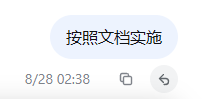 |
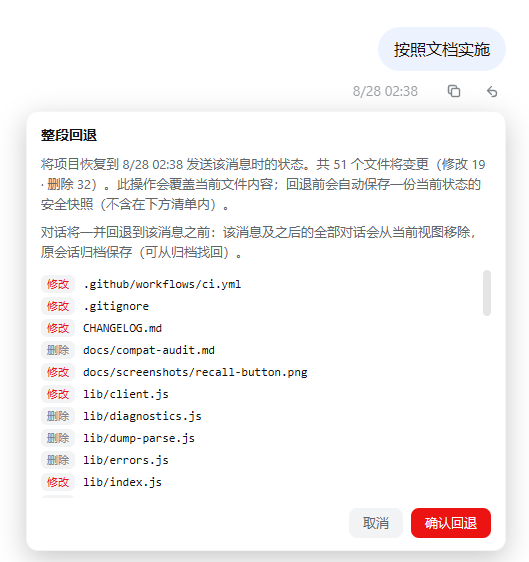 |
- 设置页 · 插件配置卡片(配置表单 / 排除表 / 快照管理,保存即热生效)
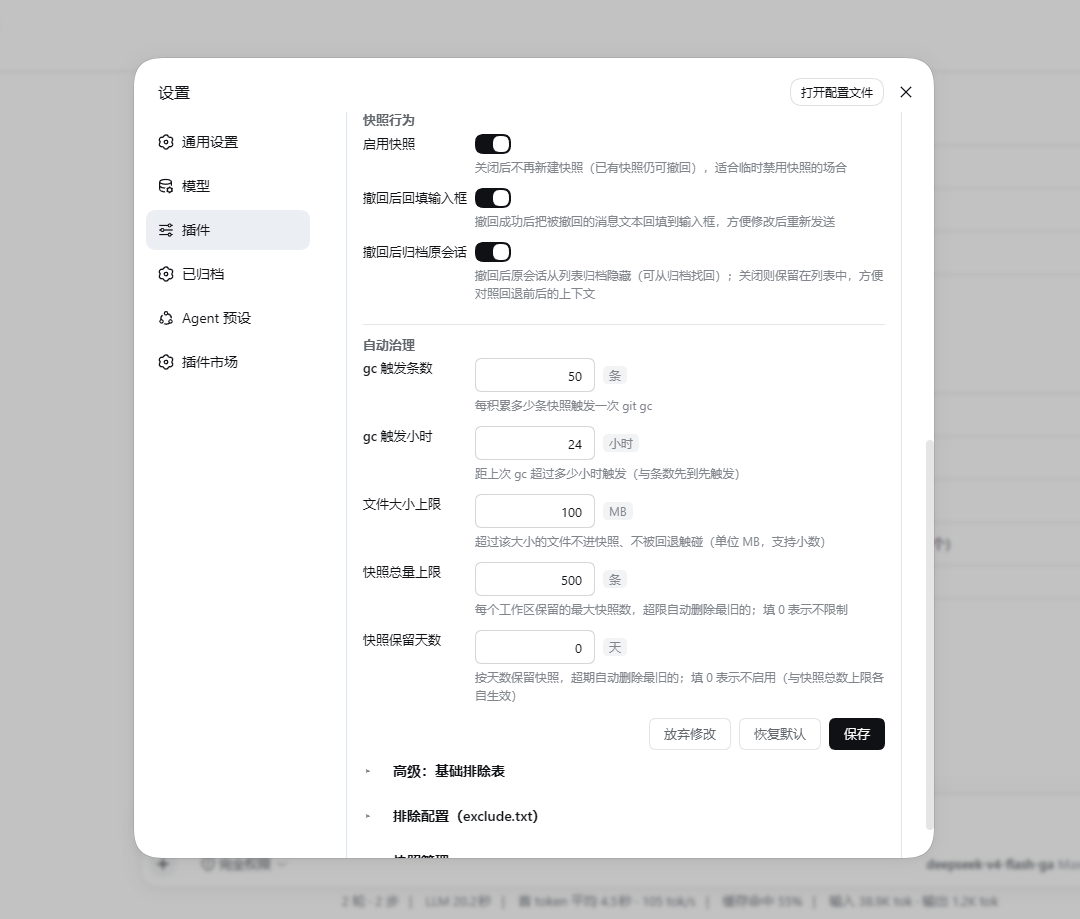
功能亮点
- 文件 + 对话,整段回退:撤回的不只是聊天记录,agent 改过的文件也一并回到原样。
- 不碰你项目自己的 git:快照存在独立的影子 git 仓库里,你的分支、暂存区、未提交改动统统不受影响;
.git、node_modules自动排除。 - 项目目录保持干净:快照始终存在
$DSH_HOME下,不会往项目里塞任何东西;与会话的沙箱权限无关(workspace-write / read-only 会话照常快照与回退),仅当 home 本身不可写(如指到只读盘)才降级到项目内.dsh-recall-snapshots(降级时页面会提示),home 恢复后自动迁走、清理干净。 - 字节级保真(2.1.1+):快照与回退不受项目
.gitattributes的 EOL 转换影响——LF/CRLF 换行、$Id$、二进制内容原样往返(影子仓库固化info/attributes关闭全部属性驱动转换)。 - 可以反复后悔:撤回一次后还能再撤到更早;撤回时被覆盖的文件也一直找得回来。快照默认每工作区保留 500 条(超限自动清最旧,上限可调或关闭),会话被彻底删除后其快照随之清理。
- 先看清单再动手:点撤回先弹出将变更的文件清单(修改 / 恢复 / 删除),确认后才执行,不会稀里糊涂覆盖。
- 运行中防护(2.0+):目标工作区的 agent 正在运行时拒绝预览与撤回,避免确认期间文件又被 agent 改动;预览之后若该消息又有了新快照,执行前强制重新预览(时效校验)。
- 回退失败自动救援(2.1+):执行撤回前先自动打一份「回退前」安全快照;回退中途失败时自动恢复到回退前状态,救援也失败则给出可直接复制执行的手动恢复命令——任何路径都不留半回退现场。
- 磁盘友好:快照走 git delta 压缩,是增量不是整目录拷贝;超过 100MB 的大文件自动跳过(阈值可在设置卡片改)。
- 自动瘦身:定期
git gc把 loose 对象压 pack(无损,快照一个不丢);会话删除后其快照自动清理;支持按条数上限与按保留天数自动清理(可配);构建产物可经exclude.txt全局排除(见下)。 - 失败了会说话:快照失败按根因分类(git 缺失 / 磁盘满 / 无权限 / 锁冲突 / 目录冲突)并给出可行动提示,页面顶部 toast(同类故障 10 分钟只打扰一次、相邻重复合并计数),不会无声失效;失败原因进设置卡片「最近错误」。
- 故障自愈:快照失败后自动清理残骸对象、连续 3 次失败起指数退避熔断(冷却后自动重试);失败路径还会清扫漏网的 git 进程与残留锁——多实例并发时按心跳互让,不会互踩死循环(2.1+),磁盘也不会被失败重试撑爆。
- 个别路径进不去就跳过:嵌入式 git 仓库、无读权限等无法索引的路径不再让整条快照失败——快照照常落盘,被跳过的路径 toast 告知(撤回时既不恢复也不删它们,与排除表语义一致)。
- 树形快照管理:设置页「快照管理」按 工作区 → 会话 → 快照 三级树形展示,支持展开/折叠与搜索;撤回产生的会话按 fork 链聚成「版本家族」(v1/v2/v3),每级右侧都有删除按钮,可一次清掉整个工作区或某个会话的全部快照,叶子显示该快照对应的消息内容摘要,方便定位“这条消息当时改了什么”。
已知限制
- 快照在消息发送时创建,插件启用前的历史消息没有快照,不显示撤回按钮。
- 会话第一条用户消息无法回退对话(仅文件回退),因为 fork 需要更早的 turn 边界。
- 目标工作区的 agent 正在运行时无法发起撤回(防护设计,先停止 agent 再撤回)。
- 支持 Windows(PowerShell 5.1/7 + git CLI)与 Linux/macOS(bash + git CLI)。Windows 真机验证充分;Linux 已在 WSL2(Ubuntu 26.04,bash 5.3 + git 2.53)实测全流程(含中文路径、home 降级、会话清理、gc);macOS 侧脚本按 bash 3.2 兼容编写,尚未真机实测。
- 工作区内嵌套的其他 git 仓库(子目录自带
.git)无法索引:快照对其余部分照常(fail-open,页面会提示跳过了哪些路径),但其内容不参与回退。 - 文件名含换行/TAB 的极端情形不在 diff 清单的解析能力内(概率可忽略)。
- 与 dsh-routing-suite(渐进式工具披露路由)的交互:若同时启用 dsh-routing-suite 的 router-standard 预设,撤回会经
sessions.fork出新会话,导致路由阶段重置为默认(工具面临时收窄)。现象、成因与解决方案见 docs/routing-interplay.md。
安装
前置:git CLI(未装时撤回按钮不出现,页面顶部会提示安装 git,不影响 DSH 运行);Windows 上 PowerShell 5.1 / 7 均可,Linux/macOS 需 bash + git;DSH 0.1.1-rc.2 至 0.1.3-alpha.1(peerDependencies 为逐 tuple OR 窗口 >=0.1.1-rc.2 <=0.1.3-alpha.1 || >=0.1.2-alpha.1 <=0.1.3-alpha.1 || >=0.1.3-alpha.1 <=0.1.3-alpha.1,与 dsh.compatibility.dshReleases 声明一致;prerelease 版本须按 (major,minor,patch) 分段放行——单段长区间匹配不了 0.1.2-alpha 系列,0.1.3-alpha.1 之后与 0.2.x 未验证线均拦截)。
- DSH 官方插件命令:安装并自动挂载进 web profile
dsh plugin --profile web add dsh-recall-plugin
- 也可从 git 直接安装:
dsh plugin --profile web add github:limbo947/dsh-recall-plugin
- 卸载:同时移除依赖与挂载,快照数据保留在 home 下
dsh-recall-snapshots/,想彻底清除手动删掉该目录即可。
dsh plugin --profile web remove dsh-recall-plugin
- 验证:重启后硬刷新页面(Ctrl+Shift+R),悬停任意一条插件启用后发送的用户消息——复制按钮旁出现「↶」即生效。没有按钮?九成是没重启 DSH 进程,或 git CLI 不在 PATH 里。
使用
- 鼠标悬停任意插件启用后发送的用户消息(含 agent 运行中插入的转向指令消息),复制按钮左侧出现「↶ 撤回」。
- 点击 → 确认面板展示将变更的文件清单(修改 / 恢复 / 删除)。
- 点「确认回退」→ 文件恢复到该消息发送前的状态;视图切到新会话(该消息及之后的对话移除),原会话归档、随时可找回。
配置项
全部配置可在「设置 → 插件配置 → 撤回插件」卡片可视化修改(保存即热生效,无需重启),也可在 profile 的 cordis.patch.yml 按 id: recall 重述 insert 行改写;env 变量仅覆盖 gc 两项且优先级最高(设了 env 的字段在卡片里锁定)。
| 配置项 | 默认值 | 说明 |
|---|---|---|
gcSnaps |
50 | 每积累多少条快照触发一次 git gc(env DSH_RECALL_GC_SNAPS 可强制覆盖) |
gcHours |
24 | 距上次 gc 超过多少小时触发(与条数先到先触发;env DSH_RECALL_GC_HOURS) |
maxFileBytes |
104857600(100MB) | 超过该大小的文件不进快照、不被回退触碰 |
maxSnapshotsPerWorkspace |
500 | 每个工作区保留的最大快照数,超限自动删除最旧的;0 = 不限制 |
retentionDays |
0 | 按天数保留快照,超期自动删除;0 = 不启用(与条数上限各自独立生效) |
baseExcludes |
.git、node_modules/、.dsh-recall-snapshots/、dsh-recall-snapshots/ |
基础排除表(gitignore 语法,优先级低于 exclude.txt) |
refillDraft |
true | 撤回后把被撤回的消息文本回填到输入框 |
snapshotEnabled |
true | 快照总开关(关闭只冻结新建,已有快照仍可撤回) |
archiveOriginal |
true | 撤回后归档原会话(关闭后原会话保留在会话列表中) |
设置卡片另提供「恢复默认」(一键重置全部字段)与「最近错误」查看/清空。
快照维护与清理
插件自动控制磁盘占用,无需手动管理:
定期 gc:每 50 条快照或距上次 gc 24 小时(先到先触发,阈值可配),后台执行
git gc把 loose 对象压成 pack。无损操作——所有快照照常可回退。节流凭据写在影子仓库内的gc.stamp,重启 DSH 不会重置周期。条数上限与保留天数:每工作区快照默认上限 500 条(超限清最旧);也可按
retentionDays设保留天数,两者独立触发、都可在配置卡片调整或关闭。会话删除联动清理:会话被彻底删除(会话日志从磁盘消失)后,下一次维护会自动删除该会话的全部快照并释放空间。归档不算删除——撤回功能自己归档的原会话日志仍在,快照保留、随时可从归档找回。判断很保守:会话只是冷着(不内存里)不会误清;无法核实日志状态时宁可不清。
用户自定义排除:打开「设置 → 插件配置 → 撤回插件」卡片(默认收起,点卡片头展开)即可可视化编辑快照排除项——输入路径或模式回车即加、常用模式(
dist/、*.log、.env等)一键追加、保存后下一次快照/回退立即生效,无需重启。也可以直接编辑 home 下dsh-recall-snapshots/exclude.txt(即$DSH_HOME/dsh-recall-snapshots/exclude.txt,未设置时为~/.dsh/dsh-recall-snapshots/exclude.txt;UTF-8),一行一条 gitignore 风格 pattern(#开头为注释),两种方式编辑的是同一份配置,例如:# 构建产物不进快照 dist/ build/ *.log对所有项目生效(home 不可写而降级到项目内存储时,该工作区有独立的排除配置,设置页会分卡片列出)。新增排除只影响之后的快照;回退到更早的快照时,当时尚未排除的文件仍会被恢复(回到当时的状态,这正是回退语义)。想彻底清掉已进快照的目录,可手动删除 home 下
dsh-recall-snapshots/里对应项目的哈希目录。树形快照管理:打开「设置 → 插件配置 → 撤回插件 → 快照管理」可看到树形列表——第一级工作区(文件夹名)、第二级会话(会话标题,撤回链聚成版本家族)、第三级快照(时间 + 消息内容摘要,悬停看完整内容)。支持搜索与「加载更多」;工作区和会话节点可展开/折叠;每一级右侧都有删除按钮,删除前会二次确认。删除工作区 = 清掉该工作区全部快照;删除会话 = 清掉该工作区内该会话的全部快照;删除叶子 = 只删那一条快照;顶部另有带确认的「全部删除」。
工作原理
每条用户消息发送时(agent 动文件之前),工作区被快照进一个独立的影子 git 仓库;撤回时先打「回退前」安全快照、再用 git archive 恢复文件、通过 DSH 官方 sessions.fork 机制把会话切到该消息之前。二进制与换行符安全,全程不触碰项目自身的 git 状态。
快照存储:home 下
dsh-recall-snapshots/<SHA256(项目绝对路径)>/,内含影子 git 仓库(git/,tag 名为snap-<消息ID>)、索引文件index.json(消息 ID → 快照时间 / 会话)与撤回链lineage.json。Windows 上脚本走 PowerShell,Linux/macOS 走 bash(按平台自动分叉)。想直接翻历史快照:
git --git-dir="<store>\git\.git" tag -l
git --git-dir="<store>\git\.git" ls-tree -r --name-only snap-<消息ID>
本地开发(无需发布)
把 profile 对本包的依赖改成 link: 指向克隆目录;DSH 加载的是工作区 lib/ 构建产物(源码在 src/),改 src/ 后先 npm run build 再重启 DSH 生效,无需复制或发布:
# 1. 编辑 $env:USERPROFILE\.dsh\profiles\web\package.json:
#    "dependencies" 里 "dsh-recall-plugin": "link:<你的克隆路径>\dsh-recall-plugin"
#    "dsh.profile.bundles" 已含 "dsh-recall-plugin"(官方命令装过一次即可)
# 2. 在 profile 目录安装并重启
cd $env:USERPROFILE\.dsh\profiles\web
pnpm install
# 3. 重启 DSH + 硬刷新页面(Ctrl+Shift+R)
注意:全部源码在 src/(Host 在 src/host/、浏览器端在 src/client/、共享类型在 src/types/),lib/ 是纯构建产物目录——npm run build 经 esbuild 生成(逐文件转译 host 产物 + 打包 lib/client.js),产物随源码提交。改任何 src/ 后必须跑 npm run build,否则运行的是旧产物(CI 有产物新鲜度统一校验)。
测试
npm test:纯逻辑单测(vitest,17 个文件 227 例,无 DSH 依赖,CI 与本地同跑)——配置解析、快照解析器、救援编排、错误分类、脚本模板同名导出契约、客户端纯函数、发布包内容布局、快照索引持久化、存储上限与保留天数等;npm run test:probe:官方 API 字段探针(依赖本机 dsh 安装;dsh 升级后本地必跑)——钉住renderMessageImages/node/cwd、sessions.fork的atSeq/increaseTitle、listSessions记录结构、AgentRegistry等字段,违反即红;npm run verify:host:装配门禁(依赖本机 dsh 安装)——用真实 cordis 起插件,断言 inject 声明、端点注册、Config schema、卸载清理,装配回归发版前即可拦截;npm run build:host+client 全量打包(改任何src/后必跑);npm run check:dsh:dsh 版本巡检(发布前)。- CI(GitHub Actions)跑
npm ci --legacy-peer-deps+npm run typecheck+npm test+ 产物新鲜度统一校验(npm run build && git diff --exit-code lib/;探针与装配门禁只在有 dsh 的机器跑)。
License
MIT
Operate deliberately
Install and manage
Prerequisites and target Profile
Target: Web Profile
Delivery: Dsh Bundle Git — limbo947/dsh-recall-plugin#4474834d33f80494d23b57f0519f8df94f0a567d。
Verify, update, and remove
Show lifecycle commands
dsh plugin --profile web listCompatibility and access
Declared compatible with DSH 0.1.2 Alpha.1 through 0.1.3 Alpha.1: DSH 0.1.2-alpha.1–0.1.3-alpha.1; peer dependencies also declare 0.1.1-rc.2–0.1.3-alpha.1。
Review compatibility evidence ↗
Risk facts
Recall can modify, restore, or delete workspace files after confirmation.
Evidence ↗Snapshots are stored under DSH_HOME; retention and size limits affect local disk usage.
Evidence ↗Evidence and editorial reviewManifest, Bundle patch, distribution and freshness
Immutable evidence
Review status and source activity
Use the confirmation panel carefully: rollback intentionally changes workspace state and starts a forked session.
AI reviewed Sep 10, 2026, 11:36 AM UTC。GitHub facts last checked Sep 10, 2026, 11:36 AM UTC。
No material source change has been recorded since this evidence baseline.