At a glance
What it does
A DSH web-profile plugin that adds an OpenAI-compatible local model-routing gateway and management panel.
Web Profile
DSH 0.1.5-rc.1 or later
Evidence-verified
Checked Sep 16, 2026, 1:55 PM UTC
Code-evidenced contributions
What it adds to DSH
Adds Settings > Routing for suppliers, account pools, fallback combos, usage, endpoint settings, and API keys.
Mechanism evidence ↗Exposes /v1/models and /v1/chat/completions through the DSH web server and routes requests to configured suppliers.
Mechanism evidence ↗Before you choose it
dsh-router-core runs inside DeepSeek Harness rather than as a separate gateway. After installation and a DSH web restart, it adds Settings > Routing and serves local OpenAI-compatible model and chat endpoints. Use its panel to configure suppliers and accounts, enable models, build fallback combos, inspect usage, and manage endpoint API keys.
Best for
DeepSeek Harness users who run the web profile and want one local endpoint for configured AI suppliers, with routing and fallback managed from DSH.
Common tasks
- Install it with `dsh plugin --profile web add dsh-router-core`, restart `dsh web`, then configure routing in Settings > Routing.
- Point an OpenAI-compatible client at `http://localhost:3080/v1` after configuring suppliers and models.
- Create a fallback combo so a DSH model selection can route across supplier models.
- Review local request usage, recent requests, supplier accounts, and enabled models.
Permissions and data
The plugin runs in the DSH web profile, exposes local routing APIs, and persists routing-related state.
Permissions- Adds a DSH settings section and local `/router/api/*` management endpoints.
- Serves local OpenAI-compatible `/v1/*` endpoints through the DSH web server.
- Can intercept bash tool calls only when separately installed, enabled router extensions register a rewrite handler.
- Stores supplier credentials as opaque data in `<dataDir>/auths/credentials.sqlite`.
- Stores API-key, supplier configuration, and usage state under its data directory, including usage JSON and key data.
- Usage records can include request counts, model and supplier information, token usage, and recent-request timing details.
- Routes requests to configured upstream AI suppliers.
- May use supplier login, API-key, model-listing, check-in, and chat capabilities when you configure and invoke them.
- Supplier accounts or API keys may be needed depending on the chosen supplier.
- Endpoint API-key enforcement is optional and is disabled by default.
Limitations
- Requires DSH 0.1.5-rc.1 or later, Node.js 20 or later, and the DSH web profile.
- The bundle patch supports only the DSH web profile.
- No installation was executed during curation.
- The README states the project is for learning and technical research and says not to use it commercially.
What DSHub checked
- The pinned source contains a structure-verified DSH bundle patch for package `dsh-router-core`.
- The package declares Node.js >=20 and DSH-related peer dependencies.
- The README documents the web-profile installation command, DSH version requirement, local endpoint, and routing UI.
What DSHub did not check
- Successful installation or runtime behavior in a DSH environment was not tested.
- The audited source record does not establish the contents of the published npm tarball.
- Upstream supplier behavior, security of stored credentials, and compatibility with specific client tools were not independently tested.
Pinned install
Install dsh-router
This plugin bundle does not have a DSH Plugin install action. Use its source documentation for the delivery method.
Maintainer source
Project README
插件版的 9router —— 不是另开一个网关服务,而是直接作为 DSH 插件嵌进 DSH web,
在 http://localhost:3080/v1 上原生暴露 OpenAI 兼容端点,把请求路由到内部供应商。
管理界面在设置 → 路由(官方设置页座位,不是自己开的页面)。装好即用,
不用多开一个 9router、不用维护第二个端口、不用在网关和 DSH 之间搬配置。
快速安装
需要 DSH 0.1.5-rc.1 及以上(支持 dsh plugin profile 插件机制)、Node.js >= 20,以及 web profile。
dsh plugin --profile web add dsh-router-core
然后重启 dsh web。打开设置面板,左侧导航「模型」下面会出现 路由。
更多供应商:DSH 插件形态的供应商各自发 npm 包,同样
dsh plugin --profile web add <包名>即可;供应商接入与开发见docs/suppliers.md。本地开发版:不用 npm,直接
dependencies加"dsh-router-core": "link:/path/to/dsh-router"指向本地仓库。
它解决什么问题
| 能力 | 说明 |
|---|---|
| 零额外进程 | 就是 DSH 插件,随 dsh web 启停,天然同源(/router/api/* 无 CORS、面板嵌在设置里)。 |
| 扩展即插即拔 | 扩展插件(如 dsh-router-ext-rtk)经 router.ext 注册,在 bash 执行前改写命令(如加 rtk 前缀压缩输出)。面板「扩展」页一键开关,带自检。 |
| 供应商即插即拔 | 内置供应商随插件分发;更多供应商 = 装一个 DSH 插件(dsh-router-*)或放一个 js 文件到 ~/.dsh/profiles/web/suppliers/。 |
| 模型不内置 | 供应商只实现差异化能力,模型拉取与缓存由核心统一管,不写死、不过时。 |
| 策略只写一次 | 组合回退、账号池(选号/冷却/禁用)、响应写入、凭证存储、积分持久化、模型管理都由核心提供。供应商 js 只对单个账号调一次上游并报告成败,不自己遍历账号、不维护冷却表、不落盘积分——否则每个插件都会长出一份互相不一致的实现,而核心也就无从判断「该不该换号」。 |
| 凭证单库 | auths/credentials.sqlite,供应商凭证不透明 blob,核心统一生命周期,干净可备份。 |
| 组合即模型 | 建好的组合自动带出为 DSH 模型目录里的 router provider 选项,设置 → 模型直接选组合名即可。 |
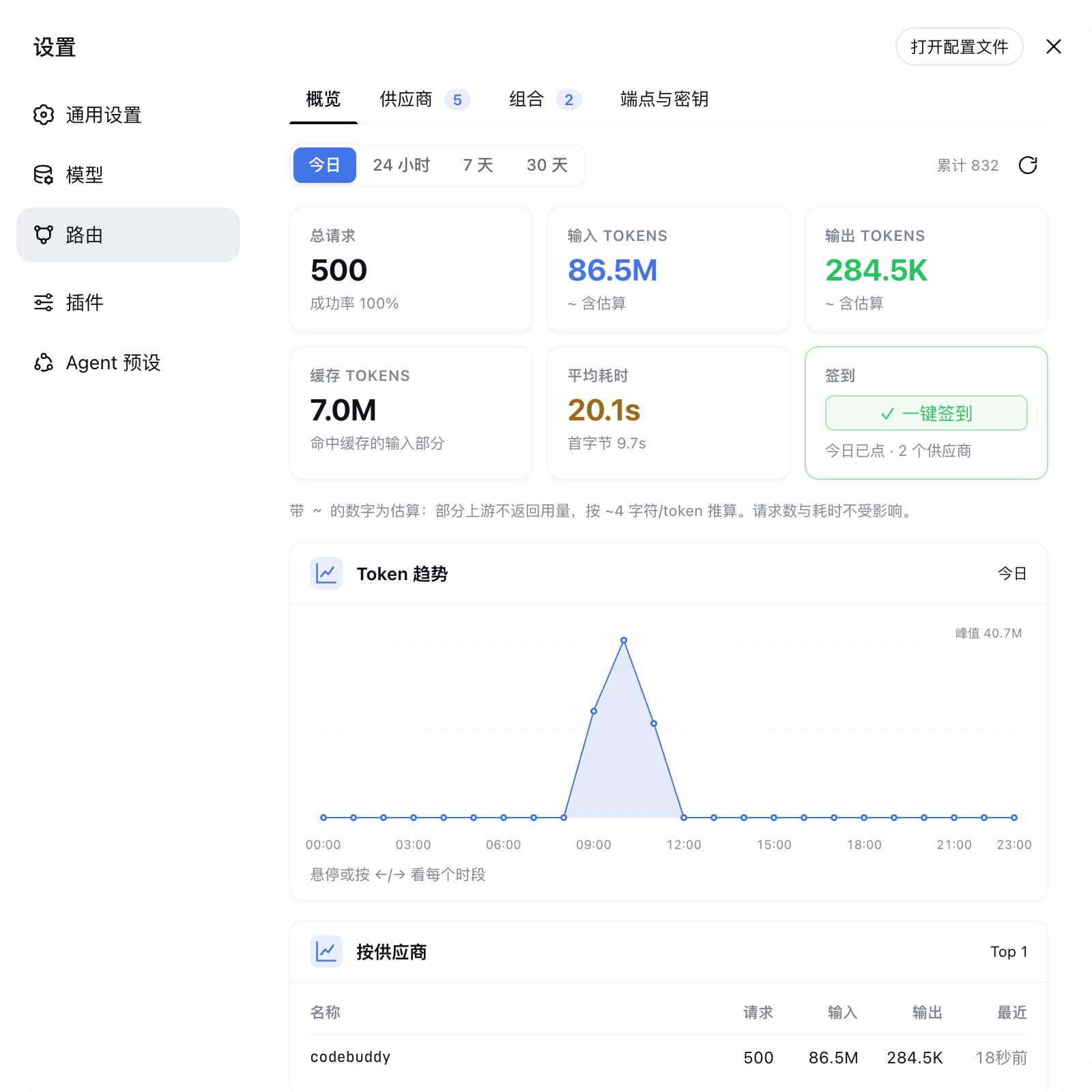
| 用量可观测 | 面板概览看板:周期切换、汇总卡、趋势折线、Top 榜、最近请求。 |
面板布局、组合 fallback、连接池/账号池、API key 管理都贴近 9router,但按 DSH「一切皆插件」的方式 重组得更轻。
供应商开发与接入规范见
docs/suppliers.md(契约 / 加载顺序 / 模型统一策略 / 内置供应商参考实现)。
面板(设置 → 路由)
面板挂在 设置 → 路由(官方 settings.section 座位,排在「模型」下面):
- 概览 — 用量看板(默认页):
- 周期切换 今日 / 24 小时 / 7 天 / 30 天;
- 汇总卡:总请求(含成功率)、输入 Tokens、输出 Tokens、缓存 Tokens、平均耗时(含首字节);
- 签到卡:一键签到所有支持签到的供应商(按
checkinNow能力筛),并显示 「今天点过没」; - Token 趋势折线图:鼠标悬停 / 触摸点选 / 键盘
←→(HomeEnd到两端,Esc取消) 看每个时段;读数和峰值用 K/M 缩写,精确值在悬停提示里; - Top 榜:按供应商 / 按模型(请求数带失败计数);
- 最近请求:时间 / 模型 / 供应商 / in↑ out↓ / 耗时,显示最近 10 条;
- 清空 — 清掉全部用量统计(不影响供应商、账号、组合配置);
- 数据落盘
data/usage.json(按天聚合 + 每天 24 个小时桶 + 最近 500 条明细 + 累计计数)。今日/7 天/30 天读天桶、24 小时读小时桶,都不受明细环容量限制; 明细环只服务「最近请求」列表。 小时桶从新数据开始累积,升级前那几天的天内分布查不到(明细环只剩 500 条 回溯不回去),那段历史的小时柱状图留空、24 小时口径按整桶计入 —— 不编数据。 token 口径:上游返回usage就用真值(分散在多帧时按字段取最大值合并); 上游不发时按 ~4 字符/token 估算,面板上标~。失败请求不估算—— 它没到上游,编造输入 token 只会把总量灌水; 缓存口径:OpenAI 系prompt_tokens含缓存,Claude 系不含(单报cache_read_input_tokens),归一时统一折成「prompt 含缓存」, 所以「缓存 Tokens」是「输入 Tokens」的子集,不是并列的第三种; 签到口径:卡片上的「今日已点」= 今天在这个浏览器点过这个按钮(记在 localStorage),不代表上游一定签上了——真凭据是上游的checked_in, 当前契约没有「查签到状态」的能力,要真状态得先给供应商契约加checkinStatus?()(升级路径写进CheckinCard.tsx头注释)。
- 供应商 — 供应商卡片(内置 / 插件分组),点击进入详情:
- 链接池 — 账号列表(冷却/禁用/健康数/积分),支持删除;
- 加链接 — 按供应商能力弹出不同流程:URL 登录(生成链接 → 浏览器登录 → 回调)、 API key 弹窗(填名字 + key)、轮询登录(登录后自动取凭证);
- 签到 — 供应商实现了签到的才显示(如 codebuddy:每日 100 积分,连续第 7 天 1000)。核心遍历所有链接逐个签,汇总「N/M 成功 · X 今日已签」;上游「今日已 签到」按成功处理(幂等),账号额度或凭证失效会单独标出;
- 刷新 — 刷所有链接的积分,并跑一次最简会话探测该供应商是否还有活着的链接 (走真实对话路径 + 账号池回退,能分清是账号额度没了还是供应商真挂了);
- 可用模型 — 模型列表,逐个启用/禁用 + 自定义模型(通用能力,持久化到
data/supplier-config.json,/v1/models与 chat 只接受启用的模型);单个模型可 「测试」,走真实对话路径并按账号池依次回退,所以能分清是这个账号额度没了还是 该模型真的不支持;
- 组合 — fallback 链(免费优先),可自定义。组合即模型:建好的组合会自动带出
为 DSH 模型目录里的
routerprovider 选项(设置 → 模型直接选组合名即可用),请求 按组合策略命中其中一个供应商模型; - 端点与密钥 — 端点核心(无隧道/Tailscale):
- API 端点 URL(
http://localhost:3080/v1,可复制); - 鉴权设置
requireApiKey开关; - API Keys 管理:创建 / 启用切换 / 显示 / 复制 / 删除(持久化到
data/keys.json)。
- API 端点 URL(
API 端点(OpenAI 兼容,:3080/v1)
# 模型列表
curl http://localhost:3080/v1/models

# 对话(流式/非流式)
curl -X POST http://localhost:3080/v1/chat/completions \
  -H "Content-Type: application/json" \
  -d '{"model":"glm-5.2","messages":[{"role":"user","content":"你好"}],"stream":false}'
任何支持 OpenAI 兼容 API 的工具(Claude Code、Cline、DSH 设置-模型 等)都可以把
baseURL 指向 http://localhost:3080/v1。
鉴权:默认 requireApiKey=false,/v1/* 不要求鉴权(本地使用,与 9router 一致)。
在「端点与密钥」页开启「要求 API Key」后,请求必须带
Authorization: Bearer <库内启用的 Key>。
面板 API(/router/api/*,同源)
| 端点 | 方法 | 说明 |
|---|---|---|
/health |
GET | 供应商列表(含来源/能力) |
/status |
GET | 全部账号(含供应商 id) |
/models |
GET | 合并模型列表(已过滤禁用) |
/combos |
GET | 组合 fallback 链 |
/keys |
GET/POST | 密钥列表(含完整 key)/ 创建 {name} → 返回明文一次 |
/keys/toggle |
POST | {id, isActive} |
/keys/delete |
POST | {id} |
/settings |
GET/PATCH | {requireApiKey} |
/ext |
GET/PATCH | 扩展插件列表 + 开关 {id, enabled}(见下) |
/stats |
GET | 用量统计 ?period=today|24h|7d|30d(汇总 + Top 榜 + 最近请求 20 条) |
/stats/chart |
GET | 趋势图数据 ?period=…(today/24h = 24 小时桶,7d/30d = 天桶) |
/stats/clear |
POST | 清空全部用量统计 |
/suppliers/:id/login |
POST | 生成登录链接 |
/suppliers/:id/login/callback |
POST | {callbackUrl} → 加账号 |
/suppliers/:id/models |
GET | 模型 + 启用状态 |
/suppliers/:id/models/toggle |
POST | {id, enabled} |
扩展插件(router.ext)
完整契约、注册方式、自检与降级约定见
docs/ext.md。
面板「扩展」页列出所有扩展插件,每个一个开关。扩展插件是独立 npm 包
(如 dsh-router-ext-rtk),
经 cordis service router.ext 注册自己 —— 同 router.suppliers 的共享表模式,
与加载顺序无关。
分工:
- dsh-router 核心:持有
router.ext空表;在tools/execute拦截 bash 工具 调用,把命令委派给表里 enabled 且 ready 的扩展器改写;命中则短路。只拦bash,其他工具(含run_code体内自起的子进程)不动。 - 扩展插件:实现
rewrite(command)(同步、不能做 IO)+ 自管开关状态 (何时 enabled、是否 ready、怎么持久化)。核心不感知具体扩展器实现。
开关打开时会自检:扩展器 getState().ready === false 的(如没装 rtk)拒绝开启
(API 返回 409 + 问题描述),面板内容区红字显示原因。
已知坑
ctx.tools.get(name)必须带 agent scope(exec.agent):bash 工具注册在 agent scope,不带 scope 只查全局视图会查不到,静默走原样执行、从不改写。- 改写在一次已被审批授权的工具调用内发生,不绕过 sandbox / 审批。
架构
浏览器(client 半)
  └─ 设置 → 路由(settings.section 座位, order 10, 排在「模型」下面)
       ├─ RouterSettingsSection  注册入口(settings-section.tsx)
       ├─ RouterView        tab: 概览 / 供应商 / 组合 / 端点与密钥(tab 条:下划线指示器)
            ├─ StatsTab          概览:用量看板(周期按钮组 + 汇总卡 + 折线趋势 + Top 榜 + 最近请求)
       ├─ SupplierDetail    供应商详情:链接池 + 加链接 + 可用模型
       ├─ EndpointTab       端点 URL + requireApiKey + 密钥管理
       └─ fetch /router/api/*            (同源,无 CORS)
            └─ host 半(src/index.ts)
                 ├─ /v1/models + /v1/chat/completions   (OpenAI 兼容, KeysStore 鉴权)
                 │    └─ RouterAdapter(src/llm/adapter.ts)  OpenAI SSE → DSH StreamChunk
                 │         (usage 经 toTokenUsage 转 DSH 契约,见 docs/suppliers.md)
                 ├─ KeysStore(src/keys.ts)              密钥库 + requireApiKey
                 └─ Router(路由器) → suppliers[]
                      ├─ OpenCodeSupplier(lib/suppliers/opencode.js) 无账号免费直连
                      ├─ OpenRouterSupplier(lib/suppliers/openrouter.js) API key 账号
                      └─ NvidiaSupplier(lib/suppliers/nvidia.js)       API key 账号
                      └─ 外部插件供应商(经 router.suppliers service 注册)
- 供应商抽象:可插拔 js 模块只提供差异化能力(
status/listModels/getAlias/chatOnce- 可选登录/签到/加 key);策略与通用能力(组合回退、账号池选号/冷却/禁用、
连接池排序、模型启用/自定义、别名、凭证、响应写入)由核心统一管。
chatOnce(uid, req)一次只服务一个账号,返回成功/失败 + 语义状态,换号由核心决定。
- 可选登录/签到/加 key);策略与通用能力(组合回退、账号池选号/冷却/禁用、
连接池排序、模型启用/自定义、别名、凭证、响应写入)由核心统一管。
- 供应商加载(三来源,见
docs/suppliers.md):- 内置:
lib/suppliers/*.js(随插件分发,如 opencode) - 用户:
~/.dsh/profiles/web/suppliers/*.js - 外部插件:其他 DSH 插件通过 cordis service
router.suppliers(值为{ [supplierId]: (env) => SupplierModule })暴露供应商, dsh-routerctx.inject(['router.suppliers'])延迟加载。
- 内置:
- 模型统一策略:插件不内置、不缓存模型;
listModels每次从上游拉取, 缓存由核心按 60s TTL 统一管(/suppliers/:id/models),/v1/models保持实时。 - 凭证存储:SQLite 单库
{authDir}/credentials.sqlite(表credentials(supplier, uid, data), 凭证为供应商不透明 JSON blob)。 - /v1/* 鉴权:由
KeysStore.requireApiKey控制。关闭 → 不鉴权; 开启 → Bearer 必须是「库内启用的 key」。
与 DSH 的边界
- dsh-router 复用 DSH 的 Web Server 与设置面板座位,不启动第二个应用或代理系统。
- 供应商 js 不改 DSH 的 prompt、工具 schema 或权限;它只负责「把上游协议翻译成 OpenAI 形态」,路由/回退/存储归核心。
- 数据分两处:
data/下的状态与用量 JSON(删了只是没统计了),以及auths/credentials.sqlite(删了要重新登录所有供应商)。 - 内置 patch 仅支持 DSH 的
webprofile。
前提
- 凭证由 dsh-router 核心统一管(SQLite 库
<dataDir>/auths/credentials.sqlite); - 供应商接入与开发见
docs/suppliers.md; - 重启 DSH 后
/v1/*即生效;面板管理账号、模型与密钥。
开发
pnpm install
pnpm build        # lib/index.js(host) + lib/client.js / lib/client-registry.js(browser)
pnpm typecheck
pnpm test         # node --test "src/**/*.test.ts"
需要一个供应商最小实现作参考时,看 examples/suppliers/echo.js;
完整契约、加载顺序与模型策略见 docs/suppliers.md。
致谢
感谢以下项目给的灵感:
- decolua/9router —— 本地 AI 路由网关,面板/组合/连接池/凭证等思路的来源;
- deepseek-ai/deepseek-harness —— DSH「一切皆插件」的宿主框架;
- omdsh-dev/DSH-better-sidebar —— DSH 插件形态与侧边栏入口的参考。
许可证
免责声明
本项目仅用于学习与技术研究,请勿用于商业用途。
Operate deliberately
Install and manage
Prerequisites and target Profile
Target: Web Profile
Delivery: Dsh Bundle Git — CARVIN94/dsh-router#a66b93f0fbbc1b5110d101549c934e5a357e16a6。
Verify, update, and remove
Show lifecycle commands
dsh plugin --profile web listCompatibility and access
DSH web Profile plugin; Node.js >=20: DSH 0.1.5-rc.1 or later。
Review compatibility evidence ↗
Risk facts
API-key protection is off by default
Evidence ↗Supplier credentials are stored in a local SQLite database
Evidence ↗Configured suppliers may receive routed model requests and credentials
Evidence ↗Evidence and editorial reviewManifest, Bundle patch, distribution and freshness
Immutable evidence
Review status and source activity
Enable “Require API Key” before exposing or sharing access to the local `/v1/*` endpoint, and review the suppliers you configure because routed requests leave DSH for those services.
AI reviewed Sep 16, 2026, 1:56 PM UTC。GitHub facts last checked Sep 16, 2026, 1:56 PM UTC。
No material source change has been recorded since this evidence baseline.