At a glance
What it does
A DSH Web panel for live monitoring of direct-child subagent runs.
Web Profile
>=0.1.0-rc.0; declared compatible: 0.1.5-alpha.2, 0.1.5-rc.1, 0.1.5-rc.2
Evidence-verified
Checked Sep 14, 2026, 1:54 PM UTC
Code-evidenced contributions
What it adds to DSH
Adds a DSH Web sidebar entry and floating panel for direct-child subagent status, run details, and aggregate usage indicators.
Mechanism evidence ↗Before you choose it
This DSH Web bundle adds a sidebar trigger and a movable floating panel. It lists subagents spawned directly by the current session, lets you open their conversations or move back to a parent session, and displays status, elapsed time, token details when reported, cache-hit metrics, and context indicators.
Best for
DeepSeek Harness Web users who coordinate subagents and want an at-a-glance view of their active and completed direct-child runs.
Common tasks
- Watch running, completed, failed, interrupted, token-limited, or rejected direct-child subagent runs.
- Open a listed subagent conversation and inspect the next layer of children.
- Review displayed input/output tokens, cache-hit rate, and context information when the provider reports usage.
- Reposition, resize, or collapse the monitor panel; its documented UI state can persist across sessions.
Permissions and data
The plugin reads subagent session status and documented token-usage information to render a local Web UI.
Permissions- Integrates with DSH client runtime, session, subagent, sidebar, layout, slots, webserver, and Cordis peer packages.
- The documentation says live sessions are read from memory; cold-session usage is read from persisted logs and cached.
- Panel position and size preferences are documented as stored locally, with some state keyed by session.
- No external service integration is declared in the supplied manifest.
- The documentation describes a local snapshot endpoint at `/api/subagent-monitor/snapshot`.
- No credential requirement is declared in the supplied evidence.
Limitations
- It shows only subagents directly spawned by the current session; deeper levels require opening a child session.
- Usage and cache fields are unavailable when the provider does not report them.
- The monitor is documented to poll only while its panel is open and the browser tab is visible.
- The documentation warns that its unauthenticated snapshot route is appropriate only for loopback or intranet use.
- The documented mobile behavior does not automatically show the panel at viewports of 768px or below.
What DSHub checked
- The immutable source commit, package manifest, and bundle patch were verified.
- The manifest declares DSH Web client injection, a bundle patch, Node.js requirements, and the listed DSH compatibility declarations.
- The package is identified in the npm registry, though its published package contents were not audited.
What DSHub did not check
- Installation, browser rendering, endpoint behavior, and runtime compatibility were not independently executed by this curation record.
- The README's claimed per-version test results and provenance/signing claim were not independently verified.
Pinned install
Install DSH Subagent Monitor
This plugin bundle does not have a DSH Plugin install action. Use its source documentation for the delivery method.
Maintainer source
Project README
中文 | English
✨ 是什么
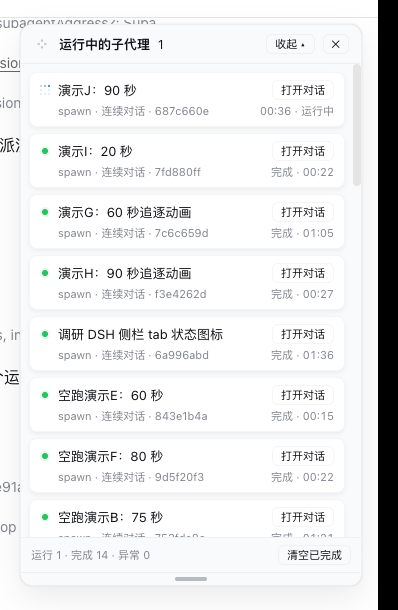
在 DSH Web 界面侧栏底部加一个「子代理」入口,并在屏幕右上角常驻一块卡片式面板,实时展示当前会话直接派生的子代理的运行状态。进入某个子代理会话后,面板随之显示该会话直接派生的下一层子代理。
面板顶部是一块总体监控看板:左侧三枚环形图展示主会话的上下文窗口当前占用、主会话与子代理聚合的缓存命中率;右侧一根状态柱状图展示当前层子代理的运行 / 完成 / 异常计数(按最大值等比缩放)。每张卡片下方另附一行用量明细(该 run 的输入 / 输出、缓存命中、上下文大小)。
面板支持两个方向的收起,互不干扰:
- 纵向(两段式):标题栏「收起」第一次只收下方子代理卡片(顶部总览看板保留,按钮变「全部收起」);再点一次才收到只剩标题栏;「展开」一步恢复。
- 横向(向左折叠为窄栏):标题栏
◂把面板折成 120px 窄栏 —— 右边缘钉住不动,所以是朝左折;保留上下文与主会话两枚环(原大小 48px),由左右一排改为从上到下一列,去掉子代理环,下部继续保留子代理运行框(紧凑卡片)。▸向右展开回 340px。
┌─ ⤢ 子代理看板 ──────────── [◂] [收起 ▴] [✕] ┐
│  ◔ 上下文 ◔ 主会话 ◔ 子代理    █ 运行 1 · █ 完成 1 · █ 异常 0 │
│ ┌─────────────────────────────────────┐ │
│ │ 🔵 统计 ui 目录 TS 文件数   [打开对话] │ │
│ │    one-shot · 1a2b3c4d   运行中 · 00:42 │ │
│ │    ↑12.3k ↓4.5k · 缓存 78% · 上下文 45.6k │ │
│ └─────────────────────────────────────┘ │
│ ┌─────────────────────────────────────┐ │
│ │ 🟢 演示子代理:统计文件类型  [打开对话] │ │
│ │    spawn · 2b3c4d5e    完成 · 03:12  │ │
│ └─────────────────────────────────────┘ │
│  运行 1 · 完成 1 · 异常 0    [清空已完成] │
│ ════════════════════════════════════════ │ ← 拖动调整高度
└─────────────────────────────────────────┘
横向收起后的窄栏(120px,两枚环原大小竖排):
┌ ⤢ 1 [▸][▴][✕] ┐
│      ◔        │  ← 上下文
│    上下文      │
│      ◔        │  ← 主会话
│    主会话      │
│ ┌───────────┐ │
│ │ 🔵 统计 ui… │ │  ← 整张卡片可点,即「打开对话」
│ │     00:42 │ │
│ └───────────┘ │
│ ┌───────────┐ │
│ │ 🟢 演示子…  │ │
│ │     03:12 │ │
│ └───────────┘ │
│ 1/1/0   [⤢][⌫] │
│ ══════════════ │
└───────────────┘
标题左侧
⤢四角箭头拖动柄移动面板位置,底部═拖动柄调整面板高度;两者均记忆,双击复位。「收起」两段式(纵向):第一次只收起下方子代理卡片(顶部总览看板保留),按钮变「全部收起」;再点一次收起到只剩标题栏;「展开」一步恢复完整面板。
◂ / ▸(横向):向左折成 120px 窄栏 / 向右展开回 340px。窄栏保留**上下文与主会话两枚环(原大小)**竖排 + 子代理卡片;窄 / 宽选择跨会话记忆,刷新后保持。两个方向可叠加 —— 窄栏里照样能两级纵向收起。
🎯 特性
| 特性 | 说明 |
|---|---|
| 🟢 实时状态 | 运行中(🔵 蓝色像素追逐动画,与 DSH 侧栏状态点同款 + 秒表)、完成(绿点 + 光晕)、失败、已打断、令牌上限、已拒绝 |
| 🃏 卡片化列表 | 每个子代理一张圆角卡片;「打开对话」在右侧,状态与耗时在第二行 |
| 🔽 逐层查看 | 只显示当前会话直接派生的子代理;打开其中一项后可继续查看下一层 |
| 🔙 一键返回 | 进入子代理会话后,面板出现「← 上一层」按钮,跳回直接父会话 |
| 🖐 自由摆放 | 标题左侧四角箭头拖动柄移动面板,位置自动记忆(跨会话保留);双击复位 |
| 📏 高度可调 | 底部拖动柄调整面板高度,高度按会话记忆;双击复位 |
| 🪗 两段式收起(纵向) | 标题栏「收起」第一段只隐藏子代理卡片、顶部总览看板保留;再点「全部收起」才收起到只剩标题栏;「展开」一步恢复 |
| ↔️ 横向收起(向左) | ◂ 把面板折成 120px 窄栏,右边缘钉住不动所以朝左折;保留上下文与主会话两枚环(原大小)竖排,去掉子代理环,下部保留子代理运行框(紧凑卡片,整张可点即打开对话);窄 / 宽跨会话记忆。与纵向两段式收起正交,可叠加 |
| 🔄 刷新自恢复 | 常驻组合,页面刷新 / 服务重启后自动恢复 |
| 💤 空闲不轮询 | 快照轮询只在面板打开且标签页可见时运行;关闭面板或切到后台即停表,重新打开 / 切回时先补一次请求再恢复 1 秒节奏 |
| 📊 总体看板 | 面板顶部汇总条:三枚环形图(主会话上下文窗口当前占用、主会话 / 子代理缓存命中率)+ 状态柱状图(运行 / 完成 / 异常计数,按最大值等比缩放) |
| ⚡ 用量明细 | 每张卡片显示该 run 的输入 / 输出 token、缓存命中率、累计上下文与上下文窗口利用率(provider 上报时) |
| 🎯 当前占用 | 主会话「上下文」环显示当前窗口占用(projectedTokens:最新 prompt 样本 + 表层启发式增减),随内容新增而上升、压缩后立即回落——而非随会话只增不减的累计量 |
| 🌐 中英文案 | 面板文案跟随宿主 UI 语言(设置 → 通用 → 语言);宿主未给出语言、或该语言无对应文案时回退中文 |
| 📱 移动端友好 | ≤768px 视口默认不弹出,侧栏按钮仍可手动打开 |
📦 安装
方式 A · npm 安装(推荐,一行命令)
dsh plugin --profile <your-profile> add @leetoners/dsh-ui-subagent-monitor
✅ 已发布
v0.5.0(GitHub Actions 构建并签名,SLSA provenance 可验)。
方式 B · GitHub 直装
dsh plugin --profile <your-profile> add github:Mombrane/dsh-subagent-monitor
# 首次安装若提示允许构建脚本,按提示在 profile 的 pnpm-workspace.yaml 中确认即可
重启 dsh web 即生效。本仓库同时是 DSH 客户端插件(dsh.client)与 组合 bundle(dsh.bundle + cordis.patch.yml),并随附预构建 lib/。
方式 C · DSH 源码仓库内联(适合二次开发)
# 1. 复制本仓库 src/ 为 <dsh>/packages/client/ui-subagent-monitor/
# 2. <dsh>/packages/bundle/web-app/package.json 加依赖
"@leetoners/dsh-ui-subagent-monitor": "workspace:*"
# 3. <dsh>/packages/bundle/web-app/cordis.patch.yml(ui-subagent 行之后)
- id: ui-subagent-monitor
  name: '@leetoners/dsh-ui-subagent-monitor'
# 4. 构建 + 重启
pnpm install && pnpm --filter @leetoners/dsh-ui-subagent-monitor bundle
# 重启 dsh web
还需在
<dsh>/tsconfig.client.json的references中加入本包路径,并将本包tsdown.config.ts改为引用主仓预设(import { clientBundle } from '../tsdown.client.ts')。
🧩 兼容性
DSH STORE 的自动复查只认 package.json 中完整 SemVer 的逐版本记录,宽泛范围不算可安装证据。本插件声明:
| 项 | 声明 |
|---|---|
| DSH 版本范围 | >=0.1.0-rc.0 |
| Node.js | ^22.19.0 或 >=24.0.0(与 DSH 自身一致) |
0.1.5-alpha.2 · 0.1.5-rc.1 · 0.1.5-rc.2 |
compatible |
上表的 compatible 不是推断,是 2026-09-14 在一次性 Profile 上逐版本实测的结果:每个版本建独立 DSH_HOME → dsh plugin --profile web add(bundle 层成功合成)→ dsh web 启动后浏览器内面板正常渲染、GET /api/subagent-monitor/snapshot 返回 200 → dsh plugin --profile web remove 后该路由回到 404、bundle 层归零。未列出的 DSH 版本即 unknown。
🏷️ 状态图例
| 状态 | 含义 |
|---|---|
| 🔵 运行中 | 正在执行,蓝色像素追逐动画(与 DSH 侧栏 tab 进行态同款)+ 实时秒表 |
| 🟢 完成 | 面板实时见证其成功结束,显示耗时(绿点 + 光晕) |
| ⚪ 已结束 | 历史回填行:服务重启前创建,结局未观测(成功/失败未知) |
| 🔴 失败 | 错误结束(红点 + 光晕) |
| 🟠 已打断 / 令牌上限 / 已拒绝 | 被中止 / 达到 token 上限 / 请求被拒绝(琥珀点 + 光晕) |
❓ FAQ
刷新页面会消失吗? 不会。面板是组合中的常驻行,页面每次加载自动恢复。
「完成」和「已结束」有什么区别? 🟢 是面板实时观测到的成功结局;⚪ 是服务重启前的历史记录,结局未观测。
面板有多大的容量? 每个直接父会话最多保留 200 条,超出淘汰最旧的已结束行。
面板位置和高度会记住吗? 会,且两者记忆策略不同:位置跨会话保留(所有会话共用同一位置);高度按会话分别记忆(localStorage 键带会话 ID,切换会话互不影响);刷新页面 / 重启浏览器后恢复;双击拖动柄恢复默认。
用量 / 缓存数据从哪来? 从每个子代理自己的会话日志折叠 provider 上报的 TokenUsage(assistant/message 事件);活会话读内存,冷会话读持久化日志并缓存。只有适配器上报用量时才有数据,否则显示「—」。
安全吗? 轮询路由 /api/subagent-monitor/snapshot 面向回环地址、无鉴权,仅建议本地/内网使用。
🌐 生态收录
| 渠道 | 状态 |
|---|---|
| GitHub topics | dsh-plugin、deepseek-harness(Oh-My-DSH 每 4 小时自动同步) |
| Oh-My-DSH 插件目录 | PR #8 待维护者合并 |
| awesome-dsh-plugin | ✅ 已收录(commit c7ad36e9,PR #675 已合并) |
📋 变更日志
完整变更历史见 CHANGELOG.md。当前版本 0.5.0(与 package.json 对齐)。
📖 架构文档
设计决策(为什么常驻、为什么自建轮询路由、事件归因模型)与数据流细节见 ARCHITECTURE.md。
📄 License
MIT © Mombrane
Operate deliberately
Install and manage
Prerequisites and target Profile
Target: Web Profile
Delivery: Dsh Bundle Git — Mombrane/dsh-subagent-monitor#f8beee47f4dea63096070c141a97f889181a590a。
Verify, update, and remove
Show lifecycle commands
dsh plugin --profile web listCompatibility and access
Declared compatible with DSH 0.1.5 alpha/RC releases: >=0.1.0-rc.0; declared compatible: 0.1.5-alpha.2, 0.1.5-rc.1, 0.1.5-rc.2。
Review compatibility evidence ↗
Risk facts
The documented snapshot route is unauthenticated and intended only for loopback or intranet use.
Evidence ↗The package declares a prepare lifecycle script that builds the package.
Evidence ↗Evidence and editorial reviewManifest, Bundle patch, distribution and freshness
Immutable evidence
Review status and source activity
MIT-licensed DSH Web bundle with a verified immutable Git delivery path; review the local unauthenticated snapshot endpoint before use outside a trusted local or intranet environment.
AI reviewed Sep 14, 2026, 1:55 PM UTC。GitHub facts last checked Sep 14, 2026, 1:55 PM UTC。
No material source change has been recorded since this evidence baseline.