At a glance
What it does
Use Telegram as a mobile remote for live DeepSeek Harness Web sessions.
Web Profile
Not declared in supplied evidence
Evidence-verified
Checked Sep 15, 2026, 1:48 PM UTC
Code-evidenced contributions
What it adds to DSH
Binds a Telegram chat to a live DeepSeek Harness Web session so phone and desktop follow the same conversation trajectory.
Mechanism evidence ↗Before you choose it
This DSH plugin lets an allowlisted Telegram user browse workspaces and non-archived sessions, bind a phone chat to one live Web session, and continue the same conversation from either device. It also exposes session status, the previous exchange, manual compaction, and model selection for the next turn.
Best for
DeepSeek Harness users who run dsh web locally and want to continue an existing Web session from Telegram.
Common tasks
- Attach a phone to a current workspace session with /sessions and continue the same conversation.
- Review the bound session’s last exchange with /last or switch its model for the next turn.
- Send supported text and image messages from Telegram while keeping the Web session as the source of truth.
Permissions and data
Connects a local DSH Web session to Telegram using a bot token and an allowed-user list.
Permissions- Telegram bot token
- Numeric Telegram user-ID allowlist
- Access to local DeepSeek Harness Web sessions through the web profile
- Text and supported image messages are sent into the bound session.
- Images are persisted through the host attachment service, using the same channel described for Web uploads.
- Telegram Bot API
- Optional local HTTP(S) proxy for Telegram connectivity
- DSH_TELEGRAM_TOKEN
- DSH_TELEGRAM_ALLOWED_USER_IDS
Limitations
- Requires a working local dsh web setup and Node.js >=22.
- Archived, blank, and sub-agent sessions are excluded from the phone session list.
- Voice, video, and other file types are not supported.
- Image input can be rejected when the selected model does not support images.
- No DeepSeek Harness version range is declared in the supplied evidence.
What DSHub checked
- The package manifest declares a DSH bundle patch, Node.js >=22, and DeepSeek Harness peer dependencies.
- The immutable Git bundle structure and patch are verified.
- The README documents Telegram session binding, allowlist configuration, and the supported commands.
What DSHub did not check
- Installation, Telegram connectivity, session synchronization, and runtime behavior were not executed during this review.
- The corresponding npm package version was not found in the supplied distribution evidence.
Pinned install
Install dsh-telegram-channel
This plugin bundle does not have a DSH Plugin install action. Use its source documentation for the delivery method.
Maintainer source
Project README
dsh-telegram-channel
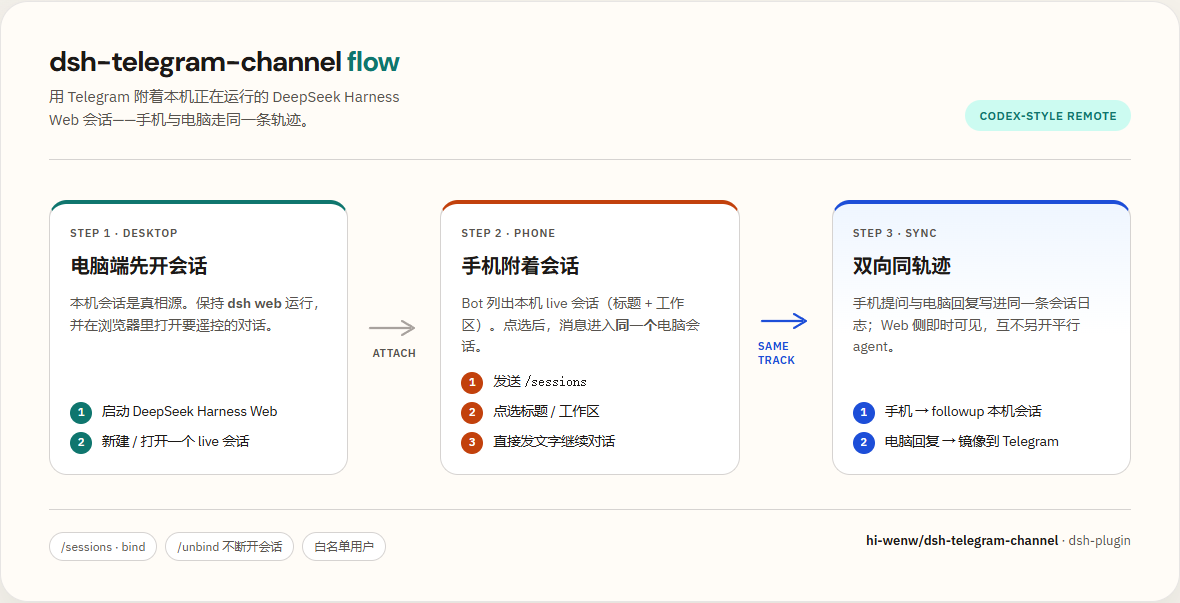
Telegram 手机遥控器 for DeepSeek Harness:附着本机正在跑的 Web 会话,与电脑 同轨迹、双向可见(Codex-style)。
发现: dsh-plugin topic · 安装:dsh plugin --profile web add github:hi-wenw/dsh-telegram-channel
Keywords: Telegram · Bot · Mobile · Remote · DSH · Cordis · dsh-plugin · sessions · bind
中文
使用前需要什么
| 需要 | 说明 |
|---|---|
DeepSeek Harness(dsh) |
本机已能跑通 dsh web |
| Node.js | 跟 Harness 走,建议 ≥22 |
| Telegram Bot Token | @BotFather → /newbot |
| 数字 User ID | @userinfobot |
| 代理(可选) | 若直连不上 api.telegram.org,需本机 HTTP(S)_PROXY |
不需要 Python。
30 秒理解
- 电脑
dsh web开着(会话列表与 Web 对齐,已归档除外) - 手机 Bot:
/sessions→ 工作区 → 会话 → 附着 - 之后手机 ↔ Web 走同一条轨迹;可用
/model切换模型(下一回合生效)
支持的消息:文本、图片(照片或以文件形式发送的 png/jpeg/webp/gif,可带文字说明;多张相册照片合并为一条消息进入会话)。语音/视频/其他文件暂不支持(会收到提示)。图片经宿主附件服务持久化,与 Web 端上传走同一通道;当前模型不支持图像输入时会收到明确提示。
效果截图
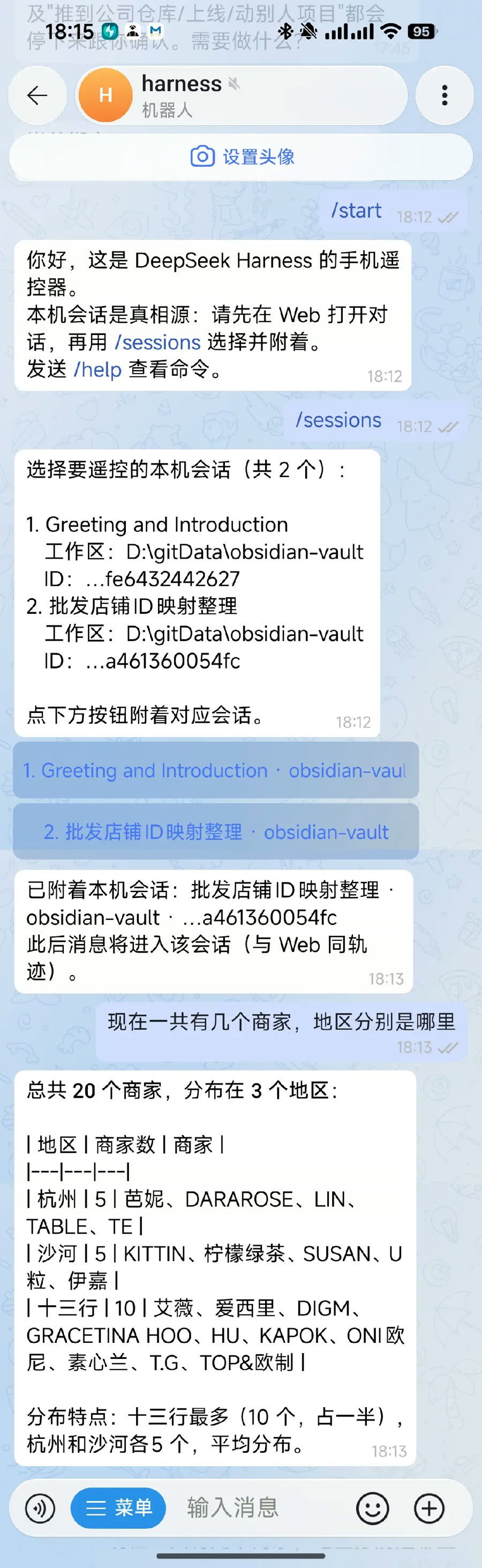
手机选择会话并发问:
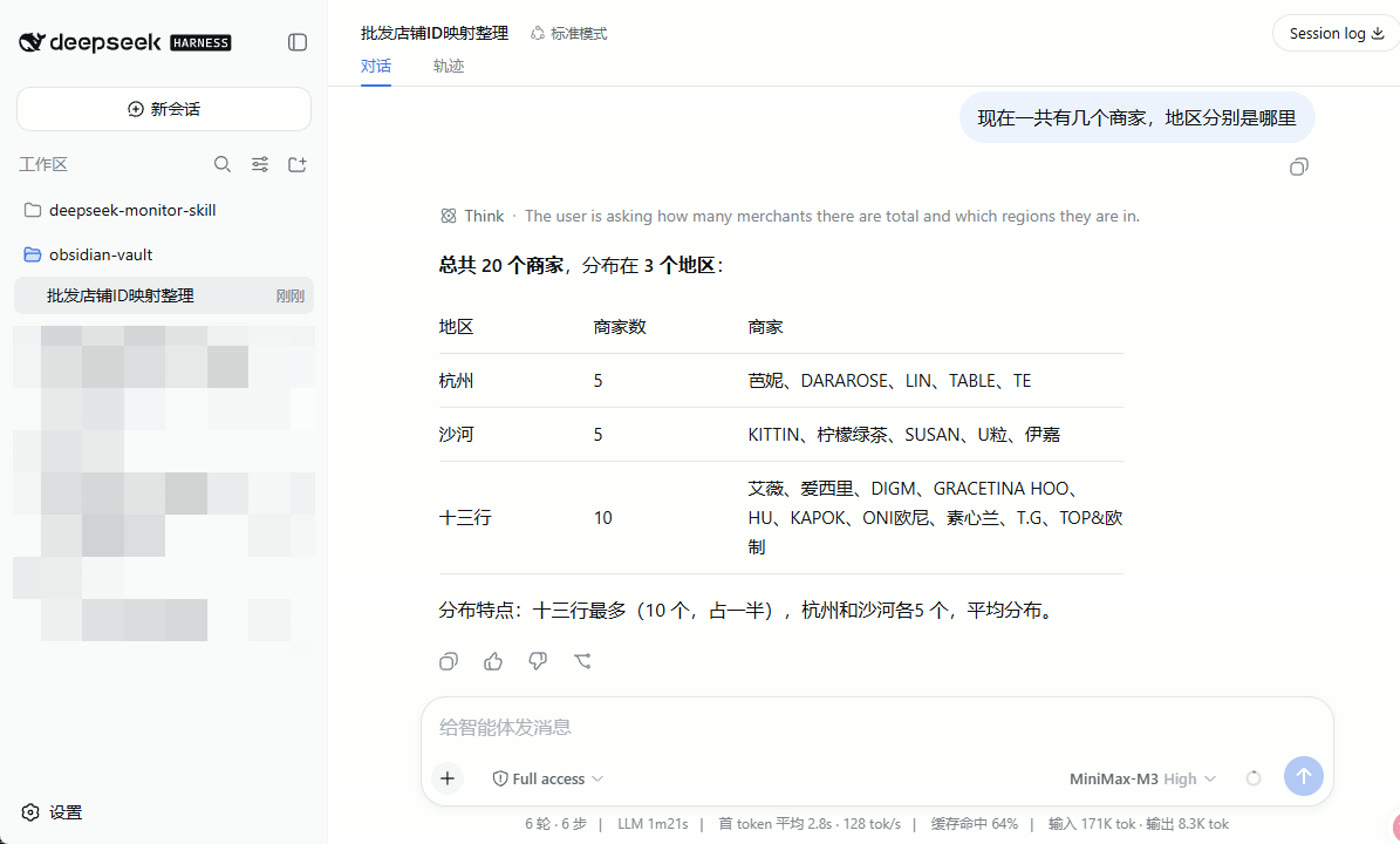
电脑 Web 同步收到同一条消息与回复:
一键管理菜单(推荐)
先准备两样东西:
| 准备 | 怎么拿 |
|---|---|
| Bot Token | Telegram 搜 @BotFather → /newbot → 复制 token |
| 数字 User ID | 搜 @userinfobot → Start → 复制纯数字 |
Token 不要发到公开群;泄露了去 BotFather
/revoke。
Windows
请在 PowerShell 执行。若当前是 CMD,用下面「CMD 一键」那行。
irm https://raw.githubusercontent.com/hi-wenw/dsh-telegram-channel/master/scripts/install.ps1 | iex
脚本已兼容
irm | iex(菜单逻辑包在 scriptblock 里)。CMD 请用下面整行。
CMD 一键:
powershell -NoProfile -ExecutionPolicy Bypass -Command "irm https://raw.githubusercontent.com/hi-wenw/dsh-telegram-channel/master/scripts/install.ps1 | iex"
备用(先下载再执行):
powershell -NoProfile -ExecutionPolicy Bypass -Command "iwr -UseBasicParsing https://raw.githubusercontent.com/hi-wenw/dsh-telegram-channel/master/scripts/install.ps1 -OutFile $env:TEMP\dsh-tg.ps1; & $env:TEMP\dsh-tg.ps1"
启动后用数字选择:
1) 安装 / 重装插件(写入 Token + 白名单)
2) 启动 dsh web(新窗口)
3) 停止 dsh web
4) 查看状态
5) 打开浏览器
0) 退出
也可直接指定动作(不进菜单):
.\scripts\install.ps1 -Action install -Token '...' -UserId '123456789'
.\scripts\install.ps1 -Action start
.\scripts\install.ps1 -Action stop
.\scripts\install.ps1 -Action status
安装时脚本会:写环境变量、补 allowBuilds、执行 dsh plugin add(不会再 insert 同名 id)。
macOS / Linux
curl -fsSL https://raw.githubusercontent.com/hi-wenw/dsh-telegram-channel/master/scripts/install.sh | bash
# 同样出现数字菜单;或:
# ./scripts/install.sh install --token '...' --user-id '...'
# ./scripts/install.sh start|stop|status
手机怎么用
- 菜单选 2 启动
dsh web(或自己运行dsh web) - 浏览器里可看到工作区与会话(归档会话不会出现在手机列表)
- 手机对 Bot:
/start→/sessions→ 选工作区 → 选会话 → 聊天 - 需要换模型时:
/model→ 点选(与 Web 同 API,下一回合生效) - 续接上下文:附着后点 查看上次对话,或发
/last
输入框旁的 / 菜单应有:start sessions last model status compact unbind help。
| 命令 | 作用 |
|---|---|
/sessions |
先列工作区,再列该工作区会话(与 Web 对齐,排除归档/空白/子代理);冷会话附着时会自动 resume |
/last |
查看绑定会话的上次问答(附着后也会出现「查看上次对话」按钮) |
/model |
切换当前绑定会话的模型 |
/status |
通用状态显示:绑定会话/会话 ID/工作区/当前模型/思考强度/上下文长度/首 token 平均/输出速率/输入输出 tokens(与 Web 底部统计条同源) |
/compact |
手动压缩当前绑定会话的历史(缩短上下文;会话需空闲,压缩期间新消息排队) |
/unbind |
只断开手机,不关电脑会话 |
/help |
帮助 |
手工安装(可选)
若不想跑脚本:
# 用户环境变量(或当前会话 $env:...)
# DSH_TELEGRAM_TOKEN = BotFather token
# DSH_TELEGRAM_ALLOWED_USER_IDS = 数字ID

dsh plugin --profile web add github:hi-wenw/dsh-telegram-channel
dsh web
本地目录安装:
dsh plugin --profile web add D:\path\to\dsh-telegram-channel
需要改 YAML 白名单时,只能按 id 覆盖,不要再 insert 同名 id:
- id: dsh-telegram-channel
  config:
    token: ""
    allowedUserIds: [123456789]
示例:examples/telegram-agent/cordis.patch.example.yml。
配置
| 键 / 环境变量 | 含义 |
|---|---|
token / DSH_TELEGRAM_TOKEN |
Bot token |
allowedUserIds / DSH_TELEGRAM_ALLOWED_USER_IDS |
白名单;都空 = 谁都不能用 |
allowAllUsers |
true 仅调试 |
maxMessageLength |
默认 4096 |
pollingTimeoutSec |
默认 30 |
rendering |
html(默认,兼容所有客户端)或 rich(原生 Rich Message) |
若本机用了 HTTP(S)_PROXY 访问 Telegram,插件会自动走代理(无需再设 NODE_USE_ENV_PROXY)。
故障排查
| 现象 | 处理 |
|---|---|
ERR_PNPM_IGNORED_BUILDS / allowBuilds |
pnpm 11 起:仅 dsh-telegram-channel: true 不够(git 包无效)。在 ~\.dsh\profiles\web\pnpm-workspace.yaml 写入仓库级授权后重装:<br>'dsh-telegram-channel@git+https://github.com/hi-wenw/dsh-telegram-channel.git': true<br>再跑菜单 1(新版安装脚本会自动写) |
duplicate loader entry id: dsh-telegram-channel |
用户 patch 不要 insert 同名 id;用上面的 - id: 覆盖,或只用环境变量白名单 |
| 手机完全没回复 / ConnectTimeout | 打开本地代理(如 7890),重启 dsh web |
missing bot token |
检查环境变量;新开终端再 dsh web |
| 「无权限」 | User ID 必须是 @userinfobot 的数字 |
/sessions 无会话 |
确认 Web 有未归档会话;空白会话会被隐藏 |
/sessions 比电脑少很多 |
升级到 ≥0.3.0:应按工作区列出;仍少则检查是否归档 |
/model 不可用 |
需 dsh web(apiProxy);先 /sessions 绑定。≥0.3.2 已修复「未 inject 读不到 apiProxy」 |
| Telegram 401 | Token 错了或被 revoke |
开发
git clone https://github.com/hi-wenw/dsh-telegram-channel.git
cd dsh-telegram-channel
npm install --legacy-peer-deps
npm test
npm run build
发布与发现(社区插件)
社区发现入口主要是 GitHub topic,不是封闭应用商店审核:
- 仓库 公开,
package.json声明dsh.bundle.patch(本仓库已有) - About → Topics 加上
dsh-plugin(已加;可浏览 topic 列表) - 用户安装:
dsh plugin --profile web add github:hi-wenw/dsh-telegram-channel
- 可选:收录到 awesome-deepseek-harness 等精选列表;可选再发 npm
官方也建议插件作者使用 dsh-plugin topic 方便检索。
许可证
English
Prerequisites
- Working DeepSeek Harness (
dsh web) - Node.js (typically ≥22 with Harness)
- Telegram bot token + numeric user id
- Optional HTTP(S)_PROXY if Telegram API is blocked
- No Python required
What this is
Telegram mobile remote for DeepSeek Harness Web sessions. Desktop/Web is the source of truth; the phone attaches (no parallel hidden agent). /sessions is workspace → session (Web-aligned, archived excluded). /model switches the bound session’s model for the next turn.
Screenshots
Phone: pick a session and chat:
Desktop Web shows the same trajectory:
One-click manager (Windows)
Run in PowerShell (not CMD). Opens a number menu: install / start / stop / status / open browser.
irm https://raw.githubusercontent.com/hi-wenw/dsh-telegram-channel/master/scripts/install.ps1 | iex
CMD:
powershell -NoProfile -ExecutionPolicy Bypass -Command "irm https://raw.githubusercontent.com/hi-wenw/dsh-telegram-channel/master/scripts/install.ps1 | iex"
Direct actions:
.\scripts\install.ps1 -Action start
.\scripts\install.ps1 -Action stop
.\scripts\install.ps1 -Action install -Token '...' -UserId '123456789'
The script sets user env vars, ensures allowBuilds, and runs dsh plugin add. After start, phone: /sessions → workspace → session → bind; optional /model.
Unix
export DSH_TELEGRAM_TOKEN='...'
export DSH_TELEGRAM_ALLOWED_USER_IDS='123456789'
curl -fsSL https://raw.githubusercontent.com/hi-wenw/dsh-telegram-channel/master/scripts/install.sh | bash
Manual
dsh plugin --profile web add github:hi-wenw/dsh-telegram-channel
Allowlist via DSH_TELEGRAM_ALLOWED_USER_IDS (preferred) or id-targeted YAML override — never re-insert the same plugin id.
Discoverability
Listed under the public GitHub topic dsh-plugin. Install:
dsh plugin --profile web add github:hi-wenw/dsh-telegram-channel
License
MIT
Operate deliberately
Install and manage
Prerequisites and target Profile
Target: Web Profile
Delivery: Dsh Bundle Git — hi-wenw/dsh-telegram-channel#2e9a3070e3efbb4a379947839e85dad1389b0e2b。
Verify, update, and remove
Show lifecycle commands
dsh plugin --profile web listCompatibility and access
DeepSeek Harness Web profile; Node.js >=22 declared: Not declared in supplied evidence。
Review compatibility evidence ↗
Risk facts
Requires a Telegram bot token and numeric allowed-user IDs; protect and rotate a leaked token through BotFather.
Evidence ↗Authorized Telegram users can attach to configured local Web sessions and send supported text or image messages into them.
Evidence ↗Evidence and editorial reviewManifest, Bundle patch, distribution and freshness
Immutable evidence
Review status and source activity
Use the pinned Git-bundle source. Configure a restrictive allowlist before starting dsh web; do not enable allowAllUsers except for debugging.
AI reviewed Sep 15, 2026, 1:49 PM UTC。GitHub facts last checked Sep 15, 2026, 1:49 PM UTC。
No material source change has been recorded since this evidence baseline.