At a glance
What it does
A DeepSeek Harness Web plugin for hands-free voice chats with streamed spoken replies.
Web Profile
dsh >= 0.1.0-rc.7
Evidence-verified
Checked Sep 11, 2026, 2:07 PM UTC
Code-evidenced contributions
What it adds to DSH
Adds a full-screen call interface with microphone input, streaming speech playback, sentence highlighting, mute, collapse, and barge-in controls.
Mechanism evidence ↗Before you choose it
Open a call-style overlay from the conversation microphone, speak a prompt, and hear the reply as it streams. It can highlight the sentence being read, mute or collapse the call layer, and optionally interrupt playback when you begin speaking.
Best for
DeepSeek Harness Web users who want to converse while away from the keyboard or reduce screen-focused interaction.
Common tasks
- Speak a prompt and automatically submit it after a configured pause.
- Listen to generated reply text while retaining the normal conversation stream for reasoning and tool activity.
- Use a mobile-friendly call layer for hands-free, multi-turn conversations.
Permissions and data
Uses microphone input for speech recognition and can use local system speech or cloud speech providers.
Permissions- Microphone permission is required for voice input.
- The documentation states that cloud-engine keys stay on the local machine and are not exposed to the browser or sent in voice requests.
- Voice recognition uses a cloud engine; no offline recognition option is documented.
- DashScope/Qwen can provide speech synthesis and recognition.
- iFlytek can provide speech synthesis and recognition.
- System speech needs no credential.
- DashScope requires a DashScope API key for its cloud engines.
- iFlytek requires an APPID, API key, and API secret.
Limitations
- Requires dsh 0.1.0-rc.7 or later with the Web profile, Chrome or Edge, and microphone permission.
- Speech recognition requires a configured cloud engine and network access.
- Cloud-provider usage may incur charges or be subject to provider quotas.
- The package’s runtime behavior and installation were not executed during this review.
What DSHub checked
- The pinned source defines a Web client injection and a bundle patch that inserts the voice-talk plugin.
- The repository documents npm installation, supported voice engines, configuration, and environment requirements.
- The package is MIT licensed and has a verified registry identity.
What DSHub did not check
- Successful installation, microphone access, provider authentication, and end-to-end voice calls were not tested.
- Registry package contents were not audited.
Pinned install
Install dsh-voice-talk
This plugin bundle does not have a DSH Plugin install action. Use its source documentation for the delivery method.
Maintainer source
Project README
dsh-voice-talk
DeepSeek Harness Web 的语音对话插件:点一下麦克风,全屏通话层起,边说边听,AI 回复边生成边念。


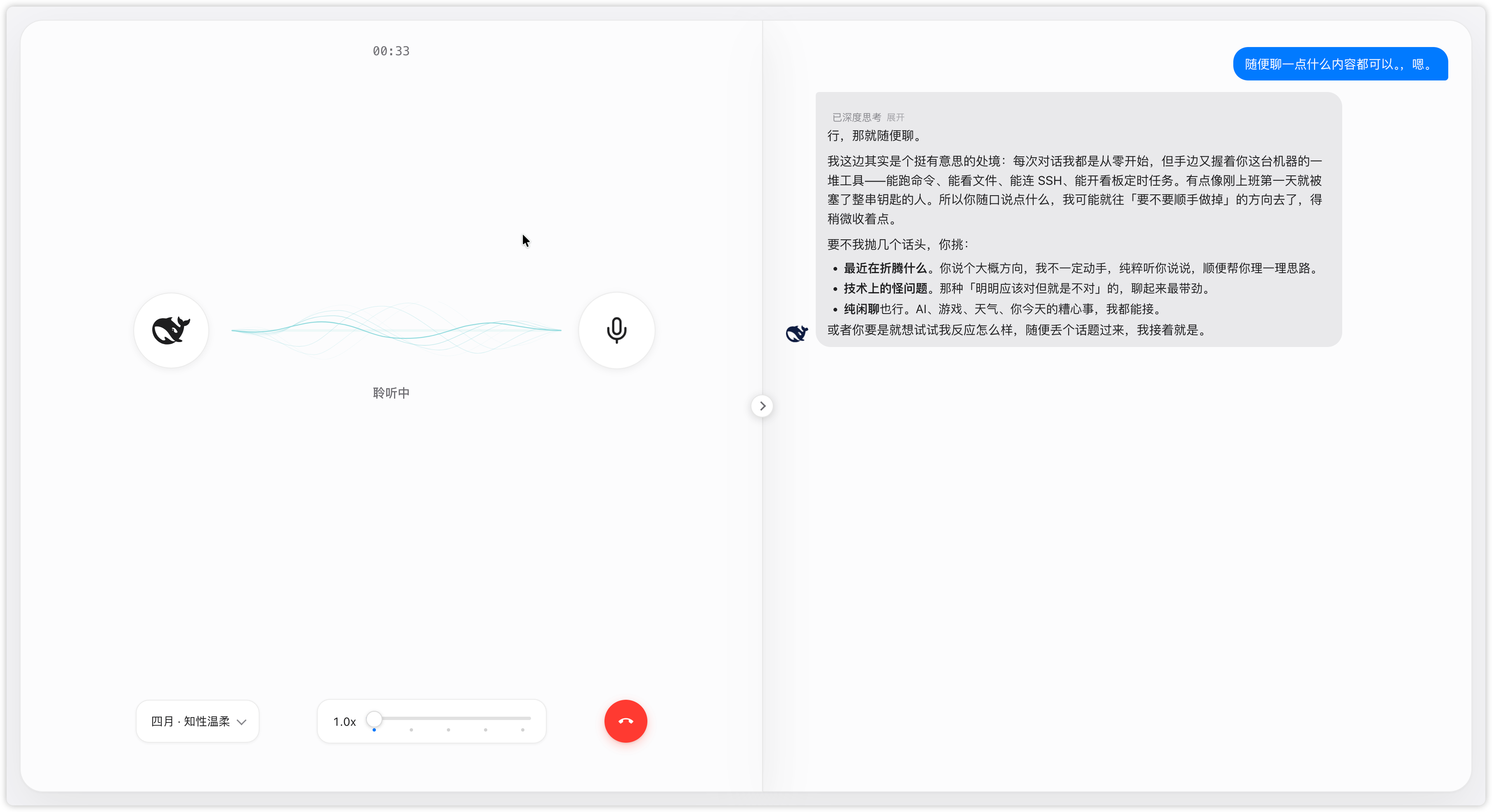
特性
- 一键通话:对话页点麦克风即进入全屏通话层,红色挂机按钮或
Esc退出。 - 边说边听:AI 回复边生成边播报,只念正文(代码、推理、工具调用不念);右侧信息流与原生一致,思考与工具调用完整展示。
- 逐句高亮:播报进度在信息流里逐句高亮,听到哪读到哪。
- 通话中可静音、可收起:静音不收录也不挂断,收起回到原生界面继续。
- 密钥不出本机:云端引擎的密钥只保存在本机,浏览器全程接触不到。
快速开始
1. 安装
方式一:npm(推荐)
dsh plugin --profile web add dsh-voice-talk
装完重启:
dsh web
方式二:源码(开发 / 使用未发布版本)
git clone https://github.com/duoduoqian708/dsh-voice-talk.git
cd dsh-voice-talk
npm install && npm run build
dsh plugin --profile web add /path/to/dsh-voice-talk
npm run typecheck类型检查;npm run build产出lib/index.js(host 半边)与lib/client.js(浏览器半边)。
2. 启用
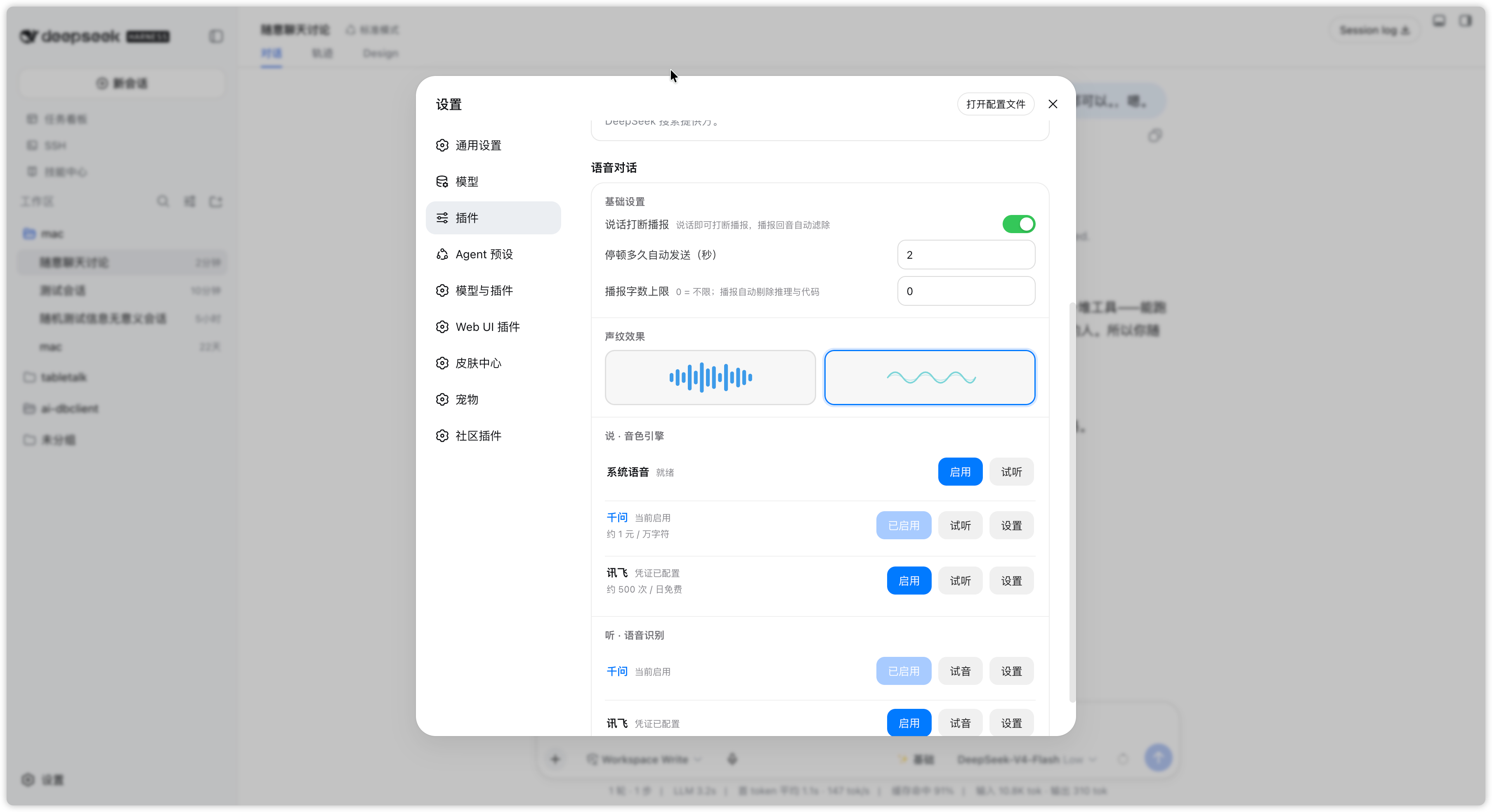
设置 → 插件 → 语音对话 → 打开「说」「听」对应引擎的开关。
3. 配置语音(关键)
「说」可以用系统语音(免费离线)或千问、讯飞;「听」只有云端引擎,没有离线识别,必须配置对应密钥。最省事的方式:申请一个阿里云百炼(DashScope)Key,同时填到「说」和「听」的千问引擎,听说就都通了。
语音引擎
| 用途 | 引擎 | 费用 | 凭证 |
|---|---|---|---|
| 说 | 系统语音 | 免费 · 离线 | 无需 |
| 说 · 听 | 千问(主推) | 约 1 元 / 万字符 | DashScope API Key |
| 说 · 听 | 讯飞 | 每日免费额度 | APPID + API Key + API Secret |
密钥入口:设置 → 插件 → 语音对话 → 对应引擎「设置」。填好后可点「试听 / 试音」验证。
配置项
设置页里改的是持久默认;通话层上调的是会话级,挂断保留、新会话回到默认。音色、语速在通话层也能临时调。
| 配置 | 说明 | 默认 |
|---|---|---|
| 说话打断播报 | 说话时打断正在播报的内容(建议戴耳机使用) | 关 |
| 停顿多久自动发送(秒) | 说完停顿多久自动提交 | 2 |
| 播报字数上限 | 单次播报的最大字数,0 为不限 | 0 |
| 声纹效果 | 通话层波形样式:律动 / 波纹 | 波纹 |
| 语速 | 播报语速,按引擎设默认,通话层可临时调 | 1.0x |
| 语言 | 识别与合成使用的语言 | zh-CN |
隐私与安全
云端引擎的密钥只保存在本机,浏览器接触不到,语音请求里也不会带上密钥。
常见问题
点了麦克风没反应,或一直停在「聆听中」? 确认「听」的引擎已配置密钥并启用(设置 → 插件 → 语音对话 → 听 · 语音识别)。
有文字但没有声音? 确认「说」的引擎已启用;云端引擎检查密钥与余额;系统语音检查系统音量与所选音色。
说话打断不了播报? 「说话打断播报」默认关闭,需手动打开;建议戴耳机,否则扬声器声音会被麦克风收录,影响打断判断。
彩蛋
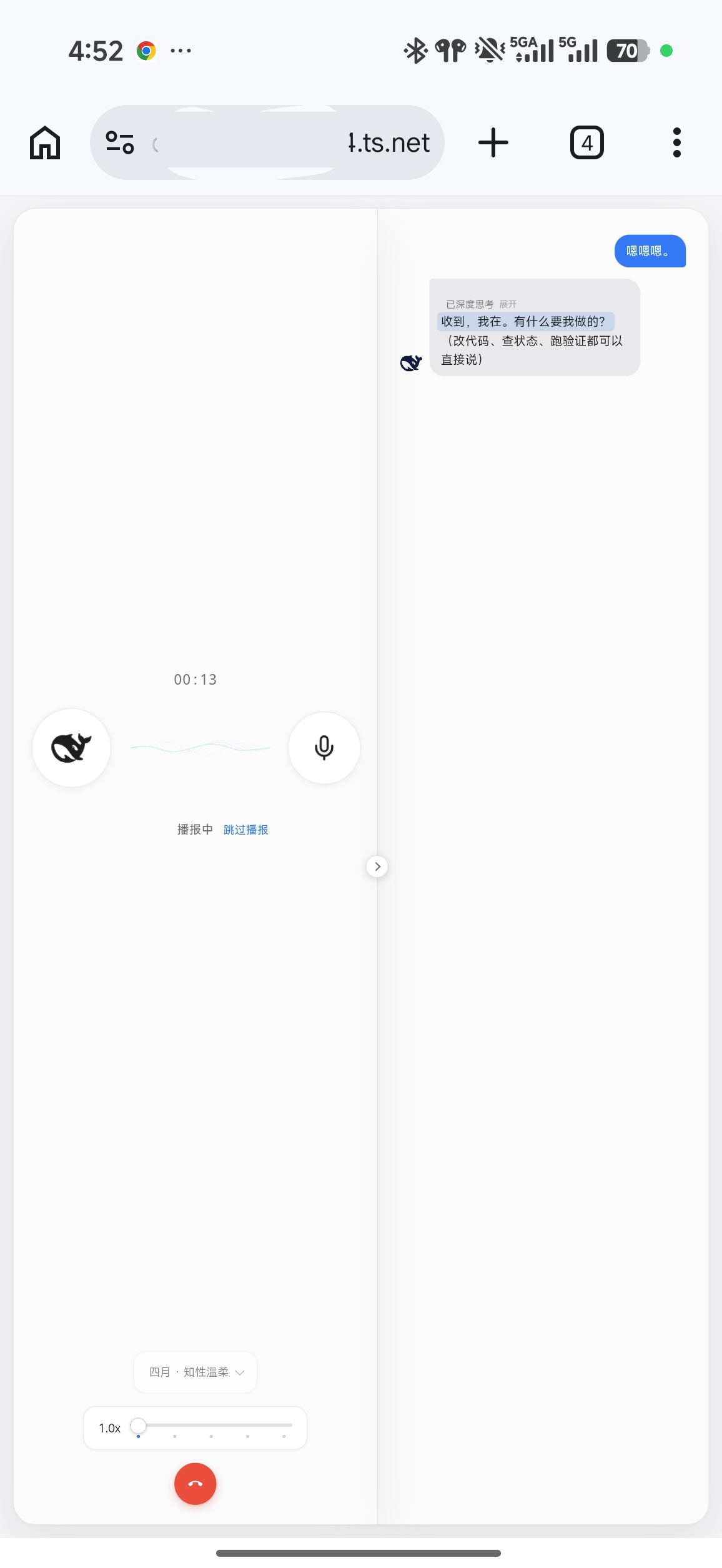
假设你肩酸脖疼不想盯着屏幕,假设你恰好开了代理端口,假设你想运动工作两头兼顾——试着带着手机出门,边散步边聊开发吧。
环境要求
- dsh ≥ 0.1.0-rc.7,
webprofile - Chrome / Edge
- 麦克风权限;云端识别需要网络
License
Operate deliberately
Install and manage
Prerequisites and target Profile
Target: Web Profile
Delivery: Dsh Bundle Git — duoduoqian708/dsh-voice-talk#35cfb0650b8178b7c373f08b5330f331120791bd。
Verify, update, and remove
Show lifecycle commands
dsh plugin --profile web listCompatibility and access
DeepSeek Harness Web profile; Chrome or Edge required: dsh >= 0.1.0-rc.7。
Review compatibility evidence ↗
Risk facts
Requires microphone permission for voice input.
Evidence ↗Cloud speech recognition and optional cloud synthesis require provider credentials and network access.
Evidence ↗The package declares a prepare lifecycle script that runs its build.
Evidence ↗Evidence and editorial reviewManifest, Bundle patch, distribution and freshness
Immutable evidence
Review status and source activity
Use the system voice option for offline spoken output, but plan on a cloud credential and network connection for speech recognition.
AI reviewed Sep 11, 2026, 2:08 PM UTC。GitHub facts last checked Sep 11, 2026, 2:08 PM UTC。
No material source change has been recorded since this evidence baseline.