At a glance
What it does
A DSH Web plugin with workbenches and skills for fiction, short dramas, novel-to-game projects, and video recaps.
Web Profile, Story Profile
DSH peer dependencies: ^0.1.5-rc.1; Node.js >=24.0.0
Evidence-verified
Checked Sep 12, 2026, 1:49 PM UTC
Code-evidenced contributions
What it adds to DSH
Adds novel, short-drama, interactive-game, and video-recap workbenches to DSH Web.
Mechanism evidence ↗Bundles skills for fiction, short-drama production, novel-to-game adaptation, and video recap workflows.
Mechanism evidence ↗Before you choose it
Oh Story extends DeepSeek Harness with creative project workbenches, bundled skills, and workspace-aware views. Its short-drama flow covers scripts, visual settings, storyboards, image and video prompts, production, review, and editing; it also includes novel, game-adaptation, and video-recap workflows.
Best for
Creators using DeepSeek Harness who want a structured workspace for fiction, episodic short-drama, interactive-game, or video-recap projects.
Common tasks
- Start or continue a fiction-writing project with dedicated story skills.
- Develop a short drama from script and visual assets through storyboard, prompts, production, and editing.
- Adapt a novel into an interactive game project.
- Organize a video-recap project and inspect source, work, and output media.
Permissions and data
The plugin works in DSH workspaces and relies on DSH-managed models, credentials, permissions, sessions, and file tools.
Permissions- Workspace file access is used for creative project files and generated media.
- DSH Web client components are injected into the web profile.
- The README states that model credentials are managed by DSH rather than read by the plugin.
- Adapter configuration is described as credential-free; provider keys are supplied through host environment variables.
- Optional short-drama production can use GPT Image 2, Seedance, MiniMax H3, and MiniMax Music.
- Video-recap and TTS workflows may require MiMo, Fish Audio, or both.
- A DSH model provider/API key is needed for AI creation.
- Optional media production requires the corresponding provider environment variables.
Limitations
- Requires Node.js 24+ and DSH peer dependencies in the declared range.
- The video workbench pipeline additionally requires Python 3.10+ and ffmpeg/ffprobe with libass subtitles support.
- Media-generation providers, models, account access, credentials, and availability are not supplied by the plugin.
- The supplied evidence does not establish a successful installation or runtime test in this environment.
What DSHub checked
- The immutable Git source, package manifest, and DSH bundle patch were verified.
- Package metadata declares version 0.1.9, MIT license, Node.js >=24, web platform integration, and DSH peer dependencies.
- The package is listed as a verified npm distribution identity, though its registry contents were not audited.
What DSHub did not check
- Installation, runtime behavior, provider access, media output quality, and compatibility with a particular local DSH installation were not executed.
Pinned install
Install Oh Story for DeepSeek Harness
This plugin bundle does not have a DSH Plugin install action. Use its source documentation for the delivery method.
Maintainer source
Project README
中文 | English
<div align="center">oh-story-dsh
项目页:https://zenstory.ai/dsh · ZenStory AI 全部项目:https://zenstory.ai/projects
小说、短剧、互动游戏与视频解说创作工作台
DeepSeek Harness · Oh Story · Drama Skills · NovelToGame · video-recap-skills · MIT
</div>oh-story-dsh 是基于 DeepSeek Harness(DSH)构建的社区插件,把小说、短剧、互动游戏与视频解说四条创作流水线带进 DSH。DSH 管理 Agent、会话、模型、权限和 Chat;插件提供创作 Skills、专业 Roles、项目协议与对应工作台。
本项目与 DeepSeek 官方无隶属、合作或背书关系;DeepSeek Harness 名称与品牌素材归其权利人所有。
小说工作台
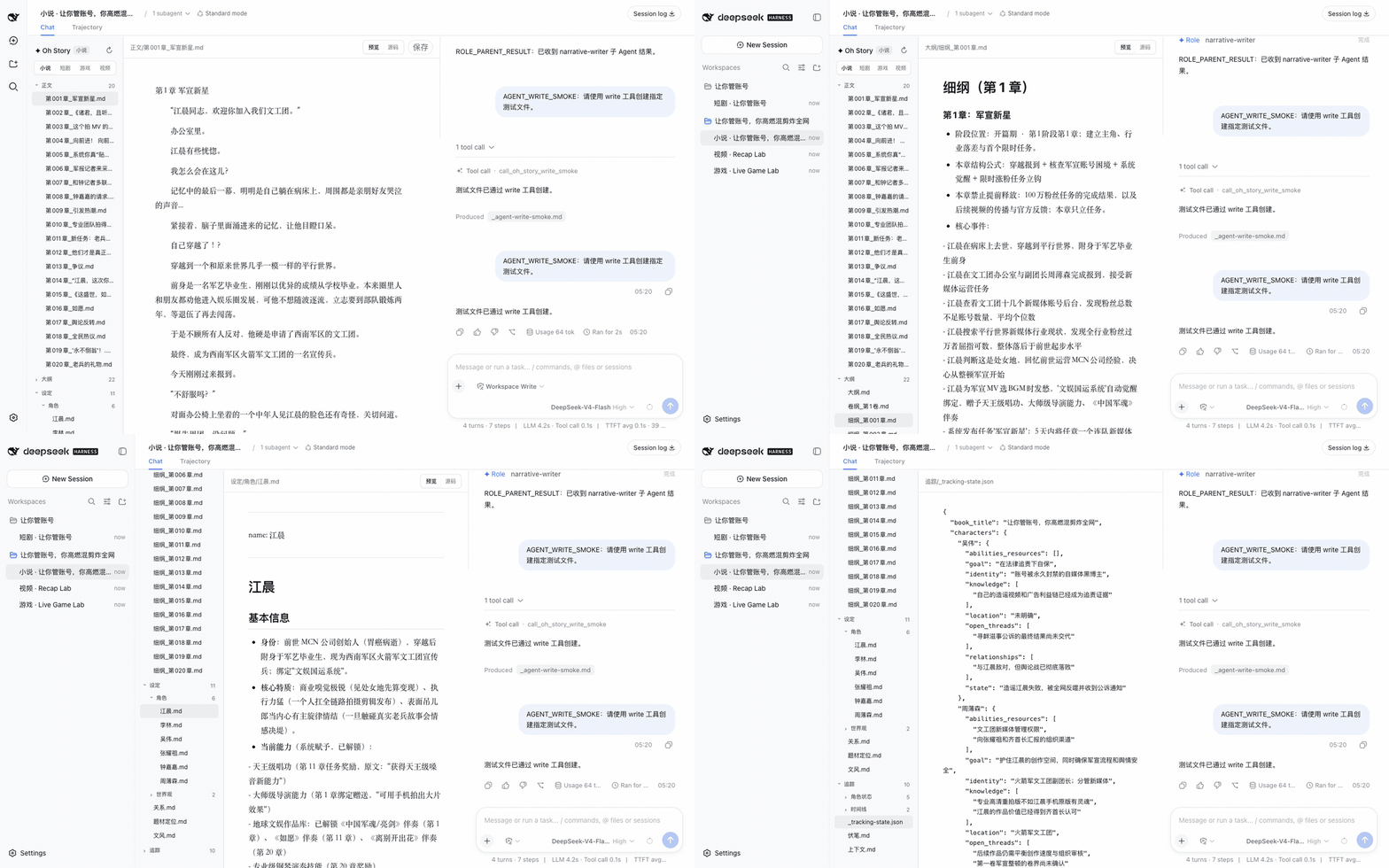
文件树、编辑器、Chat 三栏。覆盖长篇、短篇、选题、扫榜、拆文、导入、审稿、去 AI 味与封面流程,13 个 Oh Story Skills 与 7 个专业 Roles 按固定上游版本随插件交付。
短剧工作台
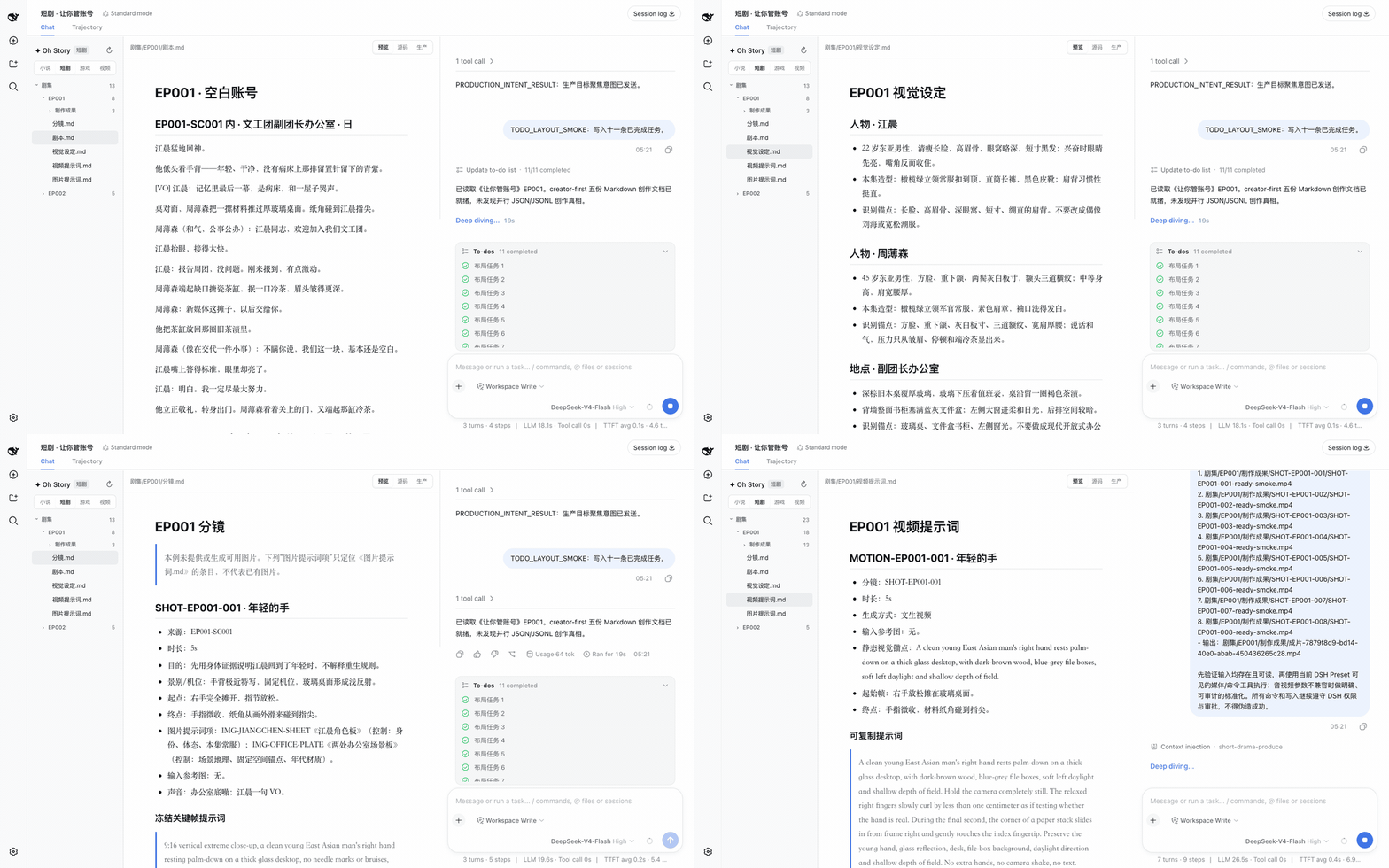
每集按请求维护最多五份可读 Markdown:剧本.md、视觉设定.md、分镜.md、图片提示词.md、视频提示词.md。「生产」视图把这些文档投影为镜头板、素材板、任务/版本、成片顺序和关系画布,并就地提示重复 ID、悬空引用与格式错误。成片装配交给 /short-drama-edit:它把排定的镜序写成《剪辑单.md》,再渲染到 剧集/<EP>/制作成果/成片/。生产交付走 DSH 原生会话、当前 Preset 工具与权限确认。
游戏工作台
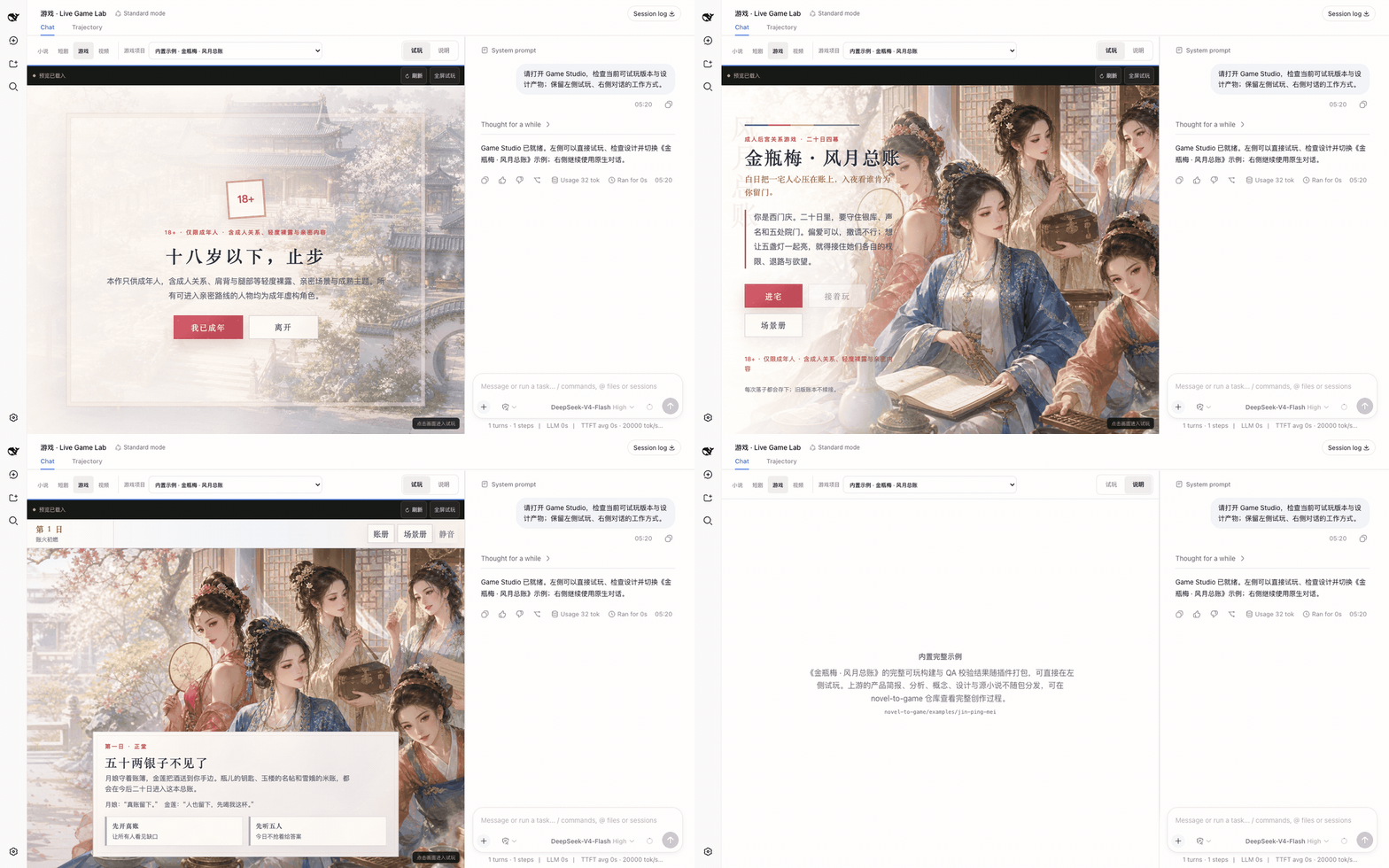
左侧实时试玩、右侧 DSH Chat 的两列布局。/novel-to-game quick 的生成物写入 game-adaptations/<project>/,build/app/index.html 就绪后自动进入项目列表,可刷新、全屏、切换项目。内置《金瓶梅 · 风月总账》完整可玩构建,开箱即可验证输入、核心循环、结局与重开。
视频工作台
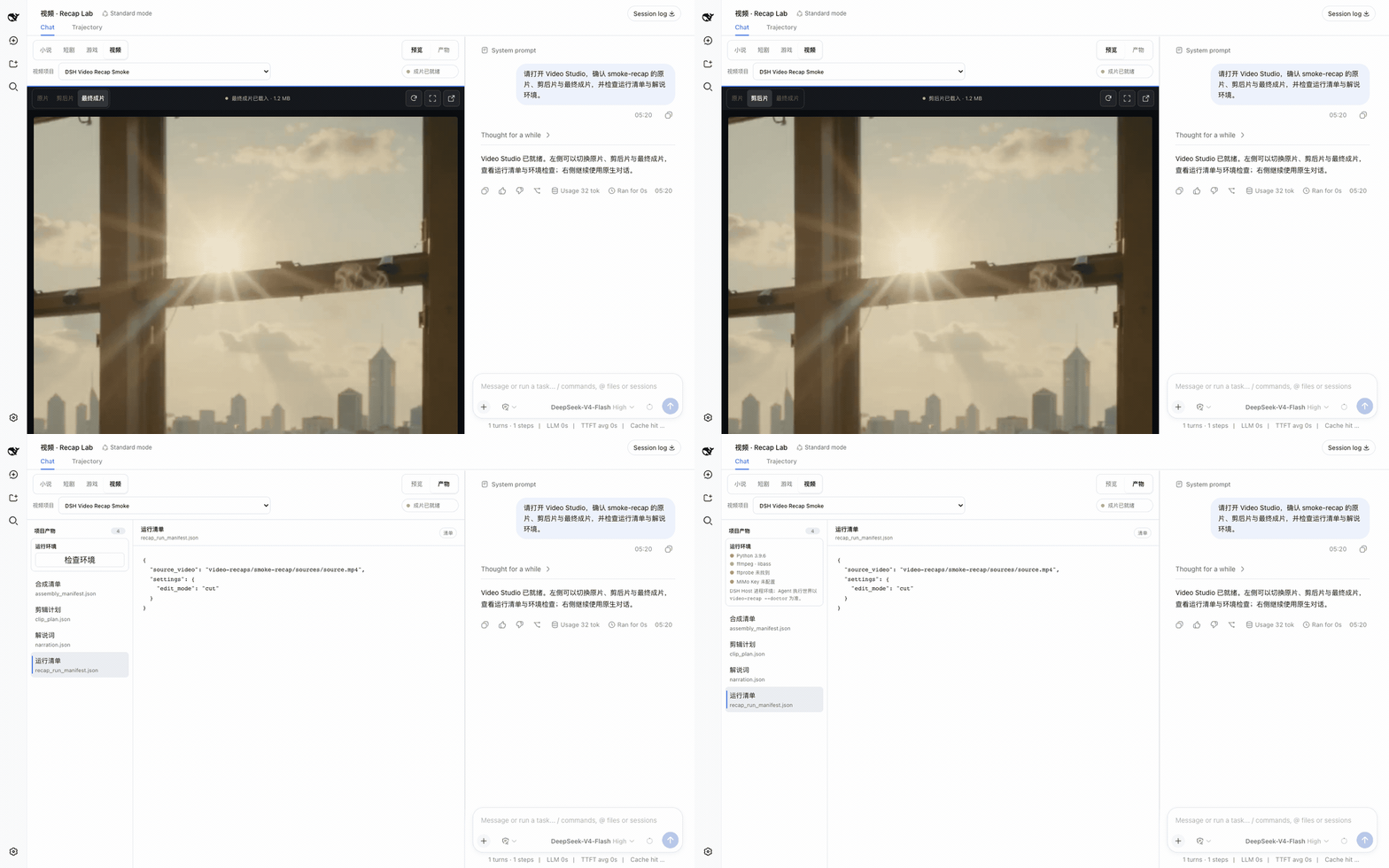
同样是预览左、Chat 右。项目放在 video-recaps/<project>/:原片在 sources/,上游工作产物在 work/,交付在 outputs/。工作台提供原片/剪后片/成片切换、阶段提示、运行清单与质检产物查看,视频经 HTTP Range 流式预览。在 Chat 里直接描述目标即可:
给 /path/to/video.mp4 做一个 3 分钟中文解说成片,保留关键原声,字幕烧进画面。
把 /path/to/english.mp4 翻译成中文配音,保留原说话人的声音。
核心体验
- 实时文件跟随:Agent 调用官方文件工具时,目标文件自动定位,编辑器同步呈现生成中的内容。
- Chat 文件导航:点击官方 Chat 中的作品文件名,文件树会定位并在编辑器打开对应文件。
- 创作文档预览:Markdown 支持标题、表格、任务列表、引用和代码块;JSONL 以带行号、类型和状态的结构化记录呈现。
- 项目媒体库:自动汇总当前 workspace 中各集和交付目录的真实图片/视频成果,支持搜索、类型筛选与跨集引用。
- 真实生成契约:可选内置 GPT Image 2、Seedance 与 MiniMax Music adapter;账号、模型、凭据与可用性由 DSH 运行环境和项目外配置决定。
- 安全编辑:支持源码编辑与快捷保存;人工未保存内容不会被并发 Agent 修改覆盖。
- 稳定长对话:消息区独立滚动,官方 Composer 固定在 Chat 栏底部。
- 不占用其他场景:只有当前 workspace 存在小说、短剧、游戏或视频项目时,工作台才接管会话布局;随时可收起,收起后会话回到 DSH 原生形态,选择按 workspace 记住。
各工作台的能力边界与协议约束见架构说明。
能力目录
| 工作台 | 上游能力 | 主要入口 |
|---|---|---|
| 小说 | Oh Story 0.7.10 · 13 Skills · 7 Roles | /story、/story-long-write、/story-review |
| 短剧 | Drama Skills 0.7.0 · 11 Skills | /short-drama、/short-drama-write、/short-drama-storyboard、/short-drama-edit |
| 游戏 | NovelToGame 0.3.1 · 7 Skills · 《金瓶梅》可玩示例 | /novel-to-game quick、/game-build、/game-qa |
| 视频 | video-recap-skills 0.5.0 · 6 Skills | /video-recap、/video-script |
安装
安装命令会临时提供 pnpm;只安装 Node.js 的机器也能执行。DSH 的 plugin add 内部需要 pnpm,单独运行 npx @deepseek-ai/dsh ... plugin add 不会自动补上它。
需要 Node.js 24+。视频工作台的流水线还需要宿主机安装 Python 3.10+ 与带 libass subtitles 滤镜的 ffmpeg/ffprobe(macOS brew install ffmpeg,Debian/Ubuntu sudo apt install ffmpeg)。
1. 安装插件并启动 DSH Web
npx -y --package pnpm@11.7.0 --package @deepseek-ai/dsh@0.1.5-rc.1 dsh plugin --profile web add @oh-story/dsh@0.1.9 &&
npx -y @deepseek-ai/dsh@0.1.5-rc.1 web
也可以直接安装 GitHub Release 中经过同一套测试的预构建包:
npx -y --package pnpm@11.7.0 --package @deepseek-ai/dsh@0.1.5-rc.1 dsh plugin --profile web add https://github.com/zenstory-ai/oh-story-dsh/releases/download/v0.1.9/oh-story-dsh-0.1.9.tgz &&
npx -y @deepseek-ai/dsh@0.1.5-rc.1 web
保持终端运行,浏览器默认自动打开。如果没有自动打开,请复制终端打印的完整 http://127.0.0.1:3080/?token=... 链接访问;首次认证需要链接里的 token。关闭终端会停止服务。
2. 配置模型
开始 AI 创作前需要在 DSH 的「设置 → 模型」中添加 Provider 并填入 API Key;也可以在启动前设置环境变量 DEEPSEEK_API_KEY。如果只查看已有作品,可在首次引导中选择「稍后配置 / Configure later」。模型、凭据与权限均由 DSH 管理,本插件不接触。
3. 配置媒体生成 API(短剧生产需要)
DeepSeek 只负责写剧本、分镜和提示词,本身不会生图、生视频或生音乐。短剧的「生产」把这些提示词交给 short-drama-produce Skill,由它调用下面的供应商 API 生成媒体。Key 不在界面里填,而是在启动 DSH 之前写入宿主机环境变量:
| 能力 | 供应商 | 必需环境变量 | 可选 |
|---|---|---|---|
| 图片 | GPT Image 2 | OPENAI_API_KEY |
OPENAI_BASE_URL |
| 视频 | Seedance(火山方舟) | ARK_API_KEY、SEEDANCE_MODEL |
SEEDANCE_BASE_URL、SEEDANCE_ALLOWED_RATIOS、SEEDANCE_MIN_DURATION/SEEDANCE_MAX_DURATION |
| 视频 | MiniMax H3 | MINIMAX_API_KEY、MINIMAX_VIDEO_MODEL、MINIMAX_VIDEO_RESOLUTIONS |
MINIMAX_VIDEO_BASE_URL、MINIMAX_VIDEO_RATIOS、MINIMAX_VIDEO_MIN_DURATION/MINIMAX_VIDEO_MAX_DURATION |
| 音乐 | MiniMax Music | MINIMAX_API_KEY |
MINIMAX_BASE_URL |
export OPENAI_API_KEY=...            # 图片
export ARK_API_KEY=... SEEDANCE_MODEL=...   # 视频,模型/Endpoint ID 以账号开通的为准
npx -y @deepseek-ai/dsh@0.1.5-rc.1 web
只配置用得到的那几个即可:没有视频 Key 仍然可以写分镜、生成关键帧图片。短剧工作台的「生产」视图顶部会显示每个供应商是否已配置、缺哪个变量;插件只报告变量是否存在,从不读取或展示 Key 的值。插件启动时会把这四个内置 adapter 登记到一份不含凭据的配置文件(默认在系统临时目录下仅当前用户可读写的 oh-story-dsh-<uid>/ 里,「生成环境」条会显示完整路径),Agent 运行 production_tool.py run 时直接引用它;自己写 adapter 或改超时,就把文件路径写进 OH_STORY_DRAMA_ADAPTER_CONFIG。每个供应商的参数、分辨率与时长约束见随包的 short-drama-produce/references/providers/。
视频解说工作台另用 MIMO_API_KEY(Fish Audio TTS 另需 FISH_API_KEY),小说封面则使用当前 Preset 里可见的图片生成工具。
4. 开始创作
首次进入会先看到 DSH 首页。点击左侧 Workspaces 旁的 +(添加工作区 / Add workspace),选择存放作品的文件夹,再在下方 选择工作区 / Choose workspace 中选中该目录,DSH 会打开一个空白会话;也可以从左侧打开已有会话。目录里已有创作项目时,会显示「小说 / 短剧 / 游戏 / 视频」四个工作台标签。
空目录会保留 DSH 原生 Chat。配置好模型后,输入 /story、/short-drama、/novel-to-game quick 或 /video-recap 开始创作;Agent 写出第一个创作文件后,工作台会自动出现。查看已有作品不需要 API Key。工作台收起后,可通过会话区的「创作工作台」按钮重新打开。
没看到界面时
- 安装报
pnpm not found on PATH:重新执行上面带--package pnpm@11.7.0的完整安装命令,确认安装成功后再启动。 - 浏览器未打开或要求认证:打开终端打印的完整带
?token=...链接;端口被占用时用web --port 3081,并访问新打印的链接。 - 没有四个创作标签:先添加作品目录并打开会话。空目录需要先在 Chat 中运行创作命令,生成创作文件后工作台才会出现;已收起的工作台可用会话区的「创作工作台」按钮恢复。已有作品仍不显示时,检查安装与启动是否使用同一个 profile,重启 DSH 并刷新页面。
- 独立
storyprofile 没有网页服务:按下节补上@deepseek-ai/dsh-web-app,仅安装创作插件不会给新 profile 添加 Web 界面。
按需加载
插件装进哪个 profile,那个 profile 的每个 Session 就都会加载创作 Skills;工作台只在有创作项目时显示。想让原版 web 保持干净、只在创作时打开工作台,就把插件装进独立 profile。
1. 装进独立 profile
npx -y --package pnpm@11.7.0 --package @deepseek-ai/dsh@0.1.5-rc.1 dsh plugin --profile story add @oh-story/dsh@0.1.9
2. 补上界面
新 profile 默认没有界面。编辑 ~/.dsh/profiles/story/package.json,把 dsh.profile.bundles 改成:
"bundles": [
  "@deepseek-ai/dsh-base",
  "@deepseek-ai/dsh-web-app",
  "@oh-story/dsh"
]
@deepseek-ai/dsh-web-app 是 DSH 自带的 Web 界面包,需要在创作插件之前加载。
3. 按需启动
npx -y @deepseek-ai/dsh@0.1.5-rc.1 web                          # 原版 DSH
npx -y @deepseek-ai/dsh@0.1.5-rc.1 --profile story --port 3081  # 创作工作台
两个 profile 用不同端口可以同时运行。模型、凭据、workspace 与历史会话由 DSH 统一保存,切换 profile 不会丢。安装与启动请使用同一个 dsh 版本,混用会报 unknown option '--no-open' 一类的错。
致谢
- DeepSeek Harness:提供原生插件运行时、Agent、会话、权限审批与 Web 工作台基础。
- LINUX DO:感谢社区的交流、反馈与开源支持。
Operate deliberately
Install and manage
Prerequisites and target Profile
Target: Web Profile, Story Profile
Delivery: Dsh Bundle Git — zenstory-ai/oh-story-dsh#493cd7793f69d4c02e19a4431d161b5284e7ad38。
Verify, update, and remove
Show lifecycle commands
dsh plugin --profile web listCompatibility and access
Requires Node.js 24+ and DSH web Profile dependencies: DSH peer dependencies: ^0.1.5-rc.1; Node.js >=24.0.0。
Review compatibility evidence ↗
Risk facts
Optional media-generation workflows can call third-party image, video, music, TTS, and video-recap providers.
Evidence ↗The package declares a prepack lifecycle script that runs its build command.
Evidence ↗Evidence and editorial reviewManifest, Bundle patch, distribution and freshness
Immutable evidence
Review status and source activity
Community project; its README states it is not affiliated with, partnered with, or endorsed by DeepSeek.
AI reviewed Sep 12, 2026, 1:50 PM UTC。GitHub facts last checked Sep 12, 2026, 1:50 PM UTC。
No material source change has been recorded since this evidence baseline.