At a glance
What it does
A DSH web plugin for importing, visualizing, analyzing, and forecasting time-series data with persistent session references.
Web Profile
Not declared in supplied evidence
Evidence-verified
Checked Sep 16, 2026, 2:17 PM UTC
Code-evidenced contributions
What it adds to DSH
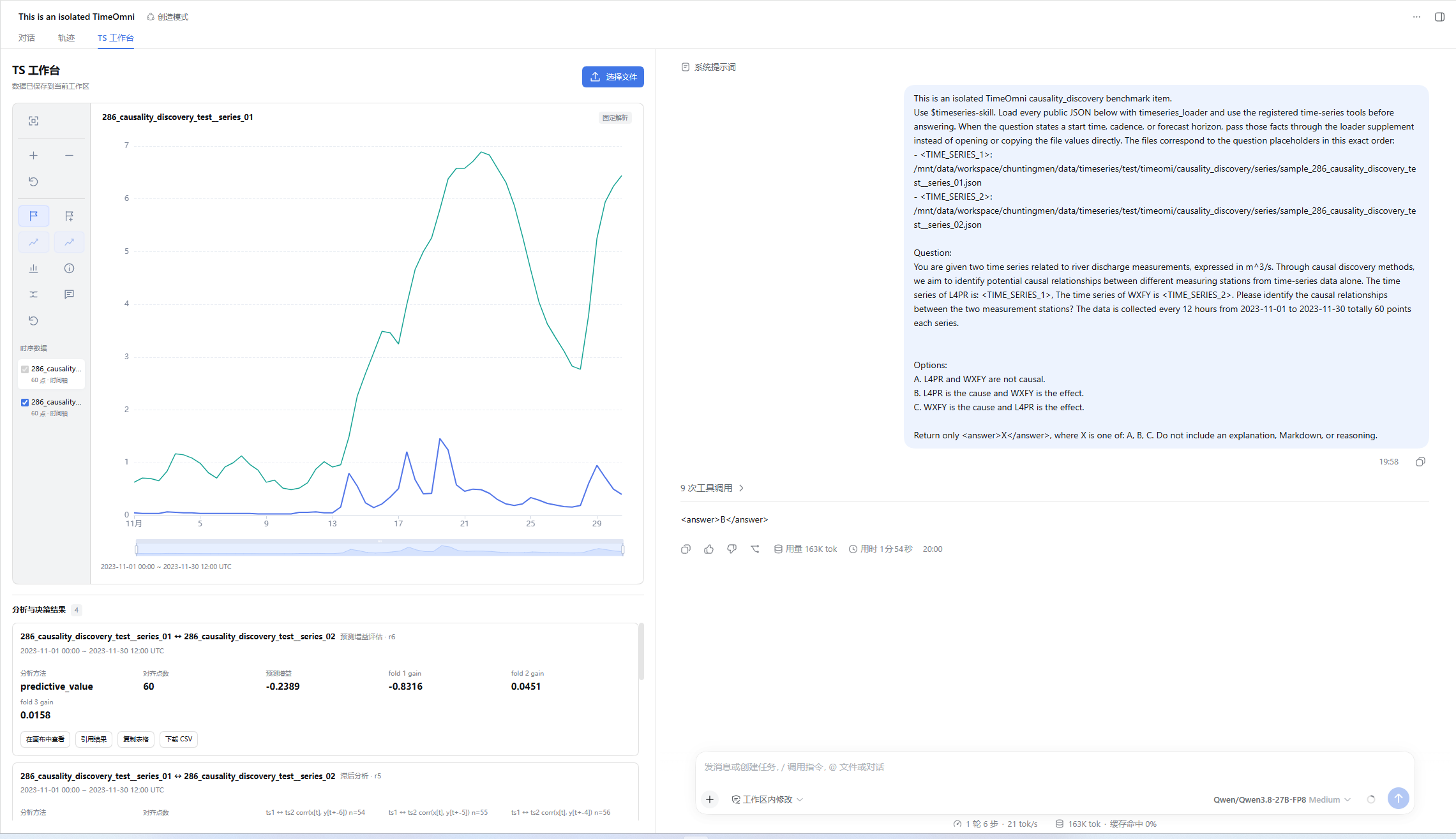
A split-pane DSH workspace for uploading, inspecting, annotating, and charting time-series data alongside chat.
Mechanism evidence ↗Guidance for canonical series references, visual-first analysis, forecasting, and evidence-linked decisions.
Mechanism evidence ↗Before you choose it
Use the TS Workbench to upload series files, inspect charts beside a DSH conversation, preserve series snapshots and analysis results, and reference selected data in chat without copying raw values. It supports multi-series analysis, event annotations, chart rendering, and optional forecasting through a separately run Toto2 service.
Best for
DSH web-host users who analyze operational, scientific, financial, or other time-indexed datasets and can prepare the required patched host and Python environment.
Common tasks
- Import CSV, TSV, JSON, JSONL, XLSX, text-number files, and selected document-derived data.
- Compare multiple series, investigate trends, seasonality, anomalies, change points, volatility, and lagged relationships.
- Create persistent chart images and use visual inspection before numeric verification.
- Attach event metadata and produce forecast or decision evidence linked to immutable series snapshots.
Permissions and data
Processes uploaded data locally within the configured workspace and may contact an optional local forecasting service.
Permissions- Requires a DSH web host with the bundle patch applied.
- Requires a configured Python executable for the time-series skill.
- Uses a session work directory and owner-only SQLite runtime database.
- Retains original uploads, extracted text, parsed JSON, and isolated parsing-request audit records in the import job directory.
- Stores series snapshots and analysis results so they can be restored after refresh.
- Optional Toto2 HTTP forecasting service; the default URL is http://127.0.0.1:9999.
- No credential requirement is declared in the supplied evidence.
Limitations
- There is no one-click deployment script.
- Plugin installation alone does not apply the DSH host patch or install Python dependencies.
- Forecast tools are unavailable until the Toto2 service is running; other capabilities remain available.
- Browser uploads are capped at 8 MiB, with stated limits for series, points, events, horizons, and lag scans.
What DSHub checked
- The package manifest, DSH bundle patch, immutable Git source, npm package identity, and Apache-2.0 license are evidenced.
- The bundle targets the DSH web platform and injects listed DSH client modules.
What DSHub did not check
- Installation, host-patch application, build, browser behavior, Python parsing, and tool execution were not performed.
- The npm package contents were not audited in the supplied evidence.
- No DSH/Harness version range is declared in the supplied evidence.
Pinned install
Install Timeseries Workbench for DSH
This plugin bundle does not have a DSH Plugin install action. Use its source documentation for the delivery method.
Maintainer source
Project README
timeseries-skill
timeseries-skill,提供时序分析、预测、多序列关系分析和证据化决策能力,以及带交互画布的 DSH 集成插件。
安装插件
当前发布方式是 DSH 源码宿主 + 宿主补丁 + npm 插件。完整工作台依赖补丁提供的双栏布局和会话占用接口,plugin add 只安装插件并登记配置,不会应用宿主补丁或安装 Python 依赖。当前没有一键部署脚本。
截至 2026-09-16,已验收的官方 master 基准为,精确发布标签 [dsh-v0.1.6-alpha.1]
首次部署按 完整部署步骤 安装并构建宿主、创建 Python 环境、安装插件和登记 Skill。以下命令适用于已经完成宿主适配的环境;DSH_SOURCE 指向该 DSH 源码目录,TIMESERIES_PYTHON 指向已安装本仓库 requirements.txt 的 Python。
发布到 npm 后,安装指定版本:
(cd "$DSH_SOURCE" && pnpm dsh plugin --profile web add dsh-timeseries-workbench@0.1.0)
(cd "$DSH_SOURCE" && pnpm dsh --profile web)
源码开发:
npm --prefix integrations/dsh install
npm --prefix integrations/dsh run build            # 必须先构建前端产物 lib/client.js
(cd "$DSH_SOURCE" && pnpm dsh plugin --profile web add "$PWD/integrations/dsh")
验证安装:
(cd "$DSH_SOURCE" && pnpm dsh --profile web --dump-config)
配置输出应包含 dsh-timeseries-workbench 层。该包声明 dsh.bundle.patch,dsh plugin add 会同时登记依赖与 dsh.profile.bundles 里的配置层;这与需要应用、构建的 DSH 源码补丁 是两件事。Skill 登记完成后,在新会话进入「TS 工作台」并上传文件。改了包名或客户端注入列表后必须重新执行 add 重建链接并刷新 cordis.patch.yml 的行名,否则浏览器模块表的按名索引会失败。
插件在加载阶段解析 Python skill root:优先 skillRoot 配置,其次 TIMESERIES_SKILL_ROOT,再依次尝试包内 python/ 与源码布局的两级上层目录。解析失败会直接报错并列出尝试过的路径,不会拖到第一次工具调用。
预测模型部署
预测走独立的 Toto2 HTTP 服务,未启动时只有预测类工具报服务不可用,其余能力不受影响。可使用其他模型充当预测模型。
python -m services.toto2_server.server \
  --host 127.0.0.1 --port 9999 \
  --model-path /absolute/model/path --device cuda --local-files-only
curl -s http://127.0.0.1:9999/ready      # 就绪后返回 {"status":"ready",...}
| 参数 / 环境变量 | 默认值 |
|---|---|
--host / --port |
127.0.0.1 / 9999 |
--model-path(FORECAST_MODEL_PATH、TOTO2_MODEL_PATH) |
Datadog/Toto-2.0-2.5B |
--device(FORECAST_MODEL_DEVICE、TOTO2_DEVICE) |
cuda |
--max-context / --decode-block-size |
4096 / 768 |
服务地址(插件侧 TOTO2_SERVICE_URL) |
http://127.0.0.1:9999 |
服务提供 /health、/ready、/forecast、/forecast-distribution 四个端点。模型实际加载失败时服务仍会启动,/ready 返回 not_ready 并附带原因。
功能
TS 工作台:空白会话输入框上方的「进入 TS 工作台」按钮直接切到工作台与对话分栏,不发送消息、不改写历史。拖入或选择文件即可上传;侧栏控制多序列、缩放、事件框选与元信息编辑,右侧保留 DSH 原对话框。曲线使用文件中的真实时间轴,缺少时间时显示索引轴。序列首次提交成功后插件会占用当前会话,之后「新会话」创建干净 session。
会话内共享引用:上传完成即得到 series_id / series_ref / revision,对话 loader 载入的序列出现在同一目录。元信息与事件保存生成新的不可变快照,旧结果仍指向生成时的版本。「引用到对话」把所选序列的引用、metadata、事件摘要、可见窗口和最近结果引用写入 [TS_WORKBENCH_CONTEXT] 块,不复制原始数值。
统一导入:固定解析支持 JSON、JSONL、CSV、TSV、文本数值和 XLSX;DOCX 与文本 PDF 经提取后进入固定解析或独立 LLM 回退;扩展名不限的文本按内容识别。同一个导入作业依次尝试固定解析、Python 权威校验,必要时才调用与对话上下文隔离的解析模型。原文件、提取文本、parsed.json 与独立 LLM 请求审计都保留在作业目录,导入成功以数据库事务提交为准。
24 个模型工具分四类(23 个来自 Python registry,另加一个 DSH 宿主的图表工具):
| 类别 | 工具 |
|---|---|
| 生命周期与数据 | timeseries_loader、timeseries_metadata、timeseries_info、timeseries_values |
| 描述与分析 | summary_statistics、trend_analysis、seasonality_analysis、autocorrelation、stationarity_test、volatility_analysis、anomaly_detection、change_point_detection |
| 多序列关系 | association_analysis、lag_analysis、similarity_analysis、coherence_analysis、predictive_value_analysis、granger_test |
| 预测与决策 | timeseries_forecaster、timeseries_event_evidence、timeseries_decision_record、timeseries_memory_commit、timeseries_memory_recall |
| 视觉 | timeseries_render_chart |
分析与关系结果以不可变 result_ref 保存,工作台卡片与对话引用读同一份结果,刷新后从 SQLite 恢复。异常点与最新预测按源快照时间轴对齐并可在侧栏叠加。一个结果可绑定多个源快照,任一来源变化后保留卡片但标记需复核。
视觉优先:timeseries_render_chart 由插件在宿主侧注册(不走 Python registry),返回可直接进入模型上下文的持久 PNG,不需要浏览器或预测模型参与,也不需要额外读取文件。默认开启,可用 chart.enabled: false 关闭,关闭时该工具不出现在工具列表中。它需要当前会话模型声明图片输入,否则按报错处理而不是静默退化成数值路径。涉及趋势、季节性、平稳性、异常、变化点、波动、跨序列关系、滞后对齐、机制切换或历史与预测分歧的问题,SKILL.md 要求先看图定性、再用数值工具验证或量化。详细输入、窗口与失败语义见 图表契约。
事件与条件预测:事件使用 UTC start/end 或时间步 start_index/end_index 闭区间,支持稳定 event_id、描述、分组和 expected_impact。时间步事件支持后续预测区间,补齐时间信息后按对应观测位置投影。
证据纪律:工具输出是测量值而非结论。SKILL.md 要求区分供给事实、测量、预测、假设与解释,标注窗口与代表性,不把低 p 值或平滑曲线当作可靠性证明,也不把缺失证据当作无效应;用「可用 / 受限 / 不可估计」表达结论强度,不编造标定置信度。
资源上限:浏览器上传 8 MiB;单次导入最多 256 条序列、500000 个点;单次元信息补丁最多 256 条事件;单次事件证据最多 32 条事件;预测视界上限 4096 步,滞后扫描与自相关上限同为 4096。权威文件为 <workspace>/work/<sessionId>/timeseries-runtime.sqlite3,文件权限 owner-only。
结构
core/、runtime/:规范数据、不可变序列版本、SQLite 文档目录与结果存储。SKILL.md、references/:唯一模型入口与渐进披露模块 —— 路由用的analysis.md、forecasting.md、decision.md,按需读取的契约loader-contract.md、memory-contract.md、chart-contract.md、analysis-contract.md、forecasting-contract.md、contextual-forecast.md、decision-record-contract.md、decision-scenarios.md。tools/:分析、预测、关系证据、决策记录和 memory 工具。integrations/dsh/:唯一 DSH 插件,包含上传解析、工作台、工具桥和结果投影;发布为 npm 包dsh-timeseries-workbench。models/、services/:独立部署的 Toto2 预测后端。data/schema/:工具输入输出契约,运行时按需读取。
发布与后续修改
Operate deliberately
Install and manage
Prerequisites and target Profile
Target: Web Profile
Delivery: Dsh Bundle Git — Crash0524/Timeseries-Workbench-DSH#6c3b1a72fbd3444af5f190444b233d318f36812f。
Verify, update, and remove
Show lifecycle commands
dsh plugin --profile web listCompatibility and access
Requires a patched DSH web host and configured Python runtime: Not declared in supplied evidence。
Review compatibility evidence ↗
Risk facts
Uploaded source files, extracted text, parsed data, and import audit records are retained in a session work directory and SQLite database.
Evidence ↗Forecasting can call a separately deployed Toto2 HTTP service, defaulting to localhost port 9999.
Evidence ↗Evidence and editorial reviewManifest, Bundle patch, distribution and freshness
Immutable evidence
Review status and source activity
Install only in an environment where you can apply the required host patch and assess whether uploaded time-series data may be retained locally.
AI reviewed Sep 16, 2026, 2:18 PM UTC。GitHub facts last checked Sep 16, 2026, 2:18 PM UTC。
No material source change has been recorded since this evidence baseline.