At a glance
What it does
A DSH web plugin that visualizes plugin and model activity as a 3D AI office.
Web Profile
@deepseek-ai/dsh@0.1.5-rc.1 (web profile); desktop unverified
Evidence-verified
Checked Sep 12, 2026, 2:24 PM UTC
Code-evidenced contributions
What it adds to DSH
Adds a 3D office view that represents DSH plugin and model activity as six fixed workstations, activity bubbles, logs, and response papers.
Mechanism evidence ↗Before you choose it
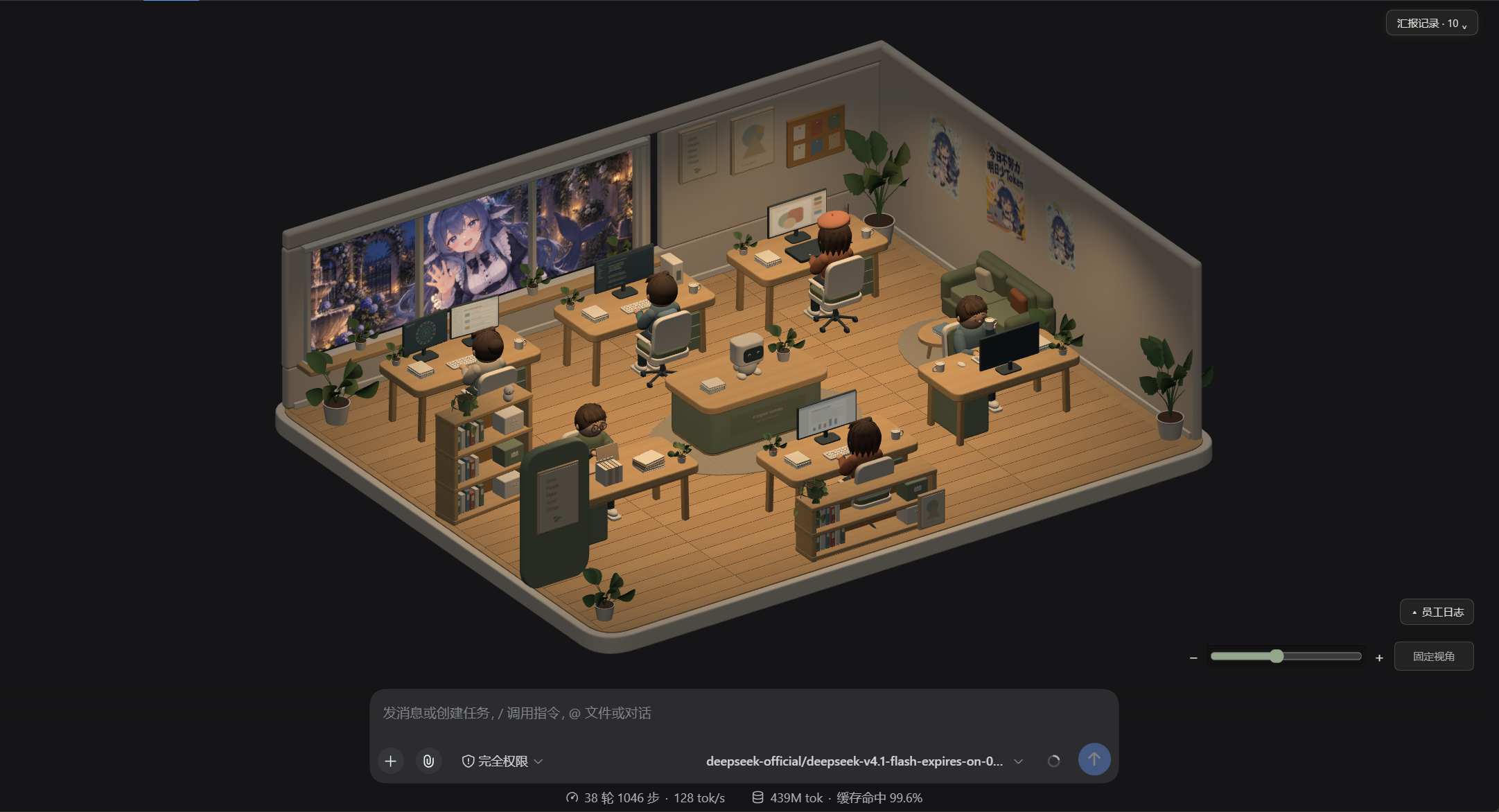
Toolfolk adds a “3D Studio” view beside DSH chat and trajectory views. It maps observed tool and model activity to six fixed roles, then shows task text, reasoning bubbles, activity logs, historical responses, and a readable delivery sheet.
Best for
DSH web users who want a visual way to follow an agent session’s tools, model activity, and responses.
Common tasks
- See which of six roles is handling observed plugin or model activity.
- Inspect task descriptions, recent event logs, and historical answers in a visual session view.
- Use the documented web-profile installation command, then open DSH with its tokenized URL and choose “3D Studio.”
Permissions and data
Documented as a read-only host-event visualization plugin with local derived-state files.
Permissions- Reads documented DSH host events such as tool execution/results, session events, and assistant streams.
- Registers a web client view through the DSH bundle patch.
- The README says authoritative state is written locally under ~/.dsh/studio/state.json unless overridden.
- The README says a derived copy is also written to .dsh-studio/state.json in the session workspace and can be deleted.
- The README claims the plugin does not send data externally; this claim was not independently verified.
- No plugin-specific credentials are documented.
Limitations
- Desktop support is explicitly unverified.
- Cross-machine installation and the documented Git one-command installation were not fully tested.
- Performance was not measured; the README notes most asset size is uncompressed geometry.
- The initial room can be empty until a conversation starts an agent.
What DSHub checked
- The source commit is immutable and pinned.
- The package manifest and DSH bundle patch structure were verified.
- npm registry identity for toolfolk-for-dsh 0.1.1 was verified, but package contents were not audited.
- MIT license text is present.
What DSHub did not check
- Installation or runtime behavior was not independently executed for this curation record.
- The plugin’s stated local-only and no-upload behavior was not independently audited.
- Desktop compatibility, performance, and cross-machine behavior remain unverified.
Pinned install
Install Toolfolk for DSH
This plugin bundle does not have a DSH Plugin install action. Use its source documentation for the delivery method.
Maintainer source
Project README
DSH AI 工作室
把 DSH 的插件与模型调用过程可视化成 3D 数字办公室——插件即员工、工位即岗位、调用即任务。
六名员工各有固定岗位,谁在干活、在干什么、为什么这么干、最后交付了什么,一眼看得见。
实机画面(暗色主题 · 真实调用驱动 · 六名员工各就各位):
安装(一条命令)
前置:官方宿主 @deepseek-ai/dsh@0.1.5-rc.1(宿主 React 18.3.1)。已经装过 DSH 就不用再装。
多数人是用 npx @deepseek-ai/dsh web 启动 DSH 的,那就用同样的形式装插件:
# 1) 装插件:一条命令,从 npm 装,不需要任何授权(包里没有安装期脚本)
npx -y @deepseek-ai/dsh plugin --profile web add toolfolk-for-dsh

# 2) 启动(就是你平时那条命令)
npx @deepseek-ai/dsh web --no-open
全局装过 dsh 的(npm i -g @deepseek-ai/dsh),把命令里的 npx -y @deepseek-ai/dsh 换成 dsh 即可,其余一字不差。
dsh web与npx @deepseek-ai/dsh web是--profile web的硬编码别名,所以插件命令里的--profile web指的就是同一个 profile。-y只是让npx不弹确认。
然后用启动输出里带 ?token= 的完整地址打开,
在视图切换器的「对话 / 轨迹」旁边切到 「3D 工作室」(标签就叫这个名,便于第一次找到)。
首次打开可能是空房间:Web profile 下工具插件要等会话的 agent 启动才加载——在对话里发一条消息,员工就上岗了。
卸载:npx -y @deepseek-ai/dsh plugin --profile web remove toolfolk-for-dsh(全局安装版把前缀换成 dsh)
其它安装方式
| 方式 | 命令(npx 形式;全局安装版把 npx -y @deepseek-ai/dsh 换成 dsh) |
是否需要授权执行作者代码 |
|---|---|---|
| npm(上面那种,推荐) | npx -y @deepseek-ai/dsh plugin --profile web add toolfolk-for-dsh |
否 |
| git 一条命令(不依赖 npm,能跟源码) | npx -y @deepseek-ai/dsh plugin --profile web add github:zkl22492-star/Toolfolk-for-DSH |
否(包里没有 prepare 等安装期脚本,pnpm 不会拦;代价是 clone 整个仓库,比 npm 慢) |
| 下载附件(适合离线 / 网络极差) | 下载 toolfolk-for-dsh-0.1.0.tgz,在下载目录执行 npx -y @deepseek-ai/dsh plugin --profile web add ./toolfolk-for-dsh-0.1.0.tgz |
否 |
| 锁定版本(可复现) | npx -y @deepseek-ai/dsh plugin --profile web add "github:zkl22492-star/Toolfolk-for-DSH#<commit>" |
否 |
安装注意
- ⚠️ 用本地文件路径安装时,路径不要含空格:
dsh plugin add会把路径按空格切开(实测L:/Toolfolk for DSH/…会被截成L:/Toolfolk)。用./文件名这种相对路径最稳;github:形式不受影响。 - 插件只读宿主事件,不联网、不上传任何数据;状态只写到本机(见下「许可、隐私与兼容」)。
- 实测(独立 profile,非本机默认 profile):
add→ 不带--patch启动即自动加载、资源从安装位置解析 →remove。
它长什么样
| 能力 | 说明 |
|---|---|
| 六个固定岗位 | 工位 = 岗位:①资料检索 ②撰写修改 ③联网调查 ④会话记忆 ⑤命令执行 ⑥协作调度。插件是岗位里的「承包方」,不占座 |
| 「正在做某事」 | 主文案由真实参数推出(如 正在联网调查:<url>),不是统计数字;未收录的工具另列"未归类",不硬塞 |
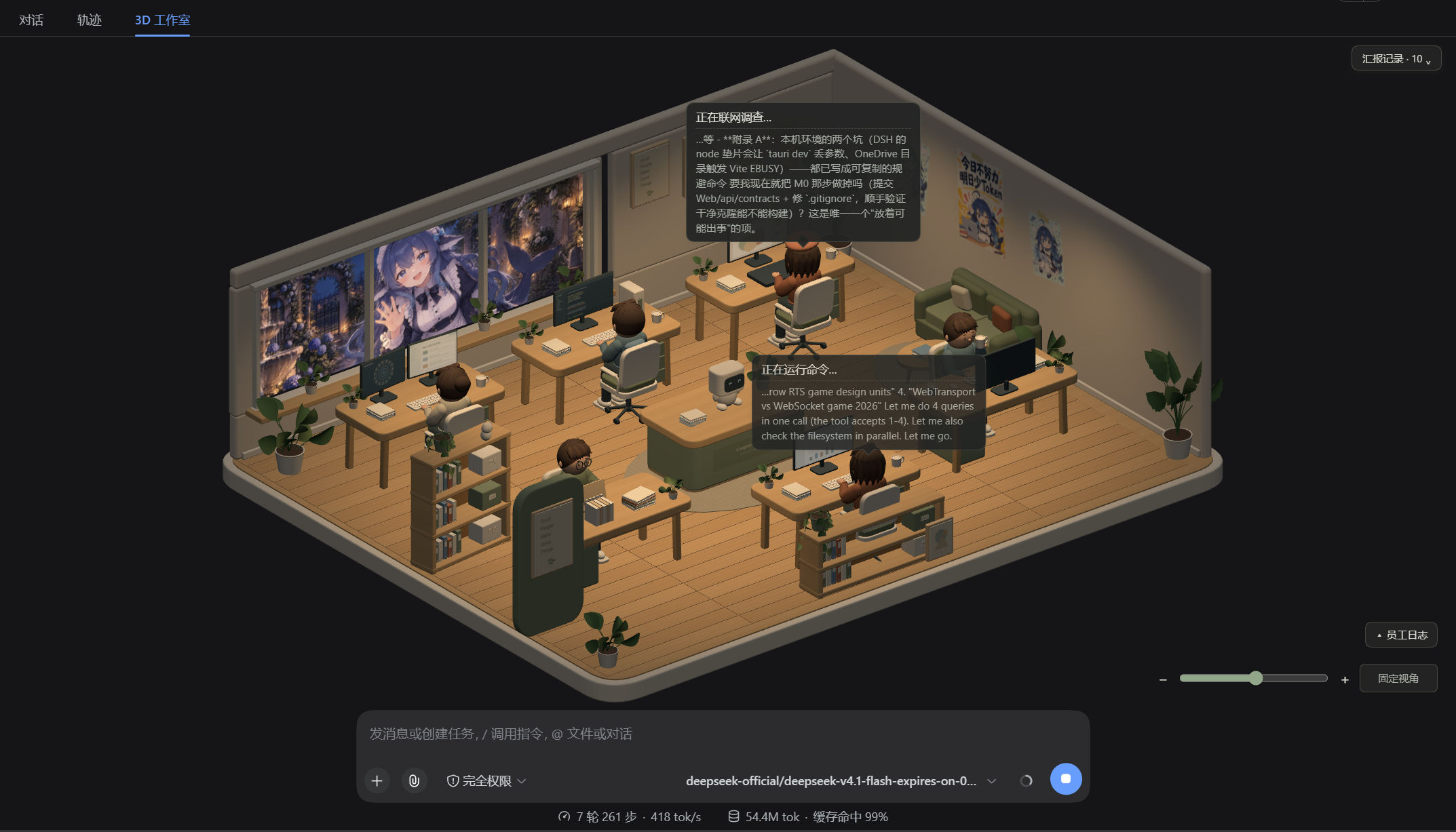
| 思维流气泡 | 员工干活时头顶冒泡,第二行是这次任务对应的模型推理原文(先想后调,按调用归属);干完停留一会儿淡出 |
| 交付纸 | 回答结束时一张微皱 A4 递到眼前(「老大请过目」+ 红章「已阅」);可滚动看全文,点印章收起 |
| 员工日志 | 左下角,头部固定(收起按钮不会滚走);按时间倒序列出调用事件与交付 |
| 汇报记录 | 右上角,默认收起;点开展开全部历史回答,含插件启动前就存在的历史(从会话完整日志回填) |
| 明暗主题 | 跟随宿主 body[data-ds-dark-theme],颜色变量单一来源 |
| 总控台机器人 | 中央总控台上的 Coordinator 即模型本人,按阶段做程序化动作 |
中央机器人气泡修复:早期 v2 资产将机器人合并进桌子,导致
Coordinator节点缺失,动作和气泡都无法绑定。修复需要更新studio.glb;只更新客户端代码无效。新资产保留独立机器人节点,并有浏览器回归检查。
员工干活时头顶冒泡,气泡第二行就是这次任务对应的模型推理原文(实机截图中两个工位正在同时干活):
更多截图见 docs/assets/。
文档
- 接入能力验证结论 —— 官方接口实测:可用接口、关键约束、已知差异与每项证据
- 开发规划与里程碑 —— 任务拆分、验收标准、收尾记录
- 打包清单 —— 打包/分发/验收细节
- 产品构想与技术路线
- 资产说明 · 资产清单
许可、隐私与兼容
- 许可:MIT(LICENSE,
Copyright (c) 2026 浊客er)。 - 第三方声明:THIRD-PARTY-NOTICES.md。客户端产物内联了 three.js(MIT), 而打包器会剥掉代码里的许可注释,所以分发时必须随包附带该文件(产物头部也留了指引)。
- 资产来源:
assets/3d/v2/*.glb由本项目脚本程序化生成;assets/art/studio-v1/*.png为项目作者自制。不含第三方素材。 - 隐私:插件只读宿主事件(
tools/execute、tools/result、session/event、agent/assistant-stream), 不修改工具调用链、不拦截返回值;状态只写到本机文件,不发送任何数据到外部:<用户目录>/.dsh/studio/state.json(可用DSH_STUDIO_STATE覆盖);- 会话工作区里的一份
.dsh-studio/state.json——纯派生数据、可随时删除,是为了让浏览器端在任何机器上都找得到状态; 建议加进你项目的.gitignore(本仓库已加)。
- 兼容:官方
@deepseek-ai/dsh@0.1.5-rc.1(宿主 React 18.3.1)。桌面端未验证。
开发
构建与测试
npm ci
npm test                  # 65 项:状态引擎 + 桥接核心 + 岗位 + 思维流 + 交付 + 状态路径
npm run client:build      # 源码 → 闭包工厂 bundle(three 内联;改完不用重启宿主)
npm run state:replay      # 纯逻辑回放(不连宿主);可传 tests/fixtures/studio-replay.json
npm run assets:build      # 重新导出模型
npm run assets:verify     # 校验 GLB 结构与动作幅度
npm run preview           # 预览 3D 资产 → http://127.0.0.1:4173/?version=v2
开发态运行
宿主用官方发行包,不需要源码构建:
npx --yes @deepseek-ai/dsh@0.1.5-rc.1 \
  --profile web --patch "<仓库绝对路径>/src/host/cordis-dev.yml" \
  --port 3081 --no-open
# 用启动输出里带 ?token= 的完整地址打开,切到「3D 工作室」
两个实测出来的环境约束(踩过,别再踩):
- 必须用 Node 22:系统 Node 24 实测会无输出挂住;
- 必须用默认 npm 缓存:
--cache指向项目tmp会生成含重复副本的模块树,宿主的 profile 软链会被带坏, 工具分发随之崩溃(agent-loop与tools的 unique symbol 失配)——详见接入结论 §5.6。
环境约束:宿主 React 为 18.3.1,3D 依赖必须按此匹配;改客户端 bundle 由 HMR 自动重载,无需重启宿主; 改
src/host/*或src/shared/*(宿主侧)必须重启宿主(token 会变)。
数据通路
tools/execute + tools/result + session/event + agent/assistant-stream
  → src/host.mjs                          宿主:归约进状态引擎(热路径不写盘,防抖 250 ms)
  → <用户目录>/.dsh/studio/state.json     权威快照(原子替换)
  → <会话工作区>/.dsh-studio/state.json   同一份副本:客户端用**工作区相对路径**引导,
                                          换台机器/换账号也能找到(绝对路径是构建期算的,包不写死)
  → remote.workspaceFiles.readAll         客户端每 500 ms 读回(两端通用通道)
  → src/client/index.mjs → lib/client.js  按会话匹配 → 六岗位动作 + 气泡 + 交付纸 + 日志/汇报
目录
本仓库自身就是一个插件包(包清单 package.json 在仓库根,files 决定哪些文件随包分发),
所以一条命令就能装;开发用的脚本、测试、文档则不进包。
| 路径 | 内容 |
|---|---|
src/host.mjs |
宿主入口(状态桥接):订阅事件、归约进状态引擎、写快照/工作区副本 |
src/client/index.mjs → lib/client.js |
客户端面板:视图注册 + 3D 场景(lib/client.js 是构建产物,含内联 three) |
cordis.patch.yml |
发行用补丁层(用包名引用本插件) |
assets/3d/v2/studio.glb、assets/art/studio-v1/ |
随包分发的模型与美术图 |
src/host/studio-probe.mjs |
事件探针:只读记录 tools/execute / tools/result / session/event(回归/排查用,不进包) |
src/host/bridge-selftest.mjs |
桥接自检驱动:合成调用 → 读回快照逐项核对,并验工作区副本相对路径可读(不进包) |
src/shared/* |
纯逻辑:状态引擎、归属解析、六岗位、模型活动、路径约定、视觉层(可单测) |
src/host/cordis*.yml |
开发/回归覆盖层(不进包) |
reference/deepseek-harness/ |
官方源码(已 gitignore,仅用于读契约,不装依赖) |
归属分两层(见接入结论 §4.10):官方目录 ∩ 已加载插件 是基线;
ctx.tools.schemas() 有内容时再求交收紧。实测工具注册在 agent 作用域层,没有 agent 活动时工具名册为空——
此时快照会带 attribution.mode = catalog-plugin,客户端把降级显示出来。基础设施包(如工具注册表 dsh-tools)不占工位。
打包与分发(维护者)
npm pack                # 在仓库根打包;files 决定内容,无需任何复制脚本
# → toolfolk-for-dsh-0.1.0.tgz(15.2 MB / 24 个文件)
包内容:src/host.mjs + src/shared/** + src/client/index.mjs、lib/client.js(含内联 three)、
assets/3d/v2/studio.glb 与 assets/art/studio-v1/**、cordis.patch.yml、README.md、LICENSE、THIRD-PARTY-NOTICES.md。
不含脚本、测试、文档、网站与开发工具。
包内没有 prepare 等安装期脚本,资源随包提交,所以 git 安装不需要任何授权(allowBuilds 不会触发);
产物内也不含任何机器相关路径(客户端引导走会话工作区相对路径)。
尚未完成(不要当作已通过)
- 跨机器安装:未在另一台机器/账号上装过(本环境只有一台)。本机已实测:安装 → 不带
--patch自动加载 → 卸载。 github:一条命令:本机网络到github.com:443时通时断,没能在真实 GitHub 上跑完整命令; 已用等价的本地 git 仓库(git+file://…,同一个代码路径)验证:免授权、装得上、能加载。- 桌面端:从未验证(一直没有可用环境)。
- 性能:从未测量;资产里 95% 是未压缩几何(12.56 MiB / 13.21 MiB),是唯一值得优化的地方。
- 真人目视项:动作穿插(手/桌/椅/脸)、交付纸排版与字号、气泡避让的边界情况;10 分钟连续观察未做。
- 减少动态效果 / 性能模式:明确决定延后。
Operate deliberately
Install and manage
Prerequisites and target Profile
Target: Web Profile
Delivery: Dsh Bundle Git — zkl22492-star/Toolfolk-for-DSH#3ae3396b2171b02f0e6ded8a80172de89658af39。
Verify, update, and remove
Show lifecycle commands
dsh plugin --profile web listCompatibility and access
Web Profile context documented; desktop remains unverified: @deepseek-ai/dsh@0.1.5-rc.1 (web profile); desktop unverified。
Review compatibility evidence ↗
Risk facts
The README states that the plugin reads host events and writes derived state snapshots locally, including under the user DSH directory and the session workspace.
Evidence ↗The README claims no external data upload or network use by the plugin; this behavior was not independently executed or audited.
Evidence ↗MIT license detected.
Evidence ↗Evidence and editorial reviewManifest, Bundle patch, distribution and freshness
Immutable evidence
Review status and source activity
Use this as a session-observability UI, not as proof that tool attribution, privacy behavior, or runtime compatibility has been independently audited.
AI reviewed Sep 12, 2026, 2:25 PM UTC。GitHub facts last checked Sep 12, 2026, 2:25 PM UTC。
No material source change has been recorded since this evidence baseline.