快速了解
它能做什么
将 DeepSeek Harness 连接到数据库工作台,可生成和执行 SQL、检查 schema,并根据执行反馈迭代。
本站提供的是中文说明,不代表该项目或 Plugin 自身提供中文界面;语言支持请以上游文档为准。
Web Profile
兼容 0.1.0-rc.6 的 Web Profile
证据已验证
核对日期 2026/8/15 UTC 09:43
固定版本安装
安装 DSH Data Agent
dsh plugin --profile web add @yejiming/dsh-data-agent@0.0.3复制操作固定到已经审查的 package 版本。证据已验证表示结构和分发已经核对,不是安全认证或运行保证。
维护者原文
项目 README
中文 | English
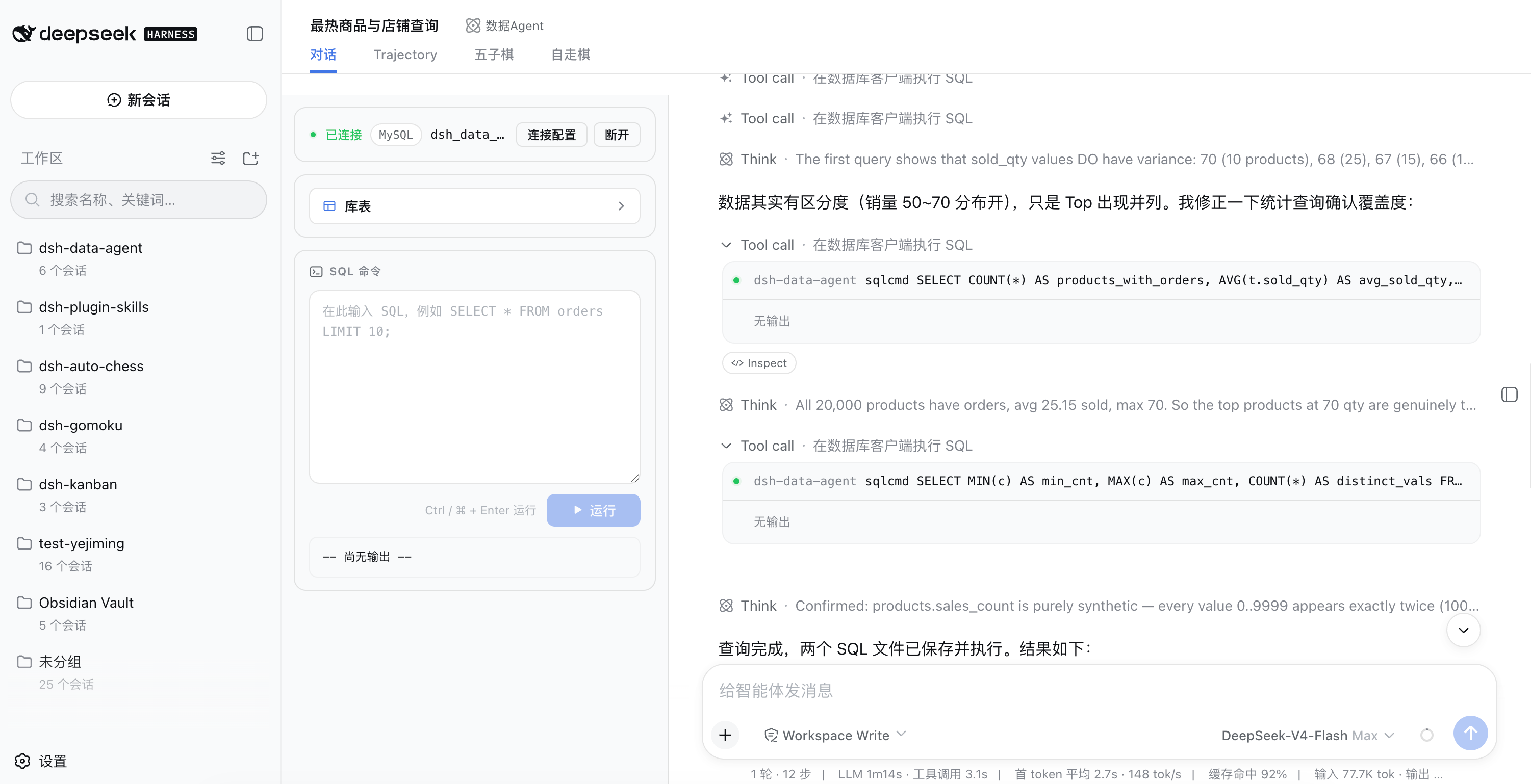
This plugin is a Data Agent built on DeepSeek Harness, letting DeepSeek focus on database operations.
Leveraging the agent-preset capability of DeepSeek Harness, it adds a Data Agent preset. The preset keeps only the three DSH built-in tools — read, edit, write — and adds a custom sqlcmd tool in place of the bash tool, free from irrelevant tools and prompts.
With this preset, you can configure a database connection right in the conversation UI, grant the AI access to the database, and complete CRUD operations.
Features
-
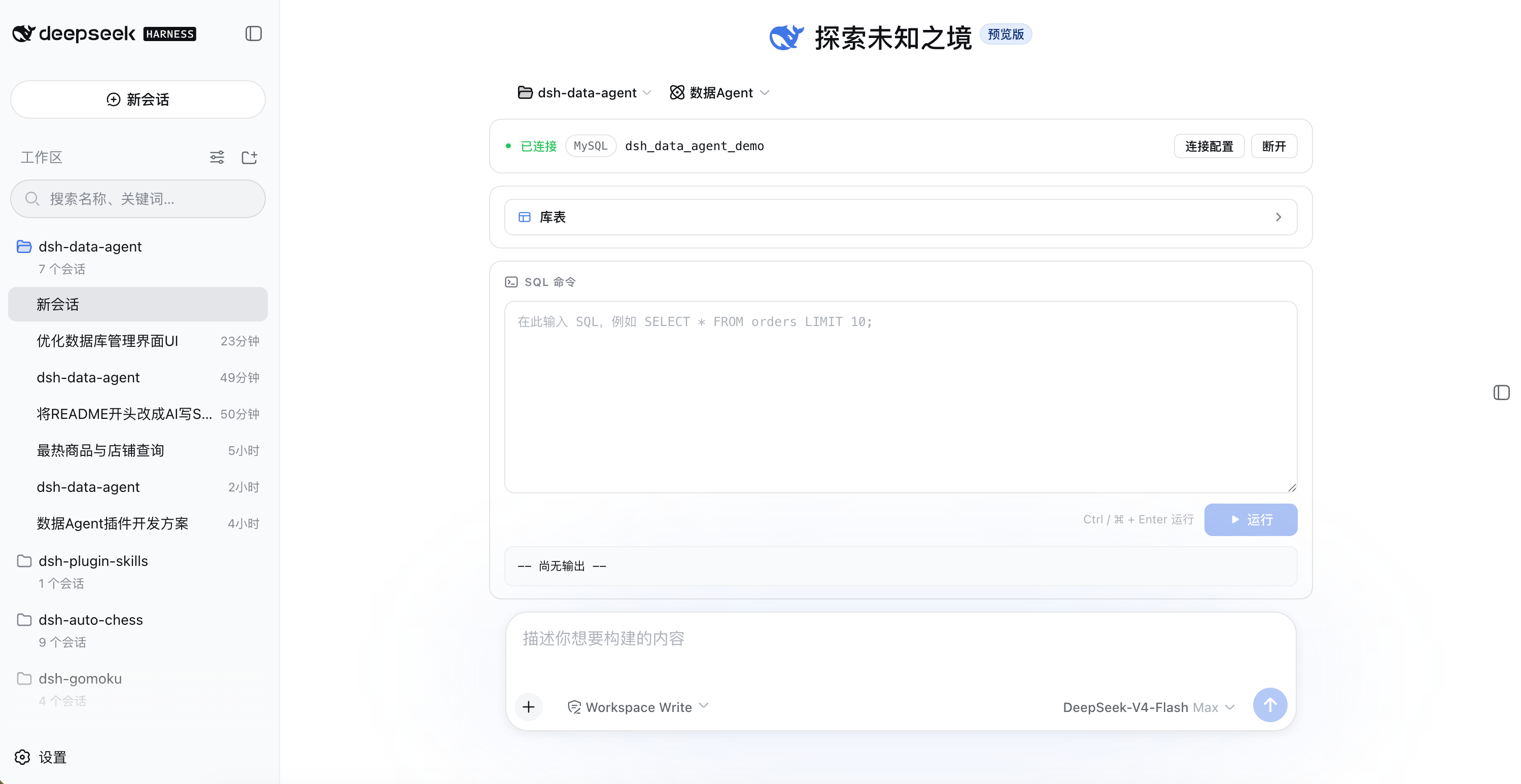
Database connection management: per-session connections to MySQL / PostgreSQL / SQLite / Oracle / Hive / Impala (SQLite uses a file path, Oracle a service name/SID, Hive/Impala a default database). Connection state lives in server memory and survives layout switches; passwords stay in memory and travel to the client via environment variables or stdin connect prefixes — never written to disk on the server.
-
Database workbench (embedded above the session's input bar): connection config card (collapses into a summary row after connecting, expandable for review); schema explorer (a "Tables" button opens a Modal — single-click a database to expand its scrollable table list, click a table to inspect its columns); SQL command box (write and run SQL on the non-agent channel, monospace output). The connection config is persisted to browser localStorage — switching pages or restarting restores the form and auto-reconnects. Once the conversation starts, the workbench becomes the left column and the chat records + input bar sit on the right.
-
sqlcmd tool: runs SQL/commands through the database clients (mysql / psql / sqlite3 / sqlplus / beeline / impala-shell); no shell layer (argv arrays + SQL via stdin), timeouts terminate the process tree, output is bounded and truncated.
-
Data Agent preset: choose "Data Agent" when creating a session — the tool surface is exactly
sqlcmd/read/write/edit, and every other project tool (bash, grep, skill, todo, goal, web, subagent, …) is simply absent, i.e. disabled; non-Data-Agent sessions render no workbench at all.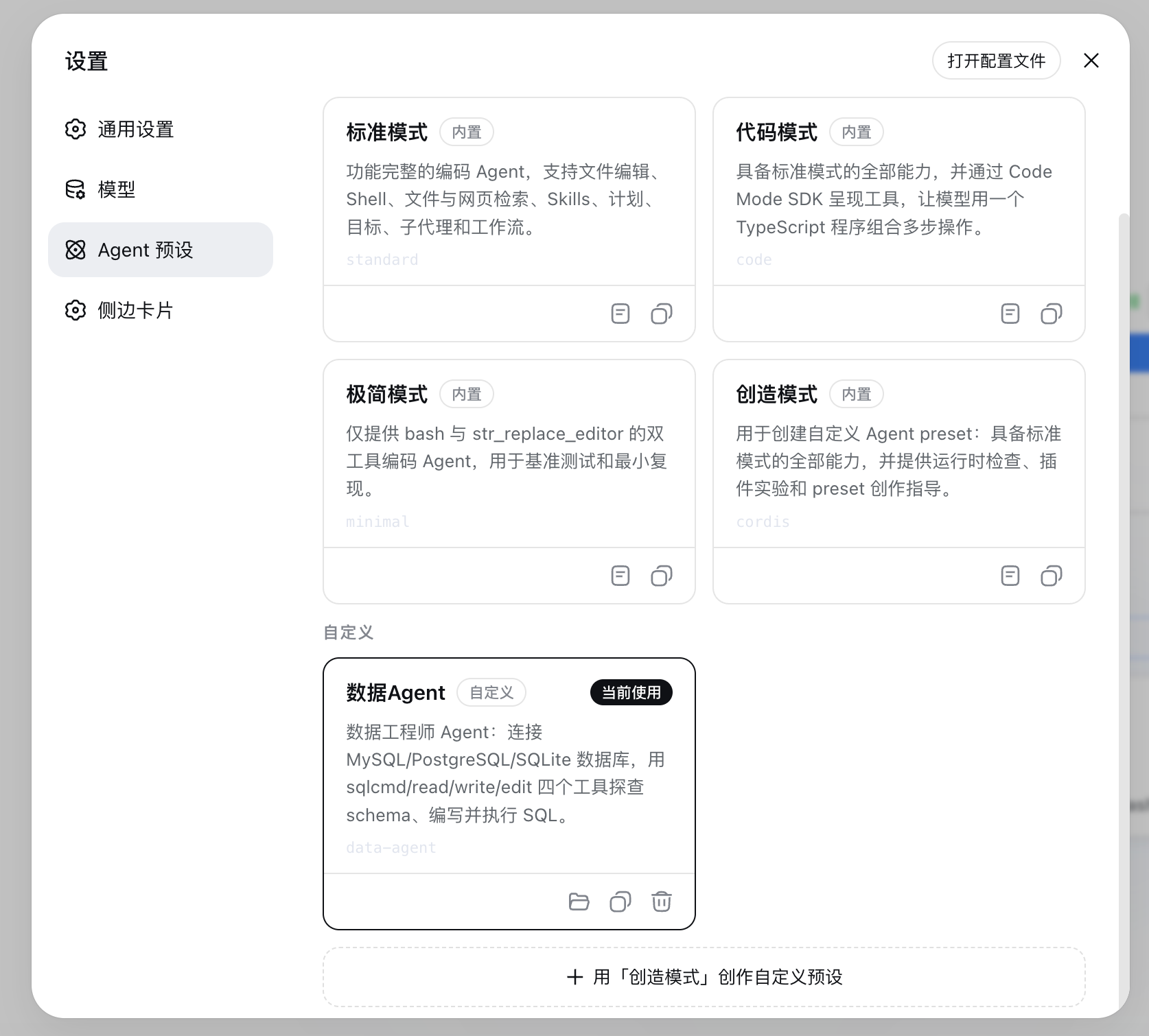
-
Standard agent loop: a data-agent session is an ordinary DSH session — standard turn/step, streaming, tool scheduling, and persistence, with zero host changes.
Quick Install
Two install methods, neither requires a local build (the prebuilt output in
lib/ is committed, and no prepare/prepack scripts are declared).
Method 1: npm (recommended)
# Install from npm (initializes the profile on first use)
dsh plugin --profile web add @yejiming/dsh-data-agent
Method 2: GitHub source
# Install from the GitHub source (lib/ is committed, no build at install time)
dsh plugin --profile web add github:omdsh-dev/dsh-data-agent
Verify the install:
dsh --profile web --dump-config   # the data-agent layer should appear
ls $DSH_HOME/.agent-presets/data-agent/   # agent.cordis.yml + preset.yml (auto-installed)
Start the Web GUI:
dsh --profile web
In the Web GUI: create a session → choose the "Data Agent" preset → the database workbench appears above the input bar → fill in the connection info (type/host/port/user/password/database; SQLite uses a file path) → after connecting, browse schemas (single-click a database to expand tables, click a table for its structure) or run SQL directly in the command box → once the conversation starts the workbench moves to the left; in Chat ask the AI to "list all tables and count rows" or "write a SQL query for orders in the last 30 days, save it to orders.sql and run it".
Database client binaries: sqlite3 usually ships with macOS/Linux; mysql / psql / sqlplus / beeline / impala-shell must be provided by the deployment and can be overridden per type via the
clientsconfig (missing clients are named in the connect error).
Architecture
Browser (apps/web)                        Host process (dsh --profile web)
┌─────────────────────────────┐          ┌──────────────────────────────────────┐
│ Database workbench (input.dock) │ fetch │ @yejiming/dsh-data-agent (host row)│
│  · connection config (6 types) │ ─────▶ │  · /plugins/data-agent/* routes       │
│  · schema explorer + SQL box   │        │  · dataAgentConnections store         │
│  · hero stacked / active rail  │        │  · preset self-install → $DSH_HOME/   │
└─────────────────────────────┘          └──────────────┬───────────────────────┘
                                                       │ same process
        data-agent session (full agent loop reuse)     ▼
┌──────────────────────────────────────────────────────────────────────────┐
│ agent.cordis.yml (preset layer, only 3 rows)                             │
│  · persona             → data-engineer system prompt                     │
│  · dsh-tool-fs         → read / write / edit (project built-ins)         │
│  · dsh-data-agent/tool → sqlcmd (this package's tool half)               │
└──────────────────────────────────────────────────────────────────────────┘
One npm package, three loadable faces, two host rows:
| Face | Entry | Loaded by |
|---|---|---|
| Server half (connection store / preset self-install) | lib/index.js (host row data-agent) | Host composition: provides dataAgentConnections, seeds connections, self-installs the preset; works headless too |
| Server half (HTTP routes) | lib/routes.js (host row data-agent-routes, exports subpath ./routes) | Host composition: registers routes via a nested inject only where a webserver exists (skipped automatically headless) |
| Tool half | lib/tool.js (exports subpath ./tool) | Only mounted by the data-agent preset (tool-sqlcmd row) |
| Browser half | lib/client.js (dsh.client declaration) | Browser: the database workbench in the input dock (conversation.input.dock) |
The tool half only consumes host services (tools, subprocess, dataAgentConnections) and provides none, so the preset guard needs no isolate realm.
Configuration
Every field has a loader default; there are no library-level defaults. Host row data-agent:
| Key | Meaning |
|---|---|
presetId | Preset directory name installed under $DSH_HOME/.agent-presets/ (default data-agent) |
installPreset | Whether to self-install the preset on startup (default true; existing directories are skipped, keeping user edits) |
connectTimeoutMs | End-to-end deadline for one /connect connectivity check (default 10000 ms) |
introspectMaxTables | Cap on the table list returned by /connect and /status (default 500) |
queryTimeoutMs | Deadline for one sqlcmd query (default 30000 ms) |
maxResultChars | In-memory cap on captured sqlcmd output, per stream (default 20000 chars) |
clients | Per-type CLI client overrides: { command?, args? } for keys mysql / postgres / sqlite / oracle / hive / impala (built-in defaults mysql/psql/sqlite3/sqlplus/beeline/impala-shell) |
connections | Config-seeded connections keyed by session id ('*' = wildcard default for any session without its own; headless/keyless runs and deployments pinning one database). No password field — passwords only enter memory via the /connect route |
The tool-sqlcmd row (inside the data-agent preset) additionally has maxRows (default 100, injected into the tool description as LIMIT guidance); queryTimeoutMs / maxResultChars / clients share the host row's names and defaults.
The data-agent-routes row has its own config: connectTimeoutMs / introspectMaxTables / maxResultChars mirror the main row; plus queryTimeoutMs (for /query and metadata queries, default 30000) and maxQueryChars (single-SQL length cap for /query, default 65536).
# Example override in cordis.patch.yml or a profile layer
- id: data-agent
  name: '@yejiming/dsh-data-agent'
  config:
    clients:
      mysql:
        command: /usr/local/bin/mysql-client
    # Wildcard default connection: sessions without an explicit /connect fall back
    # to this database (password-free scenario only)
    connections:
      '*':
        type: sqlite
        database: /tmp/analytics.db
Headless / One-shot Runs
Important: dsh run (the headless bundle) does not mount the agent-presets roster and never mounts presets for sessions — preset mounting belongs to the web surface (the api-proxy mounts on session creation). Therefore headless sessions cannot use the sqlcmd/read/write/edit tool surface; sqlcmd is verified and used on the web surface. Headless database work is limited to the host base's own tools (e.g. calling clients via bash).
(Note: inserting the roster row plus disabling the base tool rows cannot reproduce the preset tool surface headless — the agent ends up with an empty, zero-tool composition. For a headless smoke test, verify "seeded connections + host tools work" only.)
The data-agent-routes row is skipped automatically in profiles without a webserver (nested inject), so nothing needs special handling.
HTTP API
Prefix /plugins/data-agent (same-origin calls from the browser half):
| Method/Path | Meaning |
|---|---|
POST /connect | body { sessionId, type, host?, port?, user?, database, password? }; validate → connectivity check (list tables) → save only on success, returns { ok, tables }, failure returns { ok: false, error } without saving |
POST /disconnect | body { sessionId }; drop the session's connection |
GET /status?sessionId= | { connected, summary? }; summary is the password-stripped connection plus the table list |
GET /schemas?sessionId= | { ok, schemas: string[] }; database list (sqlite returns ['main']) |
GET /tables?sessionId=&schema= | { ok, tables: string[] }; tables of one schema (sqlite ignores the schema param) |
GET /describe?sessionId=&schema=&table= | { ok, columns: [{ name, type, nullable? }] }; table structure (sqlite ignores schema) |
POST /query | body { sessionId, sql }; run arbitrary SQL (the workbench command box, non-agent channel), returns { ok, result: { exitCode, stdout, stderr, truncated } }; sql length capped by maxQueryChars |
Schema/table identifiers allow only [A-Za-z0-9_$#.-] (server-side whitelist; injection-shaped input is rejected).
Security Notes
- Passwords: server-side, memory only; transport per type — mysql via
MYSQL_PWD, postgres viaPGPASSWORDenvironment variables; oracle via the sqlplusconnect user/pass@...stdin prefix, hive via the beeline!connectstdin prefix (never argv); impala sends no password by default (LDAP/kerberos configured throughclients)./statusand the public connection-store reads strip passwords. - Connection-config persistence: the workbench saves the connection config (including the password, in plain text) to browser localStorage (key
dsh-data-agent.connection.v1, per the confirmed local single-user scenario) after a successful connect, to restore the form and auto-reconnect once on page switches/restarts; disconnecting does not clear it. To clear: runlocalStorage.removeItem('dsh-data-agent.connection.v1')in the browser console. - No shell layer:
ctx.subprocess.spawnuses argv arrays, SQL and connect prefixes travel via stdin — no shell concatenation injection surface; metadata route identifiers pass the whitelist. - SQL execution authority: with the approval policy set to
never, sqlcmd and/queryexecute DDL/DML directly — connections are session-isolated; assess the data-plane risk yourself (areadonlymode is a later version). - Timeouts & caps: query timeouts, output truncation, table-list caps, and the /query SQL length are all config items — no hard-coded tunables.
Uninstall & Rollback
dsh plugin --profile web remove @yejiming/dsh-data-agent   # removes the dependency and its layer
rm -rf $DSH_HOME/.agent-presets/data-agent                      # manually delete the self-installed preset
Connections are in-memory; there is no persisted data to clean up.
Development
Build and test:
pnpm build   # cleans and rebuilds lib/ (tsdown: lib/index.js, lib/routes.js, lib/tool.js, lib/invariant.js, lib/client.js) + tsc declarations
pnpm test    # vitest: connection store / CLI templates / sqlcmd execution (mocked subprocess)
lib/ is committed, so installing and debugging (including dsh plugin add .)
never requires a build. To rebuild the artifacts, just run pnpm install: all
@deepseek-ai/* dependencies are published on npm, so there is no need to copy
or symlink node_modules from a local DSH checkout anymore.
pnpm-workspace.yaml follows the dsh convention (nodeLinker: hoisted); pnpm
11's supply-chain policy blocks freshly published packages and dependency build
scripts, so the repository pre-declares minimumReleaseAgeExclude (the rc.6
family) and allowBuilds: esbuild.
License
MIT
Friends
- dshfind.com: Chinese learning & sharing community for DeepSeek Harness — read the papers, write plugins, see the whole ecosystem.
- dsh-web-ui: Plugins & skins collection for the DeepSeek Harness (DSH) Web UI
- dsh-cc-tui: Claude Code style fullscreen interactive terminal plugin
有意识地管理
安装与管理
前置条件与目标 Profile
目标: Web Profile
交付方式: npm Bundle — @yejiming/dsh-data-agent@0.0.3。
验证、更新与移除
显示生命周期命令
dsh plugin --profile web listdsh plugin --profile web update @yejiming/dsh-data-agentdsh plugin --profile web remove @yejiming/dsh-data-agent兼容性与访问范围
Peer dependency 有证据: 兼容 0.1.0-rc.6 的 Web Profile。
风险事实
证据与编辑审查Manifest、Bundle patch、分发与新鲜度
不可变证据
- Package manifest ↗
- Bundle patch ↗
- Package registry 版本 ↗
- 源码 commit 56871019e984 ↗
- npm integrity: sha512-B9bnavVAL9APA6W4Z+euNAIfJftW5ja4l7Ro3LuFiL/S8UFF42JsZTWD2/f4Hq1EwLbPjLaxo2nbVctRxapeRQ==
审查状态与源码活动
在核对来源内容和不可变发布记录后,已由人工批准发布。AI 参与了内容草稿生成,最终发布决定由人工完成。
人工审查于 2026/8/29 UTC 16:45。GitHub 事实核对日期: 2026/8/20 UTC 14:01。
自当前证据基线以来,没有记录到重要源码变化。