快速了解
它能做什么
面向文章、书籍、PDF 和文档集的证据优先深度阅读工具。
本站提供的是中文说明,不代表该项目或 Plugin 自身提供中文界面;语言支持请以上游文档为准。
deepseek-harness-web Profile, deepseek-harness-headless Profile, dsh-tui Profile, codex Profile, claude-code Profile
DeepSeek Harness Web 0.1.2-rc.1; headless 0.1.0-rc.7; dsh-TUI >=0.8.1
证据已验证
核对日期 2026/9/11 UTC 13:48
选择前先看
DeepRead 是一个 DeepSeek Harness Bundle,并附带可移植的智能体技能。它可将提供的阅读材料整理为可追溯的观点、支持证据、来源位置、置信度标记和知识地图;也支持多文档比较及按需导出报告。
适合谁
适合需要在引用、学习或比较文档前仔细核查论证的研究人员、学生、分析师和智能体用户。
常见任务
- 精读 PDF 或文章,区分核心论点与支持证据。
- 生成知识地图,标记原文事实、合理推断和缺乏依据的内容。
- 比较 2 至 10 篇文档,梳理冲突、互补关系和综合结论。
- 使用费曼模式把一本书转化为讲解、自检和复习计划。
权限与数据
处理你提供的内容,并可能使用宿主服务获取 URL 或进行持久化。
权限- 在你请求时读取工作区中的文本、Markdown、HTML 和 PDF 输入。
- 宿主配置了网页获取能力时,获取支持的文章 URL。
- 仅在你请求导出时写入文件。
- URL 全文可能缓存到宿主存储以便复用;文档说明默认缓存期为 7 天。
- Web 面板的最近阅读记录保存在浏览器 localStorage 中。
- URL 获取依赖可用的 HTTP 提供方;获取微信公众号链接可能需要配置 User-Agent。
- 提供的证据未声明凭据要求。
局限
- 本次收录未实际执行安装、运行时兼容性验证。
- 可选浏览器界面仅适用于 Web;headless 和 dsh-TUI 不加载该界面。
- 扫描版 PDF 需先 OCR,才能可靠分析。
- 支持的 URL 获取范围有限;遇到反爬网站可能需要粘贴正文。
DSHub 已核对
- 已验证固定 Git Bundle 的结构和包身份。
- 包声明 Node.js ^22.19 或 >=24,并记录了具体宿主基线。
- 已存在打包的 DeepRead 技能,以及注册 dsh-deepread 的 Bundle patch。
DSHub 未核对
- 本次审核未执行安装、URL 获取、PDF 解析、模型调用、导出或浏览器界面。
- 未审计 npm 包的内容。
固定版本安装
安装 DeepRead
这个Plugin Bundle没有 DSH Plugin 安装操作,请根据源码文档使用真实交付方式。
维护者原文
项目 README
📖 DeepRead — Make AI reading traceable
Website · Real outputs · English · 中文
Turn articles, books, PDFs, and document sets into claims you can trace back to evidence and source locations.





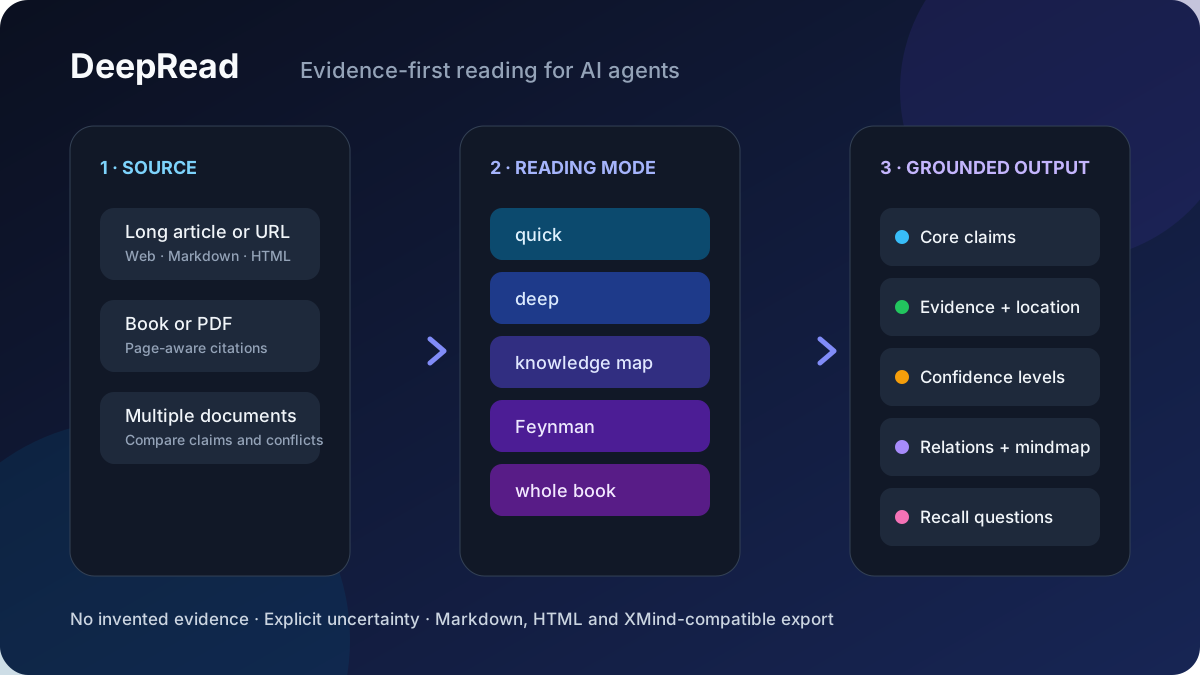
DeepRead is available in two compatible forms:
- Portable Agent Skill for Codex, Claude Code, and other Agent Skills-compatible tools. Zero runtime dependencies; the agent follows the evidence-first reading workflow with its own file and web tools.
- Host plugin package for DeepSeek Harness Web/headless and dsh-TUI, with a
deepreadtool, PDF extraction, optional persistence/jobs/Web route, batch comparison, cost preview, and HTML/XMind-compatible export. Its browser client is an optional Web-only entry.
Why it is different
| A typical summary | DeepRead |
|---|---|
| Compresses the topic | Extracts complete claims and the reasoning behind them |
| Blends source facts with model inference | Labels author intent, source facts, reasoned inference, and unverified content |
| Makes conclusions hard to check | Pairs important claims with evidence and page/paragraph locations |
| Stops at an answer | Adds knowledge maps, conflicts, limitations, and active-recall questions |
If the source does not support a claim, DeepRead says “source does not provide evidence” instead of filling the gap.
<p align="center"> <picture> <source media="(prefers-color-scheme: dark)" srcset="https://raw.githubusercontent.com/xiehuan123/dsh-deepread/main/.github/assets/deepread-panel-dark.jpg"> <img src="https://raw.githubusercontent.com/xiehuan123/dsh-deepread/main/.github/assets/deepread-panel-light.jpg" width="470" alt="DeepRead reading panel with input, reading mode, export, focus, and budget controls"> </picture> <br> <sub>The real DeepSeek Harness Web reading panel. The portable Agent Skill uses the same evidence-first workflow without this runtime UI.</sub> </p>Quick start
Portable Agent Skill
npx skills@latest add xiehuan123/dsh-deepread
Then ask your agent:
Deep-read docs/architecture.pdf in knowledge-map mode.
For every important claim, show the supporting evidence and source location.
Full DeepSeek Harness plugin
dsh plugin --profile web add dsh-deepread
If pnpm reports ERR_PNPM_ADDING_TO_ROOT, retry with the profile workspace made explicit:
dsh plugin --profile web add -w dsh-deepread
Restart dsh web, then use the 📖 reading panel or call the deepread tool in chat.
See real outputs
These are complete reports generated from public articles, not hand-written mockups:
| Report | What DeepRead made visible |
|---|---|
deep · Claude Code token optimization |
Reconstructed the engineering chain from visibility to input, output, and retrieval-path compression; separated recommendations from project-authored benchmarks. |
map · Marketing-claim fact check |
Found that the article's “90%”, “¥1.28M salary”, and “¥2,000/day” claims had no source, sample, or baseline; marked each one unverified. |
deep · vivo Tauri architecture |
Connected architecture choices to reported size/performance evidence while preserving the article's untested assumptions and deployment limits. |
Browse all reproducible examples →
Features
| Capability | Details |
|---|---|
| 🎛️ Five modes | quick key takeaways · deep in-depth reading · map knowledge map · feynman Feynman technique (11-step loop + spaced repetition) · book whole-book reading (see the comparison below) |
| 🗺️ Knowledge-map mode | Core question / core conclusion / ten content categories (conclusion, sub-claim, mechanism, fact, data, case, hidden premise, objection, limitation, actionable advice) / every claim paired with evidence (unverifiable claims marked "no evidence provided in the original text") / key data table (value & unit, time range, sample, baseline, source, location) / eight relation labels (supports, refutes, causes, explains, depends on, exemplifies, contrasts, limits) / four confidence levels (author intent, original facts & data, reasonable inference, unverifiable) / Mermaid mindmap / XMind outline / 5 active-recall questions |
| 📥 Three inputs | WeChat article URLs (mp.weixin.qq.com stable links) · files (.txt/.md/.html/.pdf, PDF via a built-in pure-JS extractor with Chinese ToUnicode mapping, page markers, and object-stream/xref-stream support) · pasted text |
| 📤 Optional export | Displayed in-session by default; export accepts md / mm (FreeMind, importable by XMind) / html (editor-style web report with light/dark theme) / all, written to deepread-output/ in the workspace |
| 🎨 Browser UI | deepread tool result card (four-color confidence legend, collapsible sections) + a 📖 shortcut button next to the input area that opens a card-style reading panel (link/path/text + mode/export selection + reading focus + one-click start) |
| 🔀 Batch compare | Pass 2-10 documents via batch (url/path/text each) to get per-document summaries plus a cross-document report: comparison matrix, conflicts, complementarity, and synthesis |
| 📍 Citations | Reports carry page/paragraph provenance: arguments, quotes, and a dedicated citation table locate claims back to 【第N页】 markers in the source |
| 🧮 Cost preview | estimate: true previews token spend, model-call count, and expected time per mode without calling the model (CJK≈0.6 tok/char heuristic; rate/latency defaults are picked per model family and can be overridden explicitly) |
| 📚 Recently read | The Web panel keeps a local history of recent reads with one-click re-read (localStorage, no server round-trip) |
| ⏳ Progress transparency | Long reads / big PDFs / batches become official background jobs: the label states segment count and budget; the progress stream pushes 「精读第 3/20 段…」 line by line; job_output polls progress and the final report, job_kill cancels |
| 🔍 Parse progress | Full PDF extraction moves inside the background job and streams per page — 「解析 PDF 中… 42%(10/24 页)」 — after a fast sampling preflight decides length (no more silent wait before the background job appears); batches stream per document — 「解析第 2/5 篇… / 精读第 2/5 篇… / 完成第 2/5 篇」 plus 「跨篇对比汇总中…」 |
| 🧮 Panel budget | The Web panel shows per-mode token + time hints above the mode chips (e.g. 深度精读 (≈38k token · ≈8分钟)), instantly for pasted text; calibrated by real model speed; links/file paths are fetched and estimated by the Host through a same-origin API (POST /api/deepread/budget) and the panel's 🔍 budget-preflight button shows a one-line result (≈N chars · ≈X token · ≈Y min) right inside the panel — no chat round-trip, no table |
| ⚡ Fast preflight | estimate mode samples the first 2 PDF pages and extrapolates by page count, so big PDF budgets come back in milliseconds |
| 🎯 Self-calibration | Real token/s measured from every model call feeds a rolling average persisted in storage — estimates converge to your actual provider speed; cold-start defaults are per model family (DeepSeek/Kimi/Qwen ≈100-110 tok/s, Claude ≈70, GPT ≈90) |
Five modes compared
| Mode | Best for | Key output | Cost |
|---|---|---|---|
quick |
"What is this article about?" at a glance | One-line summary, core claim, argument structure, quotes, key concepts, critical questions | Single call, fastest |
deep (default) |
Reading one article carefully | Overview, core claim, argument structure (claim + evidence + verbatim quotes), argument flow, section highlights, quotes, key concepts, critical thinking | Long articles are auto-split, section-by-section + summary |
map |
Research, fact-checking before citing | Core question & conclusion, ten content categories, claim-evidence pairing, key data table (five elements), eight relations, four confidence levels, Mermaid mindmap, XMind outline, active-recall questions | Structured pipeline, multiple calls |
feynman |
Truly learning it and teaching it to others | 11-step loop: TOC → questions → per-chapter → claims/data/evidence → chapter mindmap → explain with the book closed → self-check gaps → correct against the source → merged mindmap → explain again → spaced review on days 1/3/7/14/30 | Longest output, most calls |
book |
Whole books / very long texts | Table of contents, chapter flow, a full-book summary assembled from per-part deep reads | Processed part by part |
One-line picker: in a hurry, quick; read one article thoroughly, deep; cite and fact-check, map; learn and remember, feynman; a whole book, book.
Installation
DeepRead 1.0.1 requires Node.js 22.19 or 24 and higher (^22.19 || >=24). The same npm package exposes the TypeScript Host entry at lib/types/index.js, the dsh-TUI Community Consensus v0.15 manifest at dsh-plugin.json, and an optional DeepSeek Harness Web client at lib/client.js.
Host compatibility
| Host | Node deepread tool |
Web client | Packaged skill | Degraded behavior |
|---|---|---|---|---|
DeepSeek Harness Web 0.1.2-rc.1 |
Supported | Web UI loaded | Available | None |
DeepSeek Harness headless 0.1.0-rc.7 |
Supported | Web client not loaded | Available | No budget HTTP route |
dsh-TUI 0.8.1 minimum / Community Consensus v0.15 |
Supported | Web client not loaded | Available | No Web route or browser UI |
Custom composition without storageDomain |
Supported | Depends on Web services | Available | URL cache and Host calibration use in-process state |
Before replacing 0.5.4, read the Upgrade and rollback guide, including the browser-origin and DSH_HOME retention conditions. The Release notes describe the compatibility and entry-point changes.
DeepSeek Harness (tool + Web UI, full functionality)
Requires pnpm on the machine (dsh plugin runs pnpm underneath to install plugins).
The unpinned command follows the npm latest tag. For the validated Harness Web 0.1.2-rc.1 baseline, pin DeepRead 1.0.1; keep DeepRead 1.0.0 on the older 0.1.0-rc.7 Web runtime. Check the current tags with npm view dsh-deepread dist-tags.
# npm latest tag
dsh plugin --profile web add dsh-deepread

# Exact npm version
dsh plugin --profile web add dsh-deepread@1.0.1

# Exact GitHub tag
dsh plugin --profile web add "github:xiehuan123/dsh-deepread#v1.0.1"
To remove DeepRead from the Web profile:
dsh plugin --profile web remove dsh-deepread
pnpm workspace-root compatibility
Some DSH releases create each profile as a pnpm workspace but forward add and remove without marking the workspace root explicitly. With affected pnpm versions, the command stops before any DeepRead code runs and reports ERR_PNPM_ADDING_TO_ROOT. Retry only that failed operation with -w (the pnpm shorthand for --workspace-root):
# Install after ERR_PNPM_ADDING_TO_ROOT
dsh plugin --profile web add -w dsh-deepread

# Remove after the same workspace-root error
dsh plugin --profile web remove -w dsh-deepread
This is a profile package-manager compatibility issue and can affect any DSH plugin installed into that profile. Do not delete pnpm caches or edit node_modules by hand; let dsh plugin update the profile manifest and bundle list.
Restart dsh web for it to take effect. A 📖 shortcut button appears next to the input area; click it to open the card-style reading panel. You can also just say: "Read this article in knowledge-map mode: <content>".
Tip: fetching WeChat article URLs needs an HTTP provider. If you see "web fetch service unavailable" after install, mount
@deepseek-ai/dsh-web-fetch-httpin the profile'scordis.patch.ymland give it a browser User-Agent (WeChat serves an anti-bot verification page).
dsh-TUI (Host tool + skill)
dsh-TUI 0.8.1 or newer can install dsh-deepread@1.0.1 through the host's plugin installer. The installer reads the packaged dsh-plugin.json v0.15 manifest and loads lib/types/index.js; it does not load lib/client.js.
Codex / Claude Code (skill form, zero dependencies)
Install (pick one):
claude plugin install xiehuan123/dsh-deepread      # terminal command (Codex compatible)
/plugin install xiehuan123/dsh-deepread            # or the in-session slash command
npx skills@latest add xiehuan123/dsh-deepread      # or skills.sh
Usage (Codex / Claude Code):
- Trigger: say something containing "deep-read / analyze / knowledge map / Feynman", e.g.
Deep-read docs/architecture.mdAnalyze this article in knowledge-map mode: <paste text>Read this book with the Feynman technique and give me a review planQuickly summarize this WeChat article: https://mp.weixin.qq.com/s/xxxx
- Mode: the agent picks a mode automatically (default
deep); it asks when unsure. - Input: file path / web link (WeChat articles are fetched directly; for anti-bot sites like Zhihu/Juejin, paste the text) / pasted text. PDFs work too (the agent extracts text per
SKILL.md; scan-only PDFs should be OCR'd first). - Output: a Markdown report in the conversation by default; say "export html / mindmap / md" and it writes to
deepread-output/in the workspace (.mdreport,.mmFreeMind mindmap [importable by XMind],.htmlweb report). - Knowledge-map mode: output carries four confidence levels (author intent / original facts & data / reasonable inference / unverifiable), and every claim is paired with evidence — the original text lacking evidence is explicitly marked "no evidence provided in the original text".
- Feynman mode: the full 11 steps (TOC → questions → per-chapter → claims/data/evidence → chapter mindmap → explain with the book closed → self-check gaps → correct against the source → merged mindmap → explain again → spaced review on days 1/3/7/14/30).
Note: the Codex/Claude skill is the "methodology" form — the agent performs the analysis with its own tools; the DSH
deepreadis the "tool" form — the plugin runs the pipeline by calling the model directly. Output formats are identical and interchangeable (an exported.md/.htmlkeeps working when handed to an agent on either host).
Examples
Please deep-read this link: https://mp.weixin.qq.com/s/xxxx
Read book.pdf in knowledge-map mode and export html
Quickly summarize this article: <paste text>
Parameters
| Parameter | Type | Description |
|---|---|---|
url |
string | Stable WeChat article link (mp.weixin.qq.com only; for anti-bot sites, paste the text) |
path |
string | Workspace file path (.txt/.md/.markdown/.html/.pdf) |
text |
string | Pasted text |
depth |
enum | quick / deep (default) / map / feynman / book |
export |
enum | none (default, in-session only) / md / mm / html / all |
refresh |
boolean | true forces a re-fetch and cache refresh (default false: a cached URL reuses the stored full text without network access) |
focus |
string | Reader's angle of interest, e.g. "argumentation logic", "research methodology" |
language |
enum | zh / en / auto (default) |
Repository layout
├── package.json            # dsh.bundle + dsh.client + dsh.skills
├── cordis.patch.yml        # inserts itself into the composition
├── dsh-plugin.json         # dsh-TUI Community Consensus v0.15 Host-only manifest
├── src/index.ts            # TypeScript Cordis Host entry
├── src/host/**/*.ts        # Typed Host pipeline, optional services, storage, and exports
├── src/client/**/*.ts      # Typed client models, storage, store, views, and slot entry
├── tsdown.config.ts        # official lazy-CJS module build semantics for lib/client.js
├── lib/types/index.js      # generated Host runtime package entry
├── lib/client.js           # Client half (generated): __ModuleLoader__.load({ id, factory })
├── docs/                   # integration, upgrade/rollback, and release documentation
├── test/                   # Host, browser, compatibility, manifest, and package contracts
├── assets/                 # README and showcase visuals
├── skills/dsh-deepread/    # Codex / Claude Code compatible skill (SKILL.md + references + agents/openai.yaml)
├── plugin.json             # Agent Plugins-compatible root manifest
├── .claude-plugin/         # Claude Code plugin manifests (plugin.json + marketplace.json)
└── .codex-plugin/          # Codex plugin manifest (plugin.json)
The @deepseek-ai/* host packages (cordis / dsh-tools / schemastery / dsh-storage-domain) plus zod and react
are provided by the host profile and declared in peerDependencies (* means "follow the host version");
dsh.client.inject declares the client-side dependency edges (dsh-api-session-controller provides sessions,
dsh-client-ui-conversation provides conversation).
Full-text cache
Fetched article full texts are persisted following the official storageDomain convention: the
deepread_url_cache domain (version 1, zod-schema validated, records hold url/text/fetchedAt),
stored under $DSH_HOME/storages/ and surviving process restarts. Re-reading the same article in a
different mode (deep→map/feynman/book) reuses the cache without network access; when a fetch fails the
cache is used as a fallback and the report says so. Default TTL is 7 days with a cap of 200 entries
(expired entries are lazily removed on write). A composition that omits storageDomain degrades to
an in-process cache. webServer is optional: Web-capable profiles register the budget route, while
the stock headless profile activates the Host tool without that route or the browser client.
Plugin configuration (Config)
timeoutMs (default 900000), chunkChars (default 6000), maxParts (default 20),
maxInputChars (default 400000), cacheEnabled (default true), cacheTtlHours (default 168,
0 disables caching) can all be overridden in the cordis row, for example:
- insert:
    - id: deepread
      name: dsh-deepread
      config:
        timeoutMs: 600000
        cacheTtlHours: 24
Development
Before maintaining the host integration, read the DeepSeek Harness plugin integration reference. It records profile loading, the Node/browser entry points, slot lifecycle, theme rules, and the diagnostic order.
npm run typecheck:host      # strict Host typecheck
npm run typecheck:browser   # strict browser typecheck
npm run build               # build lib/types and lib/client.js
npm test                    # full repository contract suite
npm pack --dry-run --json   # inspect the publishable file list and public entries
Community
- Ask usage questions or share a reading workflow in GitHub Discussions.
- Report a reproducible problem with the bug form.
- Propose a focused improvement with the feature form.
- Read CONTRIBUTING.md before opening a pull request.
For Chinese-language notes about AI tools, open-source projects, and practical workflows, follow Appoint 实验室 on WeChat:
<img src="https://raw.githubusercontent.com/xiehuan123/dsh-deepread/main/.github/assets/appoint-lab-wechat.png" width="360" alt="Appoint 实验室 WeChat public account poster and QR code">If traceable AI reading is useful to you, star the repository to make it easier for the next reader to find and to follow future releases.
License
MIT
有意识地管理
安装与管理
前置条件与目标 Profile
目标: deepseek-harness-web Profile, deepseek-harness-headless Profile, dsh-tui Profile, codex Profile, claude-code Profile
交付方式: Git Bundle — xiehuan123/dsh-deepread#9462f1e546b94a7f27e77abaf3d9ee3fedf7f746。
验证、更新与移除
显示生命周期命令
dsh plugin --profile deepseek-harness-web list兼容性与访问范围
Node 22.19+; documented DSH Web, headless, and dsh-TUI support: DeepSeek Harness Web 0.1.2-rc.1; headless 0.1.0-rc.7; dsh-TUI >=0.8.1。
风险事实
Reads supplied files, pasted text, and supported URLs; source material may be retained in a URL cache when host storage is available.
证据 ↗Requested exports can write Markdown, HTML, or FreeMind files to deepread-output/ in the workspace.
证据 ↗Package metadata declares a prepack lifecycle script that runs its build.
证据 ↗证据与编辑审查Manifest、Bundle patch、分发与新鲜度
不可变证据
审查状态与源码活动
该包使用 MIT 许可证;使用前请根据工作区策略评估来源内容处理和缓存行为。
AI 审查于 2026/9/11 UTC 13:49。GitHub 事实核对日期: 2026/9/11 UTC 13:49。
自当前证据基线以来,没有记录到重要源码变化。