快速了解
它能做什么
将 DeepSeek Harness 的待处理编辑以差异形式审查,并按文件、变更块或选中行保留或还原。
本站提供的是中文说明,不代表该项目或 Plugin 自身提供中文界面;语言支持请以上游文档为准。
Web Profile
Cordis >=4.0.1; React ^18.2.0; Harness version not declared in supplied evidence
证据已验证
核对日期 2026/9/12 UTC 13:55
有代码证据的贡献
它为 DSH 增加什么
在侧边栏添加审查面板,将已跟踪的智能体编辑按文件或变更块显示,并可保留或还原。
机制证据 ↗选择前先看
DSH 差异审批会跟踪成功的 edit、write 和 str_replace_editor 变更,并汇总到侧边栏审查面板。你可以查看带语法高亮的文件差异,对单个变更块或整份文件作出保留/还原决定,撤销决定,并可选地导入本地 Git、SVN 或 Perforce 工作区变更。
适合谁
希望在接受智能体写入工作区的改动前进行明确审查的 DeepSeek Harness Web 用户。
常见任务
- 在保留前审查所有已跟踪的智能体编辑。
- 保留或还原某个变更块、选中的行范围或整份文件。
- 待处理列表为空时导入本地版本控制中的工作区变更。
- 审查变更时把差异行引用复制到对话输入框。
权限与数据
处理本地工作区变更,并按工作区在本地保存待审查状态。
权限- 跟踪成功的 DSH edit、write 和 str_replace_editor 变更。
- 可写回被还原的文件内容;还原新建文件会删除该文件。
- 可在默认应用中打开正在审查的文件,或在系统文件管理器中显示它。
- 通过部署环境的 shell 执行器调用只读的 Git、SVN 或 Perforce 导入命令。
- 待处理状态保存于 `<dshHome>/diff-approval/workspaces/<workspaceId>.json`。
- 没有工作区的会话仅在内存中保留条目。
- 提供的证据未声明需要凭据。
局限
- 自动跟踪仅覆盖 edit、write 和 str_replace_editor 变更。
- 在这些工具之外删除的文件,仅当文件已被跟踪时才能被感知。
- 导入版本控制变更需要相应的 Git、SVN 或 Perforce CLI 位于 PATH 中。
- 导入未跟踪文件默认关闭,且在大型工作区可能较慢。
DSHub 已核对
- 已验证不可变源提交、包结构和 bundle patch。
- 清单声明了 DSH Web 客户端 bundle 以及 Cordis/React 对等依赖。
- README 记录了 DSH 安装命令和审查流程。
DSHub 未核对
- 未实际执行安装、构建、测试或运行时验证。
- 未审计 npm tarball 的内容。
- 未确认与某个特定 DeepSeek Harness 版本的兼容性。
固定版本安装
安装 DSH Diff Approval
这个Plugin Bundle没有 DSH Plugin 安装操作,请根据源码文档使用真实交付方式。
维护者原文
项目 README
dsh-diff-approval
English | 中文


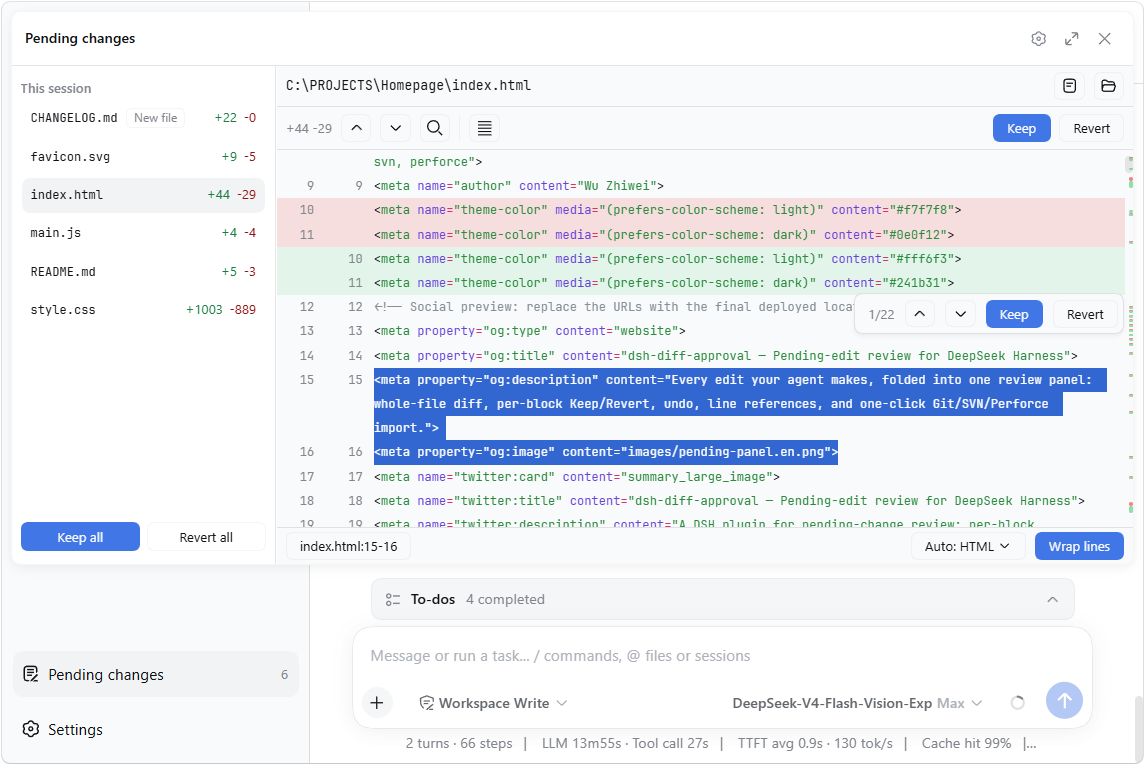
A DeepSeek Harness (DSH) plugin for pending-change review: it automatically tracks every successful edit, write, and editor (str_replace_editor) mutation, folds them into a single pending list in the sidebar where each file's diff can be reviewed and kept/reverted — and it can also import the workspace's version-control repository's local changes (Git / SVN / Perforce) in one click.
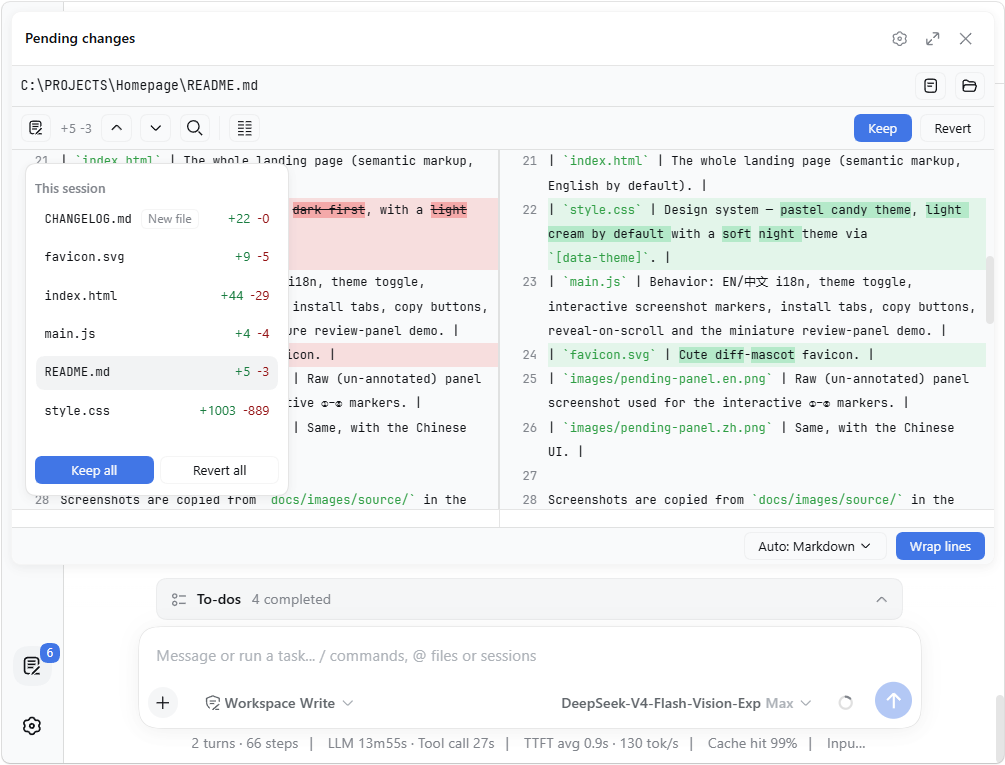
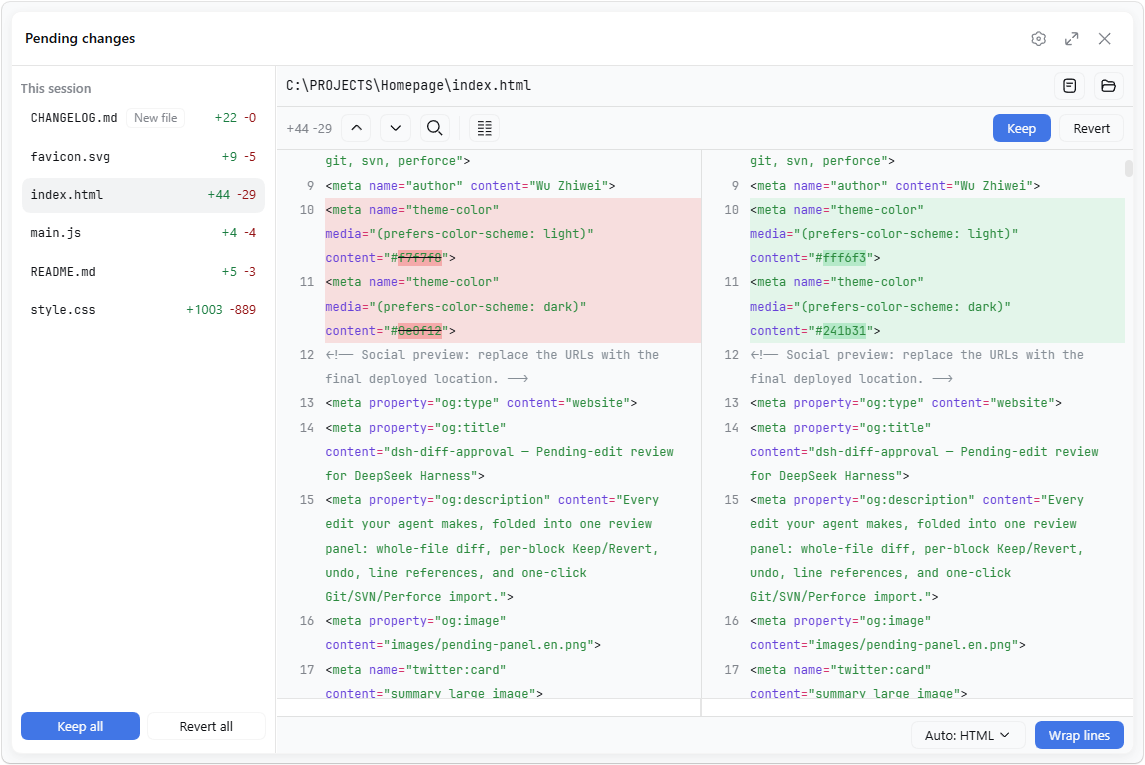
The panel also collapses its file list into a floating card and expands to fullscreen:
| Collapsed file list | Fullscreen |
|---|---|
 |
 |
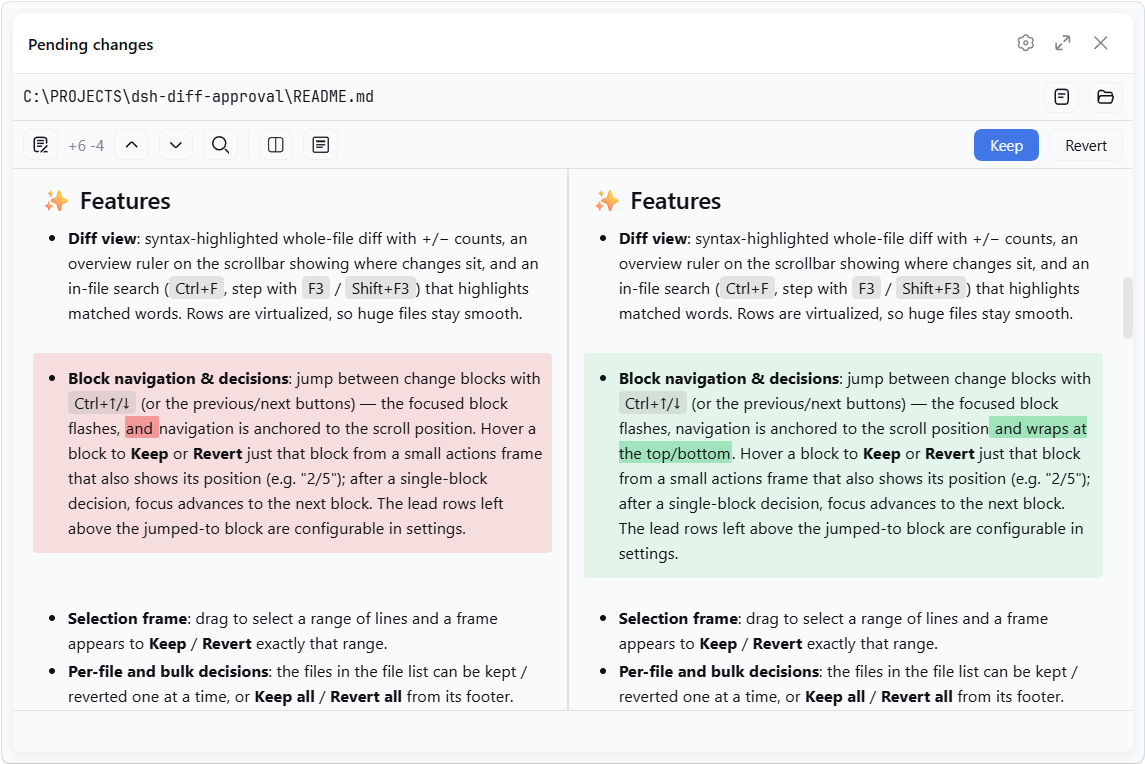
For Markdown files, the source-line diff can also be shown as a rendered before/after preview:
✨ Features
- Diff view: syntax-highlighted whole-file diff with +/− counts, an overview ruler on the scrollbar showing where changes sit, and an in-file search (
Ctrl+F, step withF3/Shift+F3) that highlights matched words. Rows are virtualized, so huge files stay smooth. - Block navigation & decisions: jump between change blocks with
Ctrl+↑/↓(or the previous/next buttons) — the focused block flashes, navigation is anchored to the scroll position and wraps at the top/bottom. Hover a block to Keep or Revert just that block from a small actions frame that also shows its position (e.g. "2/5"); after a single-block decision, focus advances to the next block. The lead rows left above the jumped-to block are configurable in settings. - Selection frame: drag to select a range of lines and a frame appears to Keep / Revert exactly that range.
- Per-file and bulk decisions: the files in the file list can be kept / reverted one at a time, or Keep all / Revert all from its footer.
- Resolved files stay listed: once every change in a file has been kept/reverted, the entry remains in the list and the panel asks whether to remove it or keep it for later.
- Undo / Redo: every keep, revert, and import is undoable with
Ctrl+Z/Ctrl+Shift+Z(rebindable in Shortcuts;Ctrl+Yremains an alias), active while the panel is open — text inputs keep their own editing. - Quick summon & file cycling:
Ctrl+D(configurable in settings) toggles the review panel from anywhere andEsccloses it;Ctrl+Tab/Ctrl+Shift+Tabcycle through the pending files. - Line references: select text in the diff — the status bar shows its
(file:line)/(file:start-end)reference; click it (or pressCtrl+L) to copy, and with the setting on it auto-pastes into the composer and focuses it. References in the composer and queued messages are auto-aligned when the referenced file changes: surviving lines re-map to their new range, and a fully-removed line becomes(file:LINE_MISSING). - Highlight language: auto-detected from the file extension, or overridden from a dropdown.
- Auto-wrap: a "Wrap lines" toggle beside the language selector wraps long lines for that language (CJK breaks between characters, Latin words stay whole), remembered per language.
- Side-by-side split view: an opt-in two-column diff (left "before" | right "current"), line-aligned with per-side horizontal scrolling and a shared vertical scrollbar. Toggle it from the toolbar or in settings (default: single-column unified view). In split view, changed blocks are aligned by content similarity and changed lines show intra-line word diffs — whole words for Latin text, per-character for CJK.
- Markdown preview: for Markdown files, toggle between the source-line diff and a rendered before/after preview (
Preview/Source). The preview content max width is configurable. - Customizable appearance: from the "Diff view" settings group, adjust the diff's code font size (%), line height (px), and the added / removed line colors, with a live preview.
- External changes: files already in the pending list are monitored — if one is later modified outside the reviewed edits (another tool, an editor), the panel adopts the new content and flags the divergence.
- Open / Reveal: while reviewing a file's diff, open it in its default app or reveal it in the system file manager with one click.
- Import workspace changes: when the list is empty, click the button to import the workspace's local changes from Git / SVN / Perforce — modified, deleted, and (opt-in) untracked files. The VCS root is found by walking up from the workspace, so a workspace inside a subdirectory works too.
- Settings: a "Diff Approval" section in DeepSeek Harness settings, grouped into Diff view (code font size, line height, added / removed colors) and Shortcuts (rebind the panel's keyboard chords) plus preferences for auto-paste on copy, whether untracked files are included when importing, the diff's tab width (2 / 4 / 8 spaces), the side-by-side split view, the block-jump lead rows, the Markdown preview default and width, and the quick-summon chord.
- Persistence: pending state is stored per workspace at
<dshHome>/diff-approval/workspaces/<workspaceId>.jsonand survives restarts — unhandled changes are still there when you come back, even in a fresh session.
📦 Install
If dsh is on your PATH:
dsh plugin --profile web add dsh-diff-approval
Or, if you run the harness through npx (e.g. npx @deepseek-ai/dsh web):
npx @deepseek-ai/dsh plugin --profile web add dsh-diff-approval
or manually: add the package to your profile's package.json dependencies and insert this row into the profile's cordis.patch.yml:
- insert:
    - id: diff-approval
      name: dsh-diff-approval
      # Optional: relocate durable pending state (defaults to
      # <dshHome>/diff-approval/workspaces).
      # config:
      #   storageDir: ~/dsh-pending
Then restart dsh web.
🚀 Usage
- Work with the agent as usual — successful
edit/write/ editor (str_replace_editor) calls are recorded automatically. - Click the Pending changes action at the sidebar footer, review each file's diff, and Keep / Revert.
- When the list is empty, Import workspace changes pulls in the workspace's local Git/SVN/Perforce changes.
📝 Notes
- Only tracked mutations (
edit,write, andstr_replace_editoreditor calls) are recorded automatically. Deletions made outside these tools (e.g. shellrm) are sensed only for tracked files: the entry turns "File is gone" and its Revert restores the file. - The VCS import runs read-only Git/SVN/Perforce commands through the deployment's shell executor, so the respective CLI must be on
PATH. Importing untracked files (default off) scans the whole workspace, which can be slow on large trees. - For a newly-created file, the whole-file revert action reads Delete and removes the file.
- Reverting a file writes it back with its current line endings (LF / CRLF) preserved.
- Sessions with no workspace keep their entries memory-only; corrupt persistence files are rejected and can be deleted to reset.
- The sidebar footer entry stacks vertically with other plugins' footer actions and defers to the dedicated
dsh-footer-orderplugin when it is present.
🛠 Development
corepack pnpm install
pnpm run typecheck   # tsc over both faces
pnpm run build       # emits lib/index.js and lib/client.js
pnpm test
有意识地管理
安装与管理
前置条件与目标 Profile
目标: Web Profile
交付方式: Git Bundle — 9087/dsh-diff-approval#8f0aac37a0465cde6cda580521ca30636228dc84。
验证、更新与移除
显示生命周期命令
dsh plugin --profile web list兼容性与访问范围
DeepSeek Harness web bundle; requires Cordis and React peers: Cordis >=4.0.1; React ^18.2.0; Harness version not declared in supplied evidence。
风险事实
Reverting a new file deletes it; reverting a file writes its preserved line endings back to disk.
证据 ↗Pending-review state is stored per workspace under the DSH home directory.
证据 ↗Workspace import invokes read-only Git, SVN, or Perforce commands through the deployment shell executor.
证据 ↗证据与编辑审查Manifest、Bundle patch、分发与新鲜度
不可变证据
审查状态与源码活动
采用 MIT 许可证。请确保使用者理解:还原操作会写入文件,并可能删除新建文件。
AI 审查于 2026/9/12 UTC 13:56。GitHub 事实核对日期: 2026/9/12 UTC 13:56。
自当前证据基线以来,没有记录到重要源码变化。