快速了解
它能做什么
在 DSH Web 设置中配置现有 llm-pi-ai 路由、模型限制、推理等级、输入模态和网关预设。
本站提供的是中文说明,不代表该项目或 Plugin 自身提供中文界面;语言支持请以上游文档为准。
Web Profile
DSH >= 0.1.1-rc.2; @deepseek-ai/cordis ^4.0.1; @deepseek-ai/dsh-settings ^0.1.5-rc.2; Node ^22.19.0 || >=24.0.0
证据已验证
核对日期 2026/9/12 UTC 14:03
有代码证据的贡献
它为 DSH 增加什么
在 DSH 应用内新增设置页面,用于编辑现有 llm-pi-ai 提供商路由、模型、兼容性选项和预设。
机制证据 ↗选择前先看
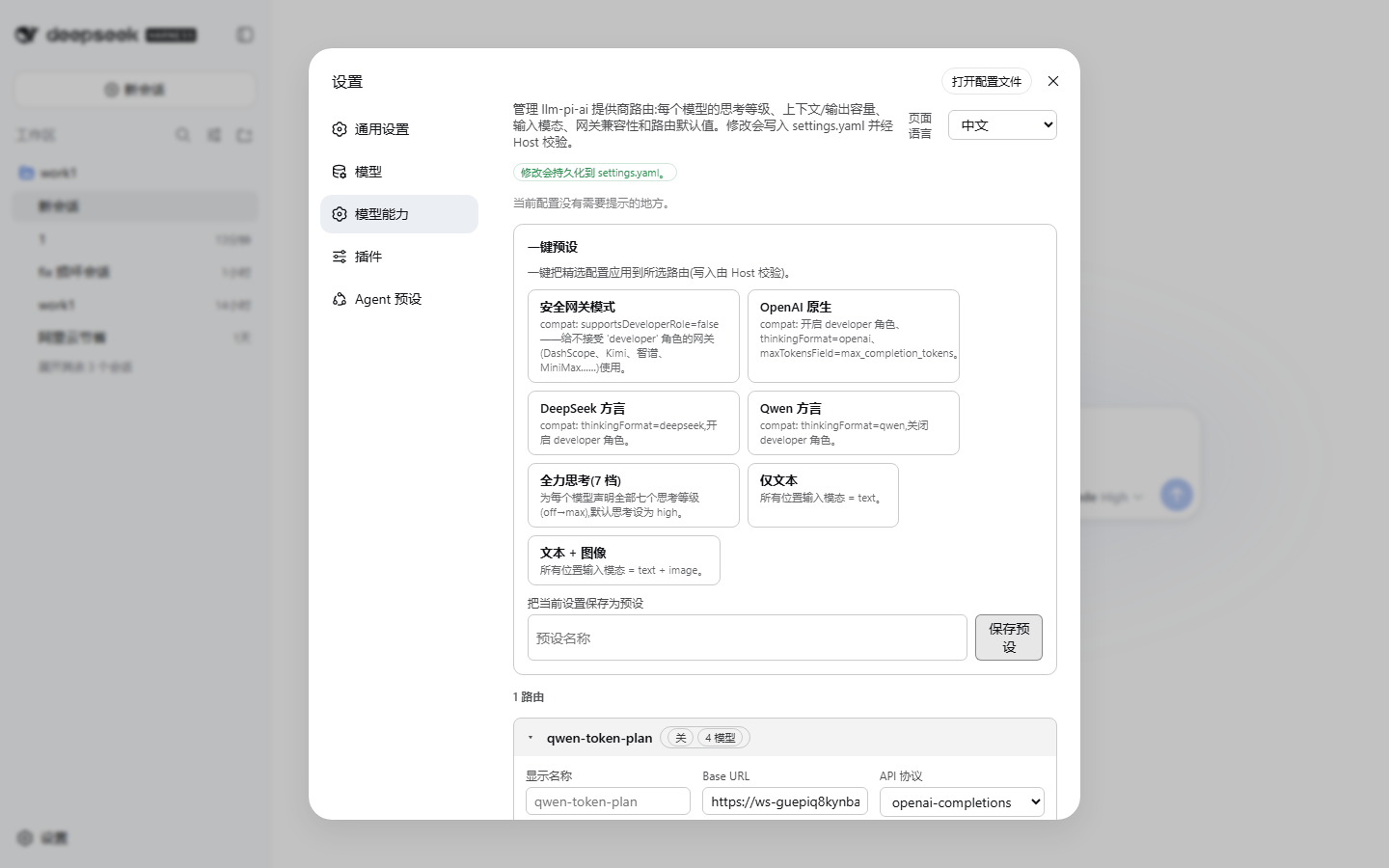
此 DSH Web Bundle 会在“设置”中新增“模型能力”页面。它可编辑现有提供商路由和模型,包括路由默认值、上下文窗口、输出上限、文本/图片输入、七档推理等级、网关兼容性字段,以及内置和已保存的预设。安装到 Profile 后,Bundle patch 会自动接入主端设置命名空间和 Web 客户端。
适合谁
已配置 llm-pi-ai 提供商路由、希望通过界面而非手动编辑 settings.yaml 管理配置的 DSH Web 用户。
常见任务
- 应用 Safe gateway、OpenAI native、DeepSeek dialect 或 Qwen dialect 等网关预设。
- 设置单模型上下文窗口、最大输出 token、文本/图片输入支持和推理等级线协议值。
- 查看路由或模型配置的提示性检查。
- 将当前路由配置保存为可复用的自定义预设。
权限与数据
通过 DSH 设置服务写入配置。
权限- 编辑现有 llm-pi-ai 设置范围中的值。
- 在 model-capability 设置命名空间保存语言偏好和自定义预设。
- 自定义预设存储在 settings.yaml 中。
- 编辑器会阻止凭据特征的请求头名称;保存自定义预设时会剥离 headers。
- 写入使用修订版本围栏;非 loopback 来源会禁用全部控制项。
- 除 DSH 和已配置的模型网关外,未声明额外外部服务要求。
- 插件建议使用 apiKeyEnv 引用,而不是在请求头中保存明文凭据。
局限
- 只能编辑现有提供商路由,不能新增路由。
- 设置界面需要 DSH Web 应用。
- 根据所提供文档,从远程或反向代理来源无法修改设置。
- 应用自定义预设是整段替换,不是合并。
DSHub 已核对
- 包和不可变 Git Bundle 结构已验证。
- 已验证 1.2.1 版本的注册表身份。
- Bundle patch 声明了自动 Profile 接线。
- 已提供 MIT 许可证文本。
DSHub 未核对
- 未在所提供证据中实际执行安装、重启、界面渲染、设置写入或网关兼容性验证。
- 未审计注册表包内容。
固定版本安装
安装 Model Capability Manager
这个Plugin Bundle没有 DSH Plugin 安装操作,请根据源码文档使用真实交付方式。
维护者原文
项目 README
dsh-plugin-model-capability




Model Capability Manager — manage the llm-pi-ai provider routes of DeepSeek Harness (DSH Web) from a dedicated Model Capability page in the in-app settings: per-model thinking levels, context window, output cap, input modalities, per-route defaults, gateway compatibility fields, one-click presets, and an EN/中文 switchable UI.
简体中文说明 · Report Bug · Request Feature
Table of Contents
- Why this plugin exists
- Screenshots
- Features
- Installation
- Quick Start
- Uninstall
- FAQ / Troubleshooting
- How it works
- Development
- Publishing
- Contributing
- License
Why this plugin exists
DSH stores provider configuration in llm-pi-ai.providers inside settings.yaml. Editing it by hand is error-prone, and two classes of problems bite people often:
- Gateway incompatibility — not every vendor accepts the same protocol dialect. For example Alibaba Cloud (DashScope) in
compatible-mode, Moonshot/Kimi, Zhipu/BigModel, MiniMax, Volcengine Ark, SiliconFlow, Baidu Qianfan and other gateways may rejectdeveloperrole messages orreasoning_effortechoes the way the OpenAI/Anthropic dialects expect. Turningcompat.supportsDeveloperRoleon against such a gateway produces 400-style errors. - Thinking-level wiring — the 7 levels (
off / minimal / low / medium / high / xhigh / max) each need a wire value the upstream provider understands (e.g.low→"low"for one vendor,"h3"for another). Max-thinking configs and per-modelreasoningEffortsare tedious to author by hand.
This plugin gives you a GUI for all of it, plus one-click presets that bake in dialect-safe configurations (see Presets).
Screenshots
| Settings entry | Section overview (EN) |
|---|---|
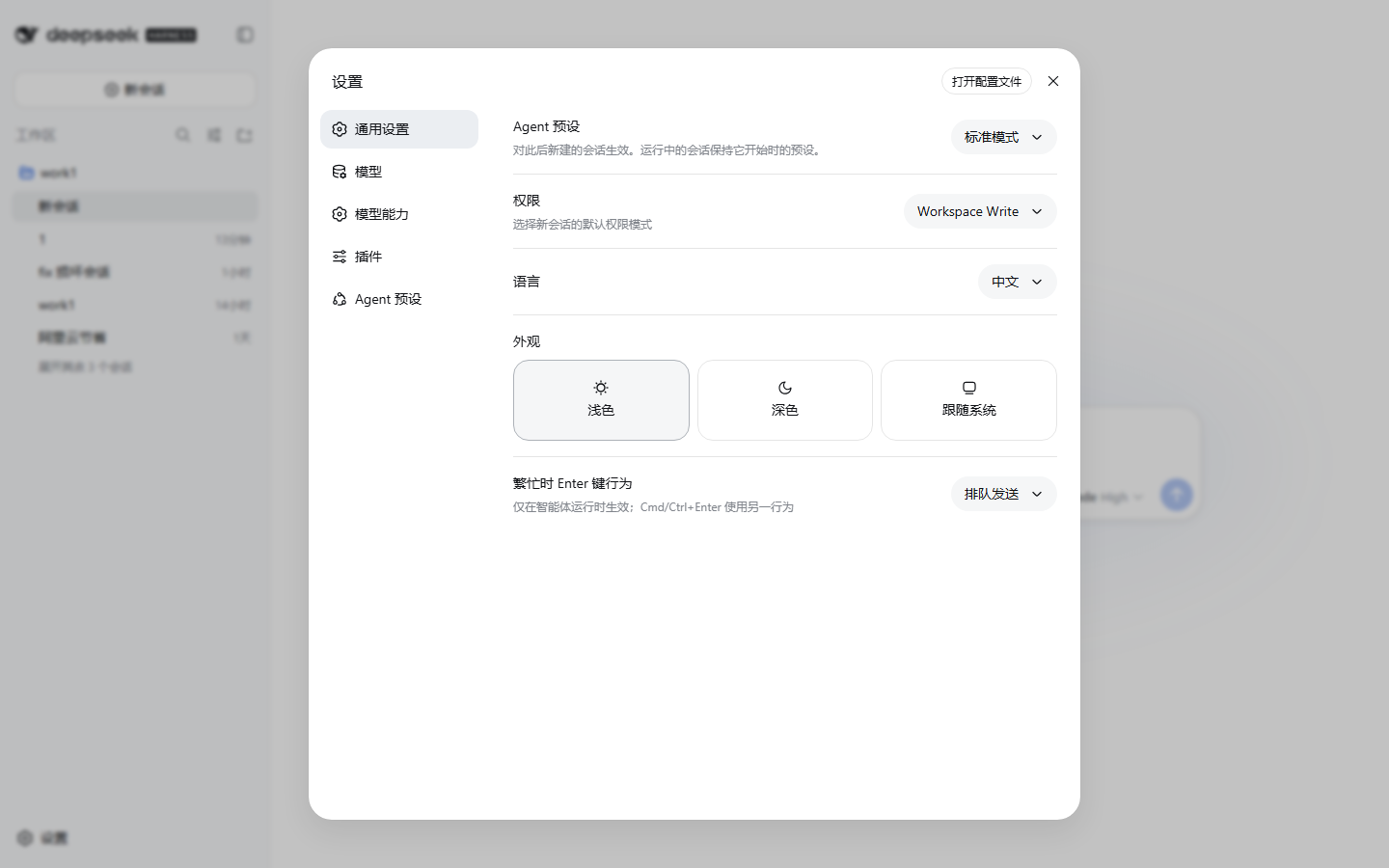 |
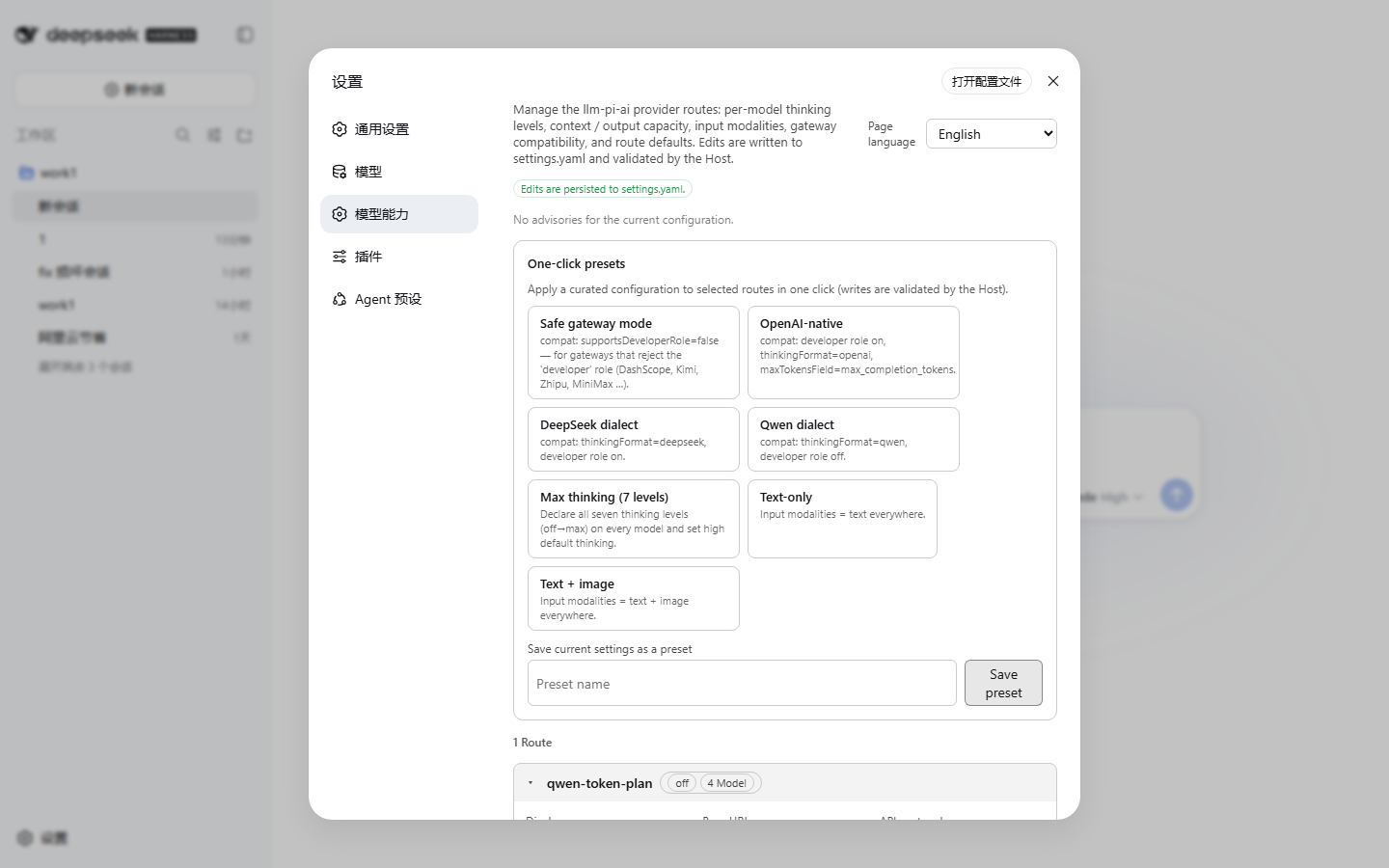 |
| Model editor (EN) | Gateway compatibility fold (ZH) | Section overview (ZH) |
|---|---|---|
 |
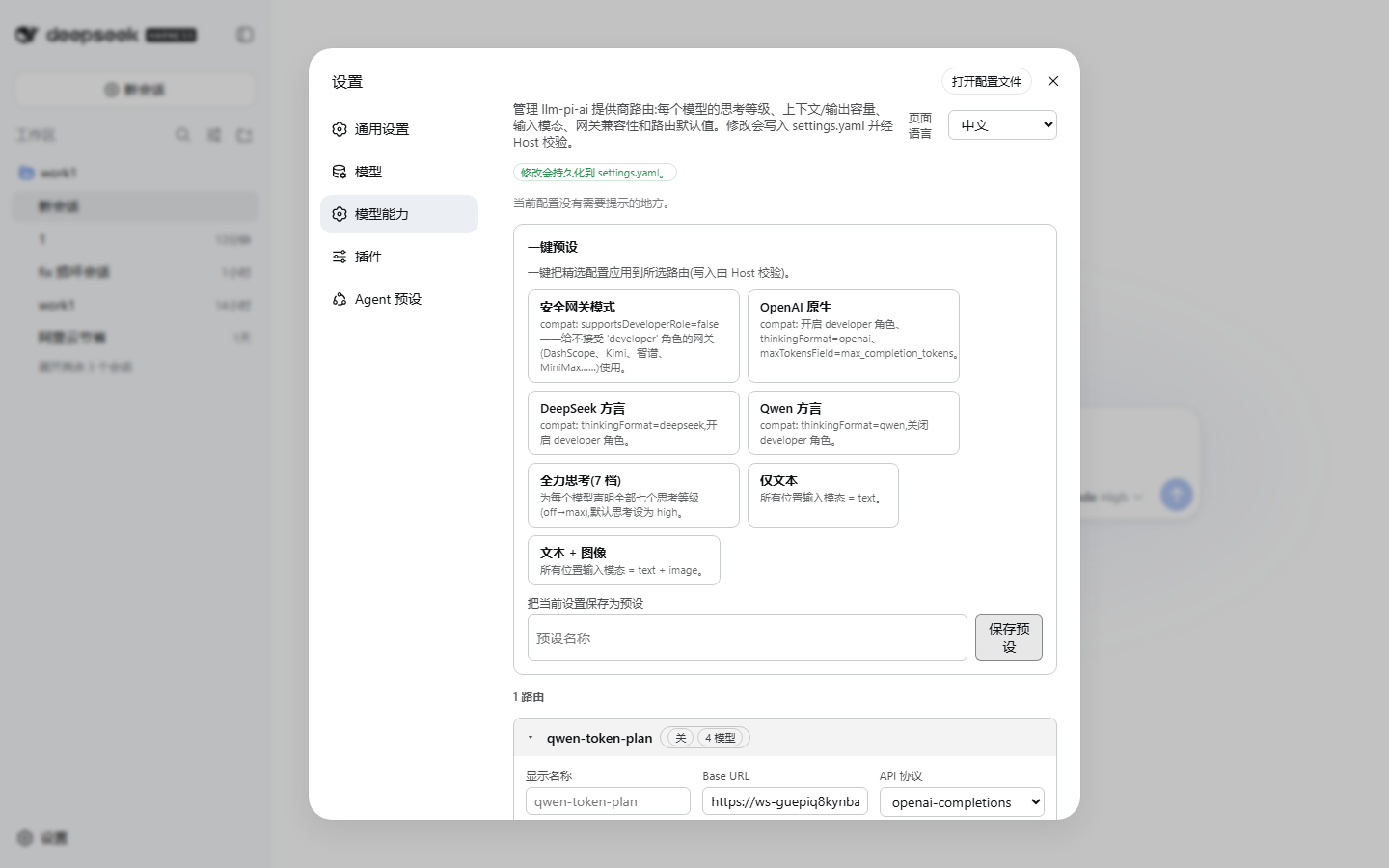 |
 |
Features
- Per-model editor for every route:
name,contextWindow,maxTokens— capacity fields accept plain numbers orK/Msuffixes (262144,256K,1M).inputmodalities —text/imagecheckboxes with de-duplication.- Thinking toggle — switch the whole model between reasoning off and the full 7-level matrix (
off/minimal/low/medium/high/xhigh/max), each level with its own wire value. Empty non-offlevels are prevented (the Host rejects them), and a one-click fill all levels with the same value button is included. - Apply field to all models of the route (name / contextWindow / maxTokens / input / reasoningEfforts).
- Per-model
compateditor (folded away by default).
- Per-route editor:
displayName,baseURL,api(openai-completions / openai-responses / anthropic-messages).- Defaults:
defaultContextWindow,defaultMaxTokens,defaultInput,reasoning,thinkingBudgets(minimal/low/medium/high),cacheRetention,transport. - Route-level
compateditor and an Advanced fold: timeouts, max image bytes / pixel budget,headers, plus a read-only raw JSON view.
- One-click presets — 7 built-in recipes plus your own saved presets:
Preset What it does Safe gateway compat.supportsDeveloperRole=false,supportsReasoningEffort=true— for gateways that rejectdeveloperrole messages (DashScope compatible-mode, Kimi/Moonshot, Zhipu, MiniMax, Ark, SiliconFlow, Qianfan, …)OpenAI native developerrole +reasoning_effort+thinkingFormat=openai+maxTokensField=max_completion_tokensDeepSeek dialect thinkingFormat=deepseek,developerrole on,reasoning_effortonQwen dialect thinkingFormat=qwen,developerrole off,reasoning_effortonMax thinking (7 levels) every model declares all 7 levels, reasoning=high, generousthinkingBudgetsText only defaultInput=['text']and per-modelinput=['text']Image ready defaultInput=['text','image']and per-modelinput=['text','image']- Apply any preset to a selected subset of routes. Save your current configuration as a custom preset; apply and delete them anytime. Custom presets are stored under
model-capability.customPresetsinsettings.yaml. - Applying a custom preset replaces the whole
llm-pi-aiuser section viasettings.replace, not a merge. Any route that was added to the user section after the preset was saved will be deleted. This is not an additive recipe — treat the preset as a full snapshot. - Header credential protection — credential-shaped header names (
authorization,api-key, etc.) are blocked in the headers editor, and theheadersdict is stripped from every provider route when saving a custom preset (credentials travel asapiKeyEnvreference names, never as literal header values). Existing presets that were saved before this safeguard are detected at startup and reported in the advisory checks.
- Apply any preset to a selected subset of routes. Save your current configuration as a custom preset; apply and delete them anytime. Custom presets are stored under
- Advisory checks — the page shows diagnostics about your current setup: legacy-gateway lookalike URLs with
supportsDeveloperRoleon (hint: use Safe gateway), reasoning levels that map to no wire value, models without an explicitcontextWindow, and routes without models. - Language switch — the page follows the DSH UI language, and a select in the page header lets you pin English / 中文 / follow DSH. The choice persists into
settings.yaml(model-capability.language), not just to the browser session.
All writes go through the DSH settings service with revision fencing (expectedRevision), the same pattern the built-in Models page uses; conflicting concurrent edits are retried via the live mirror. If the page is opened from a non-loopback origin (where writes are not allowed), every control is disabled with a hint.
Installation
Requires a DSH installation with the web app (any profile that serves the browser UI), DSH ≥ 0.1.1-rc.2.
Install the latest version
dsh plugin --profile web add dsh-plugin-model-capability # latest stable, or pin @<version>
Then restart dsh --profile web (the running Web UI is not hot-reloaded on plugin install). The Model Capability entry appears under Settings.
For other profiles, replace web with your profile name.
Pin the exact version when you need a specific release — see Getting the latest version below. Installing without a version may resolve to an older release cached locally or on the registry CDN.
Getting the latest version (cache / publish-delay caveats)
A new release is only picked up when all three caches agree — the npm registry
CDN metadata, your local pnpm store, and the profile's lockfile. Any one of them
stale means dsh plugin add dsh-plugin-model-capability (no version) keeps
installing the old build. To guarantee you get the newest version:
Check what the registry currently has:
npm view dsh-plugin-model-capability versionIf this does not show the version you expect, the registry CDN still serves stale metadata — wait ~1–2 minutes and retry (npm publishes are usually visible in seconds, but the
packumentmetadata is cached per-TTL).Uninstall any previously installed copy first (see Uninstall below). The profile lockfile (
node_modules/.pnpm/lock.yaml/pnpm-lock.yaml) otherwise keeps the old version pinned.Install with the exact version — this bypasses metadata resolution:
dsh plugin --profile web add dsh-plugin-model-capability@<version>
# e.g. dsh plugin --profile web add dsh-plugin-model-capability@1.1.1
Clear stale local caches if the profile still reports an old version:
pnpm store prune # remove unreferenced store packagesor, for the profile itself:
cd "$HOME/.dsh/profiles/web"
pnpm store prune
Verify what actually got installed:
grep -A2 '"dependencies"' "$HOME/.dsh/profiles/web/package.json"(Windows PowerShell:
Select-String -Path "$HOME\.dsh\profiles\web\package.json" -Pattern "model-capability") The version shown next todsh-plugin-model-capabilitymust match the version you intended to install.Restart the web UI — the plugin is loaded at startup, never hot-reloaded:
dsh --profile web
Registry note: an already-published version can never be overwritten. If a bad
build got released under 0.1.2, the fix is a new version (0.1.3, 1.1.1, …),
not a re-publish — which is exactly why "install the latest" means pin the
version, not npm update.
Uninstall
dsh plugin --profile web remove dsh-plugin-model-capability
If the command reports no such dependency found (a broken install whose
dependency entry is missing from package.json), remove it directly inside the
profile:
cd "$HOME/.dsh/profiles/web"
pnpm remove dsh-plugin-model-capability
After either step, restart dsh --profile web.
To verify the plugin is fully gone:
"$HOME/.dsh/profiles/web/package.json"— nodsh-plugin-model-capabilityentry underdependencies"$HOME/.dsh/profiles/web/node_modules/dsh-plugin-model-capability"— directory no longer exists"$HOME/.dsh/profiles/web/pnpm-lock.yaml"— nodsh-plugin-model-capabilityreference (0 hits)
The host half also loads headlessly (it registers the settings schema); the settings UI itself needs the web app.
Quick Start
After installing the plugin and restarting DSH, the Model Capability page is available under Settings in the sidebar. Here is how to get started in three steps:
1. Open the page
Navigate to Settings → Model Capability. You will see a list of all configured provider routes (e.g. openai, anthropic, dashscope, etc.), each with its models listed underneath.
2. Apply a preset (recommended first step)
The fastest way to get a working configuration is to use a one-click preset:
- Click the Presets button in the page header.
- Select a preset that matches your gateway type (e.g. Safe gateway for DashScope/Moonshot/Zhipu, OpenAI native for official OpenAI, DeepSeek dialect for DeepSeek API).
- Choose the routes you want to apply it to (or leave all selected).
- Click Apply.
The preset fills in the recommended compat fields, thinking levels, and defaults automatically.
3. Fine-tune individual models
Click any model row to expand its editor. From there you can:
- Set the context window and max tokens (supports
K/Msuffixes, e.g.128K,1M). - Toggle thinking on/off and configure each of the 7 reasoning levels.
- Change input modalities (
text/image). - Open the compat fold to adjust gateway-specific fields per model.
All changes are saved immediately through the DSH settings service with revision fencing — no manual YAML editing required.
Tip: If the page shows "Advisory checks" at the top, review them — they flag common misconfigurations like legacy gateways with
supportsDeveloperRoleenabled.
How it works
One npm package with two halves, installed as a profile bundle by dsh plugin add:
lib/index.js— the host half: registers themodel-capabilitysettings namespace (language + custom presets) with schemastery so the Host round-trips it like any native setting.lib/client.js— the web client half: a classic-script bundle registered with the web shell's module loader (window.__ModuleLoader__.load({ id, factory })), exactly like every shipped@deepseek-aiclient bundle. It injects a section into thesettings.sectionslot, binds both thellm-pi-aiandmodel-capabilitysettings scopes, and drives all edits throughapi.settings.mutatewith path ops and revision fencing.cordis.patch.yml— declares the bundle row, sodsh plugin addwires the whole thing automatically (no manual patch editing).
The llm-pi-ai schema itself is owned by DSH — this plugin only edits its values, so the Host keeps validating every write (assertServiceable etc.).
Development
pnpm install
npm run build        # esbuild → lib/client.js (loader-wrapped) + lib/index.js
Local testing: create a dev profile (e.g. web-dev), add the web app and the plugin, and restart the server on a separate port:
dsh plugin --profile web-dev add @deepseek-ai/dsh-web-app@0.1.1-rc.2
# add the local package, then note: `file:` dependencies are snapshotted —
# re-add after every rebuild, or replace the installed copy with a junction:
dsh plugin --profile web-dev add file:D:/path/to/dsh-plugin-model-capability
dsh --profile web-dev --port 3091 --no-open
Screenshots are captured with the included script (needs playwright-core and a local Chrome/Edge):
node scripts/screenshots.mjs [baseURL] [outDir]
node scripts/verify-dom.mjs  [baseURL]   # shadow-DOM-aware rendering checks
node scripts/e2e-write.mjs   [baseURL]   # end-to-end write smoke test (back up settings.yaml first!)
FAQ / Troubleshooting
Why are my changes not saved?
The DSH settings service only accepts writes from loopback origins (i.e. http://127.0.0.1:3080 or http://localhost:3080). If you are accessing the web UI from a different IP address or through a reverse proxy, every control on the page is disabled automatically and a hint is shown. Connect via localhost to make changes.
What does the "Safe gateway" preset do?
It sets compat.supportsDeveloperRole=false and supportsReasoningEffort=true. This is the safest choice for Chinese cloud gateways — DashScope (compatible-mode), Moonshot/Kimi, Zhipu/BigModel, MiniMax, Volcengine Ark, SiliconFlow, Baidu Qianfan, and others that do not accept the developer role message that OpenAI/Anthropic dialects send.
Why do I see a credential warning?
The plugin detects credential-shaped header names (e.g. authorization, api-key) in the headers field of a provider route. This is a safety advisory, not a block — but credentials should be stored as apiKeyEnv environment variable references instead of literal header values, especially when saving custom presets (the preset system strips headers automatically).
Can I add a new provider route?
The plugin edits existing routes in the llm-pi-ai providers section. To add a brand-new provider, you still need to edit settings.yaml manually or use the DSH CLI. Once added, this plugin will pick it up on the next page load.
How do I reset a single model to defaults?
Click the model row to expand its editor and clear the fields you want to reset. The route-level defaults (set in the route editor) are used as fallbacks when a per-model value is empty.
Why is the "Language" setting not persisting?
The language choice (model-capability.language) is stored in settings.yaml and survives restarts. If it keeps resetting, check that the settings file is writable and that no other process is overwriting it.
Why does thinkingBudgets only have minimal/low/medium/high when there are 6 thinking levels?
This is not a bug — it is a deliberate schema design. DSH's thinking capability has two separate layers:
1. Thinking Levels (6 levels) — defined by pi-ai core:
minimal | low | medium | high | xhigh | max
All 6 levels can be configured with wire values in each model's reasoningEfforts.
2. Thinking Budgets (4 levels) — defined by dsh-llm-pi-ai schema:
minimal | low | medium | high
There is no xhigh or max budget field.
The thinkingBudgets controls custom token budgets for token-based providers (e.g. Anthropic/Bedrock). At runtime, when xhigh or max levels are used, the system falls back to default budgets:
const budget = options.thinkingBudgets?.[level] ?? defaultBudgets[options.reasoning];
So if you set thinkingBudgets.minimal/low/medium/high, those levels use your custom values, while xhigh and max use the provider's default token allocation strategy — no custom budget is needed for those levels.
Publishing
Full step-by-step instructions (including a post-release checklist) are in
PUBLISHING.md. Summary:
npm publish— run afternpm run build(theprepublishOnlyhook rebuilds automatically). The package shipslib/,cordis.patch.yml,img/, license, the English README and the Chinese guide indocs/.- GitHub — repository + releases; tag versions to match
package.json.
Contributing
Contributions are welcome! Here is how you can help:
- Report bugs — open an issue with a clear description and reproduction steps.
- Suggest features — use the feature request template.
- Submit pull requests — fork the repository, make your changes, and open a PR. Please follow the existing code style and include tests where applicable.
The plugin is built with esbuild; run npm run build after making changes to the src/ files. See the Development section for local testing instructions.
License
有意识地管理
安装与管理
前置条件与目标 Profile
目标: Web Profile
交付方式: Git Bundle — yuioi666/dsh-plugin-model-capability#204d2cefa8eb4a585ffa619269723ff970358b91。
验证、更新与移除
显示生命周期命令
dsh plugin --profile web list兼容性与访问范围
DSH Web bundle; DSH ≥ 0.1.1-rc.2; Node 22.19+ or 24+: DSH >= 0.1.1-rc.2; @deepseek-ai/cordis ^4.0.1; @deepseek-ai/dsh-settings ^0.1.5-rc.2; Node ^22.19.0 || >=24.0.0。
风险事实
证据与编辑审查Manifest、Bundle patch、分发与新鲜度
不可变证据
审查状态与源码活动
在包含近期新增路由的 Profile 上使用已保存预设前,请先确认其整段替换行为。
AI 审查于 2026/9/12 UTC 14:04。GitHub 事实核对日期: 2026/9/12 UTC 14:04。
自当前证据基线以来,没有记录到重要源码变化。