快速了解
它能做什么
从选定用户消息之前恢复项目文件,或重新开始 DeepSeek Harness 对话。
本站提供的是中文说明,不代表该项目或 Plugin 自身提供中文界面;语言支持请以上游文档为准。
Web Profile
>=0.1.0-rc.8 <0.2.0
证据已验证
核对日期 2026/9/9 UTC 14:18
有代码证据的贡献
它为 DSH 增加什么
为每条用户消息添加 Web 回退操作,可查看并恢复工作区状态、回退对话,或同时执行两者。
机制证据 ↗选择前先看
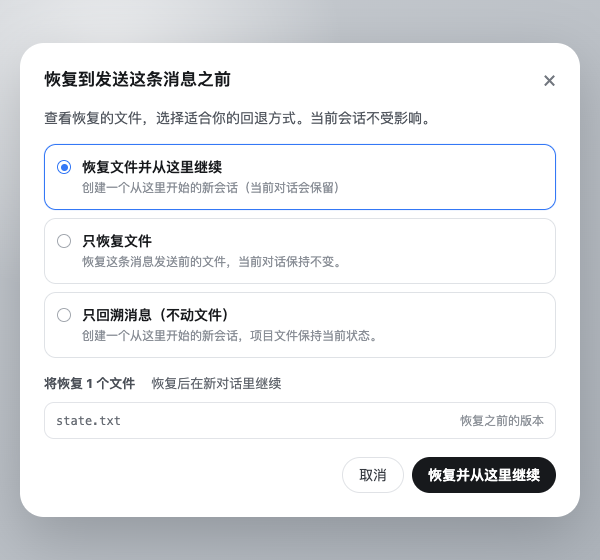
Turn Rewind 在 DeepSeek Harness Web 中每条直接用户消息下方添加回退操作。它会预览文件差异,并提供“恢复文件并重新开始”“仅恢复文件”或“仅回退消息”三种方式。底层 Change Ledger 会创建恢复点和救援点,并在写入文件前检查方案是否已过期。
适合谁
需要在代理或工具修改项目工作区后,按消息粒度恢复状态的 DeepSeek Harness Web 用户。
常见任务
- 撤销某条提示之后产生的工作区改动,同时保留原始会话。
- 只恢复文件而不改变当前对话。
- 不修改项目文件,仅回退到某条消息之前的对话。
- 在确认恢复前查看受影响的路径。
权限与数据
插件会读取工作区状态以创建检查点;只有在明确确认恢复时,才会写入选定的工作区路径。
权限- 读取会话目录中的 Git 工作树状态或普通目录文件。
- 创建恢复点、救援点、锁和恢复日志。
- 在审阅并最终确认后,可恢复、删除或重新创建选定的合格工作区路径。
- 在 Change Ledger 存储中保存检查点内容和元数据;Git 原生检查点可能使用仓库的 Git 对象数据库。
- 根据提供的 README,它不会修改 Git 提交、分支、HEAD、stash 或索引。
局限
- 包兼容性元数据仅声明 web profile。
- 稀疏检出、子模块 gitlink、忽略文件、特殊文件、扩展属性、ACL、所有权、时间戳和硬链接拓扑不在快照支持范围内。
- Git 操作进行中,或同一工作树有运行中的代理时,恢复会被阻止。
- 提供的证据未审计 npm tarball 的包内容。
DSHub 已核对
- 固定的 Git 源已验证为结构完整的 DSH bundle。
- manifest 声明 DSH >=0.1.0-rc.8 <0.2.0、web profile 和列出的 peer 依赖。
- 包声明使用 BSD-3-Clause 许可证。
DSHub 未核对
- 本次审核未实际执行安装或运行行为。
- 未审计 registry tarball 内容。
- 未测试与某个本地 DSH 安装的实际兼容性。
固定版本安装
安装 DSH Turn Rewind
这个Plugin Bundle没有 DSH Plugin 安装操作,请根据源码文档使用真实交付方式。
维护者原文
项目 README
DSH Turn Rewind

Message-anchored project-file recovery for DeepSeek Harness, with an option to restart from the restored request.
Turn Rewind is the user-facing feature, repository, and Profile Bundle name. Change Ledger is the durable restore engine underneath it: the ctx.changeLedger service, on-disk format, and storage path keep that name because they describe the reusable snapshot and recovery layer rather than the Web action alone.
Change Ledger gives a DSH session an explicit safety boundary around workspace mutations:
create restore point
        ↓
agent / user / external tools modify the worktree
        ↓
preview exact path-level drift
        ↓
review a full or selective restore plan
        ↓
press the final restore button in the rewind dialog
        ↓
create rescue point → restore → verify
It never commits, stashes, resets, switches branches, edits the Git index, or decides automatically that a change should be reverted.
Preview
Rewind appears as an icon-only third action under each user message, after its timestamp and native Copy action:

Opening it shows the affected files and offers three choices: restore the files and restart from before that message, restore only the files, or rewind only the messages and leave the files untouched:
Why it has a Change Ledger engine
A diff button can show current changes, but it does not own a durable restore lifecycle. Change Ledger owns:
- content-addressed restore-point manifests;
- Git worktree, HEAD, branch, and in-progress-operation fences;
- stale-plan detection between review and mutation;
- exact two-step confirmation plus DSH human approval;
- automatic pre-restore rescue points;
- post-restore hash verification;
- rollback after a failed restore;
- startup reconciliation of interrupted restore journals;
- a public
ctx.changeLedgerservice that other plugins can consume.
The durable format is documented in docs/FORMAT.md. The security and failure model is documented in SECURITY.md.
Safety contract
- Explicit only: nothing is restored automatically — every restore starts from the user pressing the final button in the Web dialog, or from an explicit call through the service API.
- Read before write: the dialog preview generates an expiring, session-bound plan from the current tree and changes no files.
- Human gate: the dialog's reviewed impact plus the final restore button is the human decision; direct mutation requests without a live session-bound plan pair fail closed.
- Rescue before mutation: every restore captures the current eligible tree as a durable rescue point before changing a path.
- No silent omission: unsupported submodules, sparse checkouts, oversized files, aggregate limits, and unsupported file types fail point creation.
- No path escape: every durable path is canonical and workspace-relative; restore refuses symlink parents and non-empty directory replacement.
- No stale overwrite: selected paths and the reviewed HEAD/branch/operation fence are checked again at apply time. Any relevant post-review change invalidates the plan.
- No Git control-plane mutation: the index, branch, HEAD, stash, and commits remain untouched.
Scope
Two workspace kinds are supported and selected from the Session's own directory:
Normal Git worktree
- tracked files, including currently missing tracked paths;
- untracked files not excluded by
.gitignoreor other standard Git excludes; - regular files, binary or text;
- symbolic links;
- executable and other portable permission bits.
Ordinary directory (the Session directory is not a Git repository)
- every regular file and symbolic link below it; links are captured as links and never followed;
.gitandnode_modulesare excluded by default;- an optional
.dsh-rewindignorein the directory root adds.gitignore-style rules; the built-in exclusions are applied last and cannot be re-included; - snapshot content is stored in the plugin's own content-addressed storage instead of the Git object database;
- running
git initinside the directory changes the workspace mode, so earlier restore points stop applying (WORKSPACE_MODE_CHANGED) and a new message must create a new one.
The following are rejected or deliberately outside the snapshot:
- sparse checkouts;
- submodule gitlinks (create a restore point inside each submodule instead);
- ignored files and files excluded by
.dsh-rewindignore; - special files, sockets, devices, and named pipes;
- extended attributes, ACLs, ownership, timestamps, and hard-link topology;
- the Git index and repository metadata.
If an ignored or otherwise unmanaged file occupies a path that restoration would replace, the restore fails rather than deleting it.
Install
Build the checked-out plugin, then add it to each DSH profile that should expose the service:
pnpm install --frozen-lockfile
pnpm run check

dsh plugin --profile web add @anionex/dsh-turn-rewind
dsh plugin --profile headless add @anionex/dsh-turn-rewind

dsh --profile web --dump-config | grep turn-rewind
Restart a running profile after changing its bundle list.
The package is a DSH Profile Bundle. package.json declares dsh.bundle.patch, and cordis.patch.yml mounts @anionex/dsh-turn-rewind without a DSH core patch.
When the profile also provides the DSH Agent service, the plugin captures a hidden checkpoint in the first agent/pre-step waterfall before the Agent processes the opening user message. Capture failures are reported but do not reject the user's turn; the corresponding message simply has no usable rewind point. In Web profiles, the same-origin /turn-rewind endpoint resolves the selected user/message sequence, exposes a paged file preview, mints a short-lived session-bound restore plan, and delegates child creation to DSH's official Host create/fork lifecycle. It never restores files automatically.
User flow
In the Web profile, each direct user message gains a compact, icon-only Rewind action after its timestamp and native Copy control. The tooltip reads “Return to before sending this message.” Opening Rewind checks the saved file state, shows a concise preview with a “view all files” action, and offers three modes:
| Mode | Code | Conversation |
|---|---|---|
| Restore files and restart (default when files changed) | Restores the project files after automatically backing up their current state. | Creates and opens a Session ending before the selected message, then puts that message's text back in the composer. |
| Restore files only | Restores the project files after automatically backing up their current state. | Leaves the current Session open and unchanged. |
| Rewind messages only (default when no checkpoint or no file changes) | Leaves the project files exactly as they are. | Creates and opens a Session ending before the selected message, then puts that message's text back in the composer. |
The dialog itself is the confirmation: there is no duplicate checkbox. It describes each file as restoring an earlier version, finding a deleted file, removing a later-added file, or restoring permissions/type. Rewind messages only is always available — including when the checkpoint for that message is missing, was skipped (for example after disabling automatic checkpoints), or the project files already match the saved state — because it never touches the worktree. It is not blocked by other running Agents in the same worktree.
Before mutation, Turn Rewind rechecks the selected files and repository state, then creates an automatic backup. Changes made after preview invalidate the operation. Any running Agent using the same worktree, including the source Session, blocks restoration; idle Sessions do not block. A reviewed HEAD or branch difference does not block restoration: commits, refs, branch, and index remain unchanged, so restored content may appear as ordinary uncommitted changes against the current HEAD. An in-progress Git operation still blocks. If child creation fails after “restore and restart,” Change Ledger automatically restores the pre-operation files from the backup.
DSH Session logs are append-only, so “restart” creates a new Session instead of truncating the original. For the first message, the Host creates a blank Session in the same working directory; for later messages, it forks at the previous completed turn/end. A child may reuse an ancestor's prompt checkpoint only while both the selected user/message and its exact turn/start remain inside every durable seedLength fence. Direct child checkpoints take priority and sibling checkpoints never mix. Turn Rewind always treats the two dimensions independently: the two restore modes change project files (optionally followed by a new conversation), while Rewind messages only reuses the same fork lifecycle without touching files. The original Session is always retained.
Configuration
Runtime-tunable options are editable in the DSH web settings page under Plugins → Turn Rewind (turn-rewind settings namespace). Changes apply live to the next capture, restore, or deletion; they persist in the host's settings.yaml and override the profile patch values below. storageDir is deliberately not editable there: the storage root must not move while the engine holds locks and journals, so it stays a patch-layer field.
Override the composition base (and storageDir) in the profile patch layer:
- id: turn-rewind
  config:
    storageDir: ~/.dsh/change-ledger/v1
    maxRestorePoints: 50
    maxTurnCheckpointsPerSession: 30
    maxFiles: 20000
    maxFileBytes: 16777216
    maxSnapshotBytes: 536870912
    planTtlMs: 900000
    staleLockMs: 30000
    turnCheckpointMode: legacy   # off | git-native | legacy; "off" stops creating file checkpoints
    turnCheckpointTimeoutMs: 5000
    turnCheckpointMaxNewBytes: 33554432
    turnCheckpointTrust: fast    # fast | strict
Setting turnCheckpointMode: off (in the patch or in the settings card) stops automatic file checkpoints; every turn records a durable skip instead, and the rewind dialog still offers Rewind messages only for those messages.
All size and user-point retention limits fail loudly. Automatic turn checkpoints have a separate per-session retention window and prune only their own oldest checkpoints; user and rescue restore points are never silently pruned. When omitted, storageDir resolves to $DSH_HOME/change-ledger/v1 and falls back to ~/.dsh/change-ledger/v1; it must not overlap the managed worktree.
Checkpoint management
The same settings card includes a storage manager backed by the same-origin /turn-rewind/manage endpoint. It lists every workspace this storage root has ever tracked — including projects whose directory no longer exists — grouped with checkpoint counts, approximate sizes, and pending-recovery badges. Per checkpoint, per workspace, or globally (Clear all), it deletes unprotected restore points and garbage-collects unreferenced blobs. Restore points still referenced by an incomplete recovery journal, a running restore, or an unfinished Git-native publish are retained and reported. Git-native (v2) checkpoints live in the repository's Git object database, so their disk space is reclaimed by normal Git garbage collection; the displayed sizes are logical values.
Recovery
Before writing any path, a restore creates a rescue point and a durable operation journal. If DSH stops with a non-terminal journal, the next plugin startup marks it interrupted unless another live DSH process still owns that workspace lock.
Recovery uses the public ctx.changeLedger service API: listRecovery finds the operation's rescuePointId, inspect reviews that rescue point, then planRestore/applyRestore handle the affected paths. Rescue points remain ordinary, inspectable restore points until explicitly deleted.
Public service
Other Cordis plugins can inject changeLedger and call the same lifecycle through the structured service API:
export const inject = ['changeLedger']

export async function apply(ctx: Context) {
  const point = await ctx.changeLedger.create({
    cwd: '/absolute/git/worktree',
    sessionId: 'session-id',
    label: 'before refactor',
  })
  // point.id is a durable restore-point id.
}
The complete exported types are available from @anionex/dsh-turn-rewind/format; the engine is available from @anionex/dsh-turn-rewind/core for non-Cordis tests and trusted integrations.
Development
pnpm install --frozen-lockfile
pnpm run check
The test suite creates real temporary Git repositories and covers full/selective restore, stale plans, ignored-path collision refusal, HEAD drift, rescue rollback, crash reconciliation, active-lock preservation, durable-state integrity, symlinks, size limits, sparse checkouts, submodules, deletion, and blob garbage collection.
About
DSH Turn Rewind is maintained by anionex. If you would like to follow my future work, follow me on X or GitHub.
License
BSD-3-Clause. See LICENSE.
有意识地管理
安装与管理
前置条件与目标 Profile
目标: Web Profile
交付方式: Git Bundle — Anionex/dsh-turn-rewind#3bcb1d0c18c0ee66cf2754ba362f89bddeac78b1。
验证、更新与移除
显示生命周期命令
dsh plugin --profile web list兼容性与访问范围
Declared compatible with DSH web profiles: >=0.1.0-rc.8 <0.2.0。
风险事实
证据与编辑审查Manifest、Bundle patch、分发与新鲜度
不可变证据
审查状态与源码活动
重要工作区请先自行保留备份;文件恢复是一项有意执行的工作区修改操作。
AI 审查于 2026/9/10 UTC 11:36。GitHub 事实核对日期: 2026/9/10 UTC 11:36。
自当前证据基线以来,没有记录到重要源码变化。