At a glance
What it does
A DeepSeek Harness calendar that wakes selected conversations with scheduled keywords and lateness context.
Web Profile
Not declared in supplied evidence
Evidence-verified
Checked Sep 11, 2026, 2:14 PM UTC
Code-evidenced contributions
What it adds to DSH
Adds a sidebar calendar for creating, reviewing, firing, canceling, and deleting one-shot conversation alarms.
Mechanism evidence ↗Lets an agent set, inspect, list, and cancel alarms, including alarms targeting another conversation.
Mechanism evidence ↗Before you choose it
Create one-shot alarms in a web calendar or through the agent's clock tool. When due, an alarm resumes its target conversation and includes the scheduled time, actual time, drift, and overdue warning.
Best for
DeepSeek Harness web users who need an agent or user conversation to resume work at a particular time, including after the conversation tab was closed.
Common tasks
- Resume a build-check or release task after a fixed delay.
- Schedule a standup prompt for a specific conversation.
- Review and manually fire, cancel, or delete pending one-shot alarms from the calendar.
Permissions and data
Stores alarm state locally and delivers scheduled wake messages to selected Harness conversations.
Permissions- Registers a DeepSeek Harness web client bundle.
- May register a Windows Scheduled Task mirror when useSystemScheduler is enabled.
- May wake the computer from sleep only when wakeComputer is enabled.
- Stores alarm details such as scheduled time, keyword, note, target session, and fired status in the configured data directory.
- Sends alarm and scheduler state through local HTTP endpoints.
- No external cloud service is described.
- Optionally uses the local Windows Task Scheduler service.
- No credentials are declared in the supplied evidence.
Limitations
- Requires a running dsh web host to resume a session; a missed alarm is delivered later with an overdue notice.
- Does not provide push notifications, email, or SMS while the machine is off.
- Supports one-shot alarms only; recurring schedules are not described.
- Two hosts on one machine can conflict over the shared Windows task name `dsh-clock-wake`.
- The floating panel itself is not themeable through shell slots.
What DSHub checked
- The pinned source has a verified DSH bundle structure and a web profile patch.
- The manifest declares peer dependency @deepseek-ai/cordis ^4.0.1.
- The repository documents calendar UI, agent tool, local API, in-process timing, startup replay, and optional Windows scheduler mirroring.
What DSHub did not check
- Installation and runtime behavior were not executed from the supplied evidence.
- No Harness version range is declared.
- The npm package version was not found; use the pinned Git bundle route instead.
Pinned install
Install dsh-clock
This plugin bundle does not have a DSH Plugin install action. Use its source documentation for the delivery method.
Maintainer source
Project README
⏰ dsh-clock
A calendar and clock for DeepSeek Harness that can wake a conversation: pick an instant, a keyword, and the conversation to wake — the user or the agent — and when that instant passes the keyword is delivered into that conversation, even if it is closed.
Every wake carries the clock: the scheduled instant, the actual instant, the signed drift, and an explicit warning when it is late. A wake that arrives three hours overdue must not read like one that arrived on time.
Why this exists
The harness already schedules reminders, but only inside the conversation that asked for one.
@deepseek-ai/dsh-schedule says so plainly:
delivery is session-local, there is no cold-session scheduler, and a closed session keeps its reminders
overdue until somebody resumes it. So you cannot tell a long-running task "come back to this at 09:00" and
then close the tab.
This plugin fills exactly that gap. An alarm names the conversation it wakes, that conversation may be closed, and waking it resumes it.
The wake message
⏰ dsh-clock wake — keyword: 继续迁移

scheduled  2026-09-11T09:30:00+08:00  [Asia/Shanghai]
now        2026-09-11T11:43:12+08:00  [Asia/Shanghai]
drift      +2h13m  OVERDUE
now-epoch  1789098192000
trigger    catch-up replay at host start

warning    OVERDUE by +2h13m: the host was not running at the scheduled instant and this is a catch-up
           delivery. Re-check anything time-sensitive before continuing.
note       This message was delivered by a timer, not typed by the user. Treat "继续迁移" as the signal
           to resume whatever was planned for this instant.
detail     检查构建是否结束
The drift and warning lines are the point. Without them the woken agent cannot tell "it is 09:30 as
planned" from "it is 11:43 and you are three hours late", and it will happily act on a stale premise.
Install
npm install
npm run build
dsh plugin --profile web add link:<this-directory>
# or straight from git:
dsh plugin --profile web add <git-url>
Then restart dsh web so it loads — the dsh-web-watchdog panel's restart button is the quick way. A 日历 button then appears in the sidebar foot, directly above Settings; it opens the panel.
Use
From the panel
- The clock shows the current time, the zone, and a live countdown to the next wake.
- The calendar marks every day that carries an alarm; click a day, type a time and a keyword, choose the conversation, and press the button. The button always says exactly what it will create.
- Each row can be fired immediately, cancelled, or deleted. A fired row reports whether it was on time or late, and any delivery error is shown on the row rather than swallowed.
From the agent
The model gets a clock tool:
{ "action": "set", "afterSeconds": 2700, "keyword": "check the build",
  "note": "the release job should be done by now" }

// wake a different conversation:
{ "action": "set", "at": "2026-09-11T09:30:00+08:00", "keyword": "standup",
  "sessionId": "session-…", "timeZone": "Asia/Shanghai" }

{ "action": "now" }      // what time is it
{ "action": "list" }     // pending and recent alarms
{ "action": "cancel", "id": "a-…" }
How the timing works
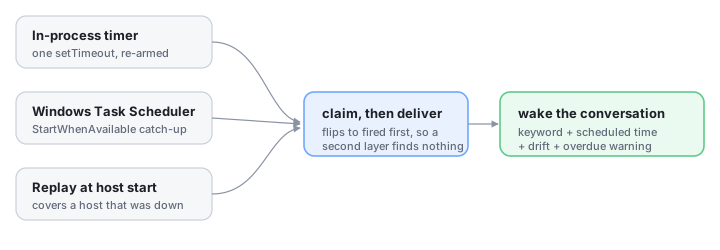
Three layers, one delivery path:
| Layer | Covers |
|---|---|
| In-process timer | The ordinary case. Exactly one setTimeout armed for the earliest pending alarm, re-derived on every change. No polling loop, no CPU while idle. |
| Windows scheduled task | Machine sleep, a suspended host, and missed schedules — StartWhenAvailable lets Windows run the task as soon as the machine is actually available. It is also the only layer that can be told to wake the machine (wakeComputer). |
| Replay at host start | The host was not running when the alarm was due. This is what actually delivers a missed alarm, and it is why the wake text reports drift. |
All three call the same claim-then-deliver path, and an alarm is flipped to fired before any delivery
starts. Whichever layer arrives first wins and the others find nothing to claim, so stacking three triggers
cannot deliver one wake three times. The prompt also carries a request id derived from the alarm id, which the
session controller deduplicates as a second line of defence.
The OS task is a mirror, not the owner: it only pings the plugin's own endpoint. A missing, failed, or stale
task degrades to the other two layers instead of losing the wake. It is registered with PowerShell's
ScheduledTasks module (not schtasks.exe, which cannot express StartWhenAvailable) and removed when the
plugin is disposed.
Configuration
- id: ui-clock
  name: '@dsh-external/dsh-client-plugin-clock'
  config:
    port: 4801                  # private carrier port when the profile has no web server
    dataDir: …                  # default: $DSH_HOME/clock
    defaultTimeZone: Asia/Shanghai
    useSystemScheduler: true    # mirror the earliest alarm into Windows Task Scheduler
    wakeComputer: false         # let that task wake the machine from sleep
    wakeMode: queue             # queue | steer — how the wake enters a busy conversation
    driftToleranceSeconds: 60   # lateness below this still reads ON-TIME
    retainFiredDays: 7          # how long a settled alarm stays in the panel
    exposeTool: true            # register the clock tool for the agent
Limits, stated plainly
- A wake needs a running host. Only the host can resume a session, so if dsh web is not running at the scheduled instant the alarm is delivered as soon as it is — via the OS task's catch-up or the replay at startup — and the message says how late it is. It is not a push notification: nothing reaches you while the machine is off, and there is no email or SMS.
- One-shot alarms only. There is no "every weekday at 9" rule yet; the calendar is for choosing a date, not for recurrence.
- One OS task, shared name. The task is named
dsh-clock-wake, so two hosts on one machine would fight over it. The in-process timer is unaffected. - The trigger is a real slot registration (
sidebar.footer.action), but the panel it opens is a body-level floating surface, so the panel itself is not themeable through the shell's slots.
HTTP API
Rides the harness web server at /api/clock, or the private loopback port when the profile has none.
| Endpoint | Purpose |
|---|---|
GET /api/clock/state |
Clock, calendar data, alarms, target conversations, scheduler status |
GET /api/clock/now |
Current instant in the host zone |
POST /api/clock/alarms |
Create — { at | afterSeconds, keyword, sessionId, … } |
POST /api/clock/alarms/update |
Change an alarm's instant, keyword, note, or target |
POST /api/clock/alarms/cancel · /forget |
Cancel a pending alarm · delete a row |
POST /api/clock/alarms/fire |
Fire now, regardless of the instant |
POST /api/clock/tick |
The OS scheduler's ping; claims and delivers whatever is due |
Every response is { ok: true, value } or { ok: false, error }.
Development
npm run build     # tsdown: host half to lib/index.js, browser half to lib/client.js
npm test          # 26 unit tests, node --test with type stripping
The tests cover the parts where being wrong is expensive: the idempotency that keeps three trigger layers from delivering one wake three times, the drift the wake text reports, alarm durability across a reload, the overdue replay at startup, and the calendar arithmetic. They never register a Windows task — every service is built with the OS mirror switched off.
See also
- dsh-context-assembler — a context tree over the session surface, with per-node assemble modes.
- dsh-web-watchdog — crash logging, exponential-backoff auto-restart, and a status panel for the dsh web GUI.
License
MIT — see LICENSE.
Operate deliberately
Install and manage
Prerequisites and target Profile
Target: Web Profile
Delivery: Dsh Bundle Git — catsenior507/dsh-clock#685e7c7c915baca0d2bf3809d072d1d836b3db33。
Verify, update, and remove
Show lifecycle commands
dsh plugin --profile web listCompatibility and access
Web bundle; peer dependency @deepseek Ai/cordis ^4.0.1: Not declared in supplied evidence。
Review compatibility evidence ↗
Risk facts
Can inject a scheduled keyword and timing details into a selected conversation, including a closed one.
Evidence ↗Can mirror the earliest alarm to Windows Task Scheduler; optional wakeComputer may wake the machine from sleep.
Evidence ↗Provides local clock and alarm HTTP endpoints through the Harness web server or a private loopback port.
Evidence ↗Evidence and editorial reviewManifest, Bundle patch, distribution and freshness
Immutable evidence
Review status and source activity
Review the scheduling and session-wake behavior in your environment before relying on it for time-sensitive automation.
AI reviewed Sep 11, 2026, 2:15 PM UTC。GitHub facts last checked Sep 11, 2026, 2:15 PM UTC。
No material source change has been recorded since this evidence baseline.