快速了解
它能做什么
用于 DeepSeek Harness 的日历闹钟,可在指定时间以关键词唤醒选定会话,并附带延迟信息。
本站提供的是中文说明,不代表该项目或 Plugin 自身提供中文界面;语言支持请以上游文档为准。
Web Profile
Not declared in supplied evidence
证据已验证
核对日期 2026/9/11 UTC 14:14
选择前先看
可在网页日历中或通过智能体的 clock 工具创建一次性闹钟。闹钟到期后会恢复目标会话,并注入预定时间、实际时间、漂移量和逾期警告。
适合谁
需要让 DeepSeek Harness Web 中的用户或智能体会话在特定时间恢复工作的用户,即使此前已关闭会话标签页。
常见任务
- 在固定延迟后提醒会话检查构建或发布任务。
- 为指定会话安排站会提示。
- 在日历中查看、立即触发、取消或删除待执行的一次性闹钟。
权限与数据
在本地保存闹钟状态,并向选定的 Harness 会话投递定时唤醒消息。
权限- 注册 DeepSeek Harness Web 客户端插件包。
- 启用 useSystemScheduler 时,可能注册 Windows 任务计划程序镜像。
- 仅在启用 wakeComputer 时,可能从睡眠中唤醒设备。
- 在配置的数据目录中保存预定时间、关键词、备注、目标会话和触发状态等闹钟信息。
- 通过本地 HTTP 接口提供闹钟与调度器状态。
- 证据中未描述外部云服务。
- 可选使用本机 Windows 任务计划程序。
- 提供的证据未声明需要凭据。
局限
- 必须有运行中的 dsh web 主机才能恢复会话;错过的闹钟会在之后投递,并标注逾期。
- 设备关闭时不提供推送通知、邮件或短信。
- 仅支持一次性闹钟,未描述循环日程。
- 同一台机器上的两个主机可能因共享 `dsh-clock-wake` Windows 任务名称而冲突。
- 浮动面板本身不能通过 shell 插槽进行主题化。
DSHub 已核对
- 固定提交的源代码已验证为 DSH Web 插件包结构。
- 清单声明了 @deepseek-ai/cordis ^4.0.1 对等依赖。
- 仓库文档描述了日历界面、智能体工具、本地 API、进程内定时、启动回放和可选 Windows 调度镜像。
DSHub 未核对
- 未根据提供的证据实际执行安装或运行时验证。
- 未声明 Harness 版本范围。
- 未找到 npm 包版本;应使用固定 Git 插件包路径。
固定版本安装
安装 dsh-clock
这个Plugin Bundle没有 DSH Plugin 安装操作,请根据源码文档使用真实交付方式。
维护者原文
项目 README
⏰ dsh-clock
A calendar and clock for DeepSeek Harness that can wake a conversation: pick an instant, a keyword, and the conversation to wake — the user or the agent — and when that instant passes the keyword is delivered into that conversation, even if it is closed.
Every wake carries the clock: the scheduled instant, the actual instant, the signed drift, and an explicit warning when it is late. A wake that arrives three hours overdue must not read like one that arrived on time.
Why this exists
The harness already schedules reminders, but only inside the conversation that asked for one.
@deepseek-ai/dsh-schedule says so plainly:
delivery is session-local, there is no cold-session scheduler, and a closed session keeps its reminders
overdue until somebody resumes it. So you cannot tell a long-running task "come back to this at 09:00" and
then close the tab.
This plugin fills exactly that gap. An alarm names the conversation it wakes, that conversation may be closed, and waking it resumes it.
The wake message
⏰ dsh-clock wake — keyword: 继续迁移

scheduled  2026-09-11T09:30:00+08:00  [Asia/Shanghai]
now        2026-09-11T11:43:12+08:00  [Asia/Shanghai]
drift      +2h13m  OVERDUE
now-epoch  1789098192000
trigger    catch-up replay at host start

warning    OVERDUE by +2h13m: the host was not running at the scheduled instant and this is a catch-up
           delivery. Re-check anything time-sensitive before continuing.
note       This message was delivered by a timer, not typed by the user. Treat "继续迁移" as the signal
           to resume whatever was planned for this instant.
detail     检查构建是否结束
The drift and warning lines are the point. Without them the woken agent cannot tell "it is 09:30 as
planned" from "it is 11:43 and you are three hours late", and it will happily act on a stale premise.
Install
npm install
npm run build
dsh plugin --profile web add link:<this-directory>
# or straight from git:
dsh plugin --profile web add <git-url>
Then restart dsh web so it loads — the dsh-web-watchdog panel's restart button is the quick way. A 日历 button then appears in the sidebar foot, directly above Settings; it opens the panel.
Use
From the panel
- The clock shows the current time, the zone, and a live countdown to the next wake.
- The calendar marks every day that carries an alarm; click a day, type a time and a keyword, choose the conversation, and press the button. The button always says exactly what it will create.
- Each row can be fired immediately, cancelled, or deleted. A fired row reports whether it was on time or late, and any delivery error is shown on the row rather than swallowed.
From the agent
The model gets a clock tool:
{ "action": "set", "afterSeconds": 2700, "keyword": "check the build",
  "note": "the release job should be done by now" }

// wake a different conversation:
{ "action": "set", "at": "2026-09-11T09:30:00+08:00", "keyword": "standup",
  "sessionId": "session-…", "timeZone": "Asia/Shanghai" }

{ "action": "now" }      // what time is it
{ "action": "list" }     // pending and recent alarms
{ "action": "cancel", "id": "a-…" }
How the timing works
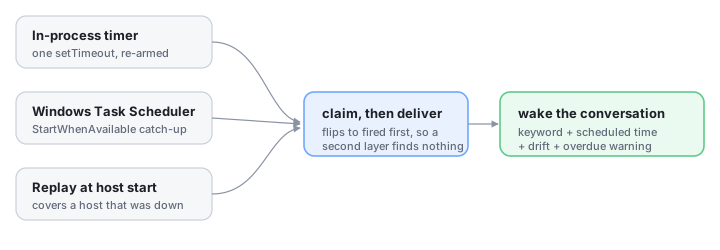
Three layers, one delivery path:
| Layer | Covers |
|---|---|
| In-process timer | The ordinary case. Exactly one setTimeout armed for the earliest pending alarm, re-derived on every change. No polling loop, no CPU while idle. |
| Windows scheduled task | Machine sleep, a suspended host, and missed schedules — StartWhenAvailable lets Windows run the task as soon as the machine is actually available. It is also the only layer that can be told to wake the machine (wakeComputer). |
| Replay at host start | The host was not running when the alarm was due. This is what actually delivers a missed alarm, and it is why the wake text reports drift. |
All three call the same claim-then-deliver path, and an alarm is flipped to fired before any delivery
starts. Whichever layer arrives first wins and the others find nothing to claim, so stacking three triggers
cannot deliver one wake three times. The prompt also carries a request id derived from the alarm id, which the
session controller deduplicates as a second line of defence.
The OS task is a mirror, not the owner: it only pings the plugin's own endpoint. A missing, failed, or stale
task degrades to the other two layers instead of losing the wake. It is registered with PowerShell's
ScheduledTasks module (not schtasks.exe, which cannot express StartWhenAvailable) and removed when the
plugin is disposed.
Configuration
- id: ui-clock
  name: '@dsh-external/dsh-client-plugin-clock'
  config:
    port: 4801                  # private carrier port when the profile has no web server
    dataDir: …                  # default: $DSH_HOME/clock
    defaultTimeZone: Asia/Shanghai
    useSystemScheduler: true    # mirror the earliest alarm into Windows Task Scheduler
    wakeComputer: false         # let that task wake the machine from sleep
    wakeMode: queue             # queue | steer — how the wake enters a busy conversation
    driftToleranceSeconds: 60   # lateness below this still reads ON-TIME
    retainFiredDays: 7          # how long a settled alarm stays in the panel
    exposeTool: true            # register the clock tool for the agent
Limits, stated plainly
- A wake needs a running host. Only the host can resume a session, so if dsh web is not running at the scheduled instant the alarm is delivered as soon as it is — via the OS task's catch-up or the replay at startup — and the message says how late it is. It is not a push notification: nothing reaches you while the machine is off, and there is no email or SMS.
- One-shot alarms only. There is no "every weekday at 9" rule yet; the calendar is for choosing a date, not for recurrence.
- One OS task, shared name. The task is named
dsh-clock-wake, so two hosts on one machine would fight over it. The in-process timer is unaffected. - The trigger is a real slot registration (
sidebar.footer.action), but the panel it opens is a body-level floating surface, so the panel itself is not themeable through the shell's slots.
HTTP API
Rides the harness web server at /api/clock, or the private loopback port when the profile has none.
| Endpoint | Purpose |
|---|---|
GET /api/clock/state |
Clock, calendar data, alarms, target conversations, scheduler status |
GET /api/clock/now |
Current instant in the host zone |
POST /api/clock/alarms |
Create — { at | afterSeconds, keyword, sessionId, … } |
POST /api/clock/alarms/update |
Change an alarm's instant, keyword, note, or target |
POST /api/clock/alarms/cancel · /forget |
Cancel a pending alarm · delete a row |
POST /api/clock/alarms/fire |
Fire now, regardless of the instant |
POST /api/clock/tick |
The OS scheduler's ping; claims and delivers whatever is due |
Every response is { ok: true, value } or { ok: false, error }.
Development
npm run build     # tsdown: host half to lib/index.js, browser half to lib/client.js
npm test          # 26 unit tests, node --test with type stripping
The tests cover the parts where being wrong is expensive: the idempotency that keeps three trigger layers from delivering one wake three times, the drift the wake text reports, alarm durability across a reload, the overdue replay at startup, and the calendar arithmetic. They never register a Windows task — every service is built with the OS mirror switched off.
See also
- dsh-context-assembler — a context tree over the session surface, with per-node assemble modes.
- dsh-web-watchdog — crash logging, exponential-backoff auto-restart, and a status panel for the dsh web GUI.
License
MIT — see LICENSE.
有意识地管理
安装与管理
前置条件与目标 Profile
目标: Web Profile
交付方式: Git Bundle — catsenior507/dsh-clock#685e7c7c915baca0d2bf3809d072d1d836b3db33。
验证、更新与移除
显示生命周期命令
dsh plugin --profile web list兼容性与访问范围
Web bundle; peer dependency @deepseek-ai/cordis ^4.0.1: Not declared in supplied evidence。
风险事实
Can inject a scheduled keyword and timing details into a selected conversation, including a closed one.
证据 ↗Can mirror the earliest alarm to Windows Task Scheduler; optional wakeComputer may wake the machine from sleep.
证据 ↗Provides local clock and alarm HTTP endpoints through the Harness web server or a private loopback port.
证据 ↗证据与编辑审查Manifest、Bundle patch、分发与新鲜度
不可变证据
审查状态与源码活动
如需依赖它执行时间敏感自动化,请先在自己的环境中审核调度和会话唤醒行为。
AI 审查于 2026/9/11 UTC 14:15。GitHub 事实核对日期: 2026/9/11 UTC 14:15。
自当前证据基线以来,没有记录到重要源码变化。