At a glance
What it does
A DeepSeek Harness web plugin for full-duplex voice conversations with local speech recognition, captions, read-aloud replies, and barge-in.
Web Profile
>=0.1.1-rc.2
Evidence-verified
Checked Sep 16, 2026, 1:54 PM UTC
Code-evidenced contributions
What it adds to DSH
Adds microphone voice input, streaming drafts, spoken replies, live captions, and interruption controls to DSH web conversations.
Mechanism evidence ↗Before you choose it
Use voice mode inside a DSH conversation: speech appears as a draft while you talk, pauses can send it automatically, and replies are read sentence by sentence with live captions. Speaking during playback can interrupt the current read-aloud. ASR is described as local zipformer2 and SenseVoice inference; TTS supports Edge plus optional local VITS or Kokoro engines.
Best for
DeepSeek Harness web users who want hands-free conversational input and spoken responses.
Common tasks
- Dictate a prompt and review the streaming draft before it is sent.
- Listen to an assistant response with synchronized captions.
- Interrupt a long spoken response and immediately continue the conversation.
- Tune recognition language, hotwords, caption size, and interruption behavior.
Permissions and data
Voice input requires browser microphone permission. Speech recognition is described as local, while the default Edge TTS path is cloud-based.
Permissions- Browser microphone access.
- Microphone audio is described as being processed by local host-side ASR.
- Text selected for the default Edge TTS option is described as going to Edge cloud TTS.
- The README describes local VITS and Kokoro TTS alternatives intended to keep reply text on the device.
- Microsoft Edge TTS when the default Edge engine is selected.
- No API key is claimed for local speech recognition.
Limitations
- The Ctrl+Shift+V shortcut overrides the browser shortcut for paste as plain text.
- Safari and iOS require HTTPS or localhost, microphone approval, and pause recognition and playback in the background or while locked.
- Initial model loading may require network access; local TTS engines may need model loading.
- Actual installation, microphone behavior, local-model operation, and TTS delivery were not executed in supplied evidence.
What DSHub checked
- The pinned source contains a verified DSH bundle manifest and Cordis patch.
- Package metadata declares Node.js >=18.0.0 and DSH >=0.1.1-rc.2.
- The package is identified as MIT licensed.
- The README documents voice input, captions, interruption, configuration, and the DSH installation command.
What DSHub did not check
- No installation or runtime test was performed from the supplied evidence.
- README claims about end-to-end version testing, test counts, security hardening, model pinning, and performance were not independently verified.
- Registry package contents were not audited.
Pinned install
Install dsh-voice-mode
This plugin bundle does not have a DSH Plugin install action. Use its source documentation for the delivery method.
Maintainer source
Project README
Full-duplex voice mode for DeepSeek Harness —— 在会话内用语音完成整轮对话:说话时边说边出字、停顿后自动发送;回复按句朗读并跟随实时字幕;朗读中开口即打断。识别在本地推理、无需 API Key;朗读默认 Edge 云端(快且自然),本地 VITS / Kokoro 可选(隐私优先)。兼容 dsh 0.1.1-rc.2 起全版本(已在 0.1.1 / 0.1.2 / 0.1.5-rc.1 / 0.1.5-rc.2 端到端验证)。当前版本 v0.7.7,254 项测试全绿。
💡 它是什么
在 DeepSeek Harness 的会话里,点一下麦克风就能用语音完成整轮对话:
- 🎤 你说 —— 一边说一边实时出字(流式识别),停顿约 1500ms 自动发送;
- 🔊 它答 —— 最终回复按句朗读,全程实时字幕跟随;
- ⏸️ 随时打断 —— AI 还在朗读时开口即打断,你的话直接被听见。
零 API Key:识别在宿主端本地推理(zipformer2 流式 + SenseVoice 定稿);朗读默认 Edge 云端(快、自然),可选本地 VITS 纯中文 / Kokoro 中英混读(回复文本不出本机,隐私优先)。
🤔 为什么值得用(5 个真痛点)
| # | 痛点 | 我们的应对 |
|---|---|---|
| 1 | 专有名词识别不对 —— 「dsh-voice-mode」总识别成「DSH voice 模式」 | 识别热词偏置 asrHotwords: "dsh-voice-mode:2.5" —— 显著提升专有名词召回 |
| 2 | 语种乱漂 —— 中英混说时句子中途跳英文 / 一锁 en 又跳回中文 | recognitionLanguage = auto/zh/en/ja/ko/yue 6 语种锁定 + 重建 worker |
| 3 | 字幕看不清 —— 字小、窄屏被输入框挡住 | captionFontSize 4 档(12/14/18/24px)+ captionMaxWidth 3 档(50/70/90vw) |
| 4 | 让位误打断 —— AI 朗读时插一句「嗯/对」就被硬打断 | backchannelYield 让位语义:短词自动让位 1.5s,真要说走才硬打断 |
| 5 | 本地 TTS 太机械 —— 一句话读完停顿 3-5 秒 | 本地 VITS / Kokoro 原生 addon + epoch 队列管理,按句流式朗读、句间无停顿 |
✨ 功能(按用户价值)
- 🎙️ 识别准 —— 热词偏置 + SenseVoice 多语种 + ITN(数字/日期/货币自动规范化)
- 🗣️ 不说错 —— 唤醒词待机、唤醒词前缀语气词白名单(
嗯/那个不再误触) - 🤝 让位 —— 让位语义 + 三档打断灵敏度(
interruptLevel),外放也能精准打断 - 💬 有感情 —— 本地 Kokoro 103 音色 + Edge 322 音色,行内可试听;分段朗读不漏句
- 👁️ 字幕 a11y —— 4 档字号 + 3 档宽度,浅色主题变量跟随 dsh 主题
🎬 Demo
真实录屏见
demos/RECORDING-SCRIPT.md(60s/30s/15s 三段脚本)。
真机截图清单见screenshots/MANIFEST.md(12 张)。
🚀 5 分钟上手(Quick Start)
dsh plugin --profile web add dsh-voice-mode
systemctl restart dsh   # Linux;其他平台重启 dsh 进程
第一次用:
- 进入任一会话,按
Ctrl+Shift+V(或点输入区麦克风按钮)进入语音模式,状态条显示「聆听中…」; - 说一句完整的话(如「帮我看看今天的天气」)→ 实时字幕立即出现,停顿后自动发送;
- AI 回复开始朗读时,开口说话 → 朗读即刻停止,你的话被听见(这就是 barge-in)。
操作手势
| 手势 | 作用 |
|---|---|
Ctrl+Shift+V |
进入 / 退出语音模式 |
| 直接说话(toggle) | 边说边出字,停顿 1500ms 自动发送;按住 Ctrl 强制立即发送 |
| 按住麦克风按钮(hold) | 松手发送;短按退出;滑出 / Esc / 失焦放弃本段 |
| 点输入框旁模式按钮 | 在「持续聆听 ⇄ 按住说」间切换(保存到设置) |
| AI 朗读时开口说话 | 打断朗读并取消当前回合 |
| 点状态条「退出」 | 退出语音模式 |
| 点字幕浮层「跳过」 | 跳过当前句朗读 |
⚙️ 配置(7 新设置字段 + 5 默认值微调)
设置 → Plugins → 插件配置 → 语音模式(voice-mode)。
7 新设置字段(11 批次周全修复落地)
| 你想调什么 | 改哪个键 | 默认 | 说明 |
|---|---|---|---|
| 识别热词 | asrHotwords / asrHotwordsScore |
空 / 1.5 |
每行一词或「词:分数」(如 dsh-voice-mode:2.5);变更触发 recognizer 重建 |
| 识别语种 | recognitionLanguage |
auto |
SenseVoice 多语:auto / zh / en / ja / ko / yue;切换终止并重建 worker |
| 逆文本归一化 | senseITN |
true |
SenseVoice 数字/日期/货币规范化(默认开,关掉保留原文) |
| 字幕字号 | captionFontSize |
0 |
档位 0=12px / 1=14px / 2=18px / 3=24px |
| 字幕宽度 | captionMaxWidth |
1 |
档位 0=50vw / 1=70vw / 2=90vw |
| 让位语义 | backchannelYield |
true |
朗读期说「嗯/对」自动让位 1.5s,真要说走硬打断(ADR-0008) |
5 默认值微调(批 J)
| 字段 | 旧 | 新 | 理由 |
|---|---|---|---|
rate |
1.0 | 1.1 | Edge 默认略慢,统一提速 10% 改善体验 |
idleTimeoutMinutes |
10 | 5 | 空闲退出更灵敏(朗读仍计为活动) |
interruptLevel description |
旧描述 | 新描述 | 明确「3/2/1 帧确认」机制 |
字段名零变化,旧
~/.dsh/settings.yaml100% 兼容。
完整 19 项设置表见 plugin/dsh-voice-mode/README.md。
🏛️ 架构(Architecture)
flowchart LR
    subgraph Client["浏览器 Client"]
        Mic[麦克风 16kHz<br/>AudioWorklet] --> VAD[客户端 VAD<br/>RMS 分段]
        VAD -->|partial 0.9s| PC[partial 出字 + 字幕浮层]
    end

    subgraph Host["宿主 dsh.host"]
        ASR[zipformer2 流式识别<br/>host 端 WASM] --> SV[SenseVoice 定稿<br/>+ ITN + 标点]
        SV --> Draft[composer draft<br/>autoSend]
        Draft --> Tap[llm/stream tap<br/>仅观察·不阻塞]
        Tap --> Seg[sentence segmenter]
        Seg --> Q[TtsQueue<br/>epoch 打断]
        Q --> TTS{引擎}
        TTS -->|edge| Edge[Edge 云端]
        TTS -->|vits| Vits[本地 VITS<br/>WASM]
        TTS -->|kokoro| Kokoro[本地 Kokoro<br/>原生 addon]
    end

    PC -->|audio f32 PCM| ASR
    Edge -.->|SSE audio frame| PC
    Vits -.->|SSE audio frame| PC
    Kokoro -.->|SSE audio frame| PC
    VAD -.->|唤醒词/打断| Host
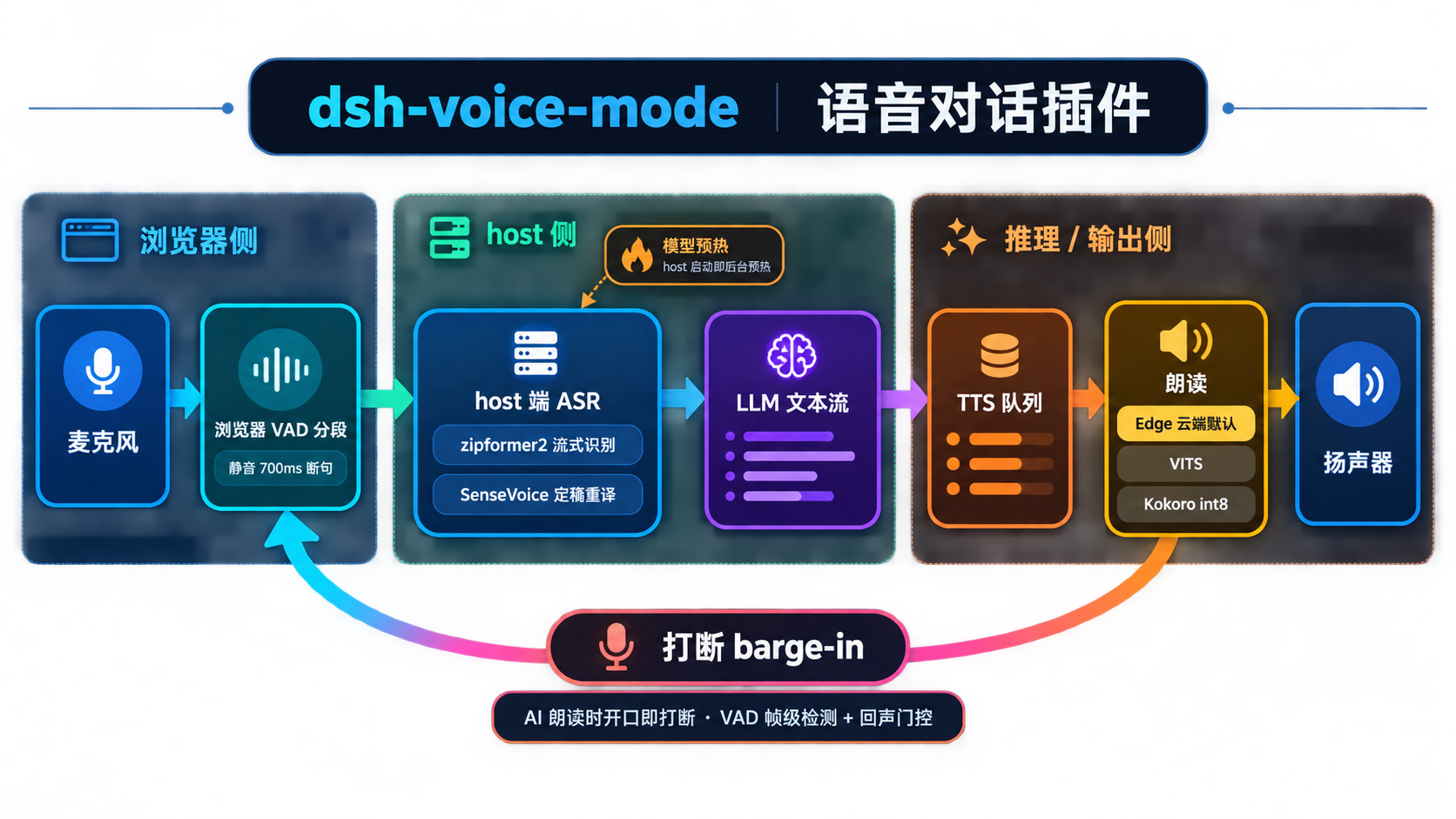
详细架构决策:见 docs/adr/ 8 个 ADR。
🔍 与 dsh 内置语音模式对比
| 维度 | dsh 内置 | dsh-voice-mode(本插件) |
|---|---|---|
| 识别模型 | 云端 API(需 key) | 本地 zipformer2 + SenseVoice(零 key) |
| 多语种 | 英文为主 | 6 语种 auto/zh/en/ja/ko/yue + ITN |
| 朗读引擎 | 云端 TTS | Edge 云端 + 本地 VITS/Kokoro 三选一 |
| 打断检测 | 基础 VAD | 三档灵敏度 + 回声门控 + 让位语义 |
| 热词偏置 | 无 | sherpa-onnx 热词 + 偏置分 |
| 字幕 a11y | 无 | 4 档字号 + 3 档宽度 + 主题跟随 |
| 唤醒词 | 无 | 轻量流式匹配 + 前缀语气词白名单 |
| 兼容 dsh | — | 0.1.1-rc.2 → 0.1.5-rc.2 全版本 |
🛠️ 故障排查
| 现象 | 处理 |
|---|---|
| 点麦克风无反应,状态条红字 | 浏览器拒绝麦克风:地址栏(iOS 为 设置 → Safari → 麦克风)开启后重试 |
| 状态条「正在加载模型… x%」卡住 | 检查网络;模型较大可先 npm run prefetch;国内网络 modelHost 配 https://hf-mirror.com |
| 朗读无声音 / 无字幕 | 本地引擎首次合成需加载模型;若持续失败看状态条提示(自动退避重试);确认页面前台且未静音 |
| 语音模式进不去 | 检查插件 enabled;多标签页时确认当前会话为活动会话 |
| 识别到但不是我要说的 | 环境噪声:降低音量或提高 interruptLevel(高门槛) |
| 打不断(朗读中开口无反应) | 调高 interruptLevel(更敏感档)或检查麦克风权限;不要调 echoGateDb——原生 AEC 生效时它从未被执行(详见 ADR-0006) |
| 热词不生效 | 检查 asrHotwords 是否为空(空 = 关闭);热词变更触发 recognizer 重建,下次进入语音模式生效;热词评分过低(<1.0)几乎无效,建议 ≥1.5 |
| 字幕被输入框挡住 | 默认 captionMaxWidth=1(70vw)+ captionFontSize=0(12px)在窄屏可能与底部输入框重叠;调整档位,或关闭语音模式后点状态条浮层右上角「×」收起 |
| 让位行为异常(朗读期说「嗯」不停 / 真话被打断) | 「嗯/对」类短词触发让位 1.5s(hold)后继续朗读;继续说真话会走硬打断;如不要让位语义把 backchannelYield 关闭即可恢复改造前行为(ADR-0008) |
| 朗读期说「嗯」没让位 | 确认 backchannelYield=true(默认开);hold 模式松手后让位 1.5s 内继续说话会变硬打断 |
| 空闲 5 分钟自动退出(不想退) | 调高 idleTimeoutMinutes(默认 5 分钟,朗读计为活动) |
已知限制:
Ctrl+Shift+V会覆盖浏览器「粘贴纯文本」快捷键(普通粘贴仍用Ctrl+V);识别为简体中文优先;Safari / iOS 需 HTTPS 或 localhost、首次需授权麦克风、后台 / 锁屏会暂停识别与朗读。
🛣️ 路线图(Roadmap)
完整 backlog(43 项 P0-P3)见 docs/competitive/backlog.md。
- ✅ 已完成(v0.7.7):11 批次周全修复(识别热词 / 锁语种 / 字幕档位 / 让位语义 / 模型预热 / 默认值微调 / 死代码清理等)
- 🚧 P0(近期):ADR-0003 VAD 下沉 / ADR-0006 第一级探测接通 manual / F1 emotion DSL 全量上线
- 📋 P1(中期):MCP
voice_*工具集 / 卡片表单 draft validate / 状态条 idle 优化 - 💡 P2(远期):声音克隆(用户已决定推迟)/ ADR-0004 WebSocket transport
- ⏸️ 已推迟:xAI fallback / C1 人格层(用户已决定推迟)
📚 文档
| 文档 | 说明 |
|---|---|
| 完整使用说明(中文) | 功能 / 手势 / 设置 / 配置 / 已知限制 / 故障排查 |
| English docs | Same, in English |
| docs/ 索引 | 架构决策 / 实施计划 / 真机验收 / 规则 / 调研 / 竞品 |
| 60 天迭代博客 | 从 91 到 254 项测试的故事 |
| CHANGELOG.md | Keep a Changelog 格式 |
| RELEASE-NOTES.md | 60 天时间线 |
🤝 Contributing / 📄 License / 🙏 Acknowledgments
License: MIT
Contributing: PR 欢迎,但请先读 docs/adr/ 8 个 ADR + CONTEXT.md + docs/rules/STATE.md;仓库遵循 CLAUDE.md 的维护纪律(CLAUDE.md / AGENTS.md 仅存本机,不入库)。
Acknowledgments:
- 上游:haoku123/dsh-voice(派生声明见子包 LICENSE)
- 核心依赖:sherpa-onnx(Apache-2.0,本地 ASR / VITS / Kokoro 推理)/ msedge-tts(Edge 云端 TTS)
- 测试支持:awesome-dsh-plugin(收录到精选列表)
- 11 批次周全修复参与贡献者:见
docs/rules/STATE.md§ 批次进度表
📌 项目维护:仓库遵循「外科手术式改动」纪律 —— 不顺手优化、不重构无关代码、不强推发布历史;每个 commit 单一职责,便于审查与回滚。详见
CONTEXT.md。
Operate deliberately
Install and manage
Prerequisites and target Profile
Target: Web Profile
Delivery: Dsh Bundle Git — qishuilalala/dsh-voice-mode#a9445521cd9a101be57e59467a340fba6c6be7ae。
Verify, update, and remove
Show lifecycle commands
dsh plugin --profile web listCompatibility and access
Requires Node.js 18+ and DSH 0.1.1 Rc.2+: >=0.1.1-rc.2。
Review compatibility evidence ↗
Risk facts
Uses browser microphone access for voice input.
Evidence ↗The default Edge TTS option sends text to a cloud service; local VITS or Kokoro options are described as privacy-oriented alternatives.
Evidence ↗Evidence and editorial reviewManifest, Bundle patch, distribution and freshness
Immutable evidence
Review status and source activity
The immutable Git bundle is the clearest installation source. Review microphone permission and the selected TTS engine's data path before enabling it.
AI reviewed Sep 16, 2026, 1:55 PM UTC。GitHub facts last checked Sep 16, 2026, 1:55 PM UTC。
No material source change has been recorded since this evidence baseline.