快速了解
它能做什么
为自定义 LLM 提供方增加推理强度设置的 DSH 设置插件。
本站提供的是中文说明,不代表该项目或 Plugin 自身提供中文界面;语言支持请以上游文档为准。
Web Profile
not tested
证据已验证
核对日期 2026/8/28 UTC 09:01
有代码证据的贡献
它为 DSH 增加什么
基于固定仓库证据提供推理强度设置。
机制证据 ↗选择前先看
该 Bundle 提供为自定义 LLM 提供方增加推理强度设置的 DSH 设置插件
适合谁
需要在 web Profile 中使用configuration能力的 DSH 用户。
常见任务
- 用于DSH 推理设置相关的configuration工作流。
- 决定是否适合你的 Profile 前先查看固定版本的仓库证据。
权限与数据
该 Bundle 会改变 DSH Profile 组成,并可能使用依赖项暴露的宿主能力;本次未测试运行时行为。
权限- 将 DSH Bundle 加入 web Profile。
- 本次未测试运行时数据处理。
- 可能使用固定清单中声明的依赖项。
- 现有证据没有确认凭据要求。
局限
- 本次未测试运行时安装和执行。
- 语义描述基于仓库证据,不构成安全认证。
DSHub 已核对
- 证据中固定了源码仓库 commit。
- Bundle 清单和 patch 结构已存在。
DSHub 未核对
- 本次未测试运行时安装、执行和兼容性。
- 不表示任何安全认证。
固定版本安装
安装 DSH Reasoning Settings
这个Plugin Bundle没有 DSH Plugin 安装操作,请根据源码文档使用真实交付方式。
维护者原文
项目 README
DSH Reasoning Settings
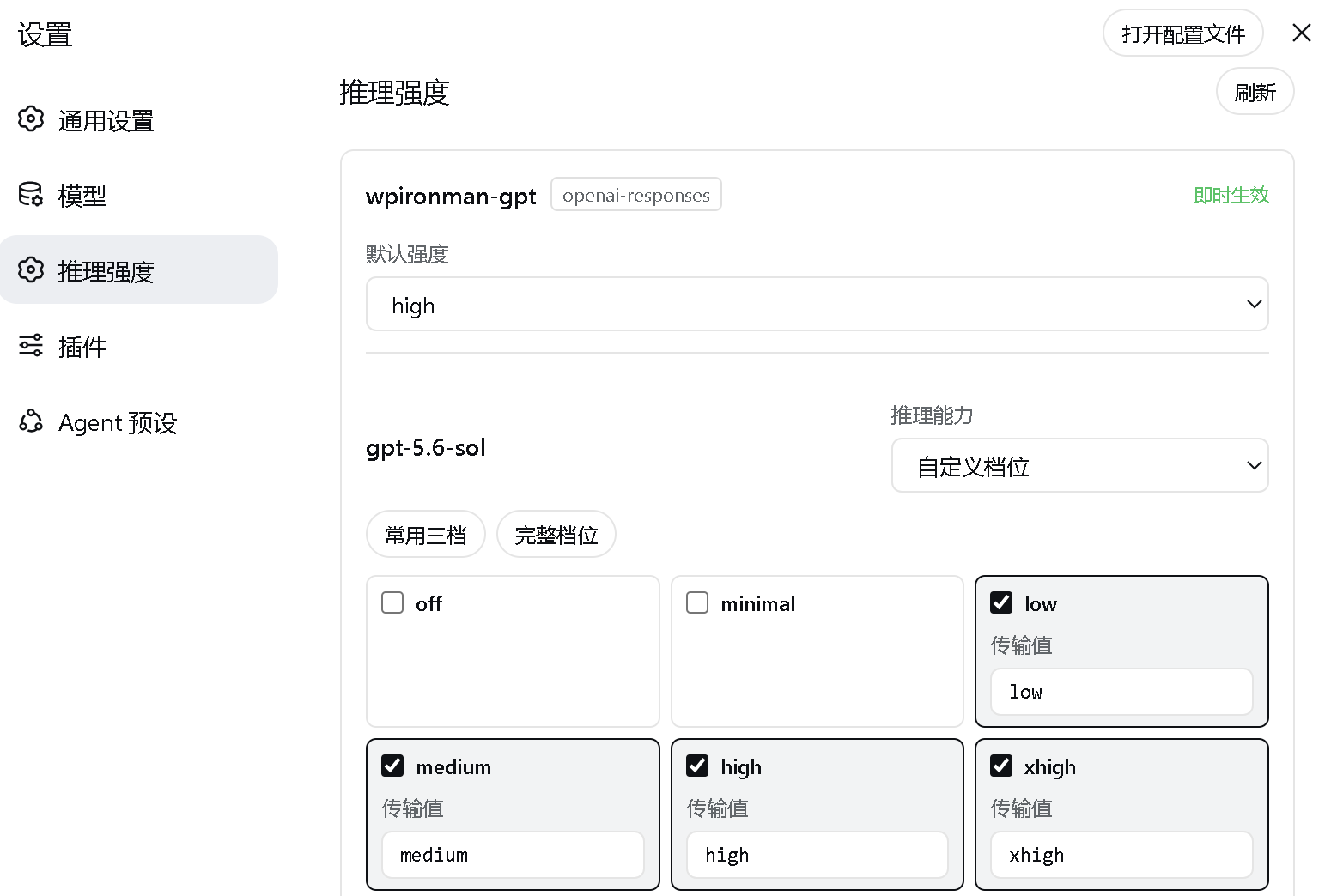
A DeepSeek Harness Web settings plugin that adds an independent reasoning effort (thinking intensity) page for custom llm-pi-ai providers. The official UI only exposes effort selection for first-party DeepSeek models; this plugin makes it work for third-party / relay APIs too.
Third-party service recommendation (referral link)
If you are looking for an OpenAI-compatible API relay, you can take a look at WPIronman API. This is my referral link, and I may receive a referral benefit if you register through it; any promotion or benefit is subject to the provider's current terms. This plugin is independent of that service and does not require any particular relay. Evaluate pricing, reliability, and privacy terms before choosing a provider.
New users can redeem the gift quota with code
99F509ABC6C38F77.
Features
- Auto-reads the custom providers and models you already added on the official Models page.
- Declares a per-model effort level from
off / minimal / low / medium / high / xhigh / max. - Customizes the actual wire value sent to the API for each level.
- Sets a provider-wide default effort, restricted to the levels supported by every model in that provider.
- Configures the reasoning wire format for
openai-completionsproviders. - Writes back to
llm-pi-ai.providers.*through the officialsettings.mutateAPI — API keys are never touched. - Fixes in-process subagents inheriting the Agent's create-time official model instead of the parent's live third-party provider/model selection.
- Makes subagents inherit an explicit parent reasoning effort, or fall back to the target provider's configured default effort.
- Resolves model-only child overrides such as
grok-4.5against user-configured third-party providers instead of an unrelated official provider. - Extends the ordinary
subagentandsubagent_forktools with per-callprovider,model, andreasoning_effortfields, without replacing their official lifecycle, background, or result behavior.
Live demo
Installation
Prerequisites
- Install Node.js. DSH currently supports Node.js 22.19.x or version 24 and newer; Node.js 24 LTS is recommended. Node.js includes
npmandnpx. - Install Git so the plugin can be fetched from its GitHub repository.
- Install pnpm. Both methods require pnpm because
dsh plugininvokes it in the profile directory to install or remove plugins. - Your network must reach
registry.npmjs.organdgithub.com. Configure a working network proxy if npm or GitHub is unavailable or unstable in your region. - Method 1 does not require a DeepSeek Harness source checkout. Method 2 additionally requires that checkout.
Check the basic environment first:
node --version
npx --version
git --version
corepack enable
pnpm --version
If corepack enable fails with a permission error, run it once from an Administrator PowerShell. Alternatively, use another option from the pnpm installation guide.
If downloads remain on a spinner or fail with ECONNRESET, ETIMEDOUT, or a GitHub connection error, set a proxy for the current PowerShell window. Port 7890 is only an example; replace it with your proxy's actual port:
$proxy = "http://127.0.0.1:7890"
$env:HTTP_PROXY = $proxy
$env:HTTPS_PROXY = $proxy
$env:npm_config_proxy = $proxy
$env:npm_config_https_proxy = $proxy
These variables only affect the current PowerShell window and disappear when it is closed.
Method 1: npx (recommended for regular users)
This method does not require a DeepSeek Harness source checkout or a global dsh installation, but Git and pnpm must already be available. On its first run, npx downloads @deepseek-ai/dsh and its dependencies, which can take several minutes:
npx --yes -p @deepseek-ai/dsh dsh plugin --profile web add github:JuneLearn/dsh-reasoning-settings
Start Web through the same package runner after installation:
npx --yes -p @deepseek-ai/dsh dsh web
Method 2: pnpm with the Harness source tree (recommended for developers)
Use this method if you already cloned deepseek-harness and want to run its source directly. First confirm pnpm is available:
pnpm --version
Enter the DeepSeek Harness source root. Install its dependencies once, then install the plugin:
cd D:\deepseek-harness
pnpm install
pnpm dsh plugin --profile web add github:JuneLearn/dsh-reasoning-settings
Start Web from that source directory afterward:
cd D:\deepseek-harness
pnpm dsh web
The package's dsh.bundle declaration adds the plugin to the Web profile automatically. Neither method requires editing cordis.patch.yml. Web listens on http://127.0.0.1:3080 by default; it uses another port only when the default is occupied or you explicitly select one.
Upgrade
Run the corresponding install command again to upgrade. No uninstall or profile-patch maintenance is required.
npx method:
npx --yes -p @deepseek-ai/dsh dsh plugin --profile web add github:JuneLearn/dsh-reasoning-settings
pnpm source method:
cd D:\deepseek-harness
pnpm dsh plugin --profile web add github:JuneLearn/dsh-reasoning-settings
Uninstall
npx method:
npx --yes -p @deepseek-ai/dsh dsh plugin --profile web remove dsh-reasoning-settings
pnpm source method:
cd D:\deepseek-harness
pnpm dsh plugin --profile web remove dsh-reasoning-settings
DSH removes both the dependency and its bundle layer. Restart dsh web; the Reasoning effort settings page is removed.
Usage
- Add your custom provider and models on the official Models page first.
- Open Settings > Reasoning effort.
- Pick the supported levels for each model and set the provider default effort.
- Click Save under that provider.
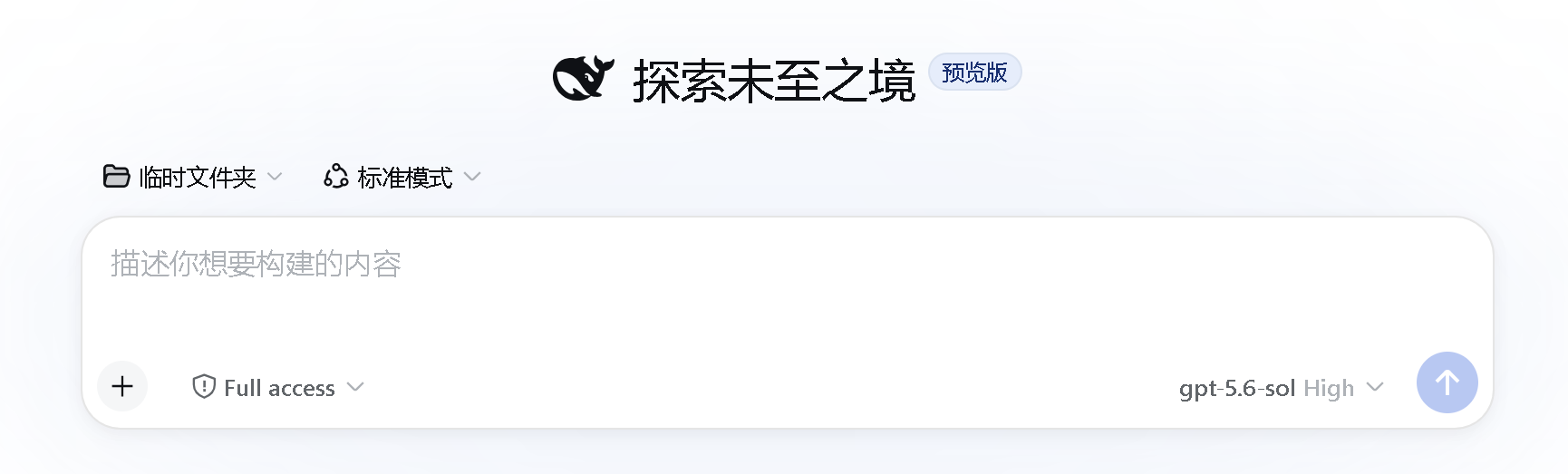
- Start a new session and choose the model and reasoning effort in the model picker.
The plugin only declares which effort levels Harness may select and send. Whether the relay API actually honors a value is up to the relay: if a request comes back with HTTP 400, uncheck the levels that model does not support or adjust their wire values.
Subagent routing and reasoning
The server entry fixes model inheritance for Harness 0.1.0-rc.5 in-process subagent, subagent_fork, and Workflow children:
- An explicit child
provider + modelroute remains authoritative when it differs from the parent's create-time route. - A model-only override is resolved against user-configured third-party providers; duplicate model ids prefer the parent's current provider.
- With no child override, the child inherits the parent's live provider/model instead of its create-time official default.
- An explicit child effort remains authoritative; otherwise the parent's effort is inherited only for the same target route.
- With no explicit effort, the plugin leaves it absent so
llm-pi-aiapplies the target provider'sreasoningdefault.
The plugin also augments the existing model-facing subagent and subagent_fork tools for each live Agent. Their original arguments remain available, with three optional fields added:
provider: exact configured Provider id;model: exact model id owned by that Provider;reasoning_effort: optionaloff / minimal / low / medium / high / xhigh / maxlevel.
provider and model must be supplied together. Omitting both preserves normal inheritance. Omitting reasoning_effort after selecting a different route uses that Provider/model's configured default. The tool descriptions enumerate exact configured pairs and instruct the parent model to delegate instead of answering directly when a user requests another Provider/model.
Do not use shorthand such as “the 5.6 model” when multiple exact ids exist. For example, if a Provider contains both gpt-5.6-sol and gpt-5.6-terra, ask for one exact pair:
Use subagent with provider=wpironman-gpt, model=gpt-5.6-terra,
reasoning_effort=max to write a 100-character random essay.
If the requested pair equals the current route, the child still uses that same route, so the result will naturally look like the parent model. The structured tool-call arguments and the child's durable request/header are the reliable verification points.
Per-call targeting affects local in-process children only. Codex, Claude Code, and ACP subagents run in separate processes and retain their own model configuration. Workflow retains its own structured provider/model phase fields and still benefits from the inheritance correction when no phase target is supplied.
All switches default to true and may be changed in the plugin mount:
- insert:
    - id: ui-settings-reasoning
      name: dsh-reasoning-settings
      config:
        subagentRouting: true
        inheritRoute: true
        resolveModelOnly: true
        inheritReasoning: true
Set subagentRouting: false to disable the entire server-side correction.
Development
pnpm test # or: node tests/plugin.test.mjs
Compatibility
Built against the public dual-end plugin, settings-slot, settings.mutate, agent-scoped tool shadowing, Agent lifecycle, and agent/request waterfall interfaces of DeepSeek Harness 0.1.0-rc.5. Harness is still in Developer Preview; if the plugin stops loading or subagent routing changes after an upgrade, check those interfaces and the subagent session metadata.
License
有意识地管理
安装与管理
前置条件与目标 Profile
目标: Web Profile
交付方式: Git Bundle — junelearn/dsh-reasoning-settings#25b6ee69fe717414cd1c6f3b1c39b5e62a8e99c9。
验证、更新与移除
显示生命周期命令
dsh plugin --profile web list兼容性与访问范围
not_runtime_tested: not tested。
风险事实
证据与编辑审查Manifest、Bundle patch、分发与新鲜度
不可变证据
审查状态与源码活动
在核对来源内容和不可变发布记录后,已由人工批准发布。AI 参与了内容草稿生成,最终发布决定由人工完成。
人工审查于 2026/8/30 UTC 08:24。GitHub 事实核对日期: 2026/8/29 UTC 15:21。
自当前证据基线以来,没有记录到重要源码变化。